Send Again
Close
PrestaShop Free Gift Products - Giving products as gifts with purchases is one of the most effective strategies used by ecommerce stores to attract the attention of buyers and boost conversion rates.
Offering free gifts with purchase encourage customers to buy more as they get more value for the same price. PrestaShop Free Gift Products allows store owners to offer free gift with customer purchases. Create custom gifting rules based on numerous conditions to increase sales and customer satisfaction.
If the applicable conditions are met, the free gift items will display in store and customer can select the desired product and add it to the shopping cart.
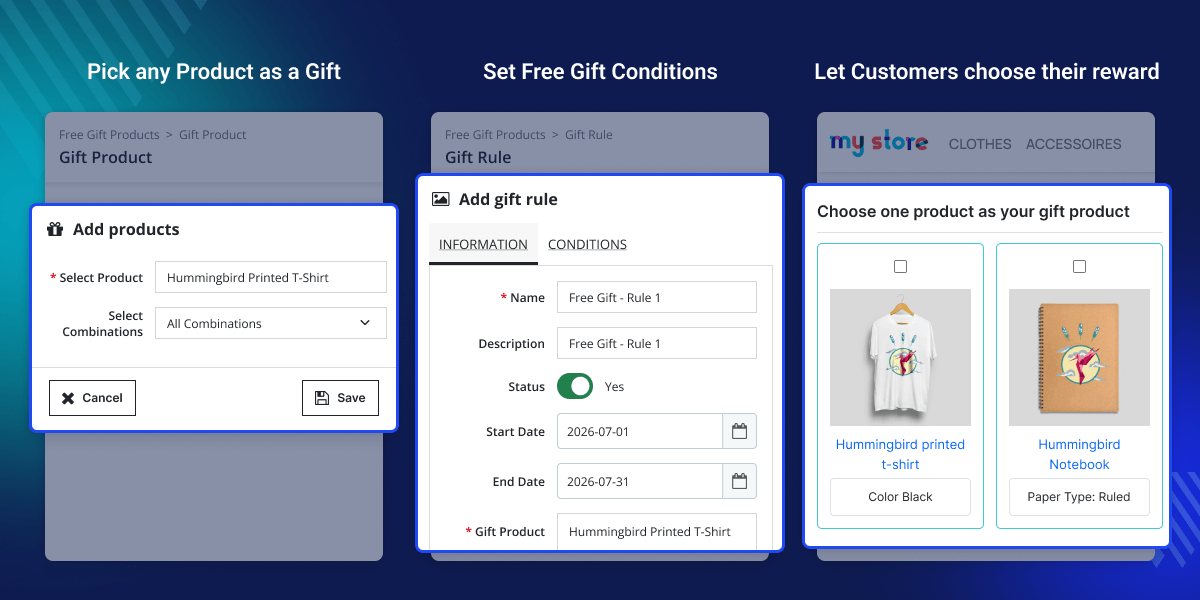
Add items you would like to offer as free gifts from the back office.
Create as many gift rules as you need and offer gift products to them.
Attract visitors’ attention to gift products by showcasing them in popup on store pages.
If cart contents change and a rule no longer matches, the previously added free gift is automatically removed.
Define the date range for which gift rules will be applicable.
Include/Exclude tax, discount, and shipping from the cart subtotal.
Post-installation, a new tab “Gift Product” get available in the PrestaShop back office. From here, the admin can select products and their combinations they would like to offer as gifts with purchase. Once added, a list of all the gift products in maintained in the gift product tab and the admin can delete the products whenever they want.

The module allows store owners to set rules for offering free gifts to customers. While adding a rule, the admin can select the gift products that will be given as free gifts and set the date range for which customers can avail free gifts. Once added, the admin can enable/disable, edit, or delete the rule.

While adding a rule, the admin can set various conditions and customers can avail free gift items on purchase when conditions are met. Following are the conditions that an admin can set to offer free gift items.

For any query or issue please create a support ticket here http://webkul.uvdesk.com
You may also check our other top-quality PrestaShop Extensions.
Excellent module. After trying several other free gift solutions that never worked properly on our PrestaShop store, this one has been a very good surprise. Clean installation, stable behavior, clear configuration, and most importantly: the module does exactly what it promises. Free gifts are added correctly to the cart and everything works reliably even with advanced configurations. Support is also very professional, responsive, and helpful. Communication was efficient and our theme-specific questions were handled quickly.
Detailed technical features and requirements to help you understand the module’s capabilities and ensure smooth integration with your system.
Detailed technical features and requirements to help you understand the module’s capabilities and ensure smooth integration with your system.
We’re partnered with top-tier, trusted providers!
Want to know more how exactly we are going to power up your eCommerce Website with Cloud to fasten up your store
* Server Configuration may vary as per application requirements.



