Prestashop LLMs TXT Generator
Prestashop LLMs TXT Generator is a module that automatically generates llms.txt and llms-full.txt files, helping AI crawlers like ChatGPT, Claude, Gemini, and Perplexity discover and understand your store's catalog, categories, and content.
- Auto-generates llms.txt & llms-full.txt files at the store root.
- Granular content controls for CMS pages, categories, products, and brands.
- Language-specific and per-domain file variants for multilingual, multi-shop stores.
- Detects 22 known AI crawlers, with optional logging of unknown bots.
- Automated cron scheduling for both file generation and data aggregation.
- Full analytics dashboard covering Overview, Crawlers, URL Intelligence, Activity, and Alerts.
- AI Visibility Score (0-100) with actionable recommendations to boost discoverability.
- One-click Generate Now with instant preview, copy, and download options.
Note: Prestashop LLMs TXT Generator module is compatible with the multi-store feature of PrestaShop.
- Description
- Reviews
- FAQ
- Customers ()
- Specifications
- Cloud Hosting
- Changelog
Prestashop LLMs TXT Generator: AI-generated search and answer engines now compete with traditional browsers, yet most PrestaShop stores remain invisible to them. PrestaShop LLMs.txt Generator solves this by producing llms.txt and llms-full.txt files at your store root, giving AI crawlers like ChatGPT, Claude, and Gemini the structured content they need to reference your products, categories, and brand pages.
The module also tracks how often these bots visit, which files they request, and whether your AI visibility improves over time. It is built for merchants who rely on organic discovery across both traditional search and AI-powered platforms.
You can serve different content per language and per shop, exclude outdated pages by ID, and filter products by variant so only relevant SKUs appear in the file. Because the module hooks into every product, category, CMS, and brand save event, files stay fresh without manual intervention.
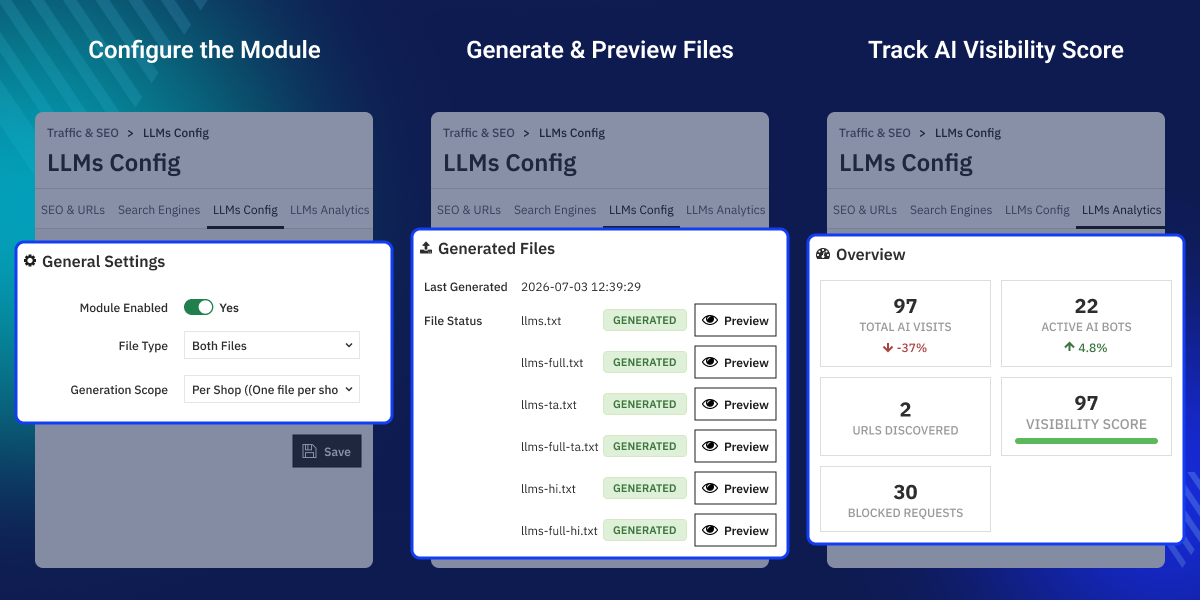
Highlighted Features
Structured LLMs.txt File Generation
Generate llms.txt and llms-full.txt on demand or on a schedule with a company header, optional Markdown, and structured content for CMS pages, categories, products, and brands.
Granular Content Selection and Exclusion
Pick exactly which fields to include — name, description, price, reference, URL, SKU, or category for products — and exclude entities by ID.
Automatic File Invalidation on Content Changes
Registered hooks on product, CMS, category, and brand events mark existing llms.txt files as pending whenever content is added, updated, or deleted.
Multi-Language and Multi-Shop Scope
Serve language-specific files, or generate one shared file per domain that merges multiple PrestaShop shops with ShopView sections.
LLMs.txt Generator Configuration

The LLMs Config panel organizes all settings into ten easy-to-use tabs. Each setting uses simple switches, checkboxes, and number fields with built-in validation, so everything is checked and confirmed before any files are created.
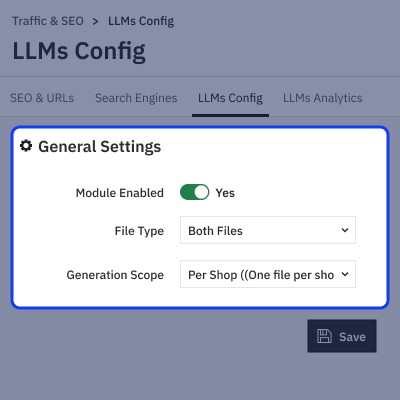
- General tab – Turn the module on or off, choose your file type (llms.txt, llms-full.txt, or both), and set the scope (per shop or per domain).
- Store Info tab – Add your company name, description, and optional markdown text that will appear at the top of every generated file.
- Content tabs (CMS, Categories, Products, Brands) – Each tab lets you enable/disable the section, pick which fields to include, and exclude specific items by ID (comma-separated).
- Languages tab – Choose specific active languages to include, or leave all boxes unchecked to include every language automatically.
- Cron tab – Set how often files regenerate, the exact hour and minute, and get secure, token-protected URLs for both regeneration and daily data aggregation.
- Analytics tab – Configure your sampling rate, default reporting period, unknown-bot logging, how long logs are kept, and your target visibility score.
LLMs.txt File Generation

The module automatically detects your store setup, selects the active languages, creates the llms.txt and/or llms-full.txt files based on your settings, and saves them to your store's root folder. A status badge shows whether each file was generated successfully, is still pending, or encountered an error.
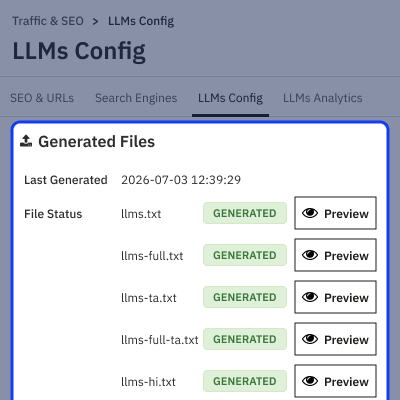
- Navigate to the SEO & URLs tab, open LLMs Config, click the Generate LLMs.txt tab, then click Generate Now.
- Click Generate Now — this button appears in place of Save while this tab is open.
- File status badges update on their own once generation is complete.
- Click Preview on any file to view its raw content in a pop-up, with options to copy or download it.
- If you generate files for a smaller scope (like a single shop instead of the whole domain), old files from a broader scope are cleaned up automatically.
LLMs.txt Generator Crawler Analytics

The LLMs Analytics dashboard has five tabs: Overview, Crawlers, URL Intelligence, Activity, and Alerts. You can filter any chart or table by time period (last 24 hours, 7 days, 30 days, or 90 days), or by a specific shop if you're running multistore, and refresh dashboard data instantly without reloading the page.
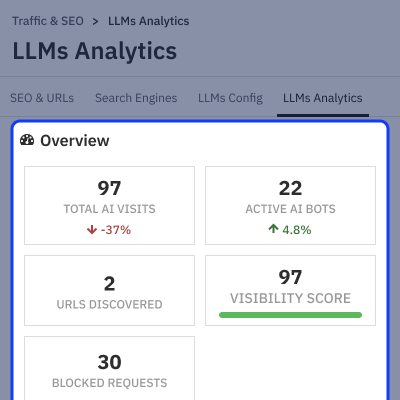
- Overview – Displays key stats (AI visits, active bots, discovered URLs, blocked requests, AI Visibility Score) with trend indicators, plus a recommendations panel flagging issues like missing .htaccess rules, empty entity types, or robots.txt blocks.
- Crawlers – Lists bots ranked by activity, along with when each was last seen and a breakdown of response codes.
- URL Intelligence – Shows which providers accessed which files, with a one-click option to export the data as CSV.
- Activity – Displays a raw log of recent hits.
- Alerts – Flags new or inactive bots, with an unread count badge. Mark all alerts as read with one click, or review them individually by severity.
Prestashop LLMs TXT Generator Features -
- Generates llms.txt and llms-full.txt files at the store root for PrestaShop stores.
- Supports per-shop or per-domain generation. Includes language-specific versions for multilingual stores.
- Offers granular control for CMS pages, categories, products, and brands. Each has its own toggle, field selection, and exclusion list.
- Filters products by attribute group and value. Sets a configurable maximum product limit.
- Automatically flags files as pending when products, CMS pages, categories, or brands change.
- Includes a one-click "Generate Now" button. Shows live file status badges and an inline preview with copy and download options.
- Adds .htaccess rewrite rules automatically. Keeps llms.txt routes publicly accessible.
- Secures generation and aggregation cron URLs with tokens. Allows configurable frequency and timing.
- Detects 22 known AI crawlers. Optionally logs unknown bots with adjustable sampling and retention settings.
- Features an analytics dashboard with Overview, Crawlers, URL Intelligence, Activity, and Alerts tabs. Supports CSV export for URL data.
- Displays an AI Visibility Score (0–100). Includes actionable recommendations and trend-indicator KPI cards.
Prestashop LLMs TXT Generator Support-
For any query or issue, please create a support ticket here http://webkul.uvdesk.com
You may also check our other top-quality PrestaShop Extensions.
Specifications
Frequently Asked Questions
Move to Cloud Today
AWS Free tier hosting for one year by amazon web services, for more details please visit AWS Free Tier.
GCP Free tier hosting for one year with 300 credit points by google cloud platform, for more details please visit GCP Free Tier.
Azure free tier hosting for one year with 25+ always free services, for more details please visit Azure Free Tier.
In our default configuration we will provide tremendous configuration for your eCommerce Website which is fast to load and response.
Default Configuration Details of Server
- 1 GB RAM
- 1 Core Processor
- 30 GB Hard Disk
- DB with 1 GB RAM and 1 Core Processor
* Server Configuration may vary as per application requirements.
Want to know more how exactly we are going to power up your eCommerce Website with Cloud to fasten up your store. Please visit the Cloudkul Services.
Get Started with Cloud


