USD
  • EUR
  • INR
  • USD
Cart
Cart 0
  • You have no items in your shopping cart.
    Cart
    Cart 0
    • You have no items in your shopping cart.
    Hire a Developer
    ×
    Contact Us!
    Send Again
    Close
    Please Login to Write Your Review

    PrestaShop Make Unique Product Identifier

    PrestaShop Make Unique Product Identifier validates the uniqueness of product identifiers like EAN-13/JAN barcode, UPC barcode, MPN, ISBN, and Reference while creating or updating the product.


    • Identifies duplicacy in product reference fields.

    • View products whose duplicate values exists in a separate tab.

    • Improve inventory management.

    • MultiShop Compatible.


    Note: PrestaShop Make Unique Product Identifier module is compatible with PrestaShop multi-store feature.

    Screenshots
    PrestaShop Make Unique Product Identifier PrestaShop Make Unique Product Identifier PrestaShop Make Unique Product Identifier PrestaShop Make Unique Product Identifier PrestaShop Make Unique Product Identifier PrestaShop Make Unique Product Identifier PrestaShop Make Unique Product Identifier PrestaShop Make Unique Product Identifier
    Show More Hide All
    $49.00

    * Required Fields

    Add To Cart
    $49.00
    Configure and Buy
    • Description
    • Reviews
    • FAQ
    • Customers ()
    • Specifications
    • Cloud Hosting
    • Changelog

    PrestaShop Make Unique Product Identifier - In an online store containing hundreds or thousands of products, while managing inventory, identifying the products can be a challenge.

    Store owners uses product identifiers to define what their product is so that it can be distinguished from other products in product catalog.

    While adding products & combinations, it may happen that the admin enter duplicate values for identifiers (EAN-13/JAN barcode, UPC barcode, MPN, ISBN, and Reference).

    The admin won’t be able to identify the products if the values of identifiers are not unique.

    PrestaShop Make Unique Product Identifier validates the uniqueness of product identifiers and ensure that the reference values of products never get duplicated.

    While creating or updating a product, if the admin enters the reference value of some other product, the module will display a warning message and let the admin know that the value already exists.

    Prevent duplicacy of product identifier and streamline inventory management with PrestaShop Make Unique Identifier.
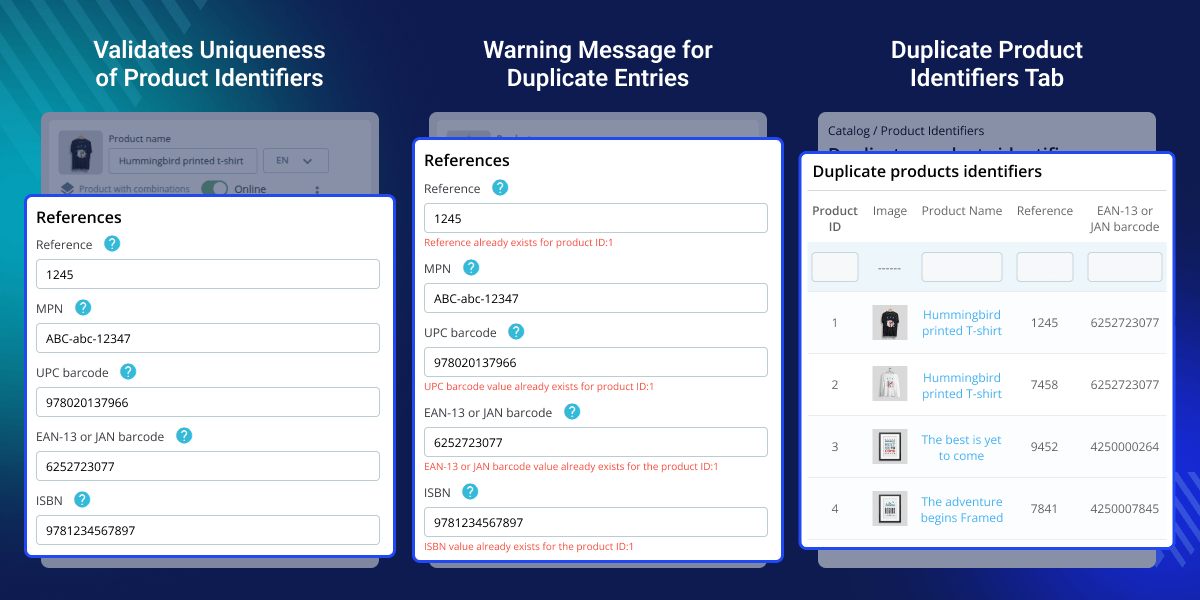
    PrestaShop Make Unique Product Identifier

    Highlighted Features

     Validation for Product Combinations

    The module checks uniqueness not only for products but also for product combinations.

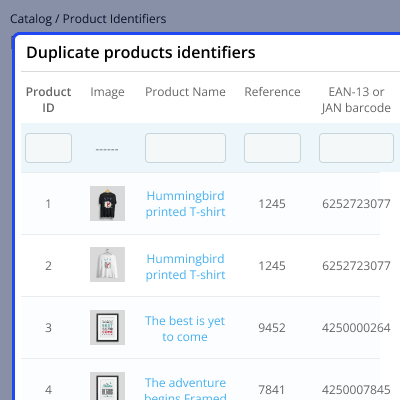
     Duplicate Product Identifiers Tab

    Provides a separate tab to view products/combinations with duplicate identifiers.

    PrestaShop Make Unique Product Identifier Configuration

    After the successful installation of Make Unique Product Identifier Configuration, the admin needs to configure the module. Under General Settings, the admin has several options.
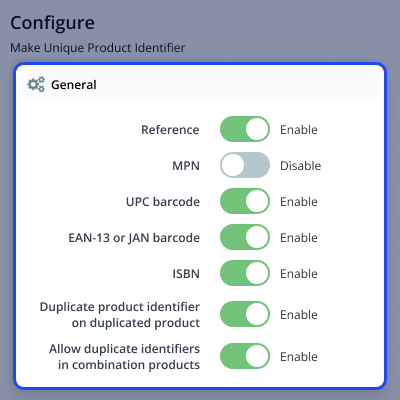
    • Configure the product identifiers such as Reference, MPN, UPC, EAN-13/JAN, and ISBN for which they want to validate uniqueness.
    • Choose to keep product reference fields blank in the duplicated product.
    • Allow duplicate identifiers in product combinations.
    configuration

    Duplicate Product Identifiers

    A separate tab in the module that provides a dedicated view listing all products and combinations that have duplicate identifier values (like Reference, MPN, UPC, EAN, ISBN). Instead of manually checking each product, the admin can quickly identify conflicts in one place. From this tab, the admin can:
    • Configure the product identifiers such as Reference, MPN, UPC, EAN-13/JAN, and ISBN for which they want to validate uniqueness.
    • View which products/combinations share the same identifier.
    • Access and edit those products directly to correct the duplicate values
    configuration

    PrestaShop Make Unique Product Identifier Features -

    • Validate reference value uniqueness of a product while creating or updating the product.
    • Validate the uniqueness of MPN, UPC, EAN-13/JAN, and ISBN while creating or updating the product.
    • Validates the uniqueness of reference fields for product combinations.
    • Duplicate product reference fields in duplicated product or left it blank.
    • A dedicated tab to view products and combinations whose duplicate values exists.
    • Improve inventory tracking.

    PrestaShop Make Unique Product Identifier Support-

    For any query or issue please create a support ticket here http://webkul.uvdesk.com

    You may also check our other top-quality PrestaShop Extensions.

    Specifications

    Product Version1.0.0
    Released1 year ago
    CategoryPrestaShop
    Last UpdatedApril 9, 2026 (3 days ago)
    Supported VersionsPrestaShop  1.7.x.x​  8.x.x  
    Write a review

    Frequently Asked Questions

      What does the Make Unique Product Identifier module do?
    PrestaShop Make Unique Product Identifier module ensures that product identifiers such as Reference, MPN, UPC, EAN-13/JAN, and ISBN remain unique across your store, helping avoid duplication and improving inventory management.
     
      What happens if the admin enters a duplicate product identifier?
    If a duplicate value is entered while creating or updating a product, the module displays a warning message indicating that the identifier already exists.
     
      Does the module check identifiers for product combinations?
    Yes, it also validates reference fields for product combinations, ensuring no duplication occurs at combination level.

    Move to Cloud Today

    AWS Free tier hosting for one year by amazon web services, for more details please visit AWS Free Tier.

    GCP Free tier hosting for one year with 300 credit points by google cloud platform, for more details please visit GCP Free Tier.

    Azure free tier hosting for one year with 25+ always free services, for more details please visit Azure Free Tier.

    In our default configuration we will provide tremendous configuration for your eCommerce Website which is fast to load and response.

    Default Configuration Details of Server

    • 1 GB RAM
    • 1 Core Processor
    • 30 GB Hard Disk
    • DB with 1 GB RAM and 1 Core Processor

    * Server Configuration may vary as per application requirements.

    Want to know more how exactly we are going to power up your eCommerce Website with Cloud to fasten up your store. Please visit the Cloudkul Services.

    Get Started with Cloud
    Not Available


