USD
  • EUR
  • INR
  • USD
Cart
Cart 0
  • You have no items in your shopping cart.
    Cart
    Cart 0
    • You have no items in your shopping cart.
    Hire a Developer
    ×
    Contact Us!
    Send Again
    Close
    Please Login to Write Your Review

    Prestashop Power BI connector

    The Power BI Connector module seamlessly integrates your PrestaShop store with Microsoft Power BI, enabling real-time analytics and business intelligence. This module automatically syncs your store data to Power BI, allowing you to create interactive dashboards and reports without manual data exports.


    • Sync multiple entities including Orders, Products, Customers, Categories, Carts, and Inventory

    • Push Datasets creation in Power BI with schema management and incremental sync support

    • 7-step Setup Wizard for guided first-time configuration and workspace selection

    • Query Builder for creating custom data exports with column selection and filters


    $179.00

    * Required Fields

    Add To Cart
    30 Days Refund*
    Only One Time Payment
    $179.00
    Configure and Buy
    • Description
    • Reviews
    • FAQ
    • Customers ()
    • Specifications
    • Cloud Hosting
    • Changelog

    Running an ambitious e-commerce store means handling massive volumes of data every single day. Unfortunately, many merchants find themselves trapped in a cycle of manual labor—exporting cluttered CSV files, dealing with broken spreadsheets, and struggling to piece together a true picture of store performance.
    The PrestaShop Power BI Connector solves this pain point completely. By establishing a robust, automated pipeline between your PrestaShop database and Microsoft Power BI (Microsoft’s leading business analytics tool), this module translates raw operational tables into interactive charts and dashboards.
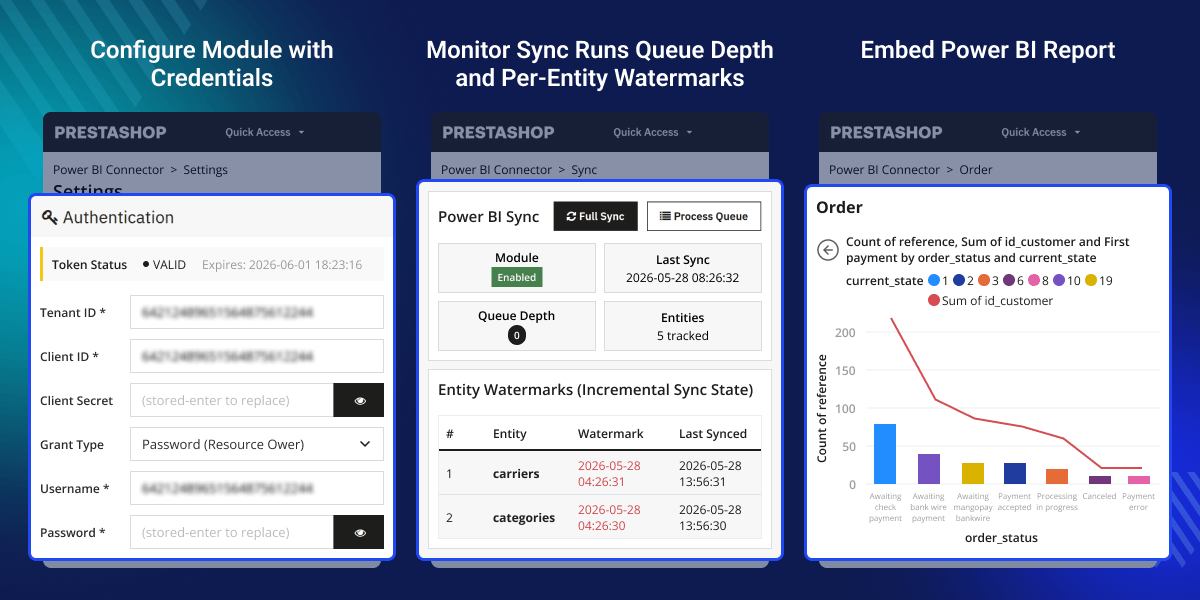
    Prestashop Power Bi Connector

    Highlighted Features

     Seamless Data Transformation

    Transform complex transactional logs into visual, high-impact graphs that show you exactly where your profit margins are growing.

     Enterprise-Grade Security

    Fully integrates Azure OAuth 2.0 protocol using either Client Credentials or Resource Owner Password Credentials (ROPC) flows.

     Multi-Mode Synchronization Control

    Supports dynamic synchronization configurations via manual execution triggers, scheduled system cron jobs, or live hook-driven events.

     In-Back-Office Reporting Hub

    View your final charts and analytical grids directly inside your merchant back-office dashboard.

    Workspaces, Datasets, and Tables Management

    Take complete control over your cloud architecture without ever having to leave your PrestaShop admin panel.
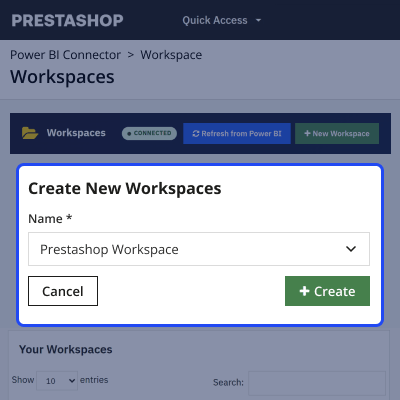
    • What it is: A full internal UI managing the three core Power BI objects.
    • How it works: The Workspaces panel lets you import existing Power BI containers or create a brand-new workspace directly. Inside the Datasets and Tables panels, the module lists active structures, executes a Schema Diff to check if your PrestaShop attributes match your cloud tables, and gives you the option to Clear Rows (wiping old rows for a clean re-sync without destroying table designs).
    • Why it matters: It saves massive administration time. You can organize separate analytical environments for multi-shop operations straight from a single control screen.
    Workspace

    Reports and Dashboards Hub

    You can import, manage, and interact with your visual data analytics directly from your merchant back-office.
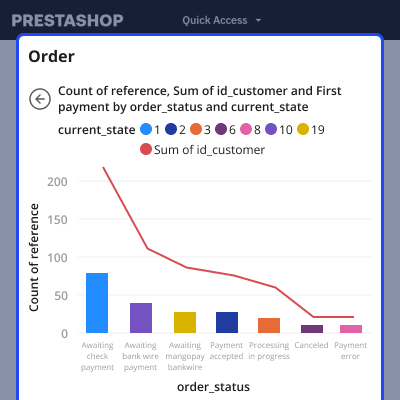
    • What it is: A centralized in-plugin reporting center that serves as a bridge to bring your final cloud-hosted reports back into the PrestaShop workflow.
    • How it works: With dedicated retrieval actions, merchants can click to directly fetch published elements from their active Power BI workspace onto this page. Clicking Embed brings up a secure, interactive lightbox modal inside the administration area. This modal loads your real-time data charts—such as order counts by status or sales trends—complete with structural side filters. From this view, administrators can also click Open in Power BI to jump straight to the source visualization on powerbi.com.
    • Why it matters: It keeps your staff aligned without forcing them to constantly swap browser tabs or share external software profiles. Your team can securely review advanced business performance graphs right alongside their regular processing queues. It also features a Copy Embed Link option to securely generate tokenized storefront paths if you ever want to display specific operational metrics to front-end visitors.
    Reports

    Employee Access Control

    When managing multi-employee fulfillment teams or external marketing contractors, ensuring data privacy and workflow integrity is vital.
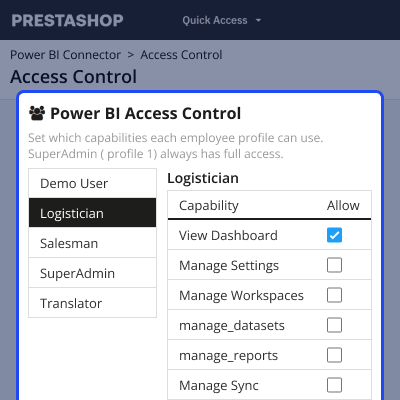
    • What it is: A local authorization matrix designed to restrict or grant module privileges based on default PrestaShop core worker roles.
    • How it works: The module auto-detects and loads all operational store groups (such as Logisticians, Salesmen, or Translators) on the left sidebar. Selecting a profile loads a comprehensive permission checklist containing nine critical system functions, including View Dashboard, Manage Settings, Manage Workspaces, Manage Sync, and Manage Access Control. Managers simply check the desired boxes and click Save Matrix to commit changes.
    • Why it matters: It provides complete database security and operational safety. For instance, you can easily allow warehouse packers (Logistician) to check shipping trends on the dashboard or view operational trails without giving them the ability to accidentally reset your Azure API configurations or wipe cloud queues. Note that for security backup protection, the system enforces a guardrail where the main account (SuperAdmin) always maintains full, un-editable access across all fields.
    Access Control

    Authentication Configuration

    Setting up your secure authentication bridge takes place within the Authentication tab, mirroring the parameters generated in your Admin Center.
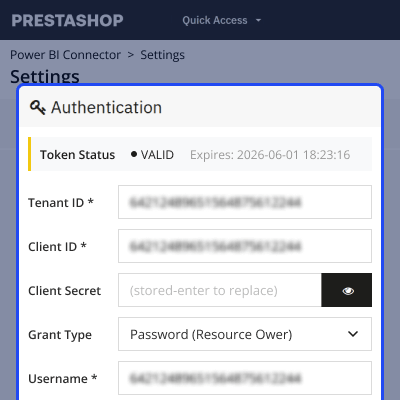
    • What it is: The security handshake configuration panel.
    • How it works: You paste your unique Tenant ID, Client ID, and Client Secret directly into the encrypted inputs. The module provides two distinct Grant Types: Client Credentials or Password (Resource Owner). For automated, hands-off background refreshes, choosing the Resource Owner flow allows the module to refresh its own tokens without requiring periodic manual logins.
    Authentication Configuration

    Features of Prestashop Power BI Connector Module

    • Azure OAuth 2.0 authentication with Client Credentials or Password grant
    • 14 PrestaShop entities available for export: Orders, Order Items, Customers, Products, Product Combinations, Categories, Carts, Cart Rules, Taxes, Carriers, Order Slips, Payments, Inventory, and Shops
    • Push Datasets creation in Power BI with automatic schema generation
    • 7-step Setup Wizard for guided initial configuration
    • Flexible sync modes: Manual, Scheduled (cron), and Live (hook-driven)
    • Saved sync profiles for customized data sync workflows
    • Visual Query Builder for custom data exports
    • Import and embed Power BI reports and dashboards
    • Configurable alert system for monitoring business metrics
    • Unified logging system with CSV export
    • Per-employee access control with granular permissions
    • REST API endpoints for programmatic access

    Prestashop Power BI connector Support -

    For any query or issue please create a support ticket here http://webkul.uvdesk.com

    You may also check our other top-quality PrestaShop Modules.

    Specifications

    Product Version1.0.0
    Released25 days ago
    CategoryPrestaShopConnector
    Last UpdatedJune 5, 2026 (25 days ago)
    Supported VersionsPrestaShop  1.7.x.x​  8.x.x  9.x.x  
    Write a review

    Frequently Asked Questions

     How does the incremental sync work?
    Incremental sync listens to PrestaShop hooks for data changes. When products, orders, customers, or categories are created, updated, or deleted, the changes are queued. The sync process processes this queue automatically (Live mode) or during cron runs (Scheduled mode).
     
     Can I create custom reports with specific data?
    Yes, use the Query Builder to create custom queries with selected columns, filters, and sorting. Preview results before exporting, save queries for reuse, and convert them to sync profiles for automated Power BI dataset updates.
     
     Can I embed Power BI reports on my storefront?
    Yes, import reports from Power BI and generate embed tokens to display them on the storefront. Reports can also be viewed in admin popup modals using the Power BI JavaScript SDK for seamless integration.
     
     What sync modes are available?
    Manual mode triggers sync only from the admin panel, Scheduled mode uses a cron URL for automated sync at defined intervals, and Live mode automatically syncs data on each change via PrestaShop hooks.
     

    Move to Cloud Today

    AWS Free tier hosting for one year by amazon web services, for more details please visit AWS Free Tier.

    GCP Free tier hosting for one year with 300 credit points by google cloud platform, for more details please visit GCP Free Tier.

    Azure free tier hosting for one year with 25+ always free services, for more details please visit Azure Free Tier.

    In our default configuration we will provide tremendous configuration for your eCommerce Website which is fast to load and response.

    Default Configuration Details of Server

    • 1 GB RAM
    • 1 Core Processor
    • 30 GB Hard Disk
    • DB with 1 GB RAM and 1 Core Processor

    * Server Configuration may vary as per application requirements.

    Want to know more how exactly we are going to power up your eCommerce Website with Cloud to fasten up your store. Please visit the Cloudkul Services.

    Get Started with Cloud
    Not Available


