Prestashop Price Dual Display Tax incl and Tax excl
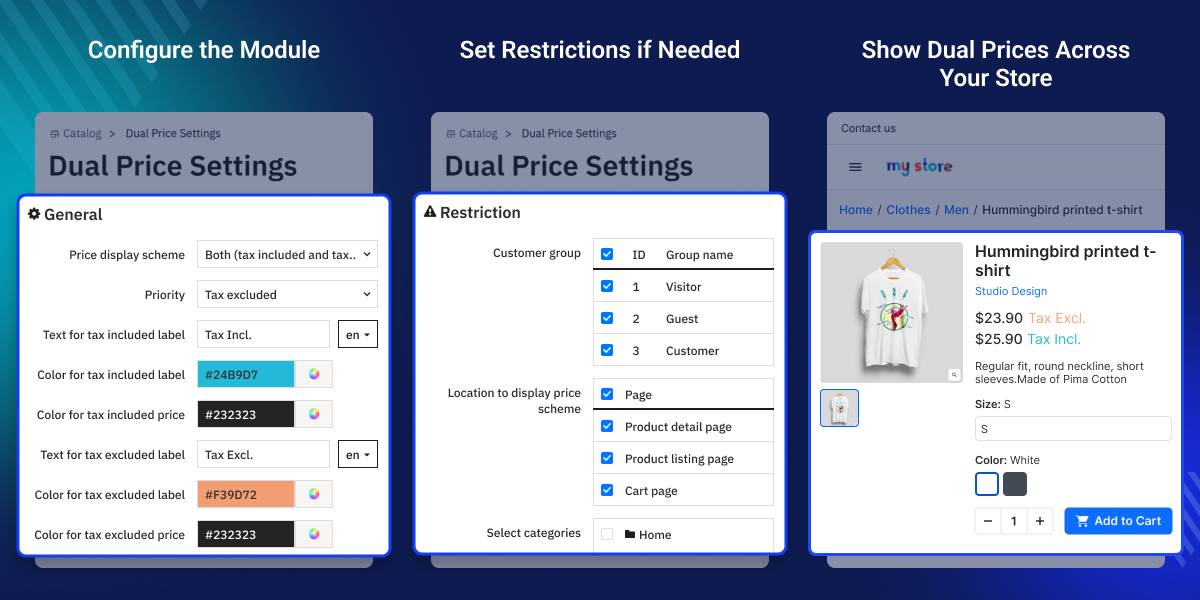
PrestaShop Price Dual Display Tax incl and Tax excl module allows store owners to display both tax-inclusive and tax-exclusive prices simultaneously on the Front Office, helping customers clearly understand product pricing and applicable taxes.
- Display tax-included price, tax-excluded price, or both together on the storefront.
- Set priority to control which price appears first when both are shown.
- Customize labels and colors for both tax-included and tax-excluded prices via a color picker.
- Show dual prices on the Product Detail Page, Product Listing, Quick View pop-up, Proceed to Checkout pop-up, and Cart Page.
- Restrict price display scheme by customer group, category, or exclude specific products.
Note: Prestashop Price Dual Display Tax incl and Tax excl module is compatible with the multi-store feature of PrestaShop.
- Description
- Reviews
- FAQ
- Customers ()
- Specifications
- Cloud Hosting
- Changelog
Prestashop Price Dual Display Tax incl and Tax excl -With this module you can display tax excluded with tax included prices together. You can pick where you need to show these prices: Product detail page, Product listing, Quick view pop-up, Proceed to checkout pop-up, and Cart page.
Highlighted Features
Flexible Price Display Options
Show tax-excluded prices, tax-included prices, or both simultaneously — adapt to your target market's expectations and legal requirements.
Priority-Based Price Ordering
Control which price appears first when displaying both — tax-excluded priority for B2B clarity or tax-included priority for consumer transparency.
Custom Tax Labels
Replace generic 'Tax incl.' and 'Tax excl.' text with your own multilingual labels that match your brand voice and customer language.
Color Customization
Style both the tax labels and the actual prices using color pickers — create visual distinction that guides customer attention.
Customer Group Restrictions
Limit the dual-price display to specific customer groups — show tax-inclusive pricing to retail customers while displaying tax-exclusion to B2B partners.
Category and Product Filters
Apply the pricing scheme to all products, or restrict it to specific categories and individual products for targeted implementation.
PrestaShop Dual Price Display Configuration
The General tab gives you complete control over how prices appear to customers. Set your preferred display scheme, configure which value shows first, and customize the text labels and colors to match your brand identity.
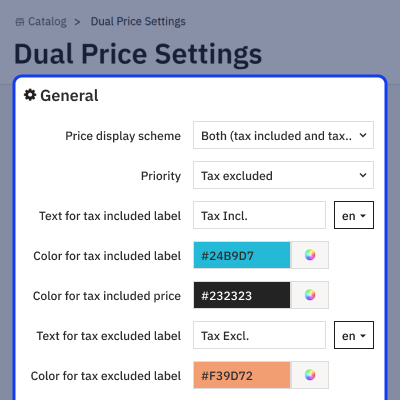
- Choose between showing only tax-excluded, only tax-included, or both prices simultaneously on your storefront.
- Decide whether tax-excluded or tax-included appears first to prioritize the most relevant price for your audience.
- Customize the label text for both tax-included and tax-excluded prices.
- Set the text color for each label using the color picker.
- Choose the display color for tax-included and tax-excluded price values.
- Enable to always show both values even when they match, or disable to avoid redundant displays.
- When prices match and both-display is disabled, choose which single price to show to customers.

PrestaShop Dual Price Display Restrictions
Fine-tune where and to whom the dual-price scheme applies using the Restriction tab. This prevents universal application and lets you target specific customer segments or product ranges
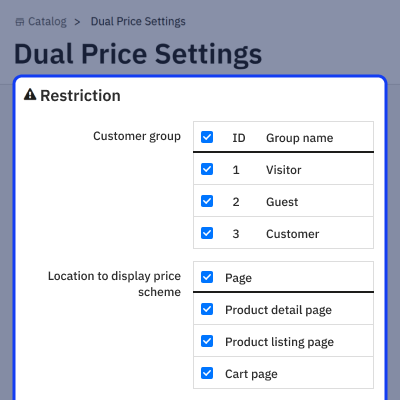
- Choose which customer groups see the dual-price display.
- Pick which store locations show dual prices: product pages, listings, quick view, or cart.
- Apply the scheme to specific categories only, or leave empty to include all categories.
- Remove individual products from the dual-price display while keeping the scheme active elsewhere.

Prestashop Price Dual Display Tax incl and Tax excl Features -
- Show single or both prices (Exclusive and Inclusive of taxes).
- Set priority as to which price will show first, in case “both prices” is selected..
- Set label for tax included price.
- Choose color for tax included price (with color picker).
- Set label for tax excluded price.
- Choose color for tax excluded price (with color picker).
- Show tax excluded and tax included prices for specific products, categories, and customer groups
- Display Tax incl. and Tax excl. price on: Product detail page, Product listing, Quick view pop up, Proceed to checkout pop up and Cart page.
- Multistore compatible.
Prestashop Price Dual Display Tax incl and Tax excl Support -
For any query or issue, please create a support ticket here http://webkul.uvdesk.com
You may also check our other top-quality PrestaShop Extensions.
Specifications
Recent Reviews
Write a reviewThe module works as expected.
The team is responsive and adapts to specific cases (theme, display, etc.). Thank you.
Frequently Asked Questions
Move to Cloud Today
AWS Free tier hosting for one year by amazon web services, for more details please visit AWS Free Tier.
GCP Free tier hosting for one year with 300 credit points by google cloud platform, for more details please visit GCP Free Tier.
Azure free tier hosting for one year with 25+ always free services, for more details please visit Azure Free Tier.
In our default configuration we will provide tremendous configuration for your eCommerce Website which is fast to load and response.
Default Configuration Details of Server
- 1 GB RAM
- 1 Core Processor
- 30 GB Hard Disk
- DB with 1 GB RAM and 1 Core Processor
* Server Configuration may vary as per application requirements.
Want to know more how exactly we are going to power up your eCommerce Website with Cloud to fasten up your store. Please visit the Cloudkul Services.
Get Started with Cloud


