PrestaShop Return Opt-Out Discount — Let customers trade their right to return for an instant discount, so more of your sales stay final and refunds cost you less.
- Keep the sale instead of paying for the refund — one checkbox lets a customer give up their return right and the lower price applies straight away in the cart.
- Protect the profit on items you never wanted back — mark selected products as no-return and the order closes with no refund request possible.
- Set the saving your way — offer a fixed amount off or a percentage off, with an optional cap so a percentage deal can never eat into your margin.
- Target exactly what you want to move — apply the offer store-wide, to a category, brand or supplier group, or product by product.
- Reach the right shoppers and nobody else — limit the offer to chosen customer groups, such as only logged-in or only wholesale customers.
- Save time for your team — every opted-out line is stored with its original price, discount and consent, so nobody has to refuse a return by hand.
Note: PrestaShop Return Opt-Out Discount is compatible with the PrestaShop Multi-store feature.
- Description
- Reviews
- FAQ
- Customers ()
- Specifications
- Cloud Hosting
- Changelog
Every return costs more than the price of the item. You pay shipping both ways, handling and repackaging, and then resell used stock at a lower price — or not at all. Merchandise that comes back simply because it no longer fits, was bought on a whim, or was never opened is the most expensive kind of return to handle, because nothing was damaged or faulty.
PrestaShop Return Opt-Out Discount offers shoppers a fair trade instead — they take an instant discount and give up the right to return that product, while you keep the sale as final. It suits any store with a high share of returns — fashion, furniture and home goods, electronics, gift sets, seasonal items, or anything sold as a one-off.
You decide the offer from your back office — one setting for the whole shop, a rule for a category, brand or supplier, or a deal on a single product. The customer sees it on the product page, accepts it in the cart or at checkout, and the price updates immediately. There are no coupon codes to copy, no refund approvals to make, and nothing new for your team to learn.
This is where it differs from what PrestaShop already does. The built-in returns setting is one switch for the entire shop and cannot price the return itself, so it can only turn returns off for everybody. This module turns the return right into a priced choice that the customer makes per product. The acceptance is then written onto the order, and the return option for that line is closed automatically, so the agreement you paid for with the discount is the one that stands.
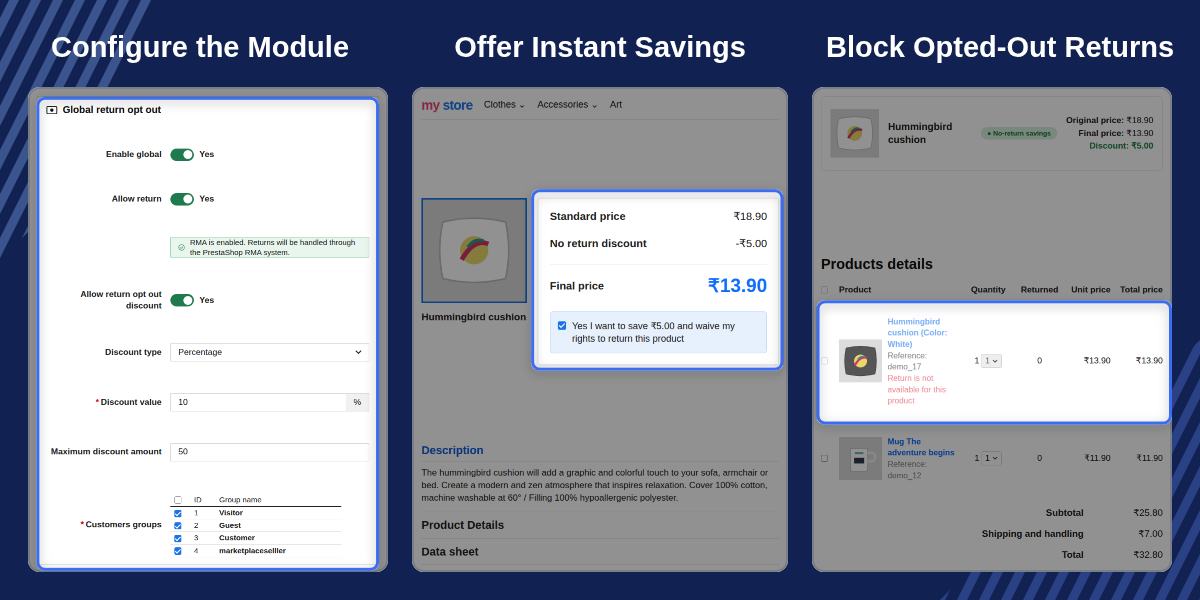
Highlighted Features
Product, Rule and Global Targeting
Set the discount on one product, a group of products, or the whole shop. The most specific setting always wins, so the final price follows your intent.
Fixed and Percentage Discounts
Offer a flat amount off or a percentage off, and cap a percentage discount with a maximum so low-priced products keep their margin.
Product Page Offer Box
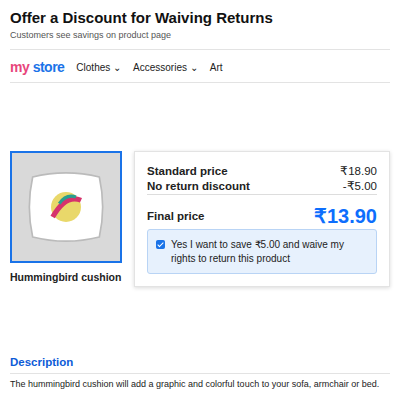
Customers see the standard price, the no-return discount and the final price together in one box, placed under the price or in the extra information area.
Returns Blocked for Opted-Out Items
A return request on an opted-out line is refused with a clear message, so no refund case is created for your team to close by hand.
Global Settings
Set the fallback offer once for your whole shop, then let individual products and rules override it wherever you need something different.
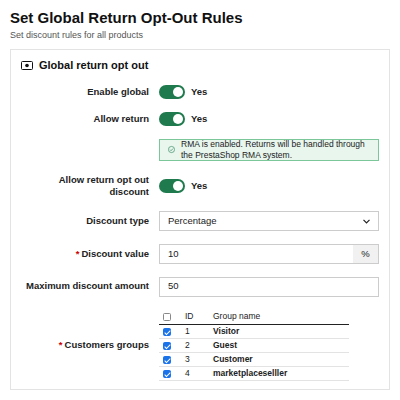
- Turn the store-wide offer on or off in one place — nothing is applied to your shop until you switch it on.
- Choose a fixed amount off or a percentage off, and set the maximum a percentage discount can reach so a cheap sale never clears your margin.
- Decide who sees the offer by picking the customer groups it applies to; leave every group selected to show it to all shoppers.
- Write one message for when your standard returns are on and one for when they are off, so customers always get an accurate explanation.
- Turn the offer box on for the product page, the cart, or both, and choose whether it sits under the price or in the extra information area.

Product and Rule Setup
Choose exactly which products the offer covers. Three levels of control work together, and the most specific one always takes priority.
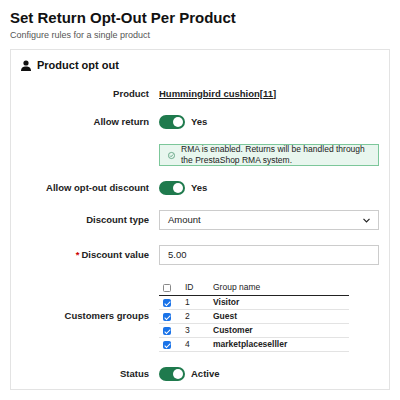
- Set the deal on the product page itself — switch on the offer, choose the discount and watch the exact final price recalculate as you type.
- Apply one discount to a whole selection — group products by category, brand, supplier or customer group, then exclude individual products that should not take part.
- Know which number applies — a product setting overrides a matching rule, and a rule overrides the store-wide setting, so there are never two answers for one product.
- Review everything in one list — see the product, its discount, whether returns are allowed and whether it is active, with a filter on every column.
- Preview before you publish — every row has a preview button that opens the live product page so you see the offer exactly as customers will.

Product Page Setup
The offer is configured from the product page you already use, so there is nothing new to learn and no separate product list to maintain.
- A return opt-out discount card sits at the bottom of the product page in your back office with every switch in one place.
- Switch on use global return setting to inherit your store-wide offer, or off to set a specific discount for this product only.
- A live preview shows the original price, the discount and the final price as you change the numbers.
- A one-click link takes you straight to the global settings when the offer you need is not set up yet.
- The card warns you when standard returns are switched off in your shop, so you know what customers will actually see.

Cart and Checkout
This is where the customer accepts the offer. Prices change the moment the box is ticked, with no coupon and no extra step.
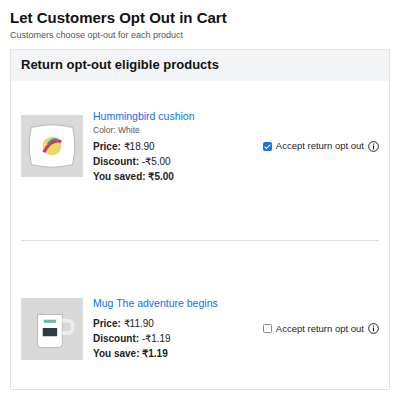
- Each eligible product in the cart has its own checkbox, the price it started at, and the exact amount being saved.
- One grouped box at the foot of the cart collects every eligible product, so a customer with five eligible items accepts them all in a single place.
- Totals refresh without a page reload when a box is ticked, a quantity changes or a product is removed from the cart.
- Require consent at checkout to protect you — the customer must tick a confirmation box carrying your own wording before the order can be placed.
- Show the original price on listing pages for accepted products, so the saving is visible from category and search results.

PrestaShop Return Opt-Out Discount Features -
- Give customers an instant discount when they agree not to return a product.
- Set the discount at three levels: Product, Rule, and Global. Product settings win over Rule, and Rule wins over Global.
- Create rules by category, brand, supplier, or customer group, and use one discount for all matching products.
- Leave out single products from a rule when they should not get the offer.
- Choose a fixed amount or a percentage discount.
- Set a maximum amount for percentage discounts, so cheaper products keep their margin.
- Show the offer only to the customer groups you choose.
- Place the offer box on the product page, either below the price or in the extra information section.
- List every eligible cart product with its own opt-out checkbox in one group.
- Update cart prices and totals right away when a customer adds or removes the offer.
- Show the original price and a "No-return savings" badge on product listing pages after a customer accepts the offer.
- Add a required consent checkbox at checkout with your own text. Customers cannot place the order until they tick it.
- Show the original price, discount, final price, and consent on the order confirmation page, in the customer account, and on the back-office order page.
- Stop return requests for opted-out products and show the customer a clear reason. Other products in the same order can still be returned.
- Show a simple return message on the product page when returns are not allowed, with a separate message for each shop language.
- Show fixed discounts in the customer's shopping currency.
- Show the return status (RMA on or off) in the Product, Global, and Rule settings, so admins know how the offer will work.
PrestaShop Return Opt-Out Discount Support-
For any query or issue, please create a support ticket here http://webkul.uvdesk.com
You may also check our other top-quality PrestaShop Extensions.
Specifications
Frequently Asked Questions
Specification
Detailed technical features and requirements to help you understand the module’s capabilities and ensure smooth integration with your system.
Cloud Hosting
Detailed technical features and requirements to help you understand the module’s capabilities and ensure smooth integration with your system.
Move to Cloud Today
We’re partnered with top-tier, trusted providers!
Default Configuration Details of Server
RAM 1 Core
Processor 30 GB
Hard Disk
Database
Want to know more how exactly we are going to power up your eCommerce Website with Cloud to fasten up your store
* Server Configuration may vary as per application requirements.


