USD
  • EUR
  • INR
  • USD
Cart
Cart 0
  • You have no items in your shopping cart.
    PrestaShop Extensions
    Cart
    Cart 0
    • You have no items in your shopping cart.
    Hire a Developer
    ×
    Contact Us!
    Send Again
    Close
    Please Login to Write Your Review
    Prestashop Security | Firewall | 2FA | Content Protection

    Prestashop Security | Firewall | 2FA | Content Protection

    x
    Free

    * Required Fields

    $49.00
    Add To Cart

    Prestashop Security | Firewall | 2FA | Content Protection Protect your website from hacker attacks, bots, and brute force login threats and enhance store management with Prestashop Security Suite.


    • Improve your website security.

    • Two-Factor Authentication to ensure the security of your admin panel.

    • Security headers for protection against XSS and clickjacking attacks.

    • WAF to detect visitor patterns and block malicious HTTP/S traffic.

    • MultiShop Compatible.

    Prestashop Security | Firewall | 2FA | Content Protection
    Prestashop Security | Firewall | 2FA | Content Protection
    $49.00
    PrestaShop Expert Partner
    PrestaShop Superhero Seller
    PrestaShop Expert Certification Core Skills
    Check How It Works
    $49.00
    Configure and Buy
    X
    • Description
    • Reviews
    • FAQ
    • Customers ()
    • Specifications
    • Cloud Hosting
    • Changelog

    Prestashop Security | Firewall | 2FA | Content Protection - eCommerce businesses have become a major target for cybercriminals. Phishing, DDoS attacks, malware, trojan horses, XSS, and SQL Injections are some of the most common cybersecurity threats and pose serious risks for online businesses. eCommerce security site breaches not only lead to loss of revenue for your business but also impact the site's reputation negatively.

    Keep both your business and customers free from cyberattacks with the Prestashop Security Suite extension. This extension facilitates you to enable the two-factor authentication which adds an additional layer of security to the authentication process thus making it harder for attackers to gain access to your admin panel. Implement security headers to improve the resilience of your web application against cross-site scripting (XSS), clickjacking, and content sniffing attacks.

    Also, the Web Application Firewall is included to ensure the protection of your website against attacks such as cross-site scripting (XSS), SQL, SHELL, and HTML Injection attacks.

    Highlighted Features

     Two-Factor Authentication

    Enable 2FA (Two-Factor Authentication) to add an extra level of protection to the admin panel.

     Protect Your Content

    Disable cut, copy, paste, right-click, and other keyboard shortcuts to prevent text and image theft.

     Enable reCAPTCHA For Frontend

    Add Google reCAPTCHA to your website pages for verification of any suspicious activity.

     Security Headers

    Improve web application security to protect against cross-site scripting (XSS), clickjacking, and content sniffing attacks.

     HTTP Authentication

    Add an additional layer of security to front and back-office login with HTTP Authentication.

    Protect your website content

    Protect your descriptions and images from being stolen by content thieves. This extension lets you disable some of the most common content copy methods such as text selection, right-click, image save, source code viewing, inspect element, etc. Disable shortcut keys such as Ctrl+C, ctrl+V, Ctrl+X, etc to prevent text theft.

    configuration

    2FA (Two-Factor Authenticaton)

    Use Two-Factor Authentication to protect your admin panel from unauthorized access. 2FA is an extra layer of security used to verify the users trying to gain access to your admin panel are who they say they are.
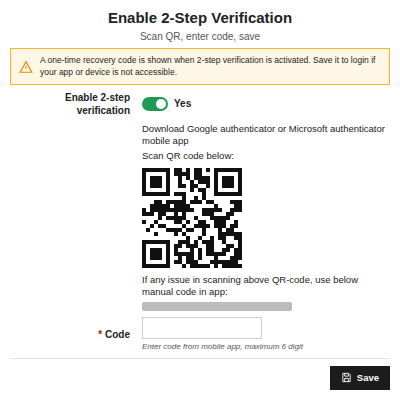
    • To set up 2FA, you need to scan the QR code given in 2-Step Verification tab.
    • You can scan the QR code using a Google Authenticator or Microsoft Authenticator app.
    • Upon scanning, you will get a 6 digit code that needs to be entered against the code tab.
    • Once the code is successfully verified, the 2FA gets set up.
    • Now, the next time the authorized person tries to log in, an additional field along with username and password will be displayed.
    • In that field, the authorized person needs to enter the six-digit code to log in.
    configuration

    Prestashop Security | Firewall | 2FA | Content Protection Features -

    • Disable cut, copy, paste, and text selection to prevent text theft.
    • Disable right clicks to prevent your images from being copied or saved.
    • Also, you can disable view page source and inspect element.
    • Enable security headers to protect your store against XSS, clickjacking, and content sniffing attacks.
    • Enable 2-factor authentication to protect your back office from unauthorized access.
    • The overall security of the website’s data is taken care of by Web Application Firewall and it protects your site from XSS, SQL, SHELL, and HTML injection attacks.
    • Prestashop Security Suite module is MultiShop Compatible.

    Prestashop Security | Firewall | 2FA | Content Protection Support -

    For any query or issue please create a support ticket here http://webkul.uvdesk.com

    You may also check our other top-quality PrestaShop Add-ons.

    Specifications

    Product Version5.1.2
    Released4 years ago
    Last UpdatedJuly 28, 2026 (18 days ago)
    Supported VersionsPrestaShop  1.7.x.x​  8.x.x  9.x.x  

    Ratings

    We'd love to hear your thoughts! Share your feedback and help us craft an even better experience tailored just for you.

    5.0
    3 Reviews
    based on verified customer feedback
    Write a review
    https://todoporteros.es/es/

    Great support.

    Posted On - August 12, 2026

    I use it in several projects, and it always works without issues.

    https://growshop.org

    Highly recommend

    Posted On - January 29, 2024

    Works perfectly.

    https://www.magpiebeauty.co.uk/
    🇬🇧 United Kingdom

    Very prompt with support

    Posted On - January 9, 2024

    Had a bit of a problem during the installation on 1.6 (all on our end, module installation seems a bit finnicky due to being old and heavily bespoke), contacted them and they were very prompt with helping us and got it all up and running for us

    Specification

    Detailed technical features and requirements to help you understand the module’s capabilities and ensure smooth integration with your system.

    Cloud Hosting

    Detailed technical features and requirements to help you understand the module’s capabilities and ensure smooth integration with your system.

    Default Configuration Details of Server

    1 GB
    RAM
    1 Core
    Processor
    30 GB
    Hard Disk
    1 GB RAM & 1 Core Processor
    Database

    Want to know more how exactly we are going to power up your eCommerce Website with Cloud to fasten up your store

    * Server Configuration may vary as per application requirements.

    Change Logs

    Not Available


