USD
  • EUR
  • INR
  • USD
Cart
Cart 0
  • You have no items in your shopping cart.
    Cart
    Cart 0
    • You have no items in your shopping cart.
    Hire a Developer
    ×
    Contact Us!
    Send Again
    Close
    Please Login to Write Your Review

    PrestaShop Square Payment Gateway

    PrestaShop Square Payment Gateway allows store owners to sell product subscriptions while securely accepting recurring payments through the Square payment gateway.


    • Accept payments via Card, Wallet, and ACH Bank via Square for non-subscription products.

    • Offer product subscriptions and accept recurring payments using Pay by Card via Square.

    • Process refunds for orders (without Subscription) paid via Square.

    • View a list of customers subscribed to the products.

    • View all transactions done through the Square Payment Gateway


    Note: PrestaShop Square Payment Gateway module is compatible with the multi-store feature of PrestaShop.

    Screenshots
    $49.00

    * Required Fields

    Add To Cart
    $49.00
    Configure and Buy
    • Description
    • Reviews
    • FAQ
    • Customers ()
    • Specifications
    • Cloud Hosting
    • Changelog

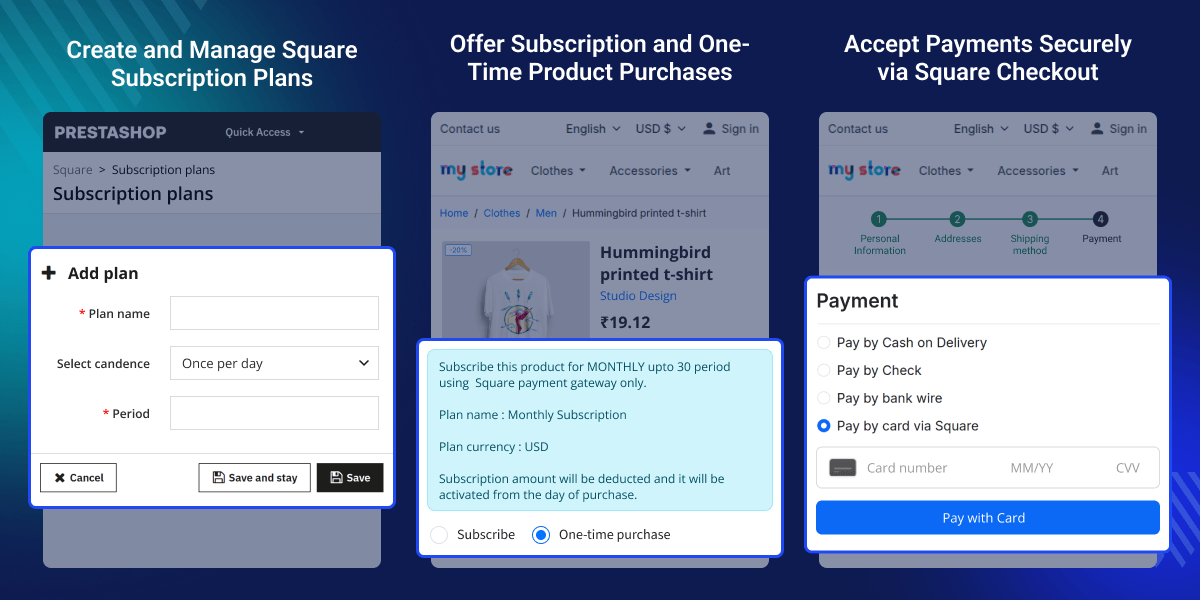
    PrestaShop Square Payment Gateway - Enable your customers to purchase normal and subscription-based products while securely accepting recurring payments through the Square payment gateway.

    The module supports one-time card purchases, Apple Pay and Google Wallet digital wallet payments, ACH bank transfers via Square, and recurring subscription billing all through a single Square merchant account.

    Configure sandbox and live credentials independently, validate App ID, Access Token, and Location ID before going live, and receive every transaction event through Square webhooks with signature verification.
    Note -

    • PrestaShop Square Payment module is fully compatible with 3D SCA (Strong Customer Authentication).
    • SSL must be enabled to use this module.
    • PHP version 7.1 or greater is required to use this module.
    • Square payment accounts are supported in the USA, Australia, Canada, Japan, United Kingdom, Ireland, France, and Spain
    PrestaShop Square Payment Gateway

    Highlighted Features

     Square Card Payment

    Process Visa, MasterCard, American Express, and Discover directly through Square's secure hosted field.

     Apple Pay and Google Wallet

    Eligible browsers and devices display Apple Pay and Google Pay buttons inside the checkout payment section without extra configuration.

     ACH Bank Transfer

    Offer ACH/debit bank payments to US customers who prefer not to use cards. The ACH flow collects bank account details through Square's secure element and validates the account before authorisation.

     Subscription Plans

    Create subscription plans in your Square account with custom billing cadence — daily, weekly, monthly, quarterly, or annual, then assign those plans to PrestaShop products.

     Webhook and Real-Time Events

    Configure sandbox and live webhook signature keys to receive event notifications from Square : payment.created, invoice.paid, subscription. updated, and more.

     Admin Transaction Management

    Every payment and subscription transaction is stored in a dedicated admin grid with customer name, order reference, amount, currency, payment type (One-time or Subscribe), and date.

    Subscription Plan Management

    Create and manage subscription billing plans that live inside Square but drive purchases inside PrestaShop. Each plan ties to a Square cadence and period, and you assign the plan to products so customers can subscribe at checkout.
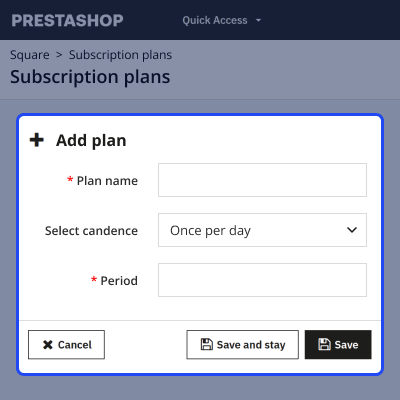
    • Create plans directly from PrestaShop — enter a plan name, select billing cadence from a list (daily through every two years), and set the period count.
    • Activate or disable plans — disabled plans are not available for new subscriptions, but existing subscribers continue unaffected.
    • Bulk actions — activate or disable multiple plans at once to manage seasonal or promotional campaigns quickly.
    • Plan ID and name are pulled from Square after creation — the module handles the synchronisation automatically through the Square SDK.
    Subscription Plan Management

    Subscription Product Assignment

    Assign previously created subscription plans to specific PrestaShop products, including combinations, so the subscription option appears automatically on qualifying product pages and in the cart.
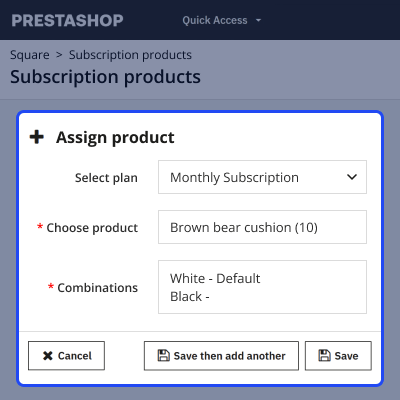
    • Search and select products via AJAX autocomplete — type a product name and pick from live results.
    • Assign plans at the product or combination level — ideal when one product has multiple subscription variants.
    • View assigned products grouped by plan — the list view shows a plan's total active product assignments.
    • Remove assignments individually or via bulk delete — the product returns to the available list automatically.
    Subscription Product Assignment

    Transaction and Subscription Management

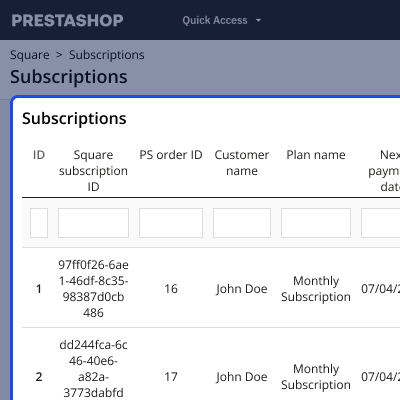
    Track every payment, subscription status change, and refund from a single back-office location. The module provides two dedicated grids — Transactions and Subscriptions.
    • Transactions grid — shows Payment ID, PrestaShop Order ID (linked), Customer name (linked), Amount, Currency, Payment type, and Date. Include a shop column in All Shops context.
    • Subscription grid — shows Square subscription ID, linked order, customer, plan name, next payment date, completed periods, status (Active, Cancelled, Expired), and a cancel action button.
    • Full transaction detail view — inspect the linked Square payment, associated refunds, refunded amount, and remaining refund balance, then issue a new refund with reason and type.
    • Refresh refund status — re-fetch refund state from Square without leaving the detail page.
    Transaction and Subscription Management

    PrestaShop Square Payment Features

    • The subscription amount deducts from the customer’s account, as per the subscribed plan.
    • Subscription is only possible through Card payment.
    • Admin can use the module either in sandbox or production mode, as per the requirement.
    • Provide the API keys according to the mode selected.
    • Create the subscription plan on store itself.
    • Admin need to specify the plan frequency & time period (till which the plan will be active) of the subscription plan.
    • Admin can also edit/delete the subscription plan.
    • Assign created plan to products.
    • Admin can assign products with or without combinations to the subscription plan.
    • Admin can update/delete the assigned plan from the product.
    • View the separate list of transactions made through Square Payment Gateway.
    • Admin can either refund full or partial amount to the customer for their orders done without subscription.
    • While refunding the partial amount, admin can specify the amount less than or equal to the amount paid by buyer.
    • View the list of subscribed customers.
    • Cancel the subscription of any customer.
    • Customer can view the subscription details on the product page.

    PrestaShop Square Payment Support

    For any query or issue, please create a support ticket here http://webkul.uvdesk.com

    You may also check our other top-quality PrestaShop Extensions.

    Specifications

    Product Version4.0.3
    Released4 years ago
    CategoryPrestaShopPayment
    Last UpdatedJune 17, 2026 (18 days ago)
    Supported VersionsPrestaShop  1.7.x.x​  8.x.x  9.x.x  
    Write a review

    Frequently Asked Questions

     Is it MultiShop Compatible?
    Yes, the module is compatible with the PrestaShop multi-store functionality.
     
     Is this module support recurring feature?
    Yes, the module supports single-time purchases and recurring purchases.
     
     Can admin refund transaction amount?
    Yes, admin can refund the transaction amount for a non-recurring order. Refund for a recurring order is not supported by the Square payment API.
     
     Can customer cancel their subscription?
    Yes, the customer can cancel their subscription from their subscription account section.
     
     What are the technical requirement to use this module?
    PrestaShop must be run on PHP 7.1+ version, SSL must be enabled, and curl must be installed on the server.

    Move to Cloud Today

    AWS Free tier hosting for one year by amazon web services, for more details please visit AWS Free Tier.

    GCP Free tier hosting for one year with 300 credit points by google cloud platform, for more details please visit GCP Free Tier.

    Azure free tier hosting for one year with 25+ always free services, for more details please visit Azure Free Tier.

    In our default configuration we will provide tremendous configuration for your eCommerce Website which is fast to load and response.

    Default Configuration Details of Server

    • 1 GB RAM
    • 1 Core Processor
    • 30 GB Hard Disk
    • DB with 1 GB RAM and 1 Core Processor

    * Server Configuration may vary as per application requirements.

    Want to know more how exactly we are going to power up your eCommerce Website with Cloud to fasten up your store. Please visit the Cloudkul Services.

    Get Started with Cloud
    Not Available


