Send Again
Close
PrestaShop UnoPim Connector: PrestaShop UnoPim Connector facilitates the linking of the PrestaShop store with the UnoPim (Product Information Management) platform.
It allows the user to manage product data transfer between the two platforms. Users can map the product attributes such as size, color, price, etc., between UnoPim and Adobe Commerce store for exporting. They can also set a fixed value for exported products.
Additionally, if you’re looking to connect your Shopify store with UnoPim, then you can check UnoPim Shopify Connector.
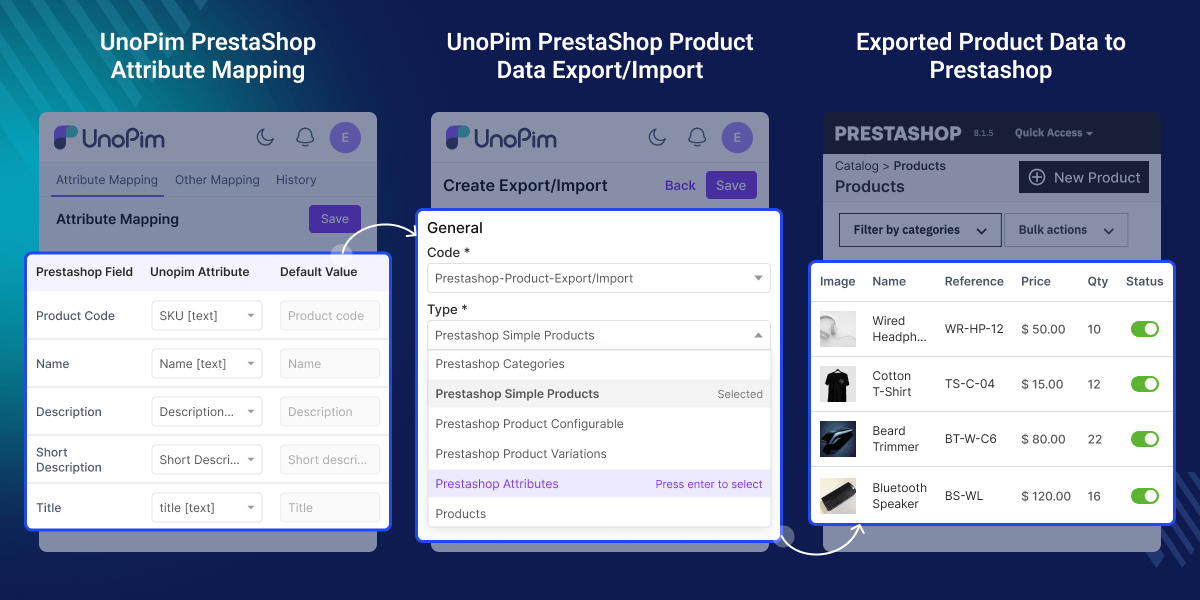
With this module, you can export/import products and combinations from UnoPim to Prestashop and vice versa.
With this module, you can export/import multiple images from UnoPim to Prestashop.
With this module, you can filter the category while exporting the category and product from UnoPim to Prestashop.
With this module, you can filter the data like channel, locales, currency, category, and attributes.
If the same attributes and categories are already present in Prestashop then you can map the attribute/category/feature in UnoPim to prevent duplicate Attribute/Category/Feature.
If you want to export the product data in multi-languages then you will be able to do this with this module.
Using the Prestashop UnoPim connector, you can export products to multiple stores.
Prestashop UnoPim connector allows you to export attributes to multiple stores.
PrestaShop UnoPim Connector enables users to manage product data transfer between PrestaShop and UnoPim platforms.
In addition to exporting data, the connector also supports the import of product data such as products, categories, and attributes from PrestaShop to UnoPim.
Apart from this, if you’re looking to get started with UnoPim as your product information management tool, then you can check the UnoPim Starter Pack.
This module helps manage product data transfer and synchronization between UnoPim and PrestaShop stores.
Move large product catalogs from UnoPim to PrestaShop in one process.
Manage product data in UnoPim and sync it with PrestaShop.
Export products and attributes to multiple PrestaShop stores together.
Publish product data in different languages to PrestaShop.
Map size, color, SKU, and other attributes to avoid errors.
Run export or import jobs to update product data like price, stock, and details.
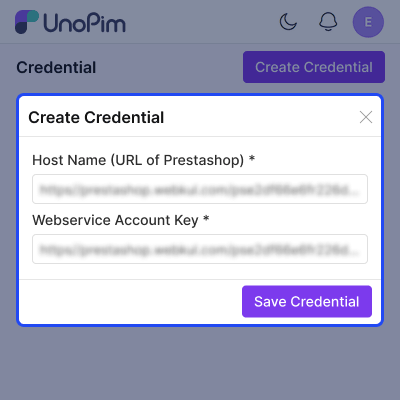
PrestaShop integration module links the store using API credentials by adding the store URL and the webservice key. It enables direct catalog data transfer between UnoPim and PrestaShop.
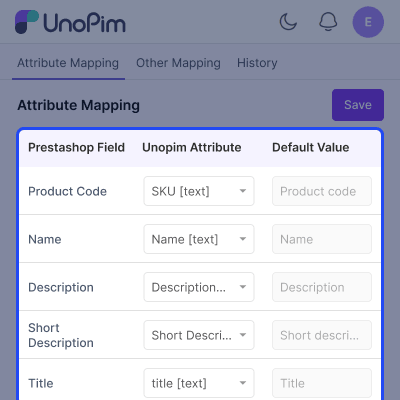
PrestaShop Connector maps product fields, images, and attributes between UnoPim and PrestaShop, keeping SKU, name, images, etc., aligned during sync. It helps publish products with correct data and visuals without manual fixes.
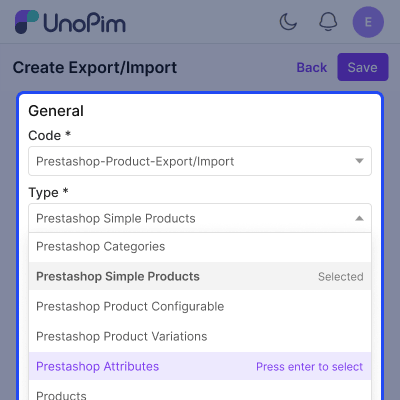
PrestaShop UnoPim Connector feature manages both export and import jobs between UnoPim and PrestaShop from one dashboard. It supports bulk product transfers, updates catalog data, and reduces manual uploads.
For any query or issue, please create a support ticket here http://webkul.uvdesk.com/. You may also check our all UnoPim Extensions.
Detailed technical features and requirements to help you understand the module’s capabilities and ensure smooth integration with your system.
Detailed technical features and requirements to help you understand the module’s capabilities and ensure smooth integration with your system.
We’re partnered with top-tier, trusted providers!
Want to know more how exactly we are going to power up your eCommerce Website with Cloud to fasten up your store
* Server Configuration may vary as per application requirements.



