USD
  • EUR
  • INR
  • USD
Cart
Cart 0
  • You have no items in your shopping cart.
    PrestaShop Extensions
    Cart
    Cart 0
    • You have no items in your shopping cart.
    Hire a Developer
    ×
    Contact Us!
    Send Again
    Close
    Please Login to Write Your Review
    PrestaShop Zoho Books Connector

    PrestaShop Zoho Books Connector

    x
    Free

    * Required Fields

    $89.00
    Add To Cart
    30 Days Money Back Guarantee*
    Only One Time Payment

    Prestashop Zoho Books Connector: Connect PrestaShop with Zoho Books to synchronize customers, products, orders, invoices, payments, and credit notes. Manage two-way data synchronization, tax mappings, payment methods, and sync logs from your PrestaShop back office.

    PrestaShop Zoho Books Connector
    PrestaShop Zoho Books Connector
    $89.00
    PrestaShop Expert Certification Core Skills
    Check How It Works

    Need Help Deciding?

    Support answers within one business day.

    Open a ticket
    $89.00
    Configure and Buy
    30 Days Money Back Guarantee*
    Only One Time Payment
    X
    • Description
    • Reviews
    • FAQ
    • Customers ()
    • Specifications
    • Cloud Hosting
    • Changelog

    The PrestaShop Zoho Books Connector integrates your PrestaShop store with Zoho Books to simplify accounting and data management. It synchronizes essential eCommerce records, including customers, products, orders, invoices, payments, and credit slips, helping you maintain consistent information across both platforms.
    With this connector, store administrators can configure synchronization settings, map tax rules and payment methods, and manage existing data synchronization from the PrestaShop back office. The module also supports two-way synchronization, allowing selected changes made in Zoho Books to be reflected in PrestaShop.
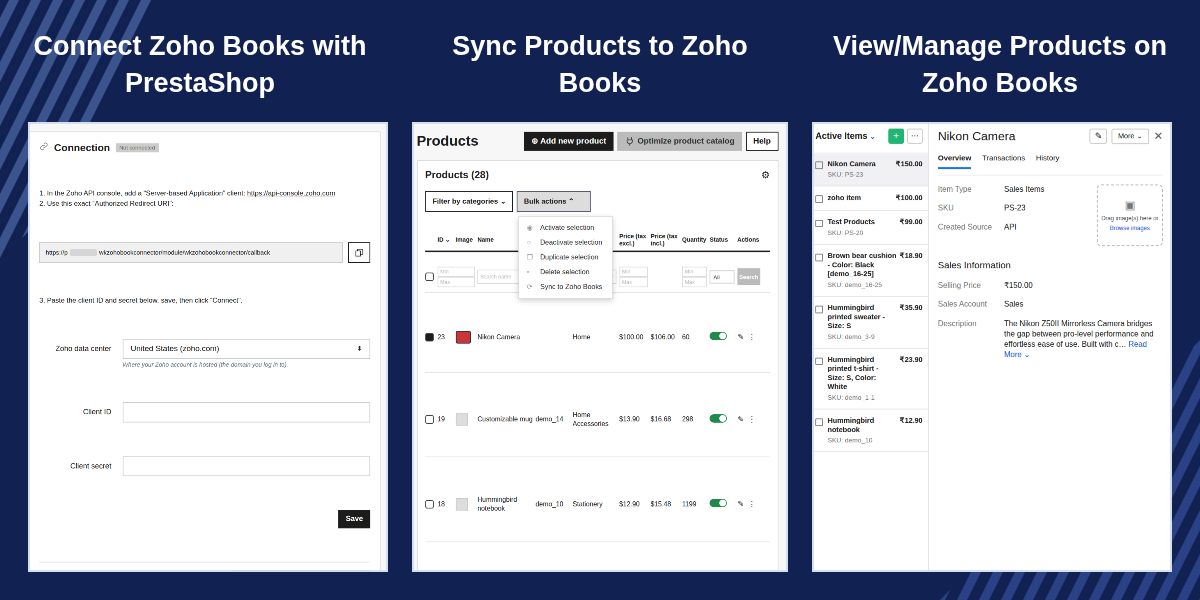
    Prestashop Zoho Books Connector

    Highlighted Features

     Two-Way Synchronization

    Synchronize customers, products, invoice statuses, payments, and stock between PrestaShop and Zoho Books.

     Automated Order & Invoice Management

    Create sales orders and invoices in Zoho Books from PrestaShop orders, including taxes, shipping charges, and discounts.

     Customer & Product Synchronization

    Sync PrestaShop customers as Zoho contacts and products or combinations as Zoho items, matched by email or SKU where applicable.

     Flexible Tax & Payment Mapping

    Map PrestaShop tax rules and payment methods to their corresponding Zoho Books settings for accurate record synchronization.

     Automated Sync Queue

    Queue data changes for processing through cron, retry failed jobs, and monitor pending, processing, synced, and failed records.

     Conflict Resolution

    Define how conflicting changes are handled when both platforms update the same field, or manually choose which platform's value to retain.

    Connect PrestaShop with Zoho Books

    Connect your PrestaShop store to a Zoho Books organization using OAuth 2.0 authentication. Configure the Zoho data center, enter your API client credentials, authorize access, and select the organization to connect.
    The connection settings also display details such as the connected organization, data center, connection date, and API usage.
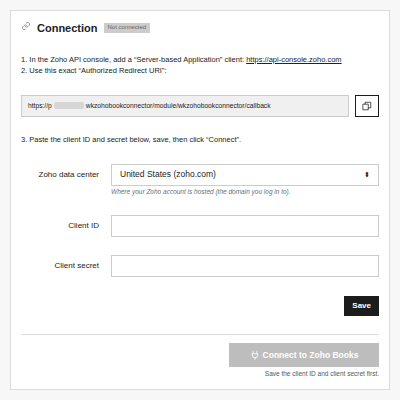
    Connect PrestaShop with Zoho Books

    Synchronize Customers and Products

    Transfer customer and product information between PrestaShop and Zoho Books.
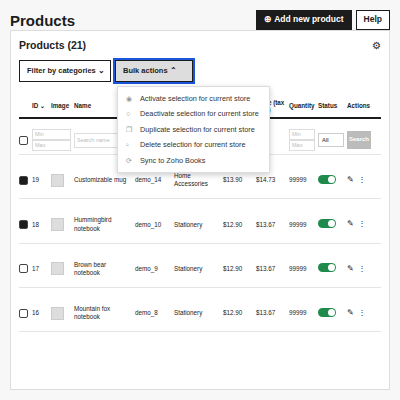
    • Customer synchronization: Create Zoho contacts from PrestaShop customers, including billing and shipping addresses. Contacts are maintained separately for different currencies.
    • Product synchronization: Transfer PrestaShop products and combinations to Zoho Books as items, using SKUs to match existing records where applicable.
    • Existing record matching: Match records using identifiers such as customer email, product SKU, or order reference, depending on the record type and operation.
    Synchronize Customers and Products

    Synchronize Orders, Invoices, and Payments

    Automate the transfer of order-related information from PrestaShop to Zoho Books.

    • Create sales orders and invoices from PrestaShop orders.
    • Include applicable taxes, shipping charges, and discounts.
    • Configure the order statuses that trigger invoice creation or document cancellation.
    • Record customer payments against invoices.
    • Convert PrestaShop credit slips into Zoho Books credit notes.
    • Configure whether invoices are marked as sent or retained as drafts.

    These settings help align document creation and payment records with your store's order workflow.
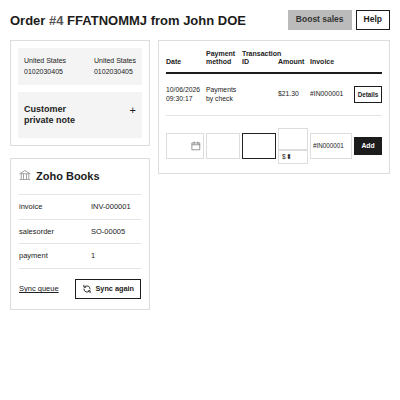
    Synchronize Orders, Invoices, and Payments

    Configure Tax and Payment Mappings

    Map PrestaShop tax rules to the corresponding Zoho Books taxes and configure payment methods.
    For each payment method, select the appropriate Zoho Books payment mode and deposit account. You can refresh the available tax and account lists from Zoho Books when required.
    Tax mapping is important for accurate document synchronization. Orders using an unmapped tax rule are not sent, preventing invoices from being created with an incorrect tax mapping.
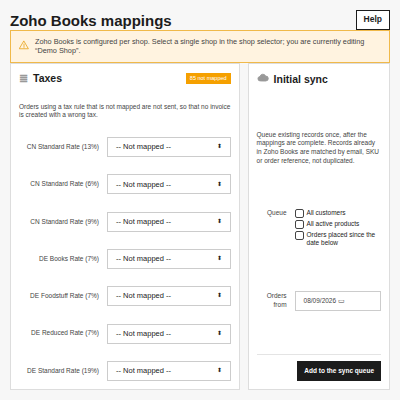
    Configure Tax and Payment Mappings

    Automate Synchronization with a Queue

    The module uses a synchronization queue to process changes and send data to Zoho Books through a scheduled cron task.
    Administrators can:

    • View pending, processing, synced, and failed jobs.
    • Run the queue manually when needed.
    • Retry failed synchronization jobs.
    • Remove completed jobs from the queue.
    • Configure job processing limits and retry attempts.
    • Monitor API usage against the configured daily budget.
    • Review synchronization logs and related record details.

    A cron task configured to run every five minutes helps process queued changes automatically.
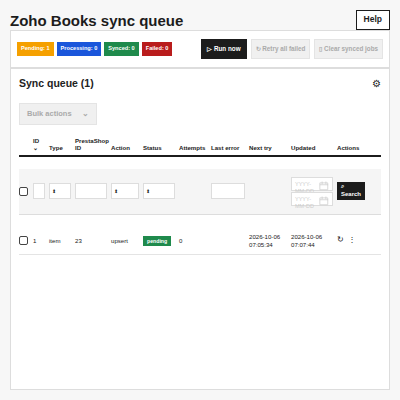
    Automate Synchronization with a Queue

    Monitor Synchronization Activity

    The module provides dedicated pages to help administrators track and manage synchronization.

    • Sync Queue: View and manage queued synchronization jobs.
    • Synced Records: Review the links between PrestaShop records and their corresponding Zoho Books records.
    • Logs: Inspect synchronization events, record identifiers, and messages.
    • Conflicts: Review and resolve conflicting data changes when manual resolution is enabled.
    • These tools help administrators identify synchronization issues and manage data exchange more effectively.
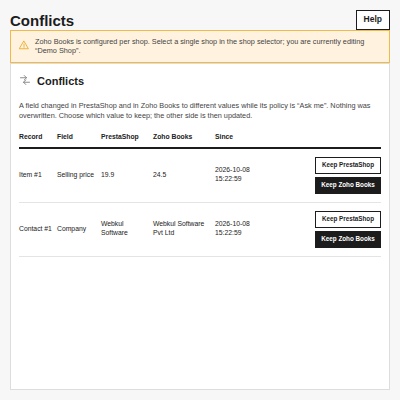
    Monitor Synchronization Activity

    Features of PrestaShop Zoho Books Connector

    • Connect PrestaShop with a Zoho Books organization using OAuth 2.0.
    • Support Zoho Books data centers through configurable connection settings.
    • Synchronize customers as Zoho Books contacts.
    • Synchronize products and combinations as Zoho Books items.
    • Match existing customers, products, and orders using supported identifiers.
    • Create sales orders and invoices in Zoho Books.
    • Synchronize order taxes, shipping charges, and discounts.
    • Record customer payments against invoices.
    • Convert credit slips into credit notes.
    • Configure synchronization separately for supported data types.
    • Map PrestaShop tax rules to Zoho Books taxes.
    • Map payment methods to Zoho Books payment modes and deposit accounts.
    • Configure invoice creation and document cancellation based on order status.
    • Configure invoice status and draft handling.
    • Process changes through a scheduled synchronization queue.
    • Configure cron-based synchronization and queue processing settings.
    • Retry failed synchronization jobs.
    • Run synchronization manually when required.
    • Monitor pending, processing, synced, and failed jobs.
    • Review synced record references and synchronization logs.
    • Perform initial synchronization of existing customers, active products, and orders.
    • Enable two-way synchronization for supported record types.
    • Synchronize supported invoice statuses, payments, and stock changes.
    • Detect Zoho Books changes through webhooks, polling, or both.
    • Configure conflict-resolution policies.
    • Resolve selected conflicts manually.
    • Monitor API usage and configure the daily API call budget.
    • Support PrestaShop multistore environments with a connection configured per shop.

    Prestashop Zoho Connector Module Support -

    For any query or issue please create a support ticket here http://webkul.uvdesk.com

    You may also check our other top-quality PrestaShop Modules.

    Specifications

    Product Version1.0.0
    Released11 days ago
    CategoryPrestaShop, Connector, 
    Last UpdatedOctober 21, 2026 (11 days ago)
    Supported VersionsPrestaShop  1.7.x.x​  8.x.x  9.x.x  

    Ratings

    We'd love to hear your thoughts! Share your feedback and help us craft an even better experience tailored just for you.

    Write a review

    Specification

    Detailed technical features and requirements to help you understand the module’s capabilities and ensure smooth integration with your system.

    Cloud Hosting

    Detailed technical features and requirements to help you understand the module’s capabilities and ensure smooth integration with your system.

    Default Configuration Details of Server

    1 GB
    RAM
    1 Core
    Processor
    30 GB
    Hard Disk
    1 GB RAM & 1 Core Processor
    Database

    Want to know more how exactly we are going to power up your eCommerce Website with Cloud to fasten up your store

    * Server Configuration may vary as per application requirements.

    Change Logs

    Not Available