Send Again
Close
Qlo Odoo Connector connects QloApps and Odoo so that hotel bookings, customers, rooms, payments, and taxes sync between both systems.
When hotel data is managed separately in QloApps and Odoo, customer, booking, and payment records can easily become inconsistent. This connector solves that problem.
Customer details, customer addresses, room categories, and room types move from QloApps into Odoo on their own. Taxes, payment methods, and currencies sync too. This keeps all hotel booking data correct and up to date inside Odoo.
Bookings and orders can be synced manually or automatically in real time. Customer details, payment info, tax data, and room details all come along with every sync.
Booking status changes like cancellations and payment confirmations also sync between both systems. Manual mapping support is available for cases where records require manual mapping.
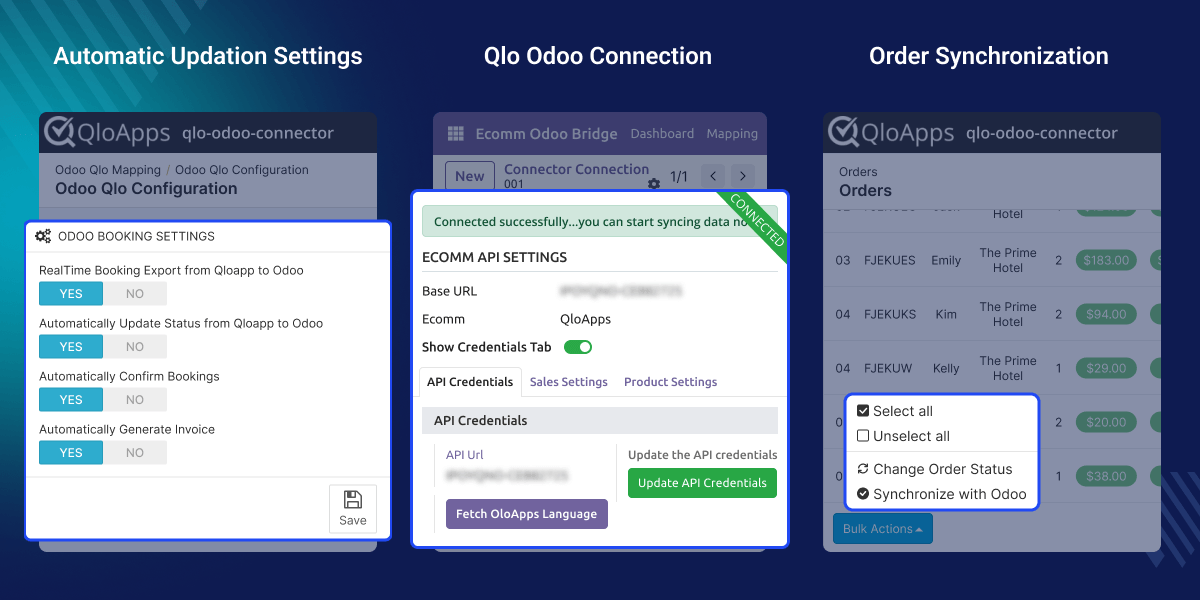
Move hotel bookings and orders from QloApps to Odoo whenever you need, manually or in real time.
When a booking is cancelled, or a payment is confirmed in QloApps, Odoo updates instantly. No delays, no manual changes needed.
Qlo Odoo Connector keeps customer details and addresses in sync between both systems.
Bring room categories and room types from QloApps into Odoo quickly. Everything stays organized and updated.
Sync taxes, currencies, and payment methods so every booking in Odoo has the right financial details attached to it.
Map bookings, customers, rooms, and other records between QloApps and Odoo manually whenever automatic mapping is not enough.
Hotels using QloApps and Odoo often struggle to keep bookings, payments, rooms, and customer data synchronized properly between both platforms.
Qlo Odoo Connector links QloApps and Odoo together. Bookings, rooms, payments, taxes, and customer details all sync so both systems always show the same accurate data.
This keeps hotel booking operations clean, up to date, and easy to manage without doing the same work twice.
One connection. Everything in sync. No extra effort.
Hotels using QloApps for bookings and Odoo for operations can keep booking and customer data synchronized automatically without updating both platforms manually.
When a booking is cancelled or a payment is confirmed in QloApps, Odoo updates right away. Hotel staff can always see the latest booking status without updating the data manually.
Hotels with different room types and categories can sync all room information from QloApps into Odoo. Everything stays organized and easy to manage in one place with the help of Qlo Odoo Connector.
Payment methods, taxes, and booking details sync directly into Odoo. This keeps hotel booking records and accounting data accurate at all times.
Qlo Odoo Connector syncs hotel bookings and orders from QloApps to Odoo. Booking records stay accurate and up to date in Odoo at all times.

Customer details from QloApps sync directly into Odoo. It keeps the customer’s data updated at both platforms, improving accuracy.

Payment methods from QloApps sync into Odoo so bookings and payments are processed without any issues.

Booking status changes in QloApps sync to Odoo automatically, so hotel operations always reflect the latest updates.

When automatic sync is not enough, records can be mapped manually to keep everything accurate and in order.

For any query or issue, please create a support ticket here CREATE A TICKET HERE
You may also check our other top-quality Odoo Modules.
Detailed technical features and requirements to help you understand the module’s capabilities and ensure smooth integration with your system.
Detailed technical features and requirements to help you understand the module’s capabilities and ensure smooth integration with your system.
We’re partnered with top-tier, trusted providers!
Want to know more how exactly we are going to power up your eCommerce Website with Cloud to fasten up your store
* Server Configuration may vary as per application requirements.



