Send Again
Close
QloApps AI Content Generator | ChatGPT is a powerful module that enables hoteliers to generate high-quality, SEO-friendly content instantly using AI. Whether it’s descriptions, room details, service content, or metadata, this tool automates text creation and saves hours of manual effort.
With customizable AI prompts, admins can automatically generate content or create custom instructions to personalize the output. This ensures accurate, well-structured, and engaging content across your QloApps website.
Generate instant AI-powered content for hotel pages, room types, services, CMS pages, and meta fields by clicking the Auto Fill Content button.
Admins can write and save their own prompt templates to generate personalized content that matches their brand voice and business needs.
A predefined set of templates is provided for page type in QloApps, helping you generate accurate content quickly.
Admin can monitor AI usage, token consumption, and approximate costs with clear numerical and graphical statistics.
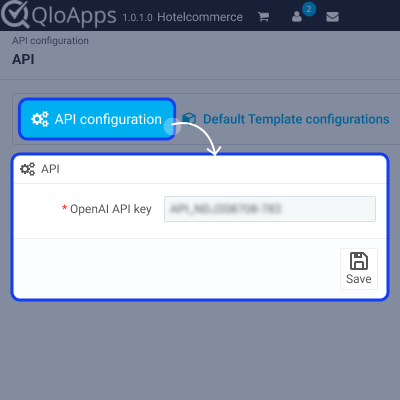
To begin generating AI content, configure your OpenAI API key in the module settings. Once entered, the AI features across QloApps will be activated.
You can get your OpenAI API key from: OpenAI API Keys Page
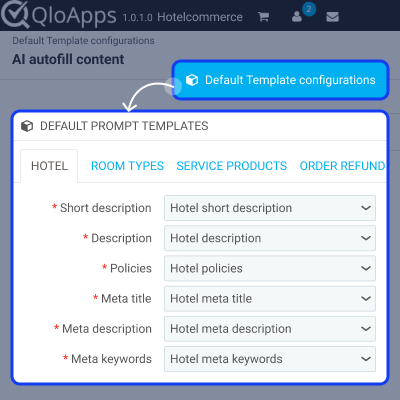
The Default Template section allows the admin to define preset AI prompt templates for different content fields across various QloApps pages.
Each template guides the AI on what type of content to generate. This helps maintain consistency and speed up content creation:
Note: Each page type has its own dedicated content fields and prompt options.
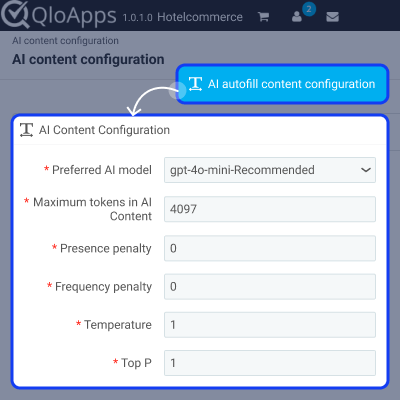
You can create multiple prompt templates using the Prompt Template menu. Each template can be associated with different pages for dynamic content generation.
If you want to delete a custom prompt, open the Prompt Template menu and use the dropdown option to remove it.
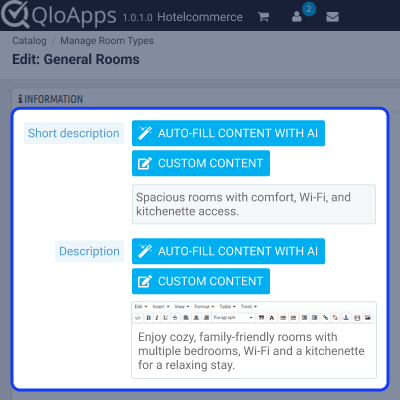
Once templates and the API key are configured, go to any supported page — for example Hotel, Room Type, Service Product, or SEO fields.
You will find two options next to the content field:
After clicking Generate, the AI will create the content. Once you click Submit, the generated text will instantly appear in your selected field.
For any query or issue regarding this module, please raise a support ticket here.
You can also explore our wide range of QloApps Add-ons to enhance your hotel website.
Detailed technical features and requirements to help you understand the module’s capabilities and ensure smooth integration with your system.
Detailed technical features and requirements to help you understand the module’s capabilities and ensure smooth integration with your system.
We’re partnered with top-tier, trusted providers!
Want to know more how exactly we are going to power up your eCommerce Website with Cloud to fasten up your store
* Server Configuration may vary as per application requirements.



