USD
  • EUR
  • INR
  • USD
Cart
Cart 0
  • You have no items in your shopping cart.
    QloApps Extensions
    Cart
    Cart 0
    • You have no items in your shopping cart.
    Hire a Developer
    ×
    Contact Us!
    Send Again
    Close
    Please Login to Write Your Review
    QloApps AI Locale Translator

    QloApps AI Locale Translator

    x
    Free
    $49.00
    Add To Cart

    QloApps AI Locale Translator uses AI to translate hotel content, QloApps interface, modules, themes and email templates into multiple installed languages, helping hotels manage multilingual websites from one place.


    • Translate hotel details, room types, amenities, CMS pages, features and refund rules.

    • Translate QloApps core, Back Office, Front Office, modules, themes and email templates.

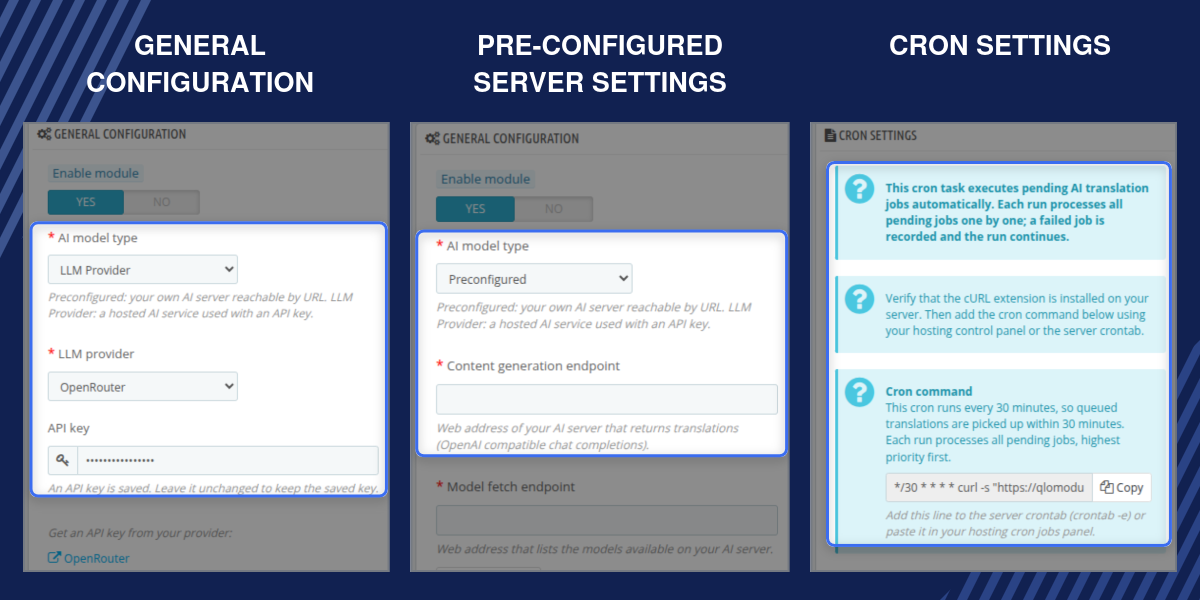
    • Connect OpenAI, Gemini, Anthropic, OpenRouter, Cerebras, DeepSeek or your own AI server.

    • Queue translation jobs with High, Medium or Low priority.

    • Track job statuses and hold, resume, retry or cancel translations.

    • Start translations directly from existing pages or bulk actions.

    • Process translation jobs in the background using a secure cron URL.

    • Protect API credentials with encrypted storage.

    QloApps AI Locale Translator
    QloApps AI Locale Translator
    $49.00
    Check How It Works

    Need Help Deciding?

    Support answers within one business day.

    Open a ticket
    $49.00
    Configure and Buy
    X
    • Description
    • Reviews
    • FAQ
    • Specifications
    • Cloud Hosting
    • Changelog

    QloApps AI Locale Translator brings AI-powered translation capabilities directly into the QloApps Back Office. It allows administrators to translate hotel content, interface text, modules, themes and email templates into multiple languages using AI providers such as OpenAI, Gemini, Anthropic, OpenRouter, Cerebras and DeepSeek.

    Instead of translating each field manually, administrators can create translation jobs, select source and target languages, assign priorities and process them automatically in the background. This helps hotels, resorts, serviced apartments and multi-property groups maintain multilingual booking websites with less manual effort.
    QloApps AI Locale Translator

    Highlighted Features

    Multiple AI Provider Support

    Connect OpenAI, Gemini, Anthropic, OpenRouter, Cerebras or DeepSeek using an API key. You can also configure your own AI server for translation requests.

    Comprehensive Hotel Content Translation

    Translate hotel descriptions, room types, amenities, CMS pages and refund rules into multiple languages by selecting the required content fields.

    Back Office, Front Office and Email Translation

    Translate interface labels, PDFs, error messages, modules, themes and email templates to provide a consistent multilingual experience for staff and guests.

    Translation Job Priority Management

    Assign High, Medium or Low priority to translation jobs so important content gets processed first when the cron executes the job queue.

    Translation Job Status Tracking

    Monitor jobs through Pending, In Progress, Completed, Failed and On Hold statuses. Review error details and retry failed jobs when required.

    Translate Directly From Existing Pages

    Start translation jobs from supported content editing pages or bulk actions, including room types, hotels, CMS pages, features and refund rules.

    Secure Background Processing

    Process translation jobs through a cron URL protected by a secure key. API keys are encrypted in the database to protect provider credentials.

    AI Model Fetch and Validation

    Fetch available AI models from your selected provider and validate the provider, API key and model before saving the configuration.

    Why Use QloApps AI Locale Translator

    Managing a multilingual hotel website requires continuous translation of room descriptions, hotel information, policies, interface labels and email templates. Updating these elements manually across multiple languages can be repetitive and time-consuming.

    QloApps AI Locale Translator simplifies this process by bringing AI-powered translations into one centralized workspace. Administrators can manage translation jobs, prioritize important content and monitor progress without interrupting their regular work. It helps hotels maintain consistent multilingual content and offer international guests a more accessible booking experience.

    QloApps AI Locale Translator Configuration

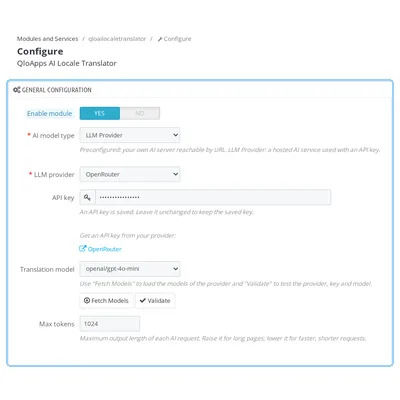
    The configuration page allows administrators to connect an AI provider and manage translation settings directly from the Back Office under Modules and Services.

    • AI Model Type: Choose LLM Provider for a hosted AI service or Preconfigured to connect your own AI server.
    • Provider and Model: Select an AI provider, enter the API key, fetch the available models and validate the configuration.
    • Max Tokens: Define the maximum token limit for each AI request. The default value is 1024.
    • Cron Settings: Access the ready-made cron command to process queued translation jobs automatically every 30 minutes.

    Once configured, the module can send translation requests to the selected AI service and process them through the background job queue.
    QloApps AI Locale Translator Configuration

    QloApps AI Locale Translator Translation Jobs

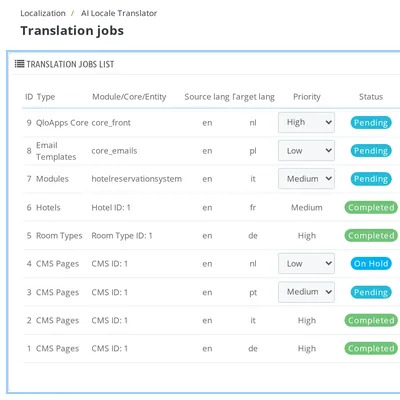
    The Translation Jobs page provides a centralized view of all translation activities. Administrators can create jobs by selecting the source language, one or more target languages, content types and priority.

    • Job Information: View the job type, selected item, source language, target languages, priority and creation date.
    • Status Counters: Get an overview of Pending, In Progress, Completed, Failed and On Hold jobs.
    • Job Actions: Run, hold, resume, retry or cancel individual translation jobs.
    • Bulk Actions: Apply available actions to multiple jobs simultaneously.

    These options help administrators organize translation activities and monitor the progress of multiple jobs from one place.
    QloApps AI Locale Translator Translation Jobs

    QloApps AI Locale Translator Job Details

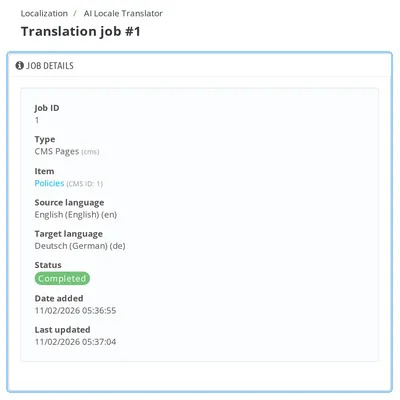
    The job details page provides a complete overview of an individual translation task, helping administrators understand its progress and results.

    • Job Information: Review the job type, selected item, source language, target language and current status.
    • Job Timeline: Check the relevant job dates and processing information.
    • Translation Results: View the translated fields and the location where the translated content was saved.
    • Error Details: Identify the reason for a failed job through the displayed error message.
    • Retry Action: Retry failed translation jobs when required.

    This makes it easier to monitor individual translations and troubleshoot unsuccessful jobs.
    QloApps AI Locale Translator Job Details

    QloApps AI Locale Translator Translate Action

    The module integrates translation actions into supported content management pages, allowing administrators to initiate translations without navigating to the Translation Jobs section.

    • Direct Translation: Start translation from supported content editing pages.
    • Bulk Translation: Select multiple items from a listing and choose Translate from the Bulk Actions menu.
    • Language Selection: Choose the source language and one or more target languages.
    • Field Selection: Specify which content fields should be included in the translation.
    • Automatic Job Creation: Confirm the selection to queue a separate translation job for each selected item and target language.

    This simplifies multilingual content management and reduces the need to open and update individual language fields manually.
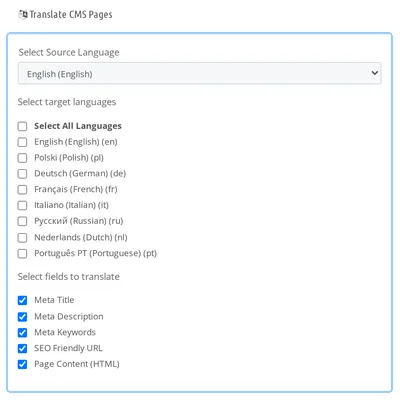
    QloApps AI Locale Translator Translate Action

    QloApps AI Locale Translator Support

    For any query or issue, please create a support ticket here.

    You may also explore our other QloApps modules.

    Specifications

    Product Version1..0.0
    Released17 days ago
    Last UpdatedNovember 13, 2026 (10 days ago)
    Supported VersionsQloApps  1.6.1  1.7.x  

    Ratings

    We'd love to hear your thoughts! Share your feedback and help us craft an even better experience tailored just for you.

    Write a review

    Frequently Asked Questions

     Which AI providers can I use with QloApps AI Locale Translator?
    You can connect OpenAI, Gemini, Anthropic, OpenRouter, Cerebras or DeepSeek using an API key. You can also connect your own AI server. For hosted providers, enter the API key, fetch the available models and validate the configuration before saving.
     Can I translate multiple languages at the same time?
    Yes. You can select one or more target languages while creating a translation job. The module queues a separate job for each selected item and target language, allowing you to manage multiple translations together.
     Which QloApps content can I translate?
    You can translate room types, service products, hotels, locations, amenities, features, CMS pages and refund rules. The module also supports translations for QloApps core, installed modules, themes and email templates.
     Can I choose which fields should be translated?
    Yes. While creating a translation job or using the Translate action, you can select the available fields for the chosen content type. This allows you to translate only the required information instead of processing every field.
     Do translation jobs run automatically?
    Yes. The module provides a cron URL with a secure key to process queued translation jobs in the background. The configuration page also provides a ready-made cron command for scheduling automatic processing every 30 minutes. You can also run pending jobs manually from the Translation Jobs page.
     What happens when a translation job fails?
    The job status changes to Failed, and the error details are displayed on the job details page. You can review the error and use the Retry action to process the job again. The failed job can also be managed from the Translation Jobs list.
     Can I pause or resume translation jobs?
    Yes. You can hold pending translation jobs and resume them whenever required. The jobs list also provides options to run, retry or cancel individual jobs, along with bulk actions for managing multiple jobs.
     Can I prioritize important translation jobs?
    Yes. Each translation job supports High, Medium or Low priority. You can assign priority while creating a job or update it from the jobs list. The cron processes higher-priority jobs first.
     How is my AI provider API key stored?
    The module stores the API key in encrypted form in the database to protect your provider credentials. The saved key remains masked in the configuration field.
     Can I start translations directly from existing QloApps pages?
    Yes. The module adds Translate actions to supported content management pages. You can also select multiple items from a listing and use the Bulk Actions menu to open the translation window, choose languages and fields, and create translation jobs.
     Can I use my own AI server?
    Yes. Select the Preconfigured AI Model Type to connect your own AI server. The server should support OpenAI-compatible chat completion requests for the module to process translation requests.
     

    Specification

    Detailed technical features and requirements to help you understand the module’s capabilities and ensure smooth integration with your system.

    Cloud Hosting for Websites & Applications

    Power your website or application with flexible, scalable cloud infrastructure designed for performance and growth.

    Move Your Website or Application to the Cloud

    Get started with Cloudkul hosting tailored to your needs.

    Flexible Cloud Plans Start small. Scale as you grow.
    Starting at US$25*
    ✓ Hosting for websites and applications
    ✓ Resources matched to your needs
    ✓ Scalable infrastructure for growth

    Configure Your Cloud Server

    RAM Flexible
    CPU Scalable
    Storage Flexible
    Built Around Your Project's Needs

    Choose server resources based on your workload, expected traffic, and performance requirements.

    Grow at Your Own Pace

    Start with the cloud resources your project needs today and adjust your server configuration as your business grows.

    Ready to Move to the Cloud?

    Explore flexible cloud hosting plans and choose your ideal configuration.

    Explore Cloud Hosting Plans

    * Starting price is indicative. Final pricing and available server resources depend on the selected hosting configuration and requirements.

    Change Logs

    Changelog

    V1.0.0

    • [CO] : Compatible with QloApps 1.7.x.
    • [NF] : Introduced AI-powered translation for hotel content, QloApps core, installed modules, themes and email templates.
    • [NF] : Added support for OpenAI, Gemini, Anthropic, OpenRouter, Cerebras, DeepSeek and preconfigured AI servers.
    • [NF] : Added a translation job queue with priority management, status tracking and job actions.
    • [NF] : Added a secure cron URL for automated background translation processing.