USD
  • EUR
  • INR
  • USD
Cart
Cart 0
  • You have no items in your shopping cart.
    Cart
    Cart 0
    • You have no items in your shopping cart.
    Hire a Developer
    ×
    Contact Us!
    Send Again
    Close
    Please Login to Write Your Review

    QloApps BlueSnap Payment Gateway

    QloApps BlueSnap Payment Gateway allows hotels to accept secure online payments directly through their booking system. By integrating BlueSnap with QloApps, guests can complete reservations using a smooth and reliable payment process while hotels manage transactions securely.


    • Allows customers to make secure online payments through the BlueSnap payment gateway during the booking process.

    • Provides smooth integration between QloApps and BlueSnap for efficient payment transaction management.

    • Enables guests to complete bookings using supported credit and debit card payment options.

    • Updates booking status automatically based on successful or failed payment responses.

    • Helps hotels accept payments using BlueSnap-supported payment options and currencies.

    Screenshots
    QloApps BlueSnap Payment Gateway QloApps BlueSnap Payment Gateway QloApps BlueSnap Payment Gateway QloApps BlueSnap Payment Gateway QloApps BlueSnap Payment Gateway QloApps BlueSnap Payment Gateway QloApps BlueSnap Payment Gateway QloApps BlueSnap Payment Gateway
    Show More Hide All
    $65.00

    * Required Fields

    Add To Cart
    $65.00
    Configure and Buy
    • Description
    • Reviews
    • FAQ
    • Customers ()
    • Specifications
    • Cloud Hosting
    • Changelog

    The QloApps BlueSnap Payment Gateway allows hotels to accept secure online payments directly through their booking system. This integration connects QloApps with BlueSnap to process customer transactions securely and helps guests complete reservations using a smooth and reliable payment process.

    The BlueSnap Payment Gateway enables guests to make payments using supported payment methods during the booking process. It also helps hotels provide a convenient and user-friendly checkout experience while automatically managing payment responses after transaction completion.
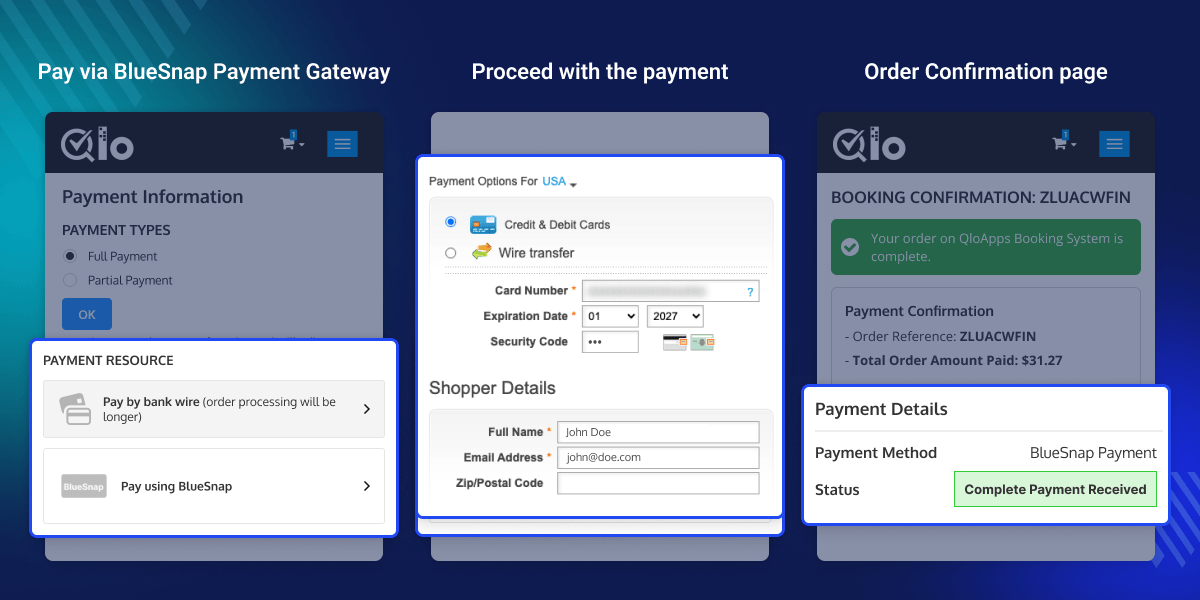
    QloApps BlueSnap Payment Gateway

    Highlighted Features

    Secure Online Payments

    Allows customers to make secure online payments through the BlueSnap payment gateway during the booking process.

    QloApps and BlueSnap Integration

    Provides smooth integration between QloApps and BlueSnap for efficient payment transaction management.

    Automatic Booking Status Updates

    Updates booking status automatically based on successful or failed payment responses and helps hotels manage transactions efficiently.

    Supported Payment Options

    Enables guests to complete bookings using supported credit and debit card payment options and BlueSnap-supported currencies.

    Why Use QloApps BlueSnap Payment Gateway

    The QloApps BlueSnap Payment Gateway helps streamline online payment collection for hotels. It improves booking management by providing a secure and efficient payment solution while creating a convenient checkout experience for guests.

    BlueSnap Configuration

    The QloApps BlueSnap Payment Gateway requires configuration of the following details:

    • Environment Mode: Select Sandbox or Production environment.
    • API User Key: Enter the API User Key provided in your BlueSnap account.
    • Password: Enter the password created while generating API credentials.
    • Store ID: Enter the Default Store ID generated during API credential creation.
    • Merchant ID: Enter the Merchant ID generated during BlueSnap account creation.
    • Webhook Secret Key: Enter the Webhook Secret Key provided under BlueSnap Webhook settings.
    • Webhook URL: Copy the Webhook URL from QloApps and configure it in BlueSnap Webhook settings.

    These settings help establish secure communication between QloApps and BlueSnap.
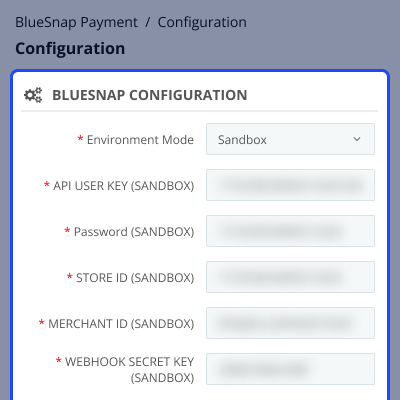
    BlueSnap Configuration Screenshot

    BlueSnap Transaction Details

    The QloApps BlueSnap Payment Gateway allows users to view complete transaction details. The transaction detail page includes BlueSnap Transaction Details, Refund Transaction, and Refund History sections.

    Admins can also initiate Full Refund or Partial Refund transactions directly from the transaction details page.
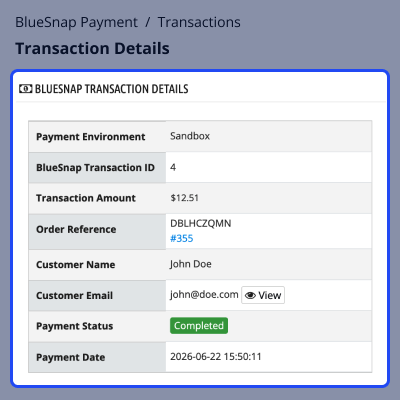
    BlueSnap Transaction Details

    BlueSnap Transaction List

    All transactions processed through BlueSnap are available in the Transactions section. This section displays Order Reference, BlueSnap ID, Customer information, Total Amount, Payment Status, and Order Date.

    Users can click on a transaction to view complete transaction information and refund history.
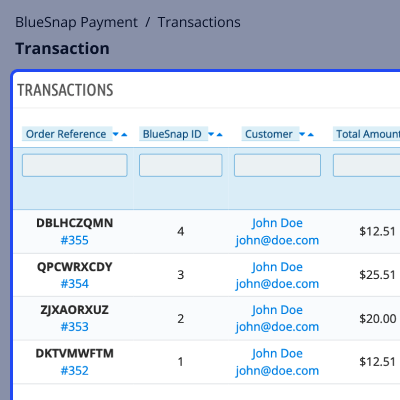
    BlueSnap Transaction List

    Refund Management

    If a payment is completed through BlueSnap, the admin user can initiate refunds from the Refund Transaction section.
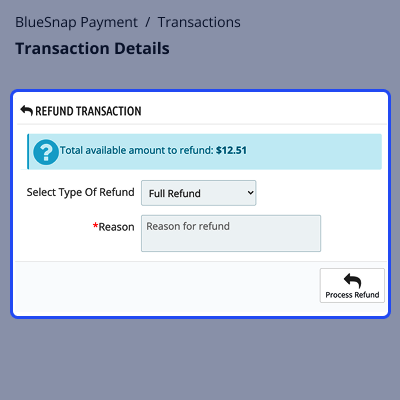
    • Full Refund: Refund the complete amount to the customer account via BlueSnap Payment.
    • Partial Refund: Refund a partial amount to the customer account via BlueSnap Payment.
    • Refund History: View Refund ID, Type, Amount, Status, Reason, and Date of refund transactions.
    BlueSnap Refund

    QloApps BlueSnap Payment Gateway Support

    In case of any query, issue, or requirement, please feel free to raise support ticket here.

    You may also explore our other top-quality QloApps Add-ons.

    Specifications

    Product Version1.0.0
    Released8 days ago
    CategoryQloAppsPayment
    Last UpdatedJune 24, 2026 (8 days ago)
    Supported VersionsQloApps  1.6.x  1.7.x  
    Write a review

    Move to Cloud Today

    AWS Free tier hosting for one year by amazon web services, for more details please visit AWS Free Tier.

    GCP Free tier hosting for one year with 300 credit points by google cloud platform, for more details please visit GCP Free Tier.

    Azure free tier hosting for one year with 25+ always free services, for more details please visit Azure Free Tier.

    In our default configuration we will provide tremendous configuration for your eCommerce Website which is fast to load and response.

    Default Configuration Details of Server

    • 1 GB RAM
    • 1 Core Processor
    • 30 GB Hard Disk
    • DB with 1 GB RAM and 1 Core Processor

    * Server Configuration may vary as per application requirements.

    Want to know more how exactly we are going to power up your eCommerce Website with Cloud to fasten up your store. Please visit the Cloudkul Services.

    Get Started with Cloud
    Not Available


