USD
  • EUR
  • INR
  • USD
Cart
Cart 0
  • You have no items in your shopping cart.
    Cart
    Cart 0
    • You have no items in your shopping cart.
    Hire a Developer
    ×
    Contact Us!
    Send Again
    Close
    Please Login to Write Your Review

    QloApps Booking Custom Emails

    QloApps Booking Custom Emails an advanced automation module that sends customizable emails based on booking events, helping hotels deliver timely, personalized guest communication before or after key milestones like booking, check-in, and check-out.


    • Automatically trigger emails based on booking events like Booking Creation, Check-in, and Check-out.

    • Schedule emails to be sent minutes, hours, or days before or after an event.

    • Create reusable Global Email Templates for quick deployment across multiple hotels.

    • Configure hotel-wise email templates for property-level communication.

    • Multilingual email subjects and HTML content support for international guests.

    • Attach files such as PDFs, guides, or images to automated emails.

    • Trigger emails only for specific room types or extra services purchased in a booking.

    • Preview email templates and send test emails before activation.

    • Track email delivery status and resend emails through the History section.

    • Cron-based automation ensures emails are sent automatically at scheduled times.

    Screenshots
    QloApps Booking Custom Emails QloApps Booking Custom Emails QloApps Booking Custom Emails QloApps Booking Custom Emails QloApps Booking Custom Emails
    Show More Hide All
    $75.00

    * Required Fields

    Add To Cart
    $75.00
    Configure and Buy
    • Description
    • Reviews
    • FAQ
    • Customers ()
    • Specifications
    • Cloud Hosting
    • Changelog

    QloApps Booking Custom Emails is an advanced guest communication automation module that allows hoteliers to send personalized emails triggered by specific booking events. Built directly for the QloApps ecosystem, the module helps automate guest engagement by sending timely emails before or after booking milestones such as booking creation, check-in, and check-out.

    With flexible scheduling options, multilingual templates, attachments, and targeted email rules based on rooms or services, hotels can ensure every guest receives relevant communication automatically. From welcome messages to check-in reminders and post-stay review requests, this module enhances the guest experience while reducing manual communication work.
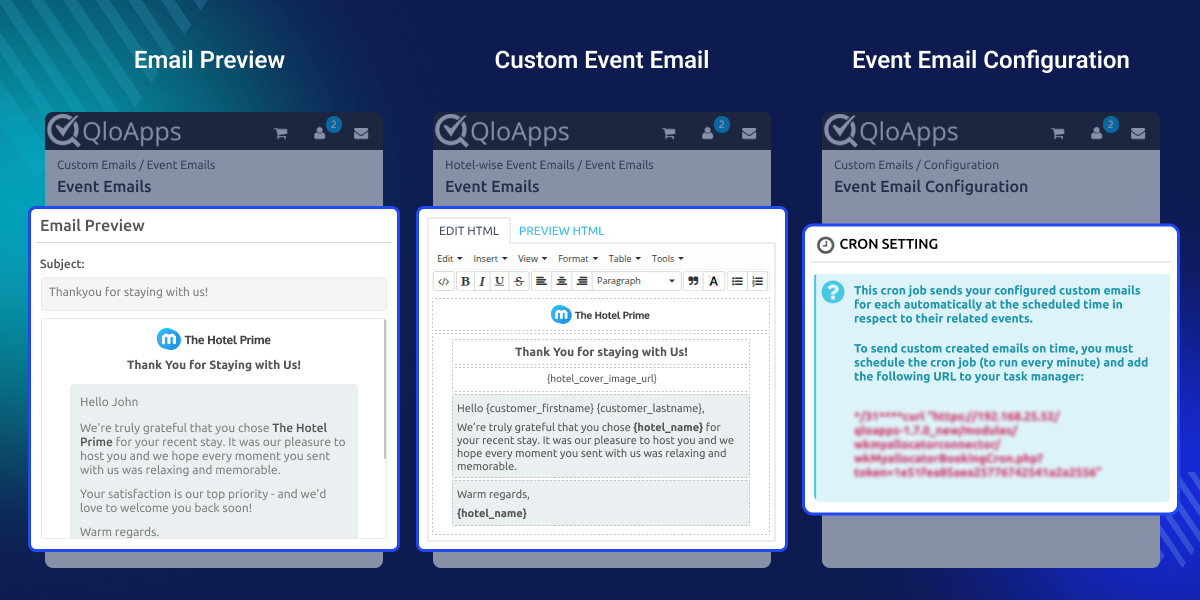
    QloApps Booking Custom Emails

    Highlighted Features

    Event-Based Email Automation

    Automatically send emails to guests when key booking events occur such as booking creation, check-in, or check-out.

    Flexible Email Scheduling

    Schedule emails to be sent minutes, hours, or days before or after the event to deliver perfectly timed guest communication.

    Global and Hotel-Wise Email Templates

    Create reusable global email templates or configure hotel-specific templates for personalized property-level communication.

    Why Use QloApps Booking Custom Emails

    Hotels often rely on manual communication for sending booking confirmations, reminders, and follow-up messages. This process is time-consuming and can easily lead to missed communication opportunities.

    QloApps Booking Custom Emails automates guest messaging with rule-based triggers and scheduling, ensuring guests receive the right message at the right time. This improves guest experience, builds stronger engagement, and saves valuable staff time.

    Hotel-Wise Event Emails

    The Hotel-wise Event Emails section is the main area where administrators create and manage automated booking emails for each hotel directly from the QloApps back office.
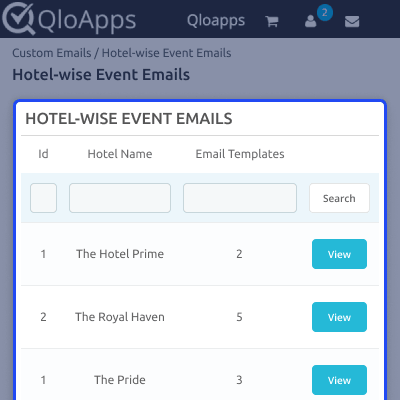
    • Create automated emails triggered by booking events such as Booking Creation, Check-in, and Check-out
    • Configure multiple schedules to send emails minutes, hours, or days before or after the event
    • Preview, edit, duplicate, or manage email templates configured for each hotel
    • Apply conditions to send emails only when specific room types or extra services are included in the booking
    QloApps Hotel Wise Event Emails

    Global Email Templates

    Global Email Templates allow administrators to create reusable email templates that can be applied across multiple hotels for faster configuration.
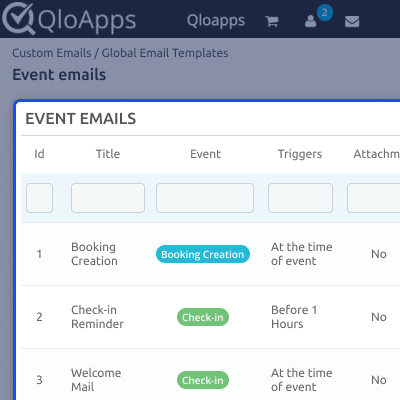
    • Create centralized email templates that can be imported into any hotel when configuring event emails
    • Automatically import template title, event, email subject, content, triggers, and attachments
    • Edit, preview, or delete global templates for easy management
    • Combine these templates with room or service-based targeting rules when applying them in hotel-wise event emails
    QloApps Global Email Templates

    Email History & Tracking

    The module maintains a complete log of all automated emails sent to guests, allowing admins to monitor communication activity.
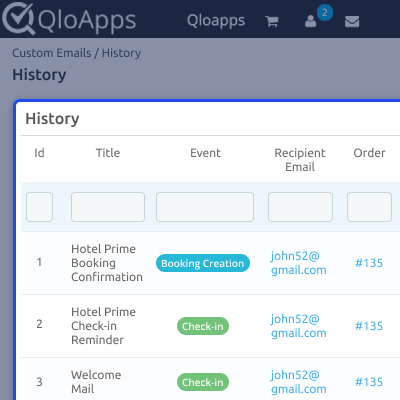
    • View email status including Processing, Sent, or Failed
    • Track the recipient email address and associated booking ID
    • Manually resend emails when required
    QloApps Email History Tracking

    Automated Email Delivery via Cron Job

    The module uses a cron job to automatically process and send scheduled emails based on configured booking events.
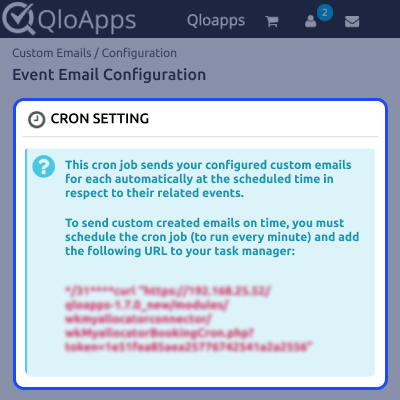
    • Schedule the cron job to run every minute
    • Automatically detect upcoming booking events
    • Send emails according to configured triggers without manual intervention
    QloApps Booking Email Cron Configuration

    QloApps Booking Custom Emails Support

    For any query or issue, please create a support ticket here.

    You may also explore our other top-quality QloApps Add-ons.

    Specifications

    Product Version4.0.0
    ReleasedToday
    Last UpdatedMarch 16, 2026 (Today)
    Supported VersionsQloApps  1.6.x  1.7.x  
    Write a review

    Move to Cloud Today

    AWS Free tier hosting for one year by amazon web services, for more details please visit AWS Free Tier.

    GCP Free tier hosting for one year with 300 credit points by google cloud platform, for more details please visit GCP Free Tier.

    Azure free tier hosting for one year with 25+ always free services, for more details please visit Azure Free Tier.

    In our default configuration we will provide tremendous configuration for your eCommerce Website which is fast to load and response.

    Default Configuration Details of Server

    • 1 GB RAM
    • 1 Core Processor
    • 30 GB Hard Disk
    • DB with 1 GB RAM and 1 Core Processor

    * Server Configuration may vary as per application requirements.

    Want to know more how exactly we are going to power up your eCommerce Website with Cloud to fasten up your store. Please visit the Cloudkul Services.

    Get Started with Cloud
    Not Available


