USD
  • EUR
  • INR
  • USD
Cart
Cart 0
  • You have no items in your shopping cart.
    QloApps Extensions
    Cart
    Cart 0
    • You have no items in your shopping cart.
    Hire a Developer
    ×
    Contact Us!
    Send Again
    Close
    Please Login to Write Your Review
    QloApps Booking Request

    QloApps Booking Request

    x
    Free

    * Required Fields

    $55.00
    Add To Cart

    QloApps Booking Request Module allows hotels to review, approve, adjust, or reject booking requests before guests proceed with payment, giving hotel staff greater control over the booking process.


    • Replace the payment step with a booking request submission process.

    • Manage pending, approved, rejected, expired, and completed booking requests.

    • Approve or reject requests with administrative remarks.

    • Edit requested rooms and extra services directly from the Back Office.

    • Generate timed checkout links and convert approved requests into bookings.

    • Enable guest request tracking, account-based request management, and email notifications.

    QloApps Booking Request
    QloApps Booking Request
    $55.00
    Check How It Works

    Need Help Deciding?

    Support answers within one business day.

    Open a ticket
    $55.00
    Configure and Buy
    X
    • Description
    • Reviews
    • FAQ
    • Customers ()
    • Specifications
    • Cloud Hosting
    • Changelog

    QloApps Booking Request allows hotels to review and approve booking requests before guests proceed with payment. It adds a Booking Requests page under Orders and a Request Booking step to checkout, helping hotels, resorts, serviced apartments and guest houses verify room availability, rates and guest details before confirming a reservation.

    The module centralizes booking requests, room details, extra services, vouchers, totals and status history in one place. Hotel staff can approve, reject or modify requests, complete checkout from the Back Office, and keep guests informed through email notifications and request tracking.
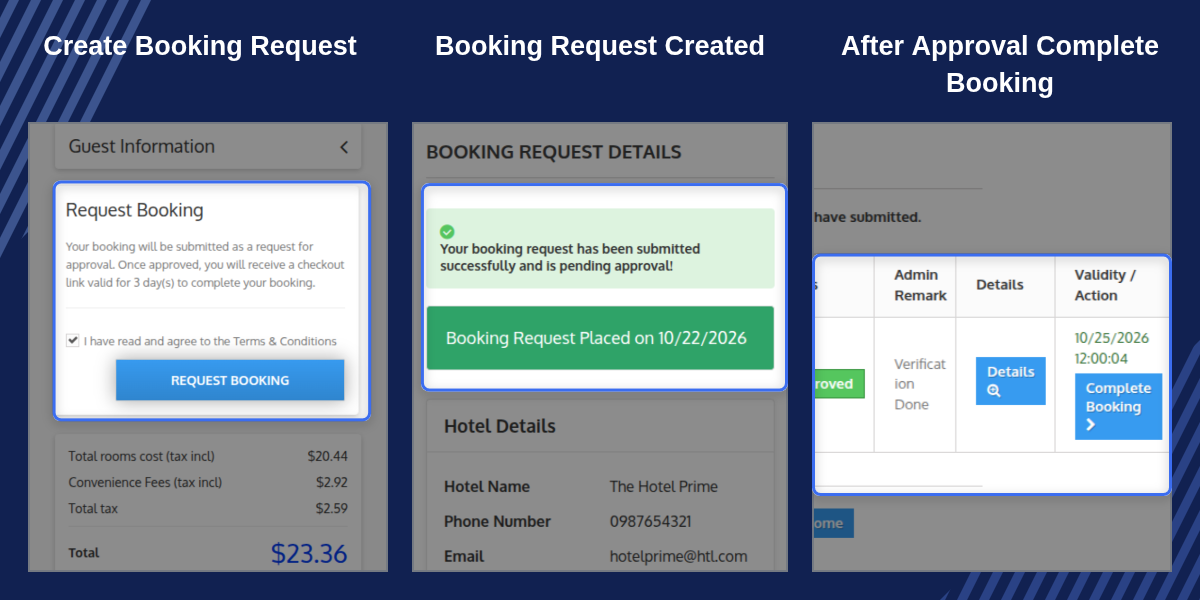
    QloApps Booking Request

    Highlighted Features

    Approval Before Payment

    Keep bookings as requests until hotel staff review and approve them, allowing the property to confirm availability and booking details before the guest pays.

    Request Status Management

    Manage Pending, Approved, Rejected, Expired and Completed requests. Update statuses with administrative remarks that guests can read.

    Editable Room Details

    Add, edit or remove rooms and extra services, and adjust booking dates and occupancy before approving a request.

    Admin Checkout

    Convert an approved request into a booking directly from the Back Office without requiring the guest to return to the checkout process.

    Timed Approval Validity

    Set the number of days an approved request remains valid for checkout. Requests expire automatically when the configured validity period ends.

    Re-Approval on Change

    Return an approved request to Pending when its booking details change, ensuring the final details are reviewed before confirmation.

    Guest Account Tracking

    Allow guests to view their requests, check statuses and access request details under My Account. Customers can also edit pending requests when the option is enabled.

    Guest Lookup Without Login

    Let guests track their booking requests using their request reference and email address without logging in to an account.

    Targeted Email Alerts

    Notify the super admin, hotel and its employees about new requests when configured, and send guests email notifications whenever a request status changes.

    Customer Page Overview

    View a customer's booking requests from their Back Office customer page and access individual requests through the provided links.

    Why Use QloApps Booking Request

    Accepting bookings without a review step can lead to rate mismatches, unavailable rooms and unconfirmed special arrangements. Handling these checks manually through phone calls and emails can also increase the workload of front office staff.

    QloApps Booking Request brings the review process directly into the booking workflow. Staff can manage requests, review remarks, adjust room details and approve reservations from the Back Office, while guests receive status updates and clear instructions for the next step.

    For multi-property businesses, the module also helps organize access by hotel assignment, allowing staff to manage requests associated with the hotels assigned to their profiles.

    QloApps Booking Requests List

    The Booking Requests page, available under Orders, provides a centralized view of booking requests. Staff can review essential information and identify the current status of each request without navigating through multiple pages.

    The list includes the following details:

    • Request ID and customer account
    • Booked For date and hotel
    • Requested rooms and total amount
    • Request status and creation date

    Counters display the number of Pending, Approved and Rejected requests. Staff can use the available row actions to Approve, Reject or proceed with Checkout where applicable.

    In multi-property setups, staff assigned to specific hotels can view only the booking requests associated with their assigned hotels.
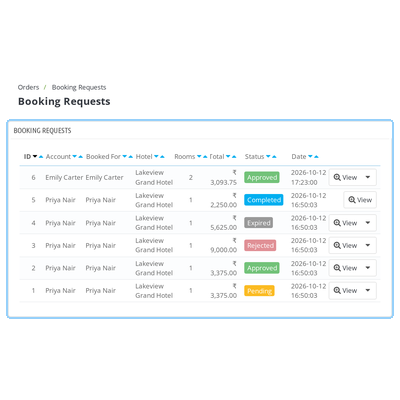
    QloApps Booking Requests list showing request details and status badges

    QloApps Booking Request Details

    Open an individual request to review its guest information, requested rooms, booking dates, occupancy, extra services, vouchers and price breakdown. This consolidated view helps staff verify the request before making a decision.

    Administrators can add, edit or delete rooms and extra services while the request is open. They can also use the Request Status modal to change the request status and save an administrative remark for the guest.

    Once a request is approved, the toolbar provides Admin Checkout and Send Checkout Email actions. These options allow staff to complete checkout from the Back Office or send the guest a checkout link.
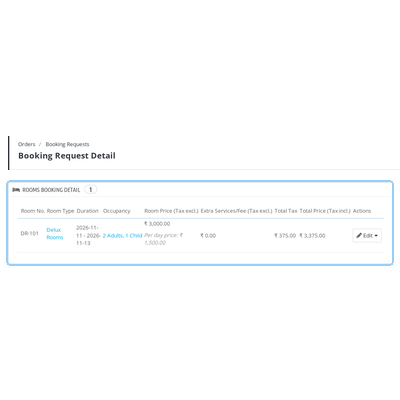
    QloApps Booking Request detail page showing rooms, services, pricing and status controls

    QloApps Booking Request Configuration

    Access the configuration page through the module's Configure button. The settings are organized into Global Configuration and Email Configuration panels, allowing administrators to control the request workflow and notification preferences.

    Global Configuration

    Configure the main booking request settings, including:

    • Enable or disable the booking request process.
    • Allow or restrict Admin Checkout.
    • Allow customers to submit multiple requests.
    • Set the validity period for approved requests in days. The default value is 3 days.
    • Allow or restrict customers from editing their bookings.

    Email Configuration

    Choose whether the super admin, the hotel and its employees receive email notifications when a new booking request is submitted.
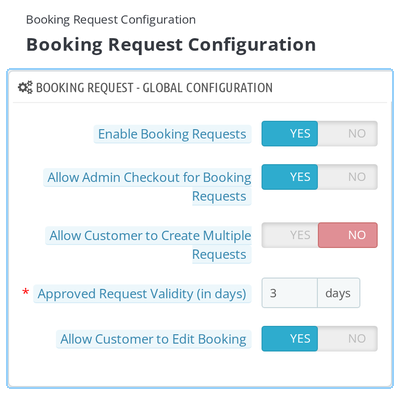
    QloApps Booking Request configuration page with Global Configuration and Email Configuration settings

    QloApps Booking Request Support

    For any query or issue, please create a support ticket here.

    You may also explore our other QloApps modules.

    Specifications

    Product Version4.0.0
    Released10 days ago
    Last UpdatedOctober 22, 2026 (9 days ago)
    Supported VersionsQloApps  1.6.x  1.7.x  

    Ratings

    We'd love to hear your thoughts! Share your feedback and help us craft an even better experience tailored just for you.

    Write a review

    Frequently Asked Questions

     Does every booking become a request once the module is enabled?
    Yes. When Enable Booking Requests is set to Yes, the checkout process displays the Request Booking step in place of payment. If you disable this setting, checkout returns to the standard flow without removing existing booking requests.
     How long does a guest have to complete checkout after approval?
    The Approved Request Validity (in days) setting determines how long an approved request remains valid. The default validity period is 3 days. Guests can complete checkout using the link sent by email. After the validity period expires, the request status changes to Expired, and the guest must submit a new request.
     Can a guest edit a booking request after submitting it?
    Yes. When Allow Customer to Edit Booking is enabled, guests can edit pending requests using the Edit Booking option. If an approved request is changed, its status returns to Pending, allowing hotel staff to review and approve the updated booking details again.
     Can hotel staff complete checkout on behalf of a guest?
    Yes. Enable Allow Admin Checkout for Booking Requests to display the Admin Checkout option on the request detail page. For approved requests, staff can also use Send Checkout Email to resend the checkout link to the guest.
     Who receives booking request email notifications?
    The module provides separate configuration options for notifying the super admin, the hotel and the hotel's employees about new booking requests. Guests receive an email when a request is created and whenever its status changes.
     Can a guest create multiple booking requests?
    By default, customers cannot keep multiple booking requests open at the same time. Enable Allow Customer to Create Multiple Requests to let the same guest maintain more than one open request.
     Can hotel staff approve or reject a booking request?
    Yes. Staff can approve or reject requests from the Booking Requests list or the request detail page. They can also add an administrative remark that the guest can read.
     Can administrators modify rooms and extra services before approval?
    Yes. Administrators can add, edit or remove rooms and extra services on a request. They can also update booking dates and occupancy before approving the request.
     Can guests track a booking request without logging in?
    Yes. Guests can look up their booking requests using the request reference and email address without logging in to an account.
     Can hotel staff view requests for multiple properties?
    In multi-property setups, staff can view only the booking requests associated with the hotels assigned to their profiles.
     

    Specification

    Detailed technical features and requirements to help you understand the module’s capabilities and ensure smooth integration with your system.

    Cloud Hosting

    Detailed technical features and requirements to help you understand the module’s capabilities and ensure smooth integration with your system.

    Default Configuration Details of Server

    1 GB
    RAM
    1 Core
    Processor
    30 GB
    Hard Disk
    1 GB RAM & 1 Core Processor
    Database

    Want to know more how exactly we are going to power up your eCommerce Website with Cloud to fasten up your store

    * Server Configuration may vary as per application requirements.

    Change Logs

    Changelog

    Version 4.0.0

    Compatible with QloApps V1.7.x

    Version 1.0.0

    Compatible with QloApps V1.6.x