USD
  • EUR
  • INR
  • USD
Cart
Cart 0
  • You have no items in your shopping cart.
    QloApps Extensions
    Cart
    Cart 0
    • You have no items in your shopping cart.
    Hire a Developer
    ×
    Contact Us!
    Send Again
    Close
    Please Login to Write Your Review
    QloApps Elegance Theme

    QloApps Elegance Theme

    x
    Free

    * Required Fields

    $129.00
    Add To Cart

    QloApps Elegance Theme gives your hotel booking website a refined and modern look with elegant
    layouts, balanced typography, and attractive room displays. Designed for boutique hotels, luxury resorts, and hotel
    chains, it enhances the guest experience with responsive designs and smooth booking interactions.


    • Display a floating availability search bar for destinations, hotels, stay dates, and guest selection.

    • Showcase room categories with image carousels, rate badges, amenities, and direct booking options.

    • Present hotel facilities, interiors, and guest testimonials through elegant gallery layouts.

    • Display detailed room pages with photographs, seasonal rates, amenities, and booking calendars.

    • Provide mobile-friendly navigation and convenient reservation options across devices.

    • Support multiple languages and currencies with Bootstrap 3 framework compatibility.

    QloApps Elegance Theme
    QloApps Elegance Theme
    $129.00
    Check How It Works

    Need Help Deciding?

    Support answers within one business day.

    Open a ticket
    $129.00
    Configure and Buy
    X
    • Description
    • Reviews
    • FAQ
    • Customers ()
    • Specifications
    • Cloud Hosting
    • Changelog

    QloApps Elegance Theme gives hotels, luxury resorts, and boutique accommodation providers a refined online presence with editorial layouts, balanced typography, and elegant room displays. It combines attractive property imagery with structured booking components to help guests explore accommodations and make direct reservations.

    The theme includes a floating availability search bar, interactive room carousels, editorial amenity sections, detailed room pages, and curated interior galleries. Its responsive design, multi-language support, and currency options provide a consistent browsing experience across desktop, tablet, and mobile devices.
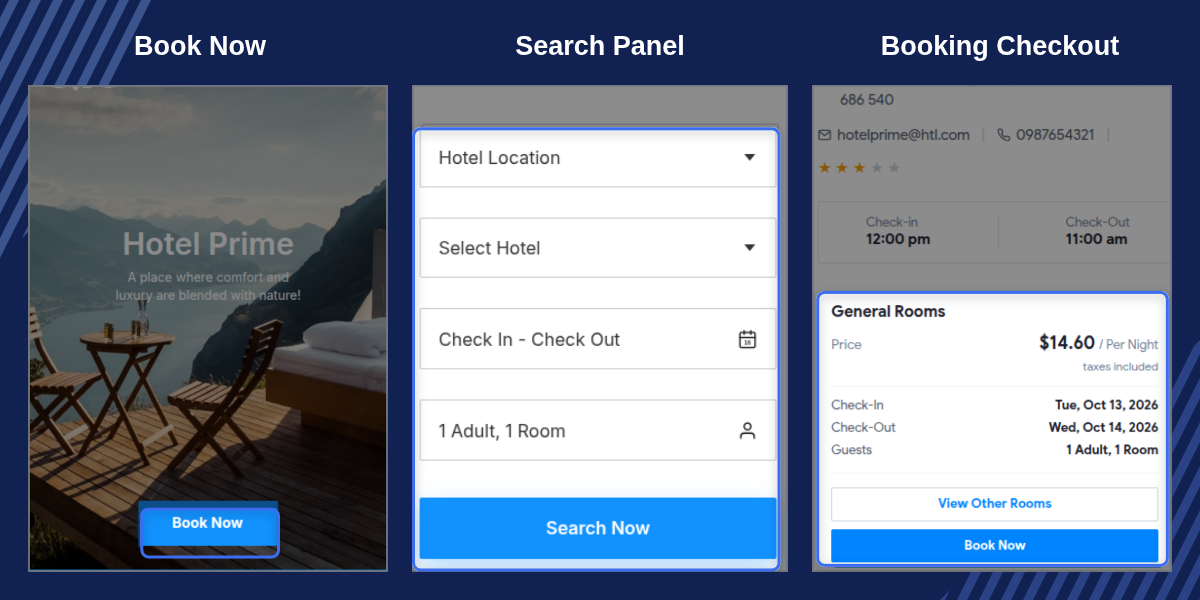
    QloApps Elegance Theme

    Highlighted Features

    Floating Reservation Search

    Allow guests to search availability, select hotel properties, choose stay dates, and specify the number of adults and children from the homepage.

    Interactive Room Carousel

    Display room categories through attractive photography, rate badges, amenity indicators, and direct booking options for easy room comparison.

    Editorial Amenity Grid

    Present hotel facilities through an asymmetrical layout that combines descriptive content with high-quality images of property amenities.

    Detailed Room Pages

    Show room photographs, occupancy details, bedding options, included amenities, pricing information, and booking calendars in organized sections.

    Curated Interior Gallery

    Highlight hotel architecture, guest rooms, interior finishes, and shared spaces through an organized and responsive image gallery.

    Multi-Property Location Map

    Present hotel branch locations with property addresses, telephone contacts, and route directions to help guests find their preferred property.

    Mobile-Friendly Booking

    Provide touch-friendly navigation, convenient date selection, and an accessible booking drawer for guests using smaller screens.

    Language And Currency Support

    Allow international guests to browse the website using available language and currency options supported by the booking platform.

    Why Use QloApps Elegance Theme

    Guests often judge a hotel by its website before making a reservation. Crowded layouts, unclear room information, and difficult availability searches can make it harder for travelers to compare options and complete bookings.

    QloApps Elegance Theme creates a clear and attractive booking experience by placing property imagery, room information, and reservation options in prominent positions. Its editorial design helps hotels present their facilities professionally while making it easier for guests to explore rooms and book directly through the website.

    QloApps Elegance Theme Hero Banner And Search

    The homepage features a full-width hero banner that introduces the hotel or hotel chain through prominent imagery and promotional headlines. A floating reservation search bar sits at the bottom of the banner, giving guests convenient access to the main booking options.

    Destination And Property Selection: Allow guests to choose their preferred destination and hotel property before checking room availability.

    Stay Date Selection: Provide calendar inputs for arrival and departure dates so travelers can specify their intended stay period.

    Guest Occupancy: Let visitors select the number of adults and children before starting their availability search.

    Mobile Booking Drawer: Present reservation fields through an accessible overlay drawer on mobile devices to maintain a clean homepage layout.
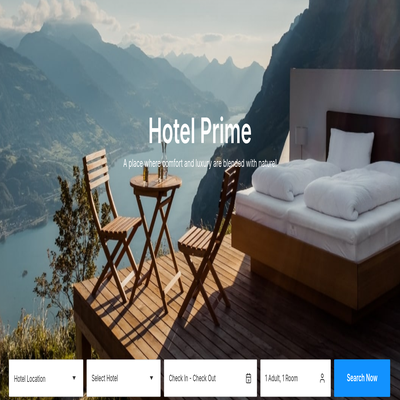
    QloApps Elegance Theme Hero Banner And Floating Search

    QloApps Elegance Theme Room Showcase

    The room showcase displays available room categories through an interactive card carousel. Each card uses prominent room photography and price badges to help guests compare accommodation options before making a reservation.
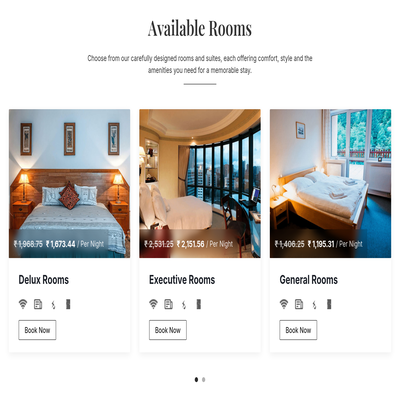
    • Display room categories through an organized and interactive carousel.
    • Highlight nightly rates using visible price badges and currency symbols.
    • Present room amenities and facilities to support quick comparisons.
    • Show bedding options and other available room details.
    • Provide direct booking actions for guests ready to reserve a room.
    • Link room cards to detailed pages for additional information.
    QloApps Elegance Theme Room Showcase

    QloApps Elegance Theme Editorial Amenities

    The amenities section presents hotel facilities through an editorial layout that balances descriptive text with high-quality property images. Its staggered arrangement gives each facility a clear place while maintaining the theme's elegant visual style.
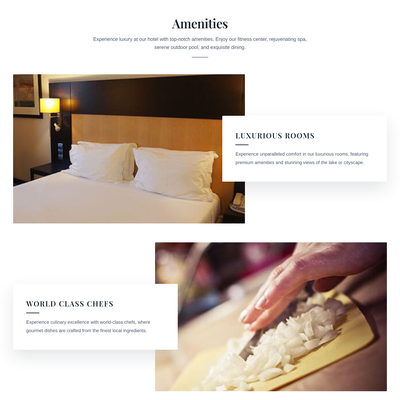
    • Showcase hotel facilities through organized content blocks and images.
    • Highlight amenities such as spa facilities, dining areas, fitness centers, and concierge services where available.
    • Present descriptive content to help guests understand the available facilities.
    • Use an asymmetrical layout to create a distinctive hospitality website.
    • Maintain a responsive presentation across desktop, tablet, and mobile screens.
    QloApps Elegance Theme Editorial Amenities

    QloApps Elegance Theme Room Details

    The room detail page organizes important accommodation and reservation information in a structured layout. Guests can explore room images, review available facilities, and check booking information before choosing their stay dates.
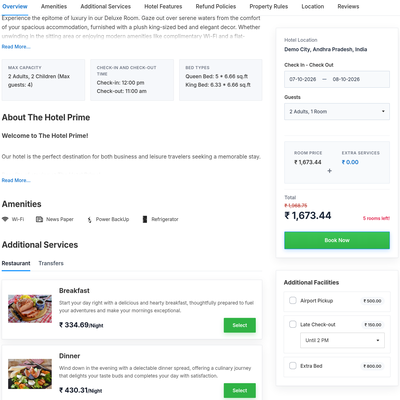
    • Display room photographs through an organized image gallery.
    • Present room capacity, bedding options, and available amenities.
    • Show applicable room rates and pricing information.
    • Provide booking calendar options for selecting stay dates.
    • Display hotel policies and additional service information where configured.
    • Help guests review room details before proceeding with their reservation.
    QloApps Elegance Theme Room Details

    QloApps Elegance Theme Support

    For any query or issue, please create a support ticket here.

    You may also explore our other QloApps themes and modules.

    Specifications

    Product Version1.0.0
    Released19 days ago
    Last UpdatedOctober 14, 2026 (17 days ago)
    Supported Versions1.7.x  

    Ratings

    We'd love to hear your thoughts! Share your feedback and help us craft an even better experience tailored just for you.

    Write a review

    Frequently Asked Questions

     Is QloApps Elegance Theme fully compatible with mobile devices?
    Yes, the theme features a responsive design that adapts to smartphones, tablets, and desktop screens. Room searches, date selection, navigation, and booking options adjust to different screen sizes for a convenient browsing experience.
     Does the theme support multiple languages and currencies?
    Yes, QloApps Elegance Theme works with the language and currency options supported by the QloApps platform. Guests can browse the website in an available language and view room prices in a supported currency.
     Can hoteliers customize the homepage hero banner and headlines?
    Homepage banner images, hotel names, and promotional headlines can be customized according to the options provided by the theme and QloApps configuration. The available customization settings determine which elements can be updated without modifying template files.
     Are core QloApps payment gateways and booking modules supported?
    The theme is designed to work with the standard QloApps booking workflow and compatible core features. Payment gateways and third-party modules should be checked for compatibility with the specific theme version and any custom overrides.
     Does the theme require template code modifications during installation?
    The theme is intended to be installed as a theme package through the QloApps administration panel. Once installed and activated, its layouts are applied to the booking website. Additional code changes may be required for custom requirements or incompatible third-party modifications.
     Can hotel chains use QloApps Elegance Theme for multiple properties?
    Yes, the theme can be used for multi-property hotel setups supported by QloApps. Where the installation and configuration support multiple hotel branches, guests can select a property and search for available rooms according to the configured booking workflow.
     

    Specification

    Detailed technical features and requirements to help you understand the module’s capabilities and ensure smooth integration with your system.

    Cloud Hosting

    Detailed technical features and requirements to help you understand the module’s capabilities and ensure smooth integration with your system.

    Default Configuration Details of Server

    1 GB
    RAM
    1 Core
    Processor
    30 GB
    Hard Disk
    1 GB RAM & 1 Core Processor
    Database

    Want to know more how exactly we are going to power up your eCommerce Website with Cloud to fasten up your store

    * Server Configuration may vary as per application requirements.

    Change Logs

    Changelog

    Version 1.0.0

    • Initial release of QloApps Elegance Theme.
    • Introduced an elegant editorial layout with Playfair Display and Plus Jakarta Sans typography.
    • Added a floating availability search console with destination, property, date, and occupancy selection.
    • Introduced an interactive room showcase carousel with frosted-glass price badges.
    • Added a staggered editorial amenities grid and structured room detail layouts.
    • Introduced curated interior galleries and multi-property location presentation.
    • Implemented responsive layouts for mobile, tablet, and desktop devices.