USD
  • EUR
  • INR
  • USD
Cart
Cart 0
  • You have no items in your shopping cart.
    QloApps Extensions
    Cart
    Cart 0
    • You have no items in your shopping cart.
    Hire a Developer
    ×
    Contact Us!
    Send Again
    Close
    Please Login to Write Your Review
    QloApps Hotel Reports

    QloApps Hotel Reports

    x
    Free
    $55.00
    Add To Cart

    QloApps Hotel Reports adds 21 ready-made reports to the Back Office Stats page, helping hotels track
    reservations, revenue, occupancy, booking channels, guests and property performance from one place.


    • Access 21 built-in reports covering bookings, revenue, occupancy, channels, guests and property performance.

    • Track daily occupancy rate, ADR, RevPAR and room availability.

    • Manage arrivals, in-house guests, departures and cancellations.

    • Review daily revenue, refunds, payments, taxes and outstanding balances.

    • Analyse booking sources, guest spending and multi-hotel performance.

    • Apply hotel and date filters and export every report to CSV.

    QloApps Hotel Reports
    QloApps Hotel Reports
    $55.00
    Check How It Works

    Need Help Deciding?

    Support answers within one business day.

    Open a ticket
    $55.00
    Configure and Buy
    X
    • Description
    • Reviews
    • FAQ
    • Customers ()
    • Specifications
    • Cloud Hosting
    • Changelog

    QloApps Hotel Reports adds 21 ready-made reports to the Back Office Stats page, covering reservations, revenue, occupancy, booking channels, guests and property performance. It helps hotels, resorts, serviced apartments and multi-property groups review their daily operations.

    Instead of compiling figures from separate lists and spreadsheets, management and front office teams can open the relevant report, filter it by hotel and date range, and export the results to CSV. All reports use existing booking data without creating additional database tables.
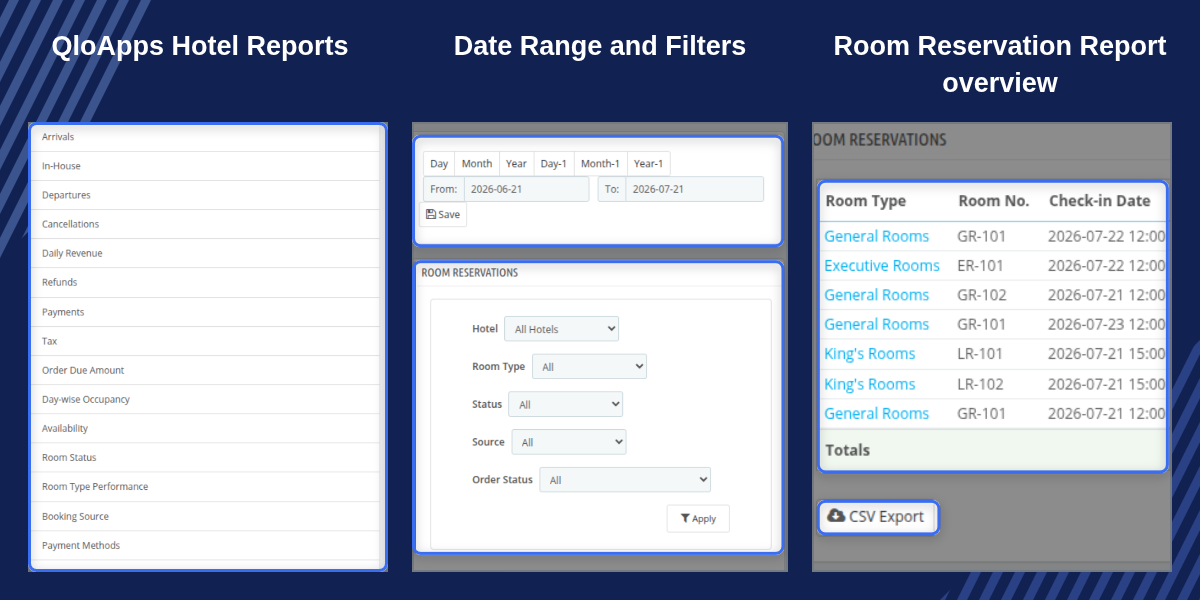
    QloApps Hotel Reports

    Highlighted Features

    21 Built-In Hotel Reports

    Access 21 reports covering reservations, revenue, occupancy, booking channels, guests and property performance directly from the Stats menu.

    Day-wise Occupancy Metrics

    Track daily occupancy rate, ADR and RevPAR, along with available, booked, occupied and out of order rooms for the selected date range.

    Front Desk Movement Lists

    Review arrivals, in-house guests and departures with room details, guest information, booking dates, nights and totals.

    Revenue And Tax Reporting

    Review room and service revenue, taxes, payments, refunds and outstanding balances to support accounting and financial reviews.

    Booking Source Analysis

    Compare booking sources by orders, nights sold, net revenue, cancellation rate and revenue contribution percentage.

    Guest Directory Insights

    View guest contact details, total stays, nights, lifetime revenue and average spending. Identify new and returning guests using guest type filters.

    Multi-Hotel Comparison

    Compare revenue, occupancy, ADR, RevPAR, cancellation rates and outstanding balances across multiple hotels in one table.

    Out Of Order Room Tracking

    Maintain a record of rooms taken out of service, including reasons, dates, duration and ongoing or resolved status.

    CSV Export For Every Report

    Download report results for the selected hotel and date range in CSV format for spreadsheets, accounting and management reviews.

    Flexible Report Filters

    Filter reports using available options such as hotel, room type, booking status, booking source and payment method.

    Why Use QloApps Hotel Reports

    Compiling occupancy, revenue and outstanding balance reports manually takes time. Rates, occupancy and payment figures change with every booking. As a result, figures collected from separate lists can become outdated before management reviews them.

    QloApps Hotel Reports brings these figures together on the existing Stats page. It calculates occupancy, ADR and RevPAR from booking data and provides separate reports for arrivals, payments, refunds, outstanding balances and property performance. Management and front office teams can review important figures without switching between multiple reports or maintaining separate spreadsheets.

    QloApps Hotel Reports Booking Reports

    QloApps Hotel Reports adds five booking reports to the Stats menu: Room Reservations, Arrivals, In-House, Departures and Cancellations.

    Each report provides relevant booking details, including room type, room number, guest, order, booking dates, number of nights and totals.
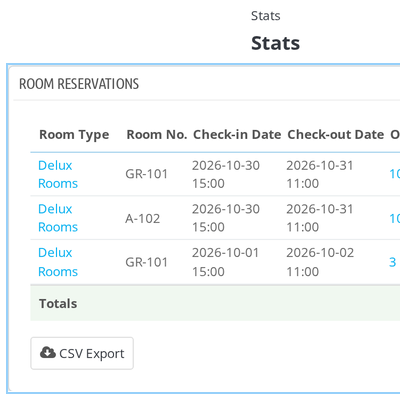
    • Room Reservations: Filter reservations by hotel, room type, status, source and order status. Review totals for nights, guests and amounts.
    • Arrivals: Check guests expected to arrive during the selected date range.
    • In-House: Review guests currently staying at the property.
    • Departures: Check scheduled guest departures and related booking details.
    • Cancellations: Review cancellation dates, reasons, refund amounts and refund status.
    QloApps Hotel Reports Room Reservations

    QloApps Hotel Reports Revenue Reports

    Track the financial performance of your property with five revenue reports: Daily Revenue, Refunds, Payments, Tax and Order Due Amount.

    • Daily Revenue: View rooms booked, room revenue, extra services revenue, taxes, refunds, net revenue and ADR for each day.
    • Refunds: Review refund-related booking and payment figures.
    • Payments: Check payment records for the selected reporting period.
    • Tax: Review tax amounts with a Tax Summary by Type.
    • Order Due Amount: Identify outstanding balances by order, including total charges, amount paid and last payment date, along with guest email and phone.

    These reports help accounting teams review collected payments, refunds, taxes and amounts that are still due.
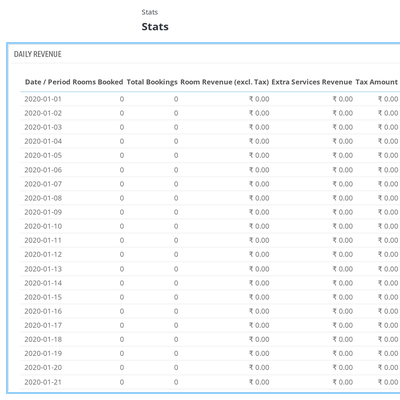
    QloApps Hotel Reports Daily Revenue

    QloApps Hotel Reports Occupancy Reports

    Understand room availability and occupancy with reports covering daily room usage, room type performance and current room status.

    • Day-wise Occupancy: View total, available, booked, occupied and out of order rooms for each day, along with occupancy rate, ADR and RevPAR.
    • Room Type Performance: Review room nights sold, revenue and average length of stay for different room types.
    • Room Status: Get a snapshot of room conditions as of the selected range's start date. View available, occupied and out of order room totals.

    The Room Status report also lists each room with its floor, room status, housekeeping status, current guest and check-out date. Vacant rooms are marked as Vacant.
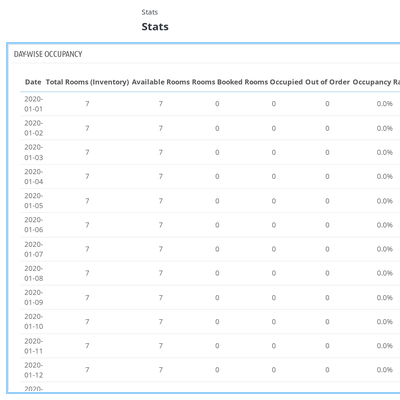
    QloApps Hotel Reports Room Status

    QloApps Hotel Reports Channel Reports

    Understand how different booking sources and payment methods contribute to your property's business. These reports help management review booking distribution and revenue performance.

    • Booking Source: Compare each source by orders, rooms booked, nights sold, room revenue, discounts, refunds, net revenue, cancellation rate, ADR and contribution percentage.
    • Payment Methods: Review booking counts and revenue for each payment method, including amounts before and after tax.

    Use these reports to identify the booking sources that contribute to revenue and review the payment methods used by guests.
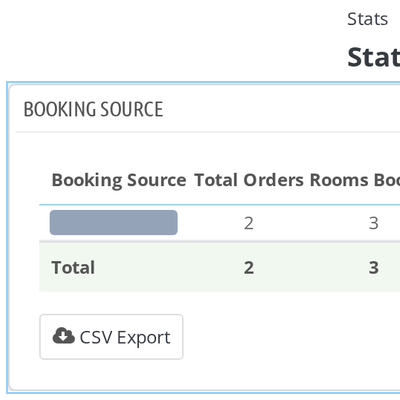
    QloApps Hotel Reports Booking Source

    QloApps Hotel Reports Guest Reports

    Review guest information and extra services sold with bookings through two dedicated reports: Booked Services and Guest Directory.

    • Booked Services: List extra services sold with bookings, including guest, room, quantity, unit price, tax and grand total. Filter records by service category and service name.
    • Guest Directory: View guest contact details, total stays, total nights, last stay date, lifetime revenue and average spend per stay.

    Each guest is identified as New or Returning. Use the Guest Type filter to narrow the directory and review the two guest groups separately.
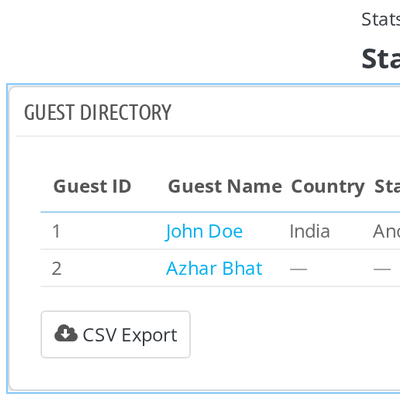
    QloApps Hotel Reports Guest Directory

    QloApps Hotel Reports Property Reports

    Get a broader view of property performance with reports for daily operations, hotel comparisons and rooms taken out of service.

    • Daily Summary: View one line per day with rooms sold, occupancy, ADR, RevPAR, revenue, arrivals, departures, in-house guests and cancellations. Filter by hotel, room type and floor.
    • Hotel Comparison: Compare revenue, bookings, cancellation rate, average length of stay and outstanding due amounts across hotels.
    • Out Of Order Rooms: Record rooms taken out of service with their reason, start and end dates, duration and Ongoing or Resolved status.

    These reports help multi-property management teams review individual hotel performance and keep track of rooms unavailable for guests.
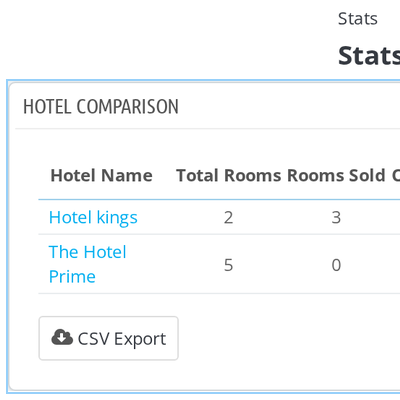
    QloApps Hotel Reports Hotel Comparison

    QloApps Hotel Reports Support

    For any query or issue, please create a support ticket here.

    You may also explore our other QloApps modules.

    Specifications

    Product Version4.0.0
    ReleasedToday
    Last UpdatedNovember 4, 2026 (1 day ago)
    Supported VersionsQloApps  1.6.1  1.7.x  

    Ratings

    We'd love to hear your thoughts! Share your feedback and help us craft an even better experience tailored just for you.

    Write a review

    Frequently Asked Questions

     Do I need to configure anything after installing the module?
    No. The module does not have a separate settings page. After installation, the 21 reports appear in the Stats menu of the Back Office. Each report uses the date range already selected on the Stats page.
     Which date range do the reports use?
    Every report follows the date range selected at the top of the Stats page. You can use the Day, Month and Year buttons or enter From and To dates and click Save. The selected range is stored on your employee account, so the next report you open uses the same dates.
     Can I look at one hotel at a time?
    Yes. Every report includes a Hotel filter. The list displays hotels that your employee profile can access. Select a hotel and click Apply to filter the report. Room type and payment method options update according to the selected hotel without reloading the page.
     What does the CSV export contain?
    The CSV Export button at the bottom of each report downloads the report rows for the selected date range and hotel. Booking reports also apply the selected Room Type, Status, Source and Order Status filters.
     What does the Room Status report show?
    Room Status provides a snapshot as of the start date of your selected range. It shows the number of available, occupied and out of order rooms. It also lists each room with its floor, status, housekeeping status, current guest and check-out date. Vacant rooms are marked as Vacant.
     Does the module change my booking data?
    No. The module only reads existing bookings, orders, payments and room data. It does not create additional database tables. It adds an override of the Stats menu controller to display its 21 report entries in the Stats sidebar.
     Which QloApps versions does it support?
    The module requires QloApps 1.7.0.0 or later and is built for the PrestaShop 1.6 based QloApps Back Office.
     Can I use QloApps Hotel Reports for multiple properties?
    Yes. The module includes a Hotel filter for individual property reports and a Hotel Comparison report. Management can compare revenue, bookings, cancellation rate, average length of stay and outstanding due amounts across hotels.
     

    Specification

    Detailed technical features and requirements to help you understand the module’s capabilities and ensure smooth integration with your system.

    Cloud Hosting

    Detailed technical features and requirements to help you understand the module’s capabilities and ensure smooth integration with your system.

    Default Configuration Details of Server

    1 GB
    RAM
    1 Core
    Processor
    30 GB
    Hard Disk
    1 GB RAM & 1 Core Processor
    Database

    Want to know more how exactly we are going to power up your eCommerce Website with Cloud to fasten up your store

    * Server Configuration may vary as per application requirements.

    Change Logs

    Changelog

    V1.0.0

    • [CO] : Compatible with QloApps 1.7.x.
    • [NF] : Added 21 hotel reports covering reservations, revenue, occupancy, booking channels, guests and property performance to the Back Office Stats page.