Send Again
Close
The QloApps Hourly Booking Module is a powerful add-on for QloApps that enables hotels to offer flexible hourly room bookings alongside traditional overnight reservations. Whether guests need a room for a few hours during a business trip, transit stop, or short stay, this module helps hotels maximize room occupancy, improve revenue, and deliver greater booking flexibility—all from a single platform.
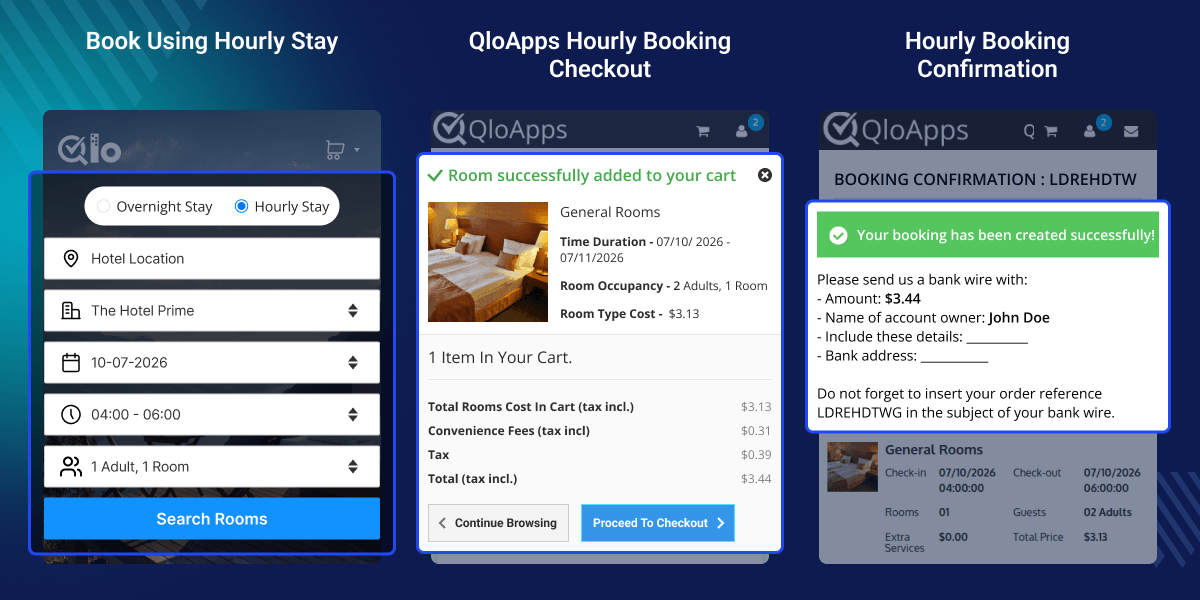
Offer hourly reservations using Time Period, Fixed Duration, or Fixed Slot booking types, allowing hotels to choose the booking model that best fits their operations.
Configure booking start time, end time, minimum booking hours, and display time in either 12-hour or 24-hour format for a seamless guest experience.
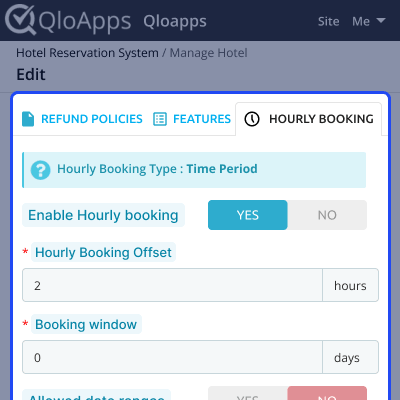
Enable hourly bookings for individual hotels and selected room types while defining booking windows, offsets, pricing methods, and availability independently.
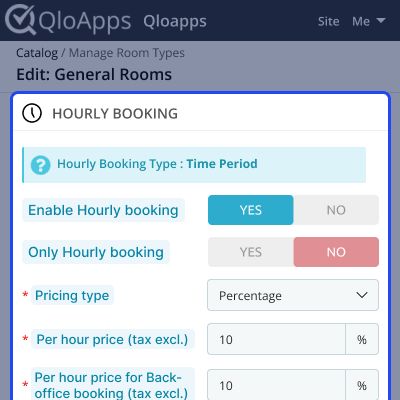
Set hourly prices using fixed rates or percentage-based pricing, create custom time slots, and configure different prices for each booking duration.
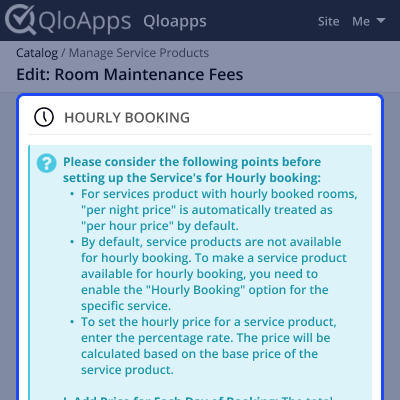
Allow hotels to offer service products with hourly bookings by enabling hourly pricing and automatically calculating service charges based on the selected booking duration.
Create flexible hourly bookings for offline guests, configure admin-specific pricing, and apply advanced pricing rules based on room type, booking duration, date range, or weekdays.
Modern travelers often need accommodation for only a few hours instead of a full night's stay. The QloApps Hourly Booking Module enables hotels to meet this growing demand by offering flexible hourly reservations while continuing to manage overnight bookings from the same system. Hotels can increase room occupancy, generate additional revenue, and provide guests with more booking choices without changing their existing booking workflow.
The module also gives complete control over hourly booking rules, pricing, room availability, hotel-specific settings, and service products. Whether you operate a single property or multiple hotels, you can easily customize hourly booking configurations to match your business requirements while delivering a smooth booking experience for your guests.
The QloApps Hourly Booking Module provides a simple configuration panel where admins can define how hourly bookings will work across their hotel. Configure booking timings, minimum booking duration, preferred time format, and choose the hourly booking type that best suits your property's operations.
These settings help hotels create a flexible hourly booking experience while maintaining complete control over reservation availability.

The QloApps Hourly Booking Module allows you to configure hourly booking settings for each hotel individually. This gives complete flexibility to enable or disable hourly bookings, define booking availability, and control reservation rules based on the requirements of each property.
These settings help hotels manage availability efficiently while applying different hourly booking rules to different properties from a single QloApps installation.
The QloApps Hourly Booking Module allows you to configure hourly booking settings for individual room types. Once hourly booking is enabled for a hotel, you can choose which room types support hourly reservations and define separate pricing and booking rules for each of them.
This flexibility allows hotels to optimize room availability, apply different pricing strategies, and offer customized hourly booking options for every room category.
Enhance the guest experience by offering service products with hourly bookings. The module allows hotels to enable hourly pricing for individual services, ensuring guests can book additional amenities that match the duration of their stay.
With hourly service product management, hotels can generate additional revenue while offering guests a complete and personalized booking experience.
For any query, installation assistance, configuration help, or technical issue related to the QloApps Hourly Booking Module, please create a support ticket here.
You may also explore our other top-quality QloApps Add-ons to enhance your hotel's booking, property management, and guest experience.
Detailed technical features and requirements to help you understand the module’s capabilities and ensure smooth integration with your system.
Detailed technical features and requirements to help you understand the module’s capabilities and ensure smooth integration with your system.
We’re partnered with top-tier, trusted providers!
Want to know more how exactly we are going to power up your eCommerce Website with Cloud to fasten up your store
* Server Configuration may vary as per application requirements.



