USD
  • EUR
  • INR
  • USD
Cart
Cart 0
  • You have no items in your shopping cart.
    QloApps Extensions
    Cart
    Cart 0
    • You have no items in your shopping cart.
    Hire a Developer
    ×
    Contact Us!
    Send Again
    Close
    Please Login to Write Your Review
    QloApps Location Wise Search

    QloApps Location Wise Search

    x
    Free

    * Required Fields

    $75.00
    Add To Cart

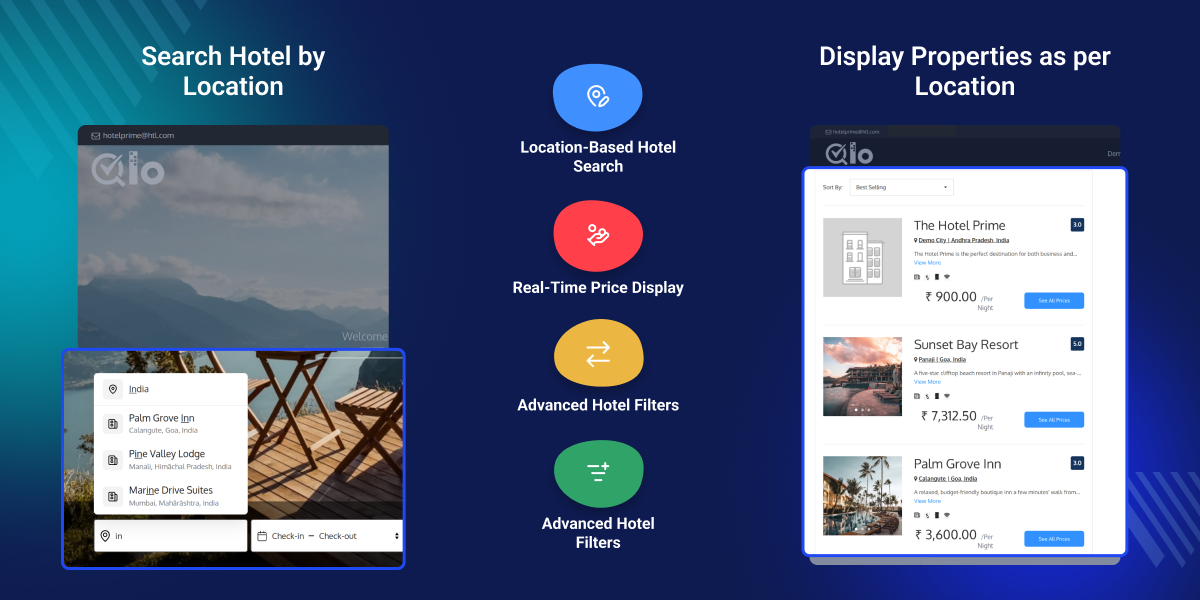
    QloApps Location-Wise Search:  The QloApps Location-Wise Search Module lets guests find a property from a single search box by typing a hotel name, city, state or country. It suits multi-property groups, resorts and regional hotel brands that want guests to compare properties and book directly.


    Instead of opening properties one at a time, guests narrow the matching hotels by amenity, star category and price, and move to a booking faster.

    QloApps Location Wise Search
    QloApps Location Wise Search
    $75.00
    Check How It Works

    Need Help Deciding?

    Support answers within one business day.

    Open a ticket
    $75.00
    Configure and Buy
    X
    • Description
    • Reviews
    • FAQ
    • Customers ()
    • Specifications
    • Cloud Hosting
    • Changelog

    QloApps Location-Wise Search - The QloApps Location-Wise Search Module lets guests find a property from a single search box by typing a hotel name, city, state or country. It suits multi-property groups, resorts and regional hotel brands that want guests to compare properties and book directly.

    If you want to learn how to launch your free hotel website with the help of QloApps then Click Here
    QloApps BlueSnap Payment Gateway

    QloApps Location-Wise Search Features -

    • Single search box for hotel name, city, state or country
    • Live suggestions grouped into destinations and hotels, with typo-tolerant matching
    • Check-in, check-out and room-wise occupancy collected in the same search bar
    • Hotel List page with photo slider, rating, location, description and per-night price
    • Amenity, star category and price range filters that refresh the list instantly
    • Sorting by best selling, lowest price or highest price
    • Cheapest room price or a fixed starting price per hotel
    • One settings page controlling hotel card details and filters
    • Same search panel on the hotel page and the room type page

    What is QloApps Location-Wise Search?

    QloApps Location-Wise Search adds a location-aware search bar to the booking website and a Hotel List page for every matching destination. Guests type a hotel, city, state or country, choose dates and occupancy, and land on the right hotel page or on a list of hotels in that place.

    Management controls the experience from one Back Office page: which details appear on each hotel card, which filters guests see, and whether prices show the cheapest room rate or a starting price set per hotel.

    Why Use QloApps Location-Wise Search

    Guests choosing among several properties typically start from a destination rather than a hotel name, and compare location, price and amenities before booking. A search that mirrors that habit shortens the path from first visit to reservation.

    The module brings search, comparison and price display into one flow, and gives management control over what guests see on every hotel card.

    Highlighted Features

      Destination-First Hotel Search

    Search by hotel, city, state or country from one box, with matching destinations and hotels listed in separate groups as guests type.

      Typo-Tolerant Suggestions

    Match hotel and destination names even when a word is misspelled, with the typed letters highlighted in each suggestion.

      Direct Hotel or List Redirects

    Send guests straight to a hotel page when they pick a hotel, or to the Hotel List when they pick a city, state or country.

      Occupancy-Aware Searching

    Collect rooms, adults, children and child ages alongside the dates, so results reflect the size of the party.

      Rich Hotel Cards

    Show photo sliders, ratings, locations, descriptions, amenity icons and per-night prices on each card, with each detail switchable from the Back Office.

      Low Availability Alerts

    Display a low-availability notice with the number of rooms left on a hotel card when five or fewer remain for the searched dates.

      Flexible Price Display

    Choose between the cheapest available room price and a starting price entered for each hotel, to match how the property markets itself.

      Instant Result Updates

    Refresh the Hotel List in place as guests change filters or sorting, without reloading the page.

      Automatically Refreshed Prices

    Keep displayed prices current as room types, specific prices, customer groups, currencies and room services change.

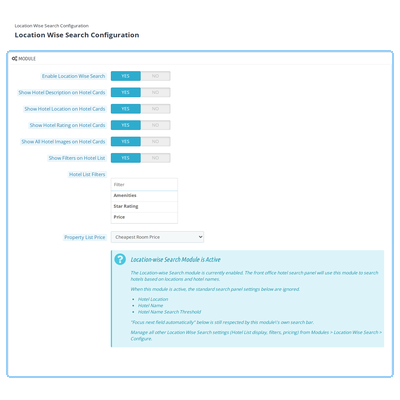
    QloApps Location-Wise Search Configuration

    The configuration page gathers every guest-facing option in one Back Office panel, so management decides what the booking website shows without editing templates.

    Enable Location Wise Search

    Turns the module on or off for the booking website. Default: Yes.

    Hotel Card Details

    Show or hide the description, location, rating and full photo slider on each card.

    Hotel List Filters

    A master switch plus separate Amenities, Star Rating and Price filters.

    Property List Price

    Show the Cheapest Room Price, or a Starting Price entered per hotel on its edit page. Hotels without one fall back to their cheapest room price.
    QloApps Booking iCalendar Channels Configuration Screenshot

    QloApps Location-Wise Search Destination Search

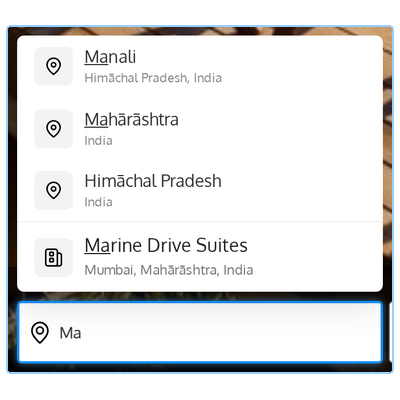
    The search bar on the home page, hotel page and room type page accepts a hotel name, city, state or country. From two typed letters, matching destinations and hotels appear in separate groups, up to five of each, with the matched letters highlighted.

    Check-in, check-out, rooms, adults, children and child ages are set in the same bar. Selecting a hotel opens its page directly, while a destination opens the Hotel List for that place.
    QloApps Booking iCalendar Configuration and Export Settings Screenshot

    QloApps Location-Wise Search Hotel List

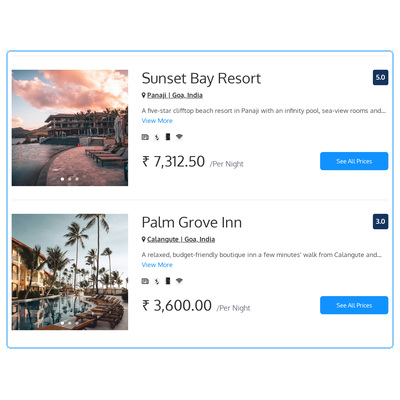
    The Hotel List shows one card for every matching hotel, with a photo slider, rating, location, description, amenity icons and a per-night price. Hurry! and the number of rooms left appear when five or fewer remain, and See All Prices opens the hotel with its room types.

    Results load 24 hotels at a time with Previous and Next controls, so large portfolios stay quick to browse.
    QloApps Booking iCalendar Room Type Sync Screenshot

    QloApps Location-Wise Search Filters and Sorting

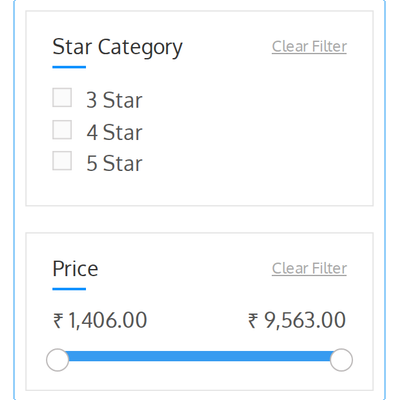
    A left-hand panel repeats the search and adds the filters enabled in the Back Office: Features, Star Category (3, 4 or 5 Star) and a Price slider. Sort By offers Best Selling, Price : Lowest First and Price : Highest First.

    The list updates in place as each option changes, and every filter has its own Clear Filter link, so guests reach a short list of suitable hotels in a few clicks.
    QloApps Booking iCalendar Sync Logs Screenshot

    QloApps Location-Wise Search Support

    For any query or issue, please create a support ticket here: QloApps Support Portal.

    You may also explore our other QloApps modules: QloApps Add-ons.

    Specifications

    Product Version4.0.0
    Released9 days ago
    Last UpdatedOctober 16, 2026 (9 days ago)
    Supported VersionsQloApps  1.6.x  1.7.x  

    Ratings

    We'd love to hear your thoughts! Share your feedback and help us craft an even better experience tailored just for you.

    Write a review

    Frequently Asked Questions

      What happens to the standard hotel search settings when the module is on?
    Enable Hotel Location, Display Hotel Name and Hotel name search threshold in Hotel Reservation System > General Settings are locked while the module is enabled, because the new search box already covers hotel names and locations. Focus next field automatically still applies, and an information box on that panel points to the module's own settings.
      Where do I find the module's settings?
    The module has no entry in the left menu. Open Modules and Services, find QloApps Location-Wise Search and click Configure to reach the Location Wise Search Configuration page, where every option is saved with one Save button.
      Can I show a fixed price on each hotel card instead of the cheapest room rate?
    Yes. Set Property List Price to Starting Price, then enter a per-night amount in the Starting Price field on each hotel's edit page. Any hotel left empty continues to show its cheapest available room price.
      Which filters can I offer on the Hotel List?
    Turn on Show Filters on Hotel List, then tick Amenities, Star Rating and Price individually under Hotel List Filters. The Price slider appears only when the hotels in the results have different prices, so it never shows a range with nothing to filter.
      Do guests have to choose dates before searching?
    Yes. A location and both check-in and check-out dates are required, otherwise the search does not run and the missing field is flagged. This keeps the prices and rooms-left figures on each card tied to the dates the guest is actually searching.
      Do displayed prices stay accurate when I change rates or currencies?
    Yes. Price calculations are cached for speed and refreshed automatically when a room type, specific price, customer group, currency or room service changes, so cards reflect the latest setup without any manual step.

    Specification

    Detailed technical features and requirements to help you understand the module’s capabilities and ensure smooth integration with your system.

    Cloud Hosting

    Detailed technical features and requirements to help you understand the module’s capabilities and ensure smooth integration with your system.

    Default Configuration Details of Server

    1 GB
    RAM
    1 Core
    Processor
    30 GB
    Hard Disk
    1 GB RAM & 1 Core Processor
    Database

    Want to know more how exactly we are going to power up your eCommerce Website with Cloud to fasten up your store

    * Server Configuration may vary as per application requirements.

    Change Logs

    Not Available


