USD
  • EUR
  • INR
  • USD
Cart
Cart 0
  • You have no items in your shopping cart.
    QloApps Extensions
    Cart
    Cart 0
    • You have no items in your shopping cart.
    Hire a Developer
    ×
    Contact Us!
    Send Again
    Close
    Please Login to Write Your Review
    QloApps Marketplace Cashfree Payment

    QloApps Marketplace Cashfree Payment

    x
    Free

    * Required Fields

    $75.00
    Add To Cart

    QloApps Marketplace Cashfree Payment lets guests pay for bookings through Cashfree while automatically splitting payments between hotel sellers and the admin. It is ideal for multi-hotel marketplaces with independent hotel sellers. Administrators can manage payments, settlements, and refunds from a single Back Office section, while sellers manage their own payout details.


    • Accept booking payments through Cashfree at checkout in INR.

    • Automatically split payments between hotel sellers and the admin according to Marketplace commission settings.

    • Allow sellers to submit their bank account or UPI payout details and KYC information through their own accounts.

    • Track seller account statuses, including Verified and Active, Setup in Progress, and Under Review, with the Sync Account option.

    • Choose Standard or Delayed settlement to release seller payouts according to Cashfree's schedule or after a specified number of days.

    • Process full and partial refunds with Standard or Instant processing speeds while recovering each seller's share proportionally.

    • View payment and settlement statuses for every Cashfree transaction in the transaction list.

    • Use separate App IDs and Secret Keys for Test and Live environments.

    • Protect seller bank account details, UPI information, and identity numbers with encryption at rest.

    QloApps Marketplace Cashfree Payment
    QloApps Marketplace Cashfree Payment
    $75.00
    Check How It Works

    Need Help Deciding?

    Support answers within one business day.

    Open a ticket
    $75.00
    Configure and Buy
    X
    • Description
    • Reviews
    • FAQ
    • Customers ()
    • Specifications
    • Cloud Hosting
    • Changelog

    QloApps Marketplace Cashfree Payment adds Cashfree as a payment method for bookings made through the QloApps Marketplace, automatically dividing each payment between sellers and admin. The Back Office includes a dedicated Marketplace Cashfree Payment section with Transactions, Sellers Onboarding, and Configuration screens.

    It is ideal for multi-hotel platforms, hotel chains, and booking networks where multiple sellers list rooms and receive payouts. Administrators can track payments, issue refunds, and verify seller accounts, while sellers manage their Cashfree payout details from their own accounts.

    QloApps Marketplace Cashfree Payment

    Highlighted Features

    Automatic Seller Payment Splits

    Divide each guest payment between sellers and admin using Marketplace commission, vouchers, advance payments, and taxes. The payment split is stored and reused for settlements and refunds.

    Webhook-Confirmed Bookings

    Confirm bookings through Cashfree's signed server notifications. Requests older than five minutes are rejected, ensuring paid bookings can be completed even if guests close their browsers.

    Delayed Seller Settlement

    Hold seller payouts for a configured number of days after payment or use Cashfree's standard settlement schedule of one to two business days.

    Seller Self-Onboarding

    Allow Individual and Business sellers to submit their payout method, account type, and KYC details through the Manage Cashfree page in their account.

    Seller Account Overview

    Review seller Cashfree account statuses, uploaded documents, total order value, and settlements paid. Refresh account information directly from Cashfree using Sync Account.

    Proportional Refund Recovery

    Process full or partial refunds using Standard or Instant processing speeds. Each seller returns the same proportion of the refund as their share of the original payment.

    Order Page Payment Breakdown

    View the Cashfree transaction, admin commission, seller amount, and settlement ID directly on the booking's order page in the Back Office.

    Encrypted Seller Details

    Protect bank account numbers, IFSC codes, UPI addresses, PAN, Aadhaar, and passport numbers using AES encryption at rest.

    Hourly Status Sync

    Refresh the status of seller accounts that are not yet Active through a scheduled cron job secured with a secret token.

    Hotel-Based Access

    Restrict employee profiles to transactions associated with the hotels they are authorized to access.

    Why Use QloApps Marketplace Cashfree Payment

    Managing payments for multiple hotel sellers from a single guest payment involves calculating each seller's share, tracking settlements, and recovering the correct amounts when bookings are refunded. Handling these tasks manually can be time-consuming and prone to errors.

    The module centralizes these operations. Seller shares are calculated using Marketplace commission settings and sent to Cashfree with the payment. Settlements are tracked per seller, and refunds recover each seller's proportional share. Administrators can monitor payment statuses and settlement progress from one place without manually following up with sellers.

    QloApps Marketplace Cashfree Payment Configuration

    The Configuration screen connects the module to Cashfree through dedicated panels, allowing administrators to test payments before switching to the live environment.
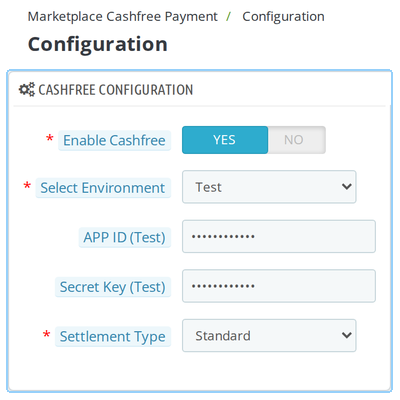
    • Cashfree Configuration: Enable the payment gateway, select Test (default) or Live mode, enter the corresponding App ID and Secret Key for each environment, and choose Standard or Delayed seller settlement.
    • Seller Onboarding Configuration: Show or hide the Sync Account option for sellers in the Front Office. This option is enabled by default.
    • Cron Job Configuration: Enable or disable automatic seller status synchronization. This option is disabled by default, and the cron URL includes a secret token.
    • Webhook Configuration: View the webhook URL and the events that must be configured in the Cashfree account.
    Marketplace Cashfree Payment Configuration

    QloApps Marketplace Cashfree Payment Transactions

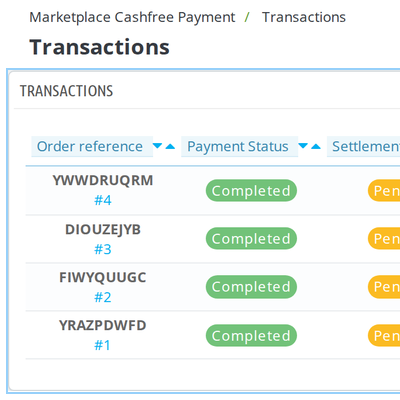
    The Transactions screen lists every Cashfree payment with its order reference, transaction ID, customer, amount, payment status, and settlement status.

    Payment statuses include Completed, Processing, Partially Paid, and Failed. Settlement statuses include Pending, Settled, Failed, and Reversed. Administrators can quickly identify which payments have reached sellers, while employee profiles display only transactions for the hotels they are authorized to access.
    Marketplace Cashfree Payment Transaction

    QloApps Marketplace Cashfree Payment Transaction Details and Refunds

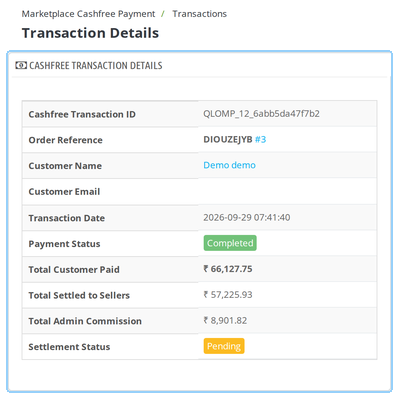
    Opening a transaction displays the amount paid, linked orders, and seller-wise commission distribution, including seller amounts, admin commission, and settlement status.

    Administrators can initiate full or partial refunds by adding a remark and selecting Standard or Instant processing. The refund list records each refund's ID, amount, processing mode, and status. Each seller's share is recovered proportionally to the amount they received from the original payment.
    Marketplace Cashfree Payment Transaction

    QloApps Marketplace Cashfree Payment Sellers Onboarding

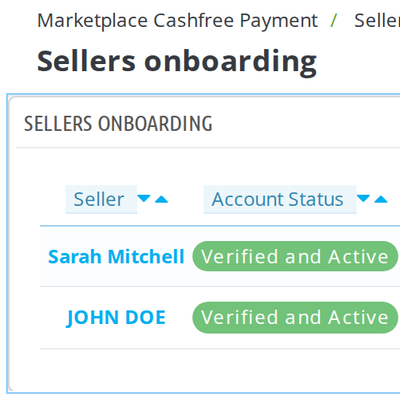
    The Sellers Onboarding screen lists each seller's Cashfree Seller ID, account status, KYC document flag, total order value, and total settlement paid for the active environment.

    Account statuses include Verified and Active, Account Setup in Progress, Bank Details Under Review, and Verification Failed. Opening a seller's record displays their account type, line of business, and KYC details. Administrators can use Sync Account to refresh the seller's status from Cashfree.
    Marketplace Cashfree Payment Transaction

    QloApps Marketplace Cashfree Payment Order Page Panel

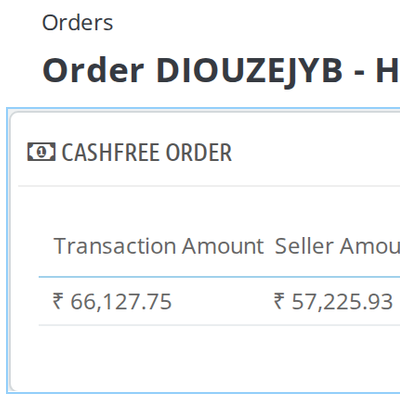
    Every booking paid through Cashfree includes a dedicated Cashfree panel on its order page in the Back Office. The panel displays the Cashfree order reference, transaction ID, transaction amount, and payment status, followed by the admin order amount, admin commission, seller amount, and settlement ID.

    Staff can review how each payment was distributed directly from the booking details without navigating to another section.
    Marketplace Cashfree Payment Transaction

    QloApps Marketplace Cashfree Payment Seller Onboarding Form

    Sellers can open Manage Cashfree from their navigation menu or the Your Hotel section of their account. The form collects contact details, payout method, account type, and KYC information.

    • Bank Account: Enter bank account details and the IFSC code.
    • UPI: Provide the UPI Virtual Payment Address (VPA).
    • Account Type: Select the appropriate account type.
    • KYC Details: Submit relevant identification and business information, including PAN, GSTIN, and CIN where applicable.

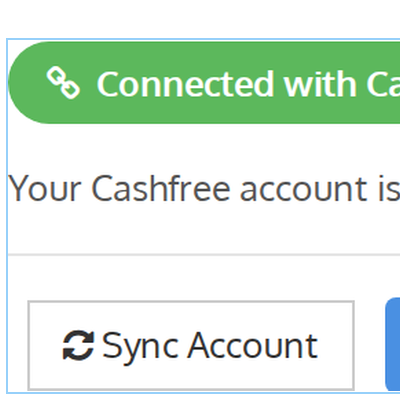
    The module validates submitted information, and sellers can refresh their Cashfree account status using Sync Account.

    [Screenshot placeholder — Front Office > My Account > Manage Cashfree page, showing the connected status and Sync Account option]
    Marketplace Cashfree Payment Transaction

    QloApps Marketplace Cashfree Payment Support

    For any query or issue, please create a support ticket here: https://webkul.uvdesk.com/en/customer/create-ticket/

    You may also explore our other QloApps modules: QloApps Add-ons.

    Specifications

    Product Version5.0.0
    Released9 days ago
    Last UpdatedNovember 2, 2026 (Today)
    Supported VersionsQloApps  1.6.x  1.7.x  

    Ratings

    We'd love to hear your thoughts! Share your feedback and help us craft an even better experience tailored just for you.

    Write a review

    Frequently Asked Questions

     What do I need before installing the module?
    The Marketplace module, version 5.0.0 or higher, must be installed first; installation stops with a message otherwise. You also need a Cashfree account with an App ID and Secret Key for the Test or Live environment.
     Which currency does Cashfree checkout support?
    The Pay using Cashfree option appears only when the booking currency is INR and the Cashfree gateway is enabled. A phone number is also required on the guest's address, although the Test environment supplies a placeholder number so test bookings are not blocked.
     Do I need to set up the webhook?
    Yes. Copy the Webhook URL from the Configuration screen into your Cashfree account and add the success payment, failed payment, success settlement, failed settlement and refund events. The module does not work properly without it, and the endpoint works only on a live server.
     How does Delayed settlement work?
    Select Delayed under Settlement Type and enter the number of days in Settlement Delay (Days). The value cannot exceed the Delayed Days limit set in your Cashfree dashboard, and Deferred Settlement must be enabled on your Cashfree account; otherwise, Cashfree settles on the standard schedule.
     Are seller bank and identity details protected?
    Bank account number, IFSC, UPI address, PAN, Aadhaar and passport numbers are encrypted at rest with AES, using a key generated when the module is installed. GST and CIN numbers are stored as entered, as they are public-register information.
     Can I test the module before accepting live payments?
    Yes. Keep Select Environment on Test and enter the Test App ID and Secret Key. Sellers onboarded in one environment are listed separately from the other, so switching to Live does not mix test sellers with real ones.
     

    Specification

    Detailed technical features and requirements to help you understand the module’s capabilities and ensure smooth integration with your system.

    Cloud Hosting

    Detailed technical features and requirements to help you understand the module’s capabilities and ensure smooth integration with your system.

    Default Configuration Details of Server

    1 GB
    RAM
    1 Core
    Processor
    30 GB
    Hard Disk
    1 GB RAM & 1 Core Processor
    Database

    Want to know more how exactly we are going to power up your eCommerce Website with Cloud to fasten up your store

    * Server Configuration may vary as per application requirements.

    Change Logs

    Changelog

    Version 4.2.4 | Compatible with QloApps 1.7.x and Marketplace 5.0.0

    • Moved the AES encryption key for vendor payout and KYC personal information from a separate file to the module configuration, simplifying file management while retaining the generate-once-on-install behavior.

    Version 4.2.3 | Compatible with QloApps 1.7.x and Marketplace 5.0.0

    • Removed redundant upgrade scripts and the upgrade folder, as the installation process already creates the required database schema and configuration defaults.
    • Moved the generated AES encryption key file from the config folder to the classes folder while preserving existing encryption keys.

    Version 4.2.2 | Compatible with QloApps 1.7.x and Marketplace 5.0.0

    • Fixed the visibility of the Manage Cashfree option in the seller's My Account section by correcting the layout and separating the account grid template from the sidebar menu template.

    Version 4.2.1 | Compatible with QloApps 1.7.x and Marketplace 5.0.0

    • Fixed incorrect cart total calculations during webhook-based payment finalization by initializing the required cart, customer, currency, and language context before calculating the order total.

    Version 4.2.0 | Compatible with QloApps 1.7.x and Marketplace 5.0.0

    • Added AES encryption for sensitive vendor payout and KYC information stored in the database, including bank account numbers, IFSC codes, UPI IDs, PAN, Aadhaar, and passport numbers.
    • Validated vendor split handling with Cashfree sandbox, including vendors undergoing bank validation, while retaining the existing eligibility restrictions for mixed carts.
    • Added a warning banner on the Configuration page when delayed settlement is selected, reminding administrators to enable Deferred Settlement in their Cashfree merchant account.

    Version 4.1.0 | Compatible with QloApps 1.7.x and Marketplace 5.0.0

    • Updated vendor payment splits to use the marketplace's payment split calculation, accounting for vouchers, advance payments, service-product commissions, and tax distribution.
    • Stored vendor payment splits with transactions and reused them for settlements, delayed-settlement eligibility, refunds, and the admin view.
    • Fixed refund split calculations to ensure that refunded amounts are proportional to the amount paid.
    • Corrected vendor identification in Cashfree order splits and removed the undocumented commission field.
    • Fixed the cron synchronization endpoint by generating and backfilling the required authentication token.
    • Fixed reflected and DOM-based cross-site scripting (XSS) in checkout error messages.
    • Optimized the Total Order Value calculation on the seller onboarding list using an indexed database query.
    • Fixed delayed-settlement eligibility requests by using the correct API field and confirmed the requirement for Deferred Settlement on the Cashfree account.
    • Improved webhook security by rejecting requests with timestamps more than five minutes old.
    • Fixed vendor synchronization to preserve existing bank and UPI details when API responses omit those fields and correctly retrieve KYC information.
    • Removed the unused updateSellerPaymentRow() method that referenced a deprecated marketplace table.
    • Added a separate connection timeout for outgoing Cashfree API requests.
    • Removed an obsolete translation string left over from the previous class naming convention.
    • Restored the direct Manage Cashfree link in the seller navigation.
    • Removed the duplicate Manage Cashfree tab from the Configuration page in favor of the direct seller navigation link.

    Version 4.0.1 | Compatible with QloApps 1.7.x and Marketplace 5.0.0

    • Updated class and database table references for Marketplace 5.0.0 compatibility.
    • Added an installation-time marketplace version check and guarded the loading of required marketplace classes to prevent fatal errors when the marketplace module is missing or incompatible.

    Version 1.0.0 | Compatible with QloApps 1.7.x and Marketplace 4.0.0

    • Initial release of the module.