Send Again
Close
The QloApps Marketplace Front Desk Module is a powerful add-on for QloApps Marketplace that enables sellers to manage daily hotel front desk operations directly from their seller panel. From handling reservations and room allocation to managing check-ins, check-outs, occupancy, and room availability through an interactive calendar, the module streamlines hotel operations while improving booking management efficiency.
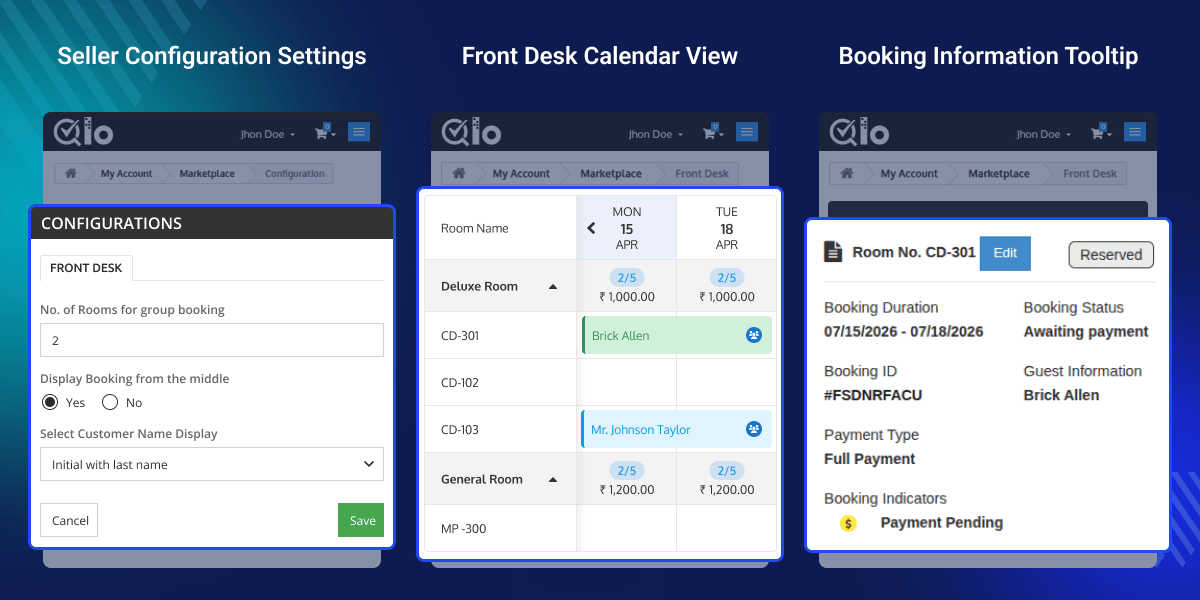
Manage reservations, room occupancy, arrivals, departures, and room availability from a structured calendar view with rooms displayed in rows and dates organized in columns.
Monitor live room inventory and room rates directly from the Front Desk calendar without switching between multiple pages.
Easily modify booking dates, reallocate rooms, swap room types, and manage reservations through simple drag-and-drop functionality.
Search reservations using booking ID, booking reference, guest details, hotel, room type, or booking status for faster reservation management.
Identify booking progress instantly with customizable booking statuses, payment indicators, group booking tags, and room availability information.
View arrivals, departures, occupied rooms, booked rooms, available rooms, and out-of-order rooms instantly for any selected calendar date.
Managing hotel operations across multiple seller properties becomes much easier with the QloApps Marketplace Front Desk Module. It provides sellers with a centralized workspace to manage reservations, room occupancy, availability, booking modifications, and guest activities from a single interactive calendar. Real-time inventory updates, drag-and-drop booking management, booking indicators, and advanced filters help reduce manual work while improving operational efficiency and overall guest service.
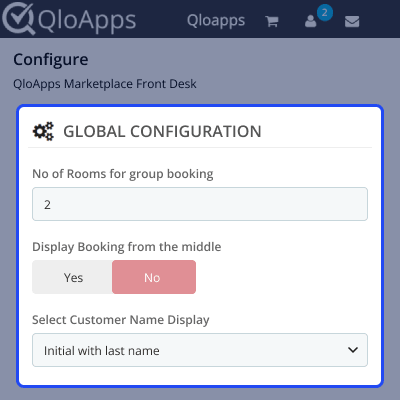
The Marketplace Front Desk module allows the marketplace admin to configure global front desk settings that apply across all seller properties. These settings help standardize front desk operations while giving sellers the flexibility to overwrite them based on their individual hotel requirements.
These configuration options ensure a consistent booking workflow while allowing each seller to customize the experience according to their operational needs.
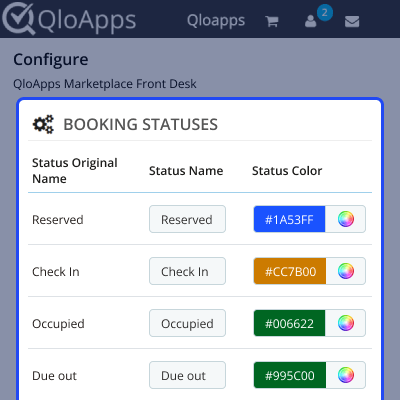
The Marketplace Front Desk module enables marketplace admins to configure booking statuses and assign unique colours for each status, making reservation tracking much easier directly from the Front Desk calendar.
Admins can customize booking statuses such as Reserved, Confirmed Reserved, Check-in, Occupied, Due Out, Check-out, and Out of Order to match their operational workflow.
The selected colours are reflected instantly within the calendar, allowing sellers to identify booking progress, room occupancy, and operational status at a glance.
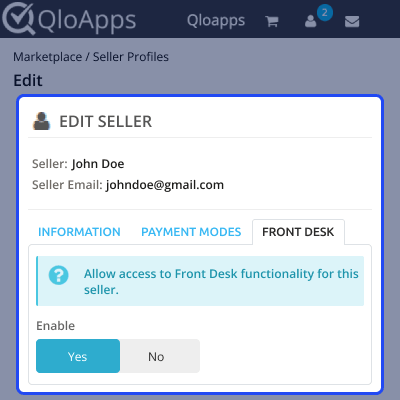
The Marketplace Front Desk module provides complete control over seller access. Marketplace admins can enable or disable Front Desk functionality individually for each seller directly from the seller profile page.
Only authorized sellers can access the Front Desk interface to manage reservations, room allocation, occupancy, and daily hotel operations. If access is disabled, the Front Desk option is automatically hidden from the seller panel.
This access control mechanism helps marketplace admins manage permissions efficiently while maintaining better operational security across all seller properties.
For any query or issue, please create a support ticket here.
You may also explore our other top-quality QloApps Add-ons.
Detailed technical features and requirements to help you understand the module’s capabilities and ensure smooth integration with your system.
Detailed technical features and requirements to help you understand the module’s capabilities and ensure smooth integration with your system.
We’re partnered with top-tier, trusted providers!
Want to know more how exactly we are going to power up your eCommerce Website with Cloud to fasten up your store
* Server Configuration may vary as per application requirements.



