USD
  • EUR
  • INR
  • USD
Cart
Cart 0
  • You have no items in your shopping cart.
    QloApps Extensions
    Cart
    Cart 0
    • You have no items in your shopping cart.
    Hire a Developer
    ×
    Contact Us!
    Send Again
    Close
    Please Login to Write Your Review
    QloApps Marketplace Hotel Reports

    QloApps Marketplace Hotel Reports

    x
    Free

    * Required Fields

    $75.00
    Add To Cart

    QloApps MP Hotel Reports provides hotel marketplace administrators and sellers with detailed reports on bookings, occupancy, revenue, taxes, refunds, and outstanding balances.


    • Access multiple reports from the seller account for their own hotels.

    • Filter Back Office reports by property source, seller, hotel, and room type.

    • Control CSV report exports for all sellers or selected sellers.

    • Track daily occupancy, ADR, RevPAR, and room availability.

    • Analyze booking sources, payment methods, revenue, and taxes.

    • Compare hotel performance and monitor outstanding booking balances.

    QloApps Marketplace Hotel Reports
    QloApps Marketplace Hotel Reports
    $75.00
    Check How It Works

    Need Help Deciding?

    Support answers within one business day.

    Open a ticket
    $75.00
    Configure and Buy
    X
    • Description
    • Reviews
    • FAQ
    • Customers ()
    • Specifications
    • Cloud Hosting
    • Changelog

    QloApps MP Hotel Reports helps marketplace administrators and sellers monitor hotel performance through detailed reports on bookings, occupancy, revenue, taxes, payments, and refunds. Administrators can analyze all properties, while sellers can access reports for their own hotels.

    The module includes 21 reports, seller-specific access, property source filters, and configurable CSV export permissions. It uses existing booking data and works with the QloApps Marketplace module without creating additional database tables.
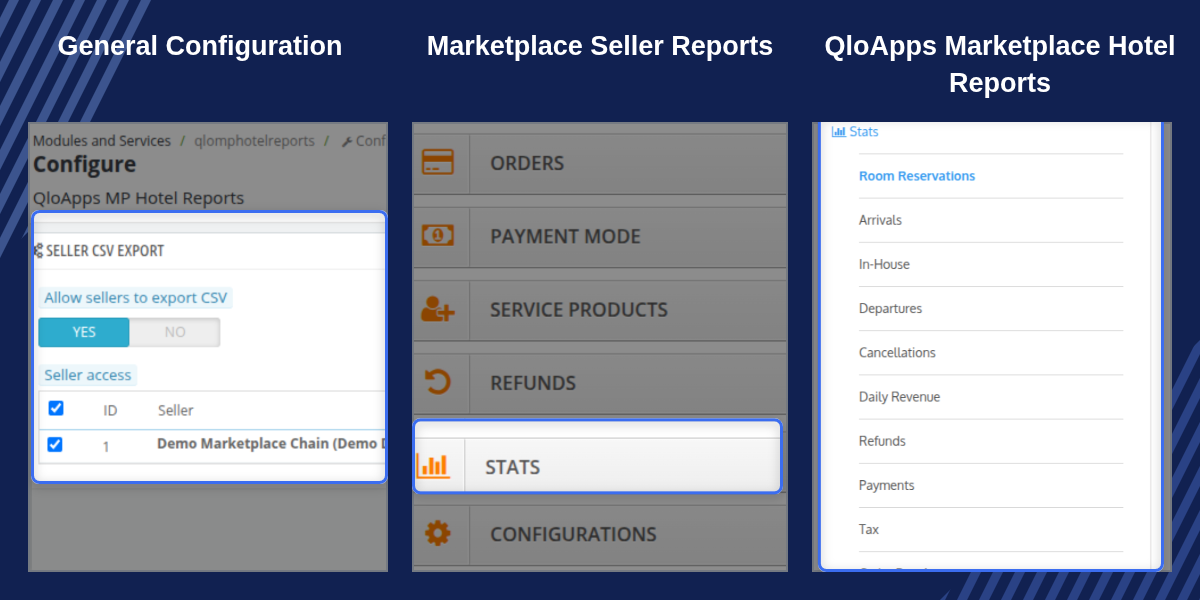
    QloApps MP Hotel Reports

    Highlighted Features

    Seller Stats Dashboard

    Give active sellers access to 21 reports for their own hotels through the seller account's Stats page.

    Property Source and Seller Filters

    Filter Back Office reports by all hotels, admin-owned hotels, seller hotels, or a specific seller.

    CSV Export Permissions

    Enable or disable CSV exports for sellers globally and select which active sellers can download reports.

    Occupancy and Revenue Reports

    Track daily occupancy, available rooms, ADR, RevPAR, room revenue, service revenue, taxes, and refunds.

    Booking and Payment Analysis

    Review reservations, arrivals, departures, cancellations, payment methods, booking sources, and outstanding balances.

    Hotel Performance Comparison

    Compare hotel revenue, bookings, occupancy, cancellation rates, RevPAR, and outstanding amounts in one report.

    Why Use QloApps MP Hotel Reports

    Managing a hotel marketplace requires clear visibility into the performance of admin-owned and seller-managed properties. Collecting booking, revenue, and occupancy figures separately can take time and make comparisons difficult.

    QloApps MP Hotel Reports brings these reports together using existing booking data. Administrators can review marketplace performance and filter results by seller, while sellers can monitor their own hotels. Configurable CSV permissions also help administrators control report downloads.

    QloApps MP Hotel Reports Seller Stats Page

    The module adds a Stats page to the seller account, accessible through the My Account tile or marketplace sidebar. Active sellers can view the available reports for their own hotels, with date range and hotel filters.
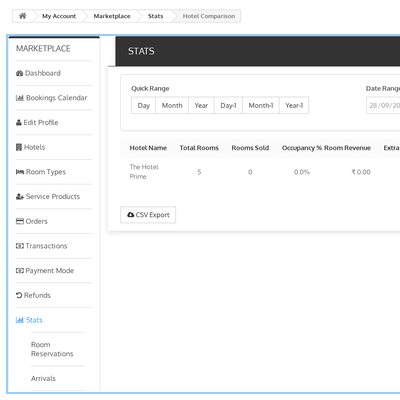
    • Access 21 reports from the seller account.
    • View data only for hotels mapped to the logged-in seller.
    • Filter reports by date range and hotel.
    • Open reports with the last 30 days selected by default.
    Seller Stats page with hotel reports

    QloApps MP Hotel Reports CSV Export Access

    Manage seller access to report downloads from the module configuration page. The Seller CSV Export panel includes a master switch and individual seller permissions.
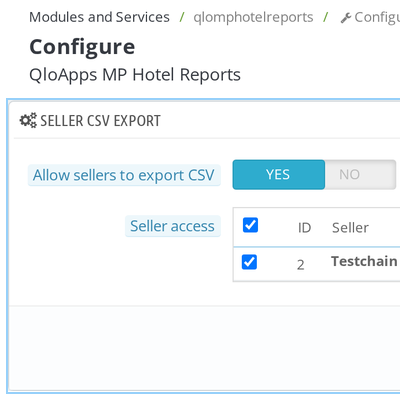
    • Allow sellers to export CSV: Enable or disable CSV exports for all sellers.
    • Seller access: Select the active sellers who can see the CSV Export button.
    • Update export permissions whenever required.
    Seller CSV export configuration

    QloApps MP Hotel Reports Property Filters

    Use the Back Office filters to review specific property groups and seller performance. Property Source allows administrators to switch between all hotels, admin hotels, and seller hotels.
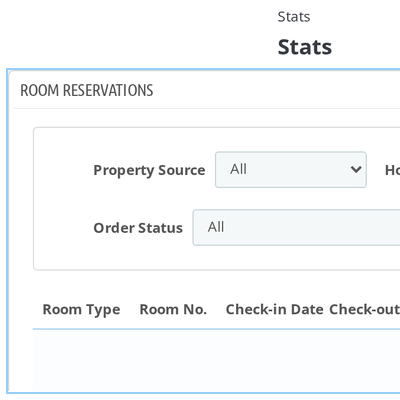
    • Filter reports by property source.
    • Select a specific seller to view their hotel data.
    • Filter by hotel and room type based on the selected criteria.
    • Apply the selected filters to report totals and CSV exports.
    Property source and seller filters in Back Office reports

    QloApps MP Hotel Reports Booking and Revenue Analysis

    Review booking activity and financial performance through dedicated booking and revenue reports. These reports help administrators and property managers follow reservations, guest stays, payments, and refunds.
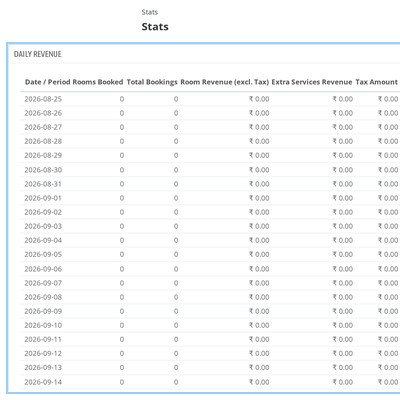
    • Booking reports: Room Reservations, Arrivals, In-House, Departures, and Cancellations.
    • Revenue reports: Daily Revenue, Refunds, Payments, Tax, and Order Due Amount.
    • Review room and extra service revenue, taxes, refunds, net revenue, and ADR.
    • Track total charges, amounts paid, and outstanding balances for each order.
    Daily revenue and booking reports

    QloApps MP Hotel Reports Occupancy and Booking Sources

    Monitor room availability and occupancy trends with daily metrics. Analyze booking sources and payment methods to understand how reservations and revenue are distributed.
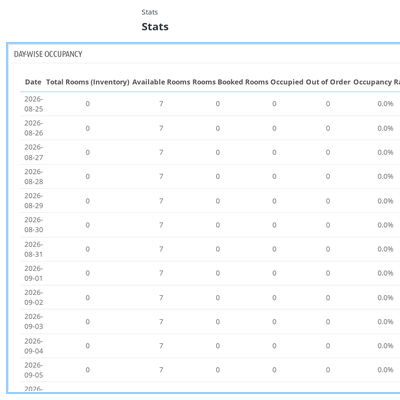
    • View total, available, booked, occupied, and out-of-order rooms by day.
    • Track occupancy rate, Average Daily Rate (ADR), and Revenue per Available Room (RevPAR).
    • Review room status as of the selected start date.
    • Compare booking sources by orders, nights sold, net revenue, cancellation rate, and contribution percentage.
    • Review booking counts and revenue by payment method.
    Daily occupancy and booking source reports

    QloApps MP Hotel Reports Guest and Property Insights

    Explore guest activity and compare property performance through guest and hotel reports. These reports provide useful information for reviewing stays, service sales, and hotel operations.
    • Guest Directory: View guest contact details, total stays, nights, lifetime revenue, average spend, and New or Returning tags.
    • Booked Services: Review extra services sold with bookings.
    • Daily Summary: View daily property figures in one report.
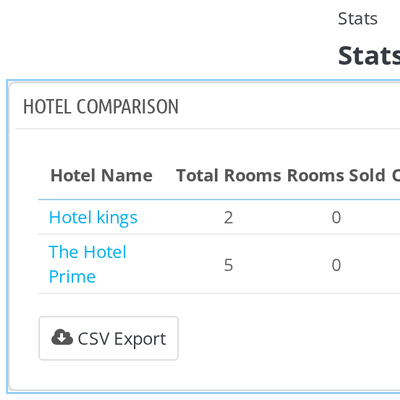
    • Hotel Comparison: Compare revenue, bookings, cancellation rates, and outstanding balances across hotels.
    • Out of Order Rooms: Review room status, dates, and reasons for rooms taken out of service.
    Hotel comparison and guest reports

    QloApps MP Hotel Reports Support

    For any query or issue, please create a support ticket here.

    You may also explore our other QloApps modules.

    Specifications

    Product Version4.0.0
    Released3 days ago
    Last UpdatedNovember 3, 2026 (Today)
    Supported VersionsQloApps  1.6.x  1.7.x  

    Ratings

    We'd love to hear your thoughts! Share your feedback and help us craft an even better experience tailored just for you.

    Write a review

    Frequently Asked Questions

     Does the module require the Marketplace module?
    Yes. QloApps MP Hotel Reports depends on the Marketplace module for seller accounts, seller hotels, and marketplace pages. Install the Marketplace module before installing QloApps MP Hotel Reports.
     Which sellers can access the Stats page?
    Only logged-in customers with an active seller account and at least one hotel mapped to them can access the seller Stats page. Visitors who are not logged in are redirected to the login page, while sellers without hotels are redirected to the hotel list.
     Can sellers view reports for other sellers' hotels?
    No. Each seller can access reports only for their own mapped hotels. The Hotel filter lists only their hotels, and hotels belonging to other sellers are excluded from the seller's reports.
     Can administrators control CSV exports for sellers?
    Yes. CSV export is enabled for all sellers by default. Administrators can disable exports for everyone using the Allow sellers to export CSV setting or remove access for individual sellers through the Seller access list. Sellers without permission will not see the CSV Export button.
     What do the Property Source and Seller filters do?
    The Property Source filter lets administrators view reports for all hotels, admin-owned hotels, or seller hotels. The Seller filter narrows reports to one seller's hotels. Hotel and Room Type options update according to the selected filters, and report totals reflect the selection.
     Which date range is selected by default on the seller Stats page?
    The seller Stats page opens with the last 30 days selected, ending on the current day. Sellers can change the From and To dates, and the selected date range carries across the reports in the sidebar.
     Which QloApps versions are supported, and does the module create database tables?
    QloApps MP Hotel Reports requires QloApps 1.7.0.0 or later. It reads existing booking data and does not create database tables. The module stores its two CSV export settings and adds an override of the Stats menu controller to display its reports in the Stats sidebar.
     

    Specification

    Detailed technical features and requirements to help you understand the module’s capabilities and ensure smooth integration with your system.

    Cloud Hosting

    Detailed technical features and requirements to help you understand the module’s capabilities and ensure smooth integration with your system.

    Default Configuration Details of Server

    1 GB
    RAM
    1 Core
    Processor
    30 GB
    Hard Disk
    1 GB RAM & 1 Core Processor
    Database

    Want to know more how exactly we are going to power up your eCommerce Website with Cloud to fasten up your store

    * Server Configuration may vary as per application requirements.

    Change Logs

    Changelog

    Version 1.0.0

    • [CO] : Compatible with QloApps 1.7.x.
    • [NF] : Added 21 hotel reports covering reservations, revenue, occupancy, booking channels, guests, and properties to the Back Office Stats page.
    • [NF] : Added a Stats page for marketplace sellers, with reports limited to their own hotels and accessible through the seller sidebar.
    • [NF] : Added Property Source (All / Admin / Sellers) and Seller filters to Back Office reports.
    • [NF] : Added seller CSV export permissions with a global enable/disable switch and individual seller access settings.