USD
  • EUR
  • INR
  • USD
Cart
Cart 0
  • You have no items in your shopping cart.
    QloApps Extensions
    Cart
    Cart 0
    • You have no items in your shopping cart.
    Hire a Developer
    ×
    Contact Us!
    Send Again
    Close
    Please Login to Write Your Review
    QloApps Marketplace Iyzico Payment

    QloApps Marketplace Iyzico Payment

    x
    Free

    * Required Fields

    $65.00
    Add To Cart

    QloApps Marketplace Iyzico Payment Gateway enables marketplaces to accept secure online payments through Iyzico while automatically splitting booking amounts between marketplace admins and sellers with flexible settlement management.


    • Supports secure online payments through Iyzico.

    • Automatically splits booking payments between marketplace admin and sellers.

    • Supports Instant and Delayed seller settlement options.

    • Allows sellers to complete Iyzico onboarding with their business and banking details.

    • Supports Auto-Approval Cron for pending seller settlements.

    • Provides detailed transaction, seller settlement, and commission distribution information.

    QloApps Marketplace Iyzico Payment
    QloApps Marketplace Iyzico Payment
    $65.00
    Check How It Works
    $65.00
    Configure and Buy
    X
    • Description
    • Reviews
    • FAQ
    • Customers ()
    • Specifications
    • Cloud Hosting
    • Changelog

    The QloApps Marketplace Iyzico Payment Gateway is a powerful add-on for QloApps Marketplace that enables secure online payments through Iyzico while automatically splitting booking payments between the marketplace admin and sellers. It helps marketplace owners manage seller settlements, commissions, and payment transactions smoothly from the QloApps back office.
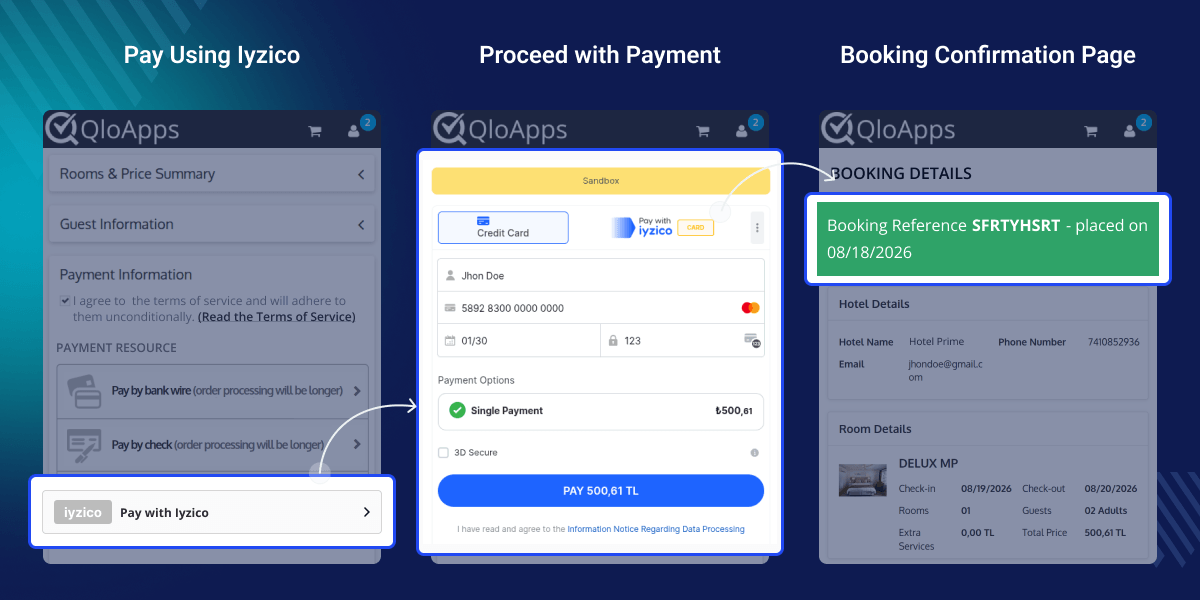
    QloApps Marketplace Iyzico Payment Gateway

    Highlighted Features

    Secure Iyzico Payment Processing

    Accept secure online payments through Iyzico and provide guests with a trusted payment experience during the hotel booking process.

    Automatic Payment Split

    Automatically split booking payments between the marketplace admin and sellers based on seller ownership and configured commission rates.

    Instant & Delayed Seller Settlements

    Choose Instant settlement for automatic seller payouts after successful payments or Delayed settlement for admin approval before seller payments are released.

    Seller Iyzico Onboarding

    Allow sellers to connect their Iyzico accounts from their seller panel by providing their business, contact, tax, and banking details.

    Auto-Approval Cron Job

    Automatically approve pending seller settlements after the configured number of days when Auto-Approval Cron is enabled for Delayed settlement.

    Multi-Currency Support

    Support payments in TRY, USD, EUR, GBP, CHF, NOK, DKK, SEK, CAD, RUB, AED, and RON for a flexible marketplace payment experience.

    Why Use QloApps Marketplace Iyzico Payment Gateway

    Managing payments in a hotel marketplace can become difficult when booking amounts, seller commissions, and settlements need to be handled separately. The QloApps Marketplace Iyzico Payment Gateway simplifies this process by splitting booking payments between the marketplace admin and sellers. Admins can choose how seller settlements are processed, while sellers can connect their Iyzico accounts and manage their payment details. This helps create a smoother payment and settlement process for the entire marketplace.

    Easy Configuration

    Configure the module by connecting your QloApps Marketplace with your Iyzico merchant account and selecting the required settlement settings.

    • API Key and Secret Key: Used to securely connect the marketplace with the Iyzico payment service.
    • Admin Submerchant Key: Identifies the marketplace admin as an Iyzico submerchant and receives the admin's share from split payments.
    • Settlement Type: Choose between Instant and Delayed settlement according to your marketplace payment workflow.

    These settings help establish a secure connection with Iyzico and manage marketplace payment settlements efficiently.
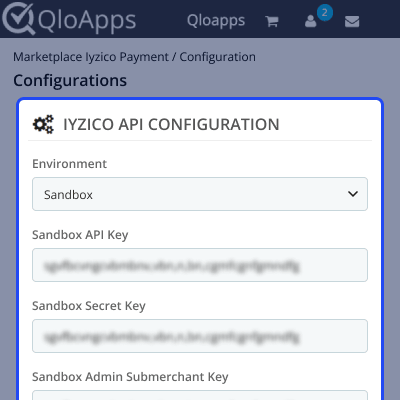
    QloApps Marketplace Iyzico Payment Gateway Configuration

    Create Admin Iyzico Submerchant

    Before processing marketplace payments, the admin can create an Iyzico Admin Submerchant to receive the admin's share from split booking payments. Enter the required seller type, identity number, contact details, address, and IBAN, then create the Admin Submerchant from the module configuration.
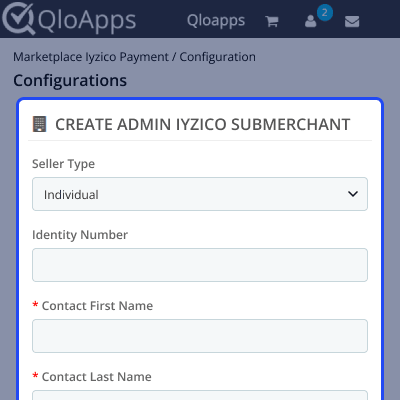
    QloApps Marketplace Iyzico Admin Submerchant

    Cron Job Configuration

    When Delayed settlement is selected, the admin can use the Auto-Approval Cron to automatically approve pending seller settlements after a configured waiting period. If the cron is disabled, seller settlements can be approved manually by the marketplace admin.

    With Instant settlement, seller settlements are approved immediately after a successful payment, so no cron job or manual approval is required.
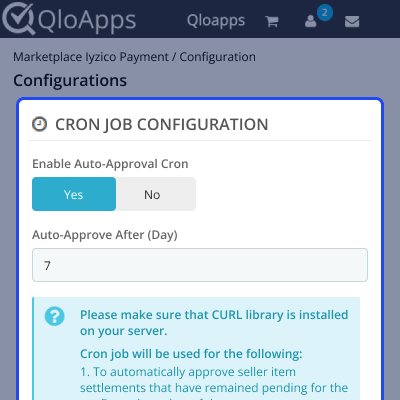
    QloApps Marketplace Iyzico Cron Job Configuration

    Iyzico Transaction Details

    Admins can view marketplace bookings made through Iyzico from the dedicated Marketplace Iyzico Payment Transactions section. By opening a transaction, admins can review complete payment and booking information along with seller settlement details.
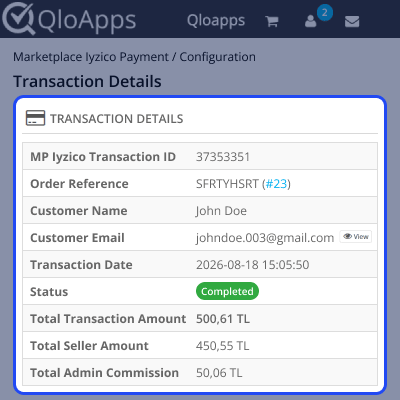
    QloApps Marketplace Iyzico Transaction Details

    Seller Item Settlements

    Review the settlement amount assigned to each seller from the transaction details. The admin can check the seller settlement and process or approve the settlement according to the selected settlement workflow.
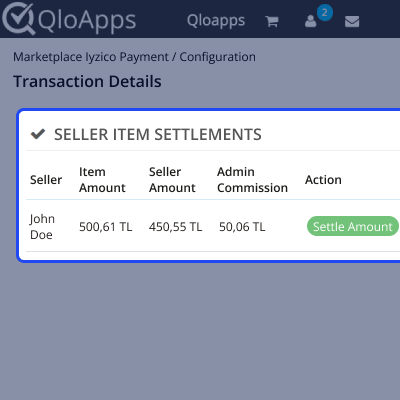
    QloApps Marketplace Iyzico Seller Item Settlements

    Seller-wise Commission Distribution

    View a clear breakdown of the booking amount, seller share, admin commission, and settlement amount for each seller. This makes it easier for marketplace admins to track how booking payments are distributed between sellers and the marketplace.
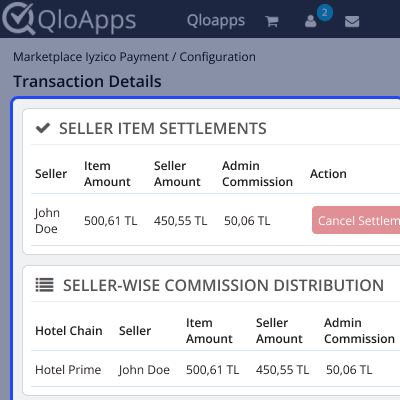
    QloApps Marketplace Iyzico Seller-wise Commission Distribution

    QloApps Marketplace Iyzico Payment Gateway Support

    For any query or issue, please create a support ticket here.

    You may also explore our other top-quality QloApps Add-ons.

    Specifications

    Product Version4.0.0
    Released11 days ago
    CategoryQloAppsPayment
    Last UpdatedAugust 27, 2026 (5 days ago)
    Supported VersionsQloApps  1.6.x  1.7.x  

    Ratings

    We'd love to hear your thoughts! Share your feedback and help us craft an even better experience tailored just for you.

    Write a review

    Frequently Asked Questions

     What is the QloApps Marketplace Iyzico Payment Gateway?
    The QloApps Marketplace Iyzico Payment Gateway allows marketplace admins to accept secure online payments through Iyzico and automatically split booking payments between the marketplace admin and sellers.
     
     What settlement options are supported?
    The module supports Instant and Delayed settlement options. Instant settlement approves seller settlements immediately, while Delayed settlement allows the admin to approve settlements manually or automatically using the Auto-Approval Cron.
     
     Can the marketplace admin create an Iyzico Submerchant?
    Yes, the marketplace admin can create an Iyzico Admin Submerchant from the module configuration by providing the required business, contact, identity, address, and IBAN details.
     
     Can sellers connect their Iyzico accounts?
    Yes, sellers can connect their Iyzico accounts from the seller panel by providing their seller type, contact details, identity information, address, and IBAN.
     
     Does the module support automatic seller settlement approval?
    Yes, when Delayed settlement is selected, the admin can enable the Auto-Approval Cron and configure the number of days after which pending seller settlements will be approved automatically.
     
     Can I view seller commissions and settlement details?
    Yes, admins can view transaction details, seller item settlements, seller shares, admin commissions, and settlement amounts from the Marketplace Iyzico Payment Transactions section.

    Specification

    Detailed technical features and requirements to help you understand the module’s capabilities and ensure smooth integration with your system.

    Cloud Hosting

    Detailed technical features and requirements to help you understand the module’s capabilities and ensure smooth integration with your system.

    Default Configuration Details of Server

    1 GB
    RAM
    1 Core
    Processor
    30 GB
    Hard Disk
    1 GB RAM & 1 Core Processor
    Database

    Want to know more how exactly we are going to power up your eCommerce Website with Cloud to fasten up your store

    * Server Configuration may vary as per application requirements.

    Change Logs

    Not Available


