USD
  • EUR
  • INR
  • USD
Cart
Cart 0
  • You have no items in your shopping cart.
    QloApps Extensions
    Cart
    Cart 0
    • You have no items in your shopping cart.
    Hire a Developer
    ×
    Contact Us!
    Send Again
    Close
    Please Login to Write Your Review
    QloApps Marketplace Occupancy Based Pricing

    QloApps Marketplace Occupancy Based Pricing

    x
    Free

    * Required Fields

    $125.00
    Add To Cart

    QloApps Marketplace Occupancy Based Pricing gives marketplace sellers a flexible pricing model that
    adjusts room and service prices based on guest occupancy. Sellers can configure pricing for adults, children, and
    infants while managing different occupancy strategies across hotels, room types, and service products.


    • Flexible occupancy-based pricing for marketplace hotels and room types.

    • Four pricing strategies for different guest-based pricing requirements.

    • Separate adult, child, and infant pricing with fixed or percentage values.

    • Date-specific occupancy price overrides for seasonal and advance pricing.

    • Occupancy-based pricing for service products with independent child and infant settings.

    • Per-seller pricing control with clear visibility across seller hotels and room types.

    QloApps Marketplace Occupancy Based Pricing
    QloApps Marketplace Occupancy Based Pricing
    $125.00
    Check How It Works

    Need Help Deciding?

    Support answers within one business day.

    Open a ticket
    $125.00
    Configure and Buy
    X
    • Description
    • Reviews
    • FAQ
    • Customers ()
    • Specifications
    • Cloud Hosting
    • Changelog

    QloApps Marketplace Occupancy Based Pricing gives marketplace sellers a flexible pricing model that adjusts room and service prices based on guest occupancy instead of using one flat rate for every booking. Sellers can configure how prices change as adults, children, and infants are added or removed, making it easier to manage guest-based pricing across independent hotels and properties.
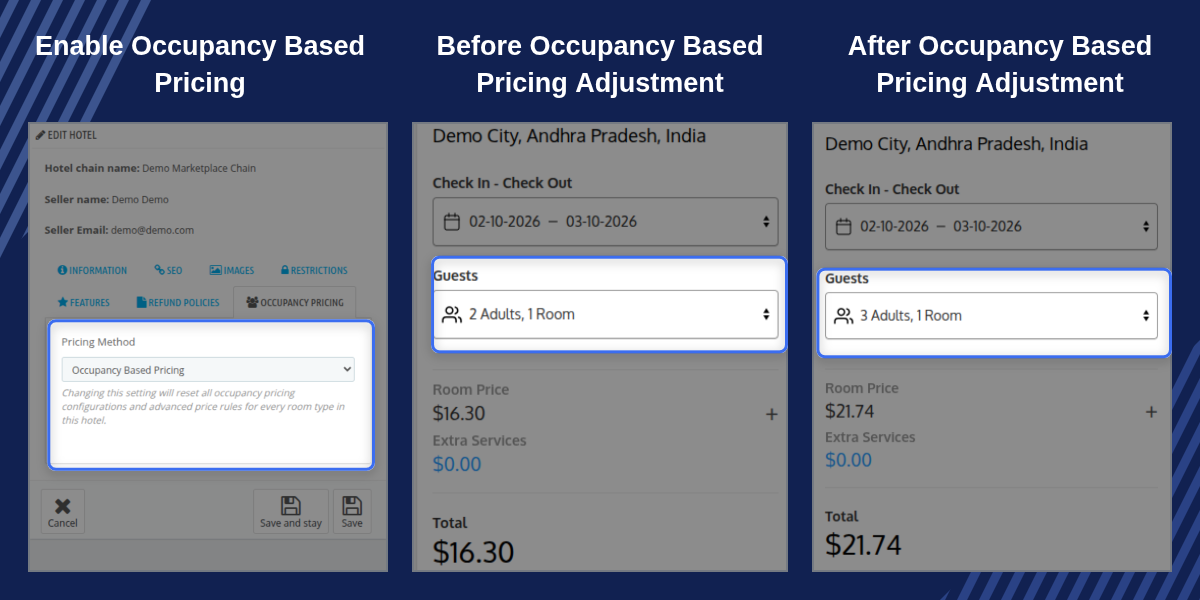
    QloApps Marketplace Occupancy Based Pricing

    Highlighted Features

    Flexible Occupancy-Based Pricing

    Allow marketplace sellers to adjust room and service prices according to guest occupancy instead of using a single flat booking rate.

    Four Pricing Strategies

    Choose from four pricing strategies to support different occupancy-based pricing requirements for marketplace room types.

    Adult, Child and Infant Pricing

    Configure separate pricing values for adults, children, and infants using fixed amount or percentage-based pricing options.

    Date-Specific Price Overrides

    Apply different occupancy-based prices for selected dates and seasonal periods using advance price rules.

    Service Product Occupancy Pricing

    Apply occupancy-based pricing to service products and independently decide whether children and infants are included in the guest count.

    Per-Seller Pricing Control

    Marketplace administrators can enable or disable occupancy-based pricing access for individual sellers according to their business requirements.

    Why Use QloApps Marketplace Occupancy Based Pricing

    Different marketplace sellers may follow different pricing models depending on their room types, occupancy limits, guest categories, and business requirements. QloApps Marketplace Occupancy Based Pricing provides sellers with the flexibility to calculate room and service prices according to the number and type of guests included in a booking.

    With multiple pricing strategies, date-specific overrides, separate adult, child, and infant pricing, and service product support, marketplace sellers can manage more accurate and flexible rates. Administrators can also control feature access for individual sellers while maintaining consistent pricing management across the marketplace.

    Hotel Pricing Method

    Each hotel in the seller dashboard includes a dedicated Pricing Method option within Hotel Settings. Sellers can choose between Per Night Pricing and Occupancy Based Pricing according to the hotel's pricing requirements.
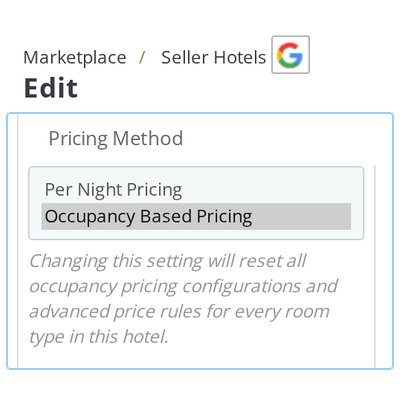
    • Select Per Night Pricing when the hotel follows a standard room pricing model.
    • Select Occupancy Based Pricing when room prices need to change according to guest occupancy.
    • When Occupancy Based Pricing is enabled, sellers can configure guest-based pricing for individual room types.
    • A confirmation is displayed before changing the hotel's pricing method to help prevent accidental configuration changes.
    • Changing the pricing method resets existing advanced price rules and occupancy configurations for the hotel's room types.
    • Marketplace administrators can review or adjust the seller's pricing configuration from the admin backoffice.
    QloApps Marketplace Occupancy Based Pricing Hotel Pricing Method

    Room Type Pricing Strategy

    Once a hotel uses Occupancy Based Pricing, sellers can select a dedicated Pricing Strategy for each room type. The module provides four flexible strategies to calculate room prices according to guest occupancy.
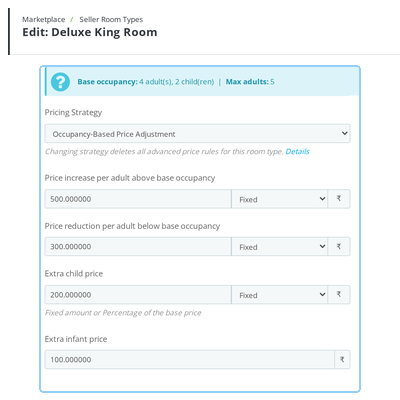
    • Occupancy-Based Price Adjustment: Adjust the base room price according to additional adult occupancy along with child and infant pricing.
    • Per-Guest Pricing: Calculate the room price individually based on the number of adults, children, and infants.
    • Price for Each Occupancy Level: Define specific prices for different adult occupancy levels with additional child and infant pricing.
    • Derived Pricing: Calculate different adult occupancy levels by increasing or decreasing the base occupancy price.
    • Configure separate pricing values for adults, children, and infants according to the selected strategy.
    • Pricing values can be configured as fixed amounts or percentages where supported by the selected strategy.
    QloApps Marketplace Occupancy Based Pricing Room Type Pricing Strategy

    Date-Specific Price Overrides

    Sellers can apply different occupancy-based prices to specific date ranges through advance price rules. This allows hotels to manage seasonal rates and selected date-based pricing without changing their standard room pricing configuration.
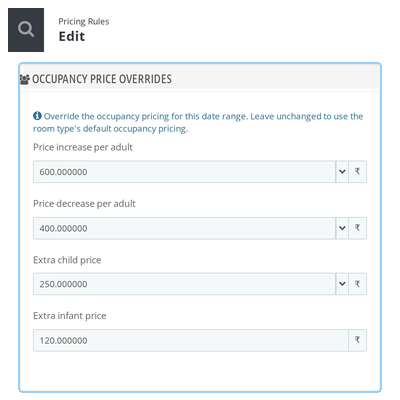
    • Apply occupancy-based pricing overrides to specific date ranges.
    • Configure different guest-based prices for seasonal periods and selected dates.
    • Use the pricing strategy already selected for the room type when configuring the override.
    • Manage occupancy adjustments, per-guest pricing, occupancy-level pricing, or derived pricing for specific periods.
    • Maintain different occupancy prices while keeping the standard room pricing configuration unchanged.
    • Use occupancy pricing overrides alongside advance pricing rules for greater seasonal pricing control.
    • Changing the room type's overall pricing strategy clears the related occupancy overrides along with the advanced price rules.
    QloApps Marketplace Occupancy Based Pricing Date-Specific Price Overrides

    Service Product Pricing

    Occupancy-based pricing can also be applied to service products such as extra beds, spa services, airport transfers, and other hotel extras. Sellers can configure how service product prices are calculated according to the guest count included in a booking.
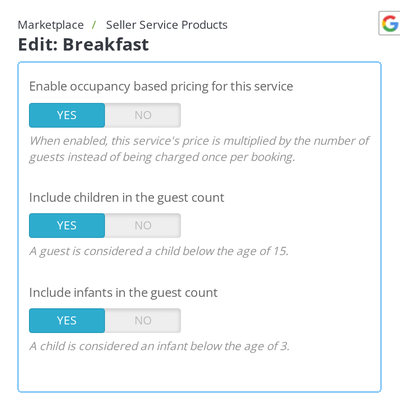
    • Enable Occupancy Based Pricing directly from the service product's Prices tab.
    • The service product price can be multiplied according to the guest count included in the booking.
    • Include Children: Decide whether children should be included in the service product's guest count.
    • Include Infants: Independently decide whether infants should be included in the guest count.
    • Child and infant calculations use the age threshold configured for the marketplace shop.
    • Each service product can have its own child and infant inclusion settings for greater pricing flexibility.
    QloApps Marketplace Occupancy Based Pricing Service Product Pricing

    QloApps Marketplace Occupancy Based Pricing Support

    For any query or issue, please create a support ticket here.

    You may also explore our other top-quality QloApps Add-ons.

    Specifications

    Product Version5.0.0
    Released18 days ago
    Last UpdatedOctober 5, 2026 (14 days ago)
    Supported VersionsQloApps  1.6.x  1.7.x  

    Ratings

    We'd love to hear your thoughts! Share your feedback and help us craft an even better experience tailored just for you.

    Write a review

    Frequently Asked Questions

     What happens to a room type's existing pricing rules if a seller changes its pricing strategy?
    Changing the Pricing Strategy on the Room Type Price tab deletes the room type's existing advanced price rules and occupancy overrides. A confirmation warning is displayed before the change is saved, helping prevent outdated pricing data from carrying over between different pricing strategies.
     
     How does the module tell a child apart from an infant?
    The module uses a single shop-wide Consider child as infant below age setting configured under Modules → Configure. This threshold is applied consistently across occupancy pricing and service product pricing for all sellers in the marketplace.
     
     Can occupancy-based pricing apply on some dates and not others?
    Yes. Sellers can add occupancy pricing overrides to room type advance price rules, allowing different adult, child, and infant pricing for specific date ranges without changing the default occupancy pricing for the rest of the year.
     
     Does occupancy-based pricing apply to service products as well as rooms?
    Yes. Each service product includes an Enable Occupancy Based Pricing option on its Prices tab. Sellers can also separately decide whether children and infants should be included in the guest multiplier for each service.
     
     Can a marketplace admin stop specific sellers from using occupancy-based pricing?
    Yes. Marketplace administrators can enable or disable occupancy-based pricing access from the seller profile. This allows the feature to be controlled for individual sellers without affecting the pricing configuration of other sellers.
     
     What is the difference between the four pricing strategies?
    Occupancy-Based Price Adjustment changes the base price by a fixed or percentage amount based on adult occupancy. Per-Guest Pricing calculates pricing for individual guests. Price for Each Occupancy Level lets sellers define a specific price for each adult occupancy level, while Derived Pricing calculates each occupancy level as an increase or decrease from the base occupancy price.
     
     Do sellers configure occupancy pricing from the front office, the backoffice, or both?
    Both. The same Pricing Method, Pricing Strategy, and service product pricing fields are available in the seller front-office dashboard and admin backoffice, allowing marketplace administrators to review or adjust seller occupancy pricing directly.

    Specification

    Detailed technical features and requirements to help you understand the module’s capabilities and ensure smooth integration with your system.

    Cloud Hosting

    Detailed technical features and requirements to help you understand the module’s capabilities and ensure smooth integration with your system.

    Default Configuration Details of Server

    1 GB
    RAM
    1 Core
    Processor
    30 GB
    Hard Disk
    1 GB RAM & 1 Core Processor
    Database

    Want to know more how exactly we are going to power up your eCommerce Website with Cloud to fasten up your store

    * Server Configuration may vary as per application requirements.

    Change Logs

    Changelog

    V5.0.0 – Compatible with QloApps-1.7.0

    • Compatible with Marketplace version 5.0.0.

    V4.0.0 – Compatible with QloApps-1.7.0

    • Compatible with Marketplace version 4.0.0.

    V2.0.0 – Compatible with QloApps-1.6.1

    • Compatible with Marketplace version 2.0.0.


