QloApps Marketplace Paypal Commerce Payment Gateway
QloApps Marketplace PayPal Commerce Payment Gateway enables secure PayPal payments in a multi-vendor marketplace, with automated commission handling, flexible payouts, and built-in refund management.
- Supports secure PayPal checkout with global buyer protection.
- Automatic payment split between admin and hotel sellers.
- Offers instant or delayed disbursement control for seller payouts.
- Admin can process full or partial refunds directly from transactions.
- Dedicated “PayPal Transactions” tab for complete payment visibility.
- Description
- Reviews
- FAQ
- Customers ()
- Specifications
- Cloud Hosting
- Changelog
The QloApps Marketplace PayPal Commerce Payment Gateway is a powerful and secure add-on for QloApps Marketplace, enabling guests to pay via PayPal while automatically managing admin commissions and seller payouts within a multi-vendor hotel marketplace.
The module ensures smooth checkout, transparent payment distribution, and centralized transaction control for admins and partner hotels.
Highlighted Features
Marketplace Payment Split
Automatically splits booking amounts between admin and hotel sellers based on configured commission rules.
Instant & Delayed Disbursement
Admins can choose instant payouts to sellers or delay disbursement based on marketplace policies.
Seller PayPal Onboarding
Allows partner hotels to connect their PayPal accounts directly from the seller dashboard.
Transaction & Refund Management
Admins can monitor transactions and issue full or partial refunds directly from the PayPal Transactions tab.
PayPal Commerce Configuration
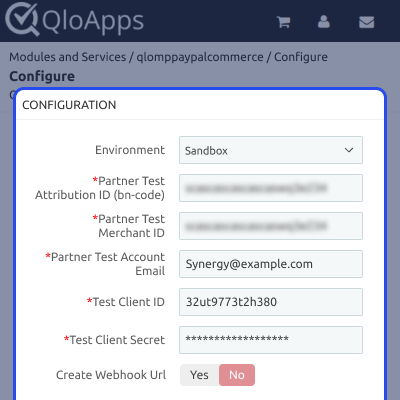
Admins can configure PayPal Commerce by providing all necessary details:
- Environment: Select how PayPal processes transactions (Sandbox for testing or Production for live payments).
- Partner Attribution ID (bn-code): Identifies your PayPal integration.
- Partner Merchant ID: Merchant identifier assigned by PayPal to link your marketplace account.
- Account Email: Email linked to the PayPal merchant account application.
- Client ID: Public identifier used to authenticate PayPal API requests.
- Client Secret: Private credential for secure communication with PayPal APIs.
- Create Webhook URL: Select Yes to automatically generate a webhook, or No if testing locally.
- Disbursement Mode: Controls how payouts are released to sellers.
- Instant: Funds are released to sellers immediately.
- Delayed: Funds are held and released later based on admin approval.
- Enable PayPal on Checkout Page by Default: When enabled, guests see a PayPal drop-up panel automatically. If disabled, guests must click “Pay by PayPal” to proceed.
- Title: Name shown to customers for this payment method at checkout.
Note: Changing the environment from Sandbox to Production will update all details accordingly.
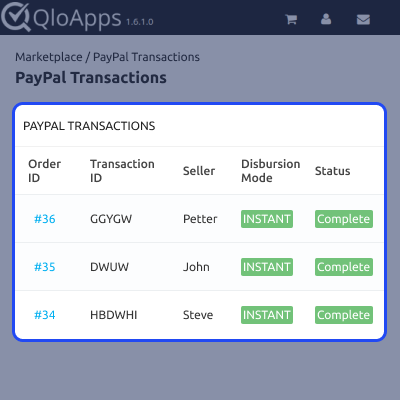
PayPal Transactions
All marketplace PayPal payments are listed in a centralized Transactions tab, allowing admins to track booking payments, commissions, and seller settlements.
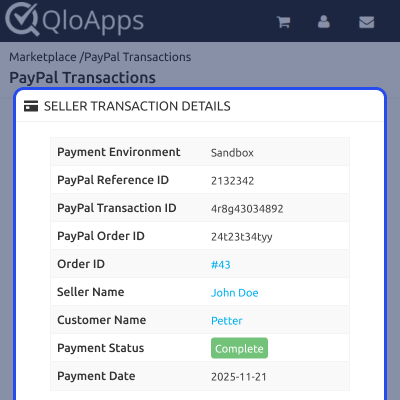
PayPal Transaction Details & Refunds
Admins can view detailed transaction summaries and initiate full or partial refunds. Refunds are deducted from the seller or admin based on the selected disbursement mode and returned to the guest.
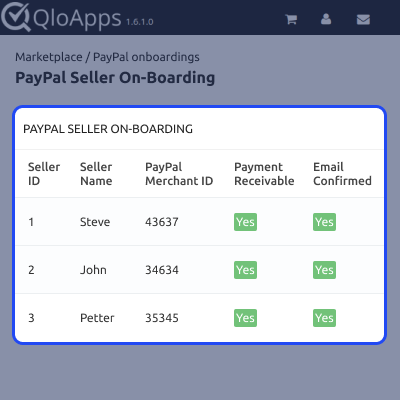
Seller PayPal Onboarding
After the admin enables the QloApps Marketplace PayPal Commerce Payment Gateway, all sellers can connect their PayPal accounts from the seller dashboard to receive payouts.
The “PayPal Onboard” tab lists all sellers and display their details based on the configuration.
QloApps Marketplace PayPal Commerce Support
For assistance, create a support ticket here.
Explore other QloApps Add-ons to extend marketplace functionality.
Specifications
Move to Cloud Today
AWS Free tier hosting for one year by amazon web services, for more details please visit AWS Free Tier.
GCP Free tier hosting for one year with 300 credit points by google cloud platform, for more details please visit GCP Free Tier.
Azure free tier hosting for one year with 25+ always free services, for more details please visit Azure Free Tier.
In our default configuration we will provide tremendous configuration for your eCommerce Website which is fast to load and response.
Default Configuration Details of Server
- 1 GB RAM
- 1 Core Processor
- 30 GB Hard Disk
- DB with 1 GB RAM and 1 Core Processor
* Server Configuration may vary as per application requirements.
Want to know more how exactly we are going to power up your eCommerce Website with Cloud to fasten up your store. Please visit the Cloudkul Services.
Get Started with Cloud


