USD
  • EUR
  • INR
  • USD
Cart
Cart 0
  • You have no items in your shopping cart.
    QloApps Extensions
    Cart
    Cart 0
    • You have no items in your shopping cart.
    Hire a Developer
    ×
    Contact Us!
    Send Again
    Close
    Please Login to Write Your Review
    QloApps Mosler Smart Lock Connector

    QloApps Mosler Smart Lock Connector

    x
    Free

    * Required Fields

    $75.00
    Add To Cart

    QloApps Mosler Smart Lock Connector: Simplify hotel access management with automated smart-lock integration, secure guest credentials, and seamless keyless entry.


    • Automatically generates eKeys and passcodes for guests.

    • Maps hotels, buildings, and physical rooms to Mosler locks.

    • Restricts common-area access based on room types.

    • Automates guest access emails and access revocation.

    • Enables remote unlocking and credential management.

    QloApps Mosler Smart Lock Connector
    QloApps Mosler Smart Lock Connector
    $75.00
    Check How It Works

    Need Help Deciding?

    Support answers within one business day.

    Open a ticket
    $75.00
    Configure and Buy
    X
    • Description
    • Reviews
    • FAQ
    • Customers ()
    • Specifications
    • Cloud Hosting
    • Changelog

    QloApps Mosler Smart Lock Connector connects Mosler smart locks with your QloApps system, helping hotels manage room and common-area access without traditional keys or manual intervention.

    This module automates eKey and passcode generation, improves security, and simplifies the guest check-in experience. Admins can map hotels, buildings, and physical rooms to Mosler locks, allowing guests to receive digital access credentials for their stay. The module also supports common-area access restrictions based on room types, giving hotels greater control over guest access.

    QloApps Mosler Smart Lock Connector ensures convenient, secure, and keyless access for guests while reducing front desk workload and streamlining hotel operations.
    QloApps Mosler Smart Lock Connector

    Highlighted Features of QloApps Mosler Smart Lock Connector

    Smart Lock Assignment to Rooms

    Admins can map each hotel to its corresponding Mosler site and building, then assign the matching Mosler room to each physical room in QloApps. This ensures that guest access is generated for the correct room.

    Contactless Check-In Experience

    Guests receive their room access credentials via email before check-in, allowing them to access their rooms without collecting physical keys from the front desk.

    Common-Area Access Management

    Admins can configure common areas such as gyms, pools, and lounges and restrict access to selected room types. Alternatively, access can be enabled for guests from every room type within the hotel.

    Enhanced Security

    The module automatically generates guest access credentials and revokes access at checkout, upon cancellation, or after a configurable grace period. Admins can also revoke or regenerate access credentials when required.
    How QloApps Mosler Smart Lock Connector Works

    • Once a booking is confirmed, the system requests Mosler access credentials for the guest. Depending on the configuration, it can request a passcode, an eKey, or both.
    • Guest access emails are sent automatically according to the configured schedule. Admins can also resend access emails manually from the booking's order page.
    • Access is updated automatically when booking dates change, rooms are reallocated, or room assignments are changed.

    Lock Configuration

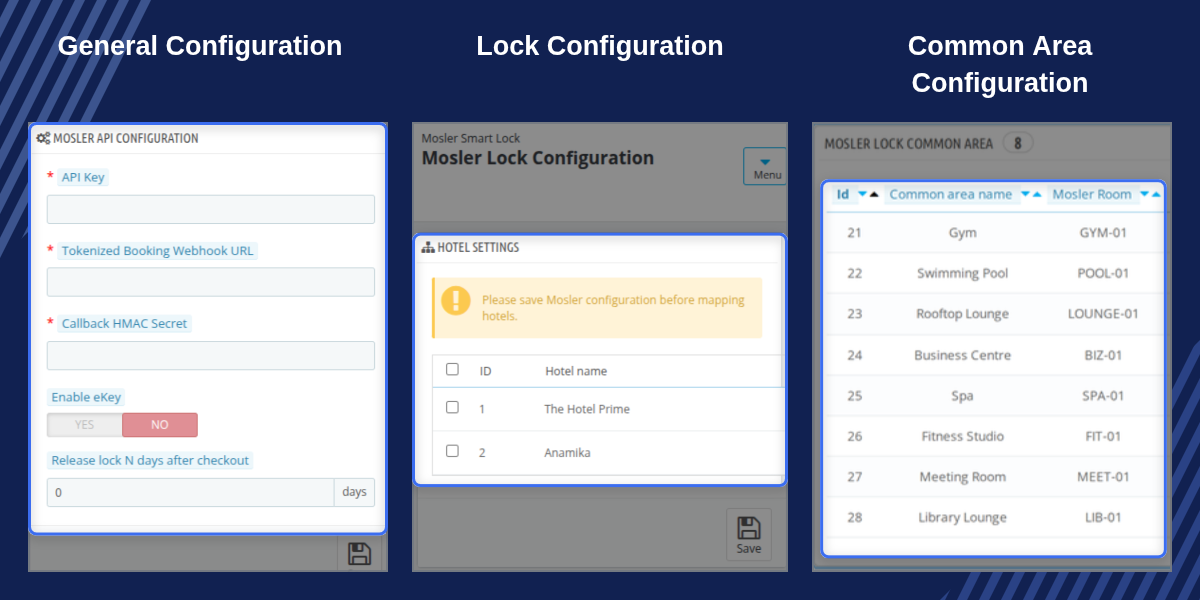
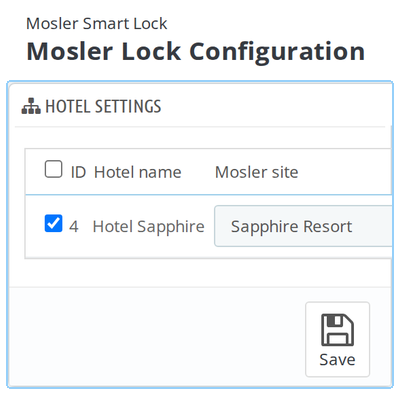
    • Admins can map each QloApps hotel to its corresponding Mosler site and building.
    • Physical rooms can be linked to their corresponding Mosler rooms through the room-type configuration.
    • Admins can import the latest site, building, and room information from Mosler using the Import Rooms button.
    • Each building can be mapped to only one QloApps hotel to prevent duplicate assignments.
    QloApps Mosler Smart Lock Connector Lock Configuration

    Common-Area Configuration

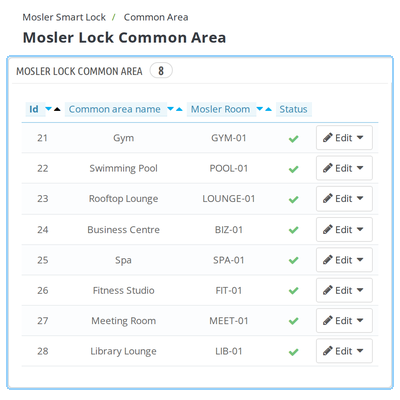
    • Admins can create common areas such as gyms, pools, and lounges for Mosler-enabled hotels.
    • Each common area can be linked to its corresponding Mosler room.
    • Access can be restricted to selected room types using the room-type access settings.
    • Leaving all room types unchecked allows guests from every room type in the hotel to access the common area.
    QloApps Mosler Smart Lock Connector Common-Area Configuration

    General Configuration

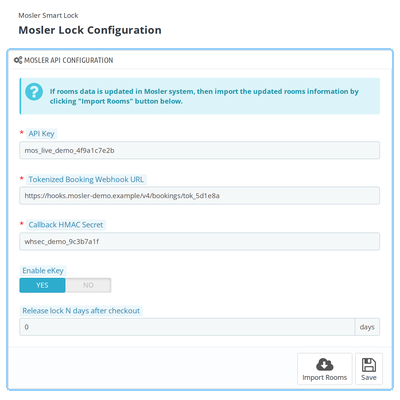
    • Admins can configure the Mosler API key, tokenized booking webhook URL, and callback HMAC secret.
    • The Enable eKey option allows the system to request both PASSCODE and EKEY access types. When disabled, only PASSCODE is requested.
    • Admins can configure the grace period for revoking access after checkout.
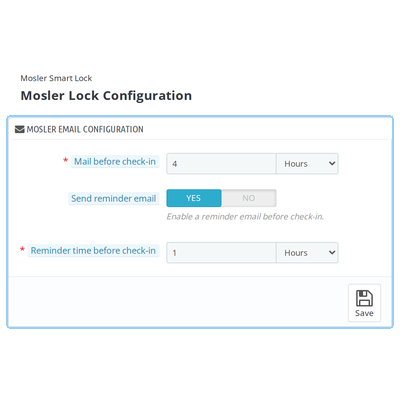
    • Email settings allow admins to configure how long before check-in the access email should be sent and whether a reminder email is required.
    QloApps Mosler Smart Lock Connector General Configuration

    Cron Setting

    • The cron job processes pending guest access emails and revokes access for expired bookings.
    • It ensures scheduled tasks run automatically without requiring staff to open the QloApps Back Office.
    • Admins must configure the cron job on their server to ensure scheduled emails and access revocation work reliably.
    QloApps Mosler Smart Lock Connector Cron Configuration

    Admin Control & Access Management

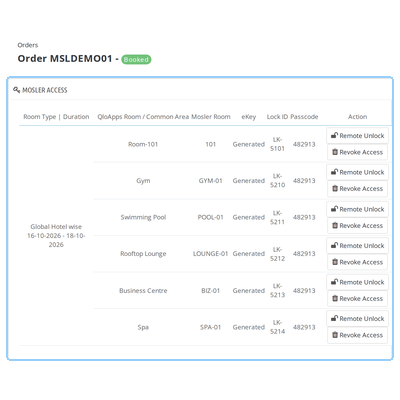
    • Admins can view guest access details, including eKeys, lock IDs, and passcodes, from the booking's order page.
    • They can remotely unlock doors, revoke access, or regenerate access credentials when required.
    • Admins can resend access emails for individual rooms or send all active access emails for a booking at once.
    • The module provides a Test Webhook option to verify callback connectivity with Mosler before going live.
    QloApps Mosler Smart Lock Connector Admin Control and Access Management

    QloApps Mosler Smart Lock Connector Support

    For any queries or support requests, please create a ticket through QloApps Support .

    Explore our other top-quality QloApps Add-ons to enhance your hotel operations.

    Specifications

    Product Version1.0.0
    Released9 days ago
    CategoryQloApps, Connectors, 
    Last UpdatedNovember 5, 2026 (1 day ago)
    Supported VersionsQloApps  1.7.x  

    Ratings

    We'd love to hear your thoughts! Share your feedback and help us craft an even better experience tailored just for you.

    Write a review

    Frequently Asked Questions

      Does the module require an active Mosler account?
    Yes. You need an active Mosler account with a v4 API key, Tokenized Booking Webhook URL, and Callback HMAC Secret before configuring the connector in QloApps.
      Which QloApps versions are supported by the Mosler Smart Lock Connector?
    The QloApps Mosler Smart Lock Connector supports QloApps versions 1.6.x and 1.7.x.
      Can the module generate both eKeys and passcodes for guests?
    Yes. The module can request both PASSCODE and EKEY access types when the Enable eKey option is turned on. When this option is disabled, the system requests only PASSCODE access by default.
      Can administrators map multiple hotels and rooms to Mosler locks?
    Yes. Administrators can map each QloApps hotel to its corresponding Mosler site and building. Physical rooms can also be mapped to their respective Mosler rooms. However, one Mosler building can only be assigned to one QloApps hotel.
      Can access to common areas be restricted to selected room types?
    Yes. Administrators can configure common areas such as gyms, pools, and lounges and select which room types are allowed access. If all room types are left unchecked, guests from every room type in the hotel can access the common area.
      When are guest access credentials generated and revoked?
    The module requests guest access credentials when a booking is confirmed. Access is automatically updated when booking dates change, rooms are reallocated, or room assignments are changed. Access is revoked at checkout, upon booking cancellation, or after the configured grace period.
      Can administrators remotely unlock doors or manage guest access?
    Yes. Administrators can manage guest access from the booking's order page. They can view eKeys, lock IDs, and passcodes, remotely unlock doors, revoke access, or regenerate access credentials when required.
      Can the module automatically send access emails to guests?
    Yes. Administrators can configure how long before check-in the access email should be sent. An optional reminder email can also be enabled. Access emails can additionally be resent manually from the booking's order page.
      Is it necessary to configure a cron job?
    Yes. The cron job processes pending guest access emails and revokes access for expired bookings. It ensures these scheduled tasks run automatically without requiring staff to open the QloApps Back Office. The cron command must be configured on the server.
      What happens if the QloApps installation is not publicly accessible?
    If the QloApps installation is not reachable from the public internet, Mosler cannot deliver webhook events to it. In this situation, the module falls back to polling Mosler directly. However, webhook delivery remains unavailable until the callback URL becomes publicly reachable.
      Can administrators test the Mosler webhook connection?
    Yes. The module provides a Test Webhook option that sends a test.ping event to the configured callback URL. This helps administrators verify callback connectivity with Mosler before going live.
      Can guest access be extended after checkout?
    Yes. Administrators can configure the Release lock N days after checkout setting to define a grace period before access is revoked. By default, the setting is 0, which means access is revoked at checkout time.
     

    Specification

    Detailed technical features and requirements to help you understand the module’s capabilities and ensure smooth integration with your system.

    Cloud Hosting

    Detailed technical features and requirements to help you understand the module’s capabilities and ensure smooth integration with your system.

    Default Configuration Details of Server

    1 GB
    RAM
    1 Core
    Processor
    30 GB
    Hard Disk
    1 GB RAM & 1 Core Processor
    Database

    Want to know more how exactly we are going to power up your eCommerce Website with Cloud to fasten up your store

    * Server Configuration may vary as per application requirements.

    Change Logs

    Changelog

    Version 1.0.0

    • [CO] : Compatible with QloApps 1.6.x and 1.7.x.
    • [NF] : Added integration with Mosler smart locks for automated guest access management.
    • [NF] : Added automatic generation of guest eKeys and passcodes for confirmed bookings.
    • [NF] : Added hotel, building, and physical room mapping with corresponding Mosler sites and rooms.
    • [NF] : Added common-area access management with room-type-based access restrictions.
    • [NF] : Added automatic access updates for booking date changes, room reallocation, and room swaps.
    • [NF] : Added automated guest access emails with configurable pre-check-in timing and optional reminder emails.
    • [NF] : Added automatic access revocation at checkout, upon booking cancellation, or after a configurable grace period.
    • [NF] : Added booking-level access management options, including remote unlocking, access revocation, and credential regeneration.
    • [NF] : Added webhook callback configuration and a Test Webhook option to verify connectivity with Mosler.
    • [NF] : Added cron job support for processing pending access emails and revoking expired booking access.