USD
  • EUR
  • INR
  • USD
Cart
Cart 0
  • You have no items in your shopping cart.
    Cart
    Cart 0
    • You have no items in your shopping cart.
    Hire a Developer
    ×
    Contact Us!
    Send Again
    Close
    Please Login to Write Your Review

    QloApps PMS & Channel manager Connector


    QloApps PMS & Channel Manager Connector: We present the QloApps PMS & Channel Manager Connector—your smart solution to automate hotel operations. This connector creates a seamless link between QloApps PMS and QloApps Channel Manager, allowing hoteliers to sync room availability, rates, and reservations in real-time across all connected OTAs, ensuring accuracy and preventing overbookings.

    Screenshots
    QloApps PMS & Channel manager Connector QloApps PMS & Channel manager Connector QloApps PMS & Channel manager Connector QloApps PMS & Channel manager Connector QloApps PMS & Channel manager Connector QloApps PMS & Channel manager Connector
    Show More Hide All
    $0.00
    $0.00
    Configure and Buy
    • Description
    • Reviews
    • FAQ
    • Customers ()
    • Specifications
    • Cloud Hosting
    • Changelog

    QloApps PMS & Channel Manager Connector - Managing a hotel with multiple online booking platforms can be overwhelming and prone to errors if done manually. To ease this challenge, QloApps introduces the PMS & Channel Manager Connector. This robust integration ensures seamless syncing of inventory, pricing, and reservations between the QloApps Property Management System and the QloApps Channel Manager—making hotel operations more efficient and reliable.

    If you want to learn how to launch your free hotel website with the help of QloApps then Click Here

    Highlighted Features

    Real-time Synchronization

    As soon as the admin updates room availability or bookings in the QloApps PMS, the system pushes the changes to the QloApps Channel Manager. This, in turn, updates all connected OTAs instantly, eliminating the need for repeated manual updates.

    Automatic Booking Updates

    When a reservation is made on any OTA platform, the API sends real-time updates to QloApps PMS, reducing human error and streamlining front-desk operations.

    Accurate API-Based Communication

    The connector uses a single, optimized API request to send all the required data, reducing API load and improving performance. This ensures data consistency and reduces the risk of overbookings, pricing errors, and availability mismatches.

    Installation Guide

    To install the QloApps PMS & Channel Manager Connector:

    • Login to your QloApps Admin Panel
    • Navigate to Modules & Services > Manage Module
    • Click on Add a New Module
    • Choose the module file and click Upload

    Enabling Connector Permissions

    To allow data synchronization, enable the proper API permissions:
    • Navigate to Advanced Parameters > Webservices
    • Identify the API key used for the Channel Manager
    • Verify the key from Channel Manager > PMS Settings -> General Settings
    • Click the pencil icon to edit the correct API key
    • Scroll to the Permissions section and enable cm_api permissions:
      • ALL – Enable all permissions at once
      • GET – View data
      • POST – Add new entries
      • PUT – Modify existing entries
      • DELETE – Remove entries
      • HEAD – View metadata
    • Click Save to apply changes

    QloApps PMS & Channel Manager Connector Features

    • Reduced overbooking and double bookings
    • Sync data across all OTA channels from QloApps PMS
    • Single API request for faster, lighter data processing
    • Centralized control for multi-channel hotel management
    • Minimal technical setup for connecting PMS to the Channel Manager
    • Accurate pricing and availability without manual errors
    • Improved booking efficiency and guest experience
    • Easy module installation and permission setup

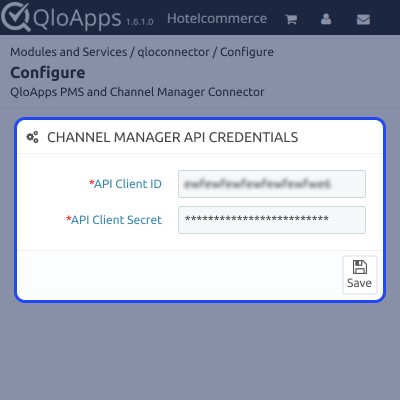
    Configuration

    • Enter the API Client ID and API Client Secret in the connector’s configuration panel to link QloApps PMS with the Channel Manager.
    Iyzico Configuration Screenshot

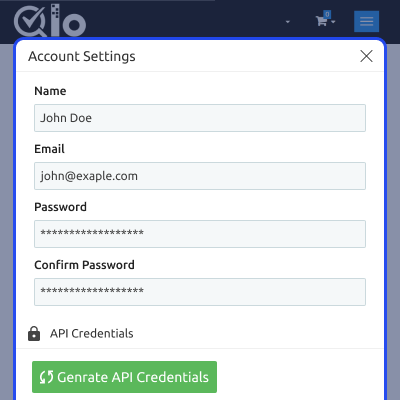
    Generate API Credentials

    • Log in to your QloApps Channel Manager account and navigate to Account Settings to generate API credentials.
    transaction-details-screenshot

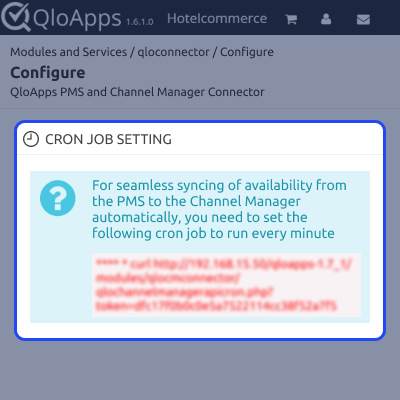
    Cron Setting

    • Set up a cron job to run every minute to ensure continuous synchronization of room availability and bookings.
    • This automated process prevents overbookings by instantly reflecting inventory changes across all connected channels.
    transaction-list-screenshot

    Support & Resources

    For any queries or issues, please create a support ticket here: http://webkul.uvdesk.com

    You may also explore more top-rated QloApps Add-ons.

    Specifications

    Product Version5.0.1
    Released11 months ago
    CategoryQloAppsConnectors
    Last UpdatedFebruary 5, 2026 (1 month ago)
    Supported VersionsQloApps  1.6.1  1.7.x  
    Write a review

    Move to Cloud Today

    AWS Free tier hosting for one year by amazon web services, for more details please visit AWS Free Tier.

    GCP Free tier hosting for one year with 300 credit points by google cloud platform, for more details please visit GCP Free Tier.

    Azure free tier hosting for one year with 25+ always free services, for more details please visit Azure Free Tier.

    In our default configuration we will provide tremendous configuration for your eCommerce Website which is fast to load and response.

    Default Configuration Details of Server

    • 1 GB RAM
    • 1 Core Processor
    • 30 GB Hard Disk
    • DB with 1 GB RAM and 1 Core Processor

    * Server Configuration may vary as per application requirements.

    Want to know more how exactly we are going to power up your eCommerce Website with Cloud to fasten up your store. Please visit the Cloudkul Services.

    Get Started with Cloud
    Not Available