USD
  • EUR
  • INR
  • USD
Cart
Cart 0
  • You have no items in your shopping cart.
    QloApps Extensions
    Cart
    Cart 0
    • You have no items in your shopping cart.
    Hire a Developer
    ×
    Contact Us!
    Send Again
    Close
    Please Login to Write Your Review
    QloApps Quotation and Proforma Invoice

    QloApps Quotation and Proforma Invoice

    x
    Free

    * Required Fields

    $75.00
    Add To Cart

    QloApps Quotation and Proforma Invoice helps hotels create professional quotations and proforma invoices for guest inquiries, with custom pricing, detailed charges, and personalized booking terms. It also simplifies follow-ups and enables guests to confirm bookings through integrated online payment links.


    • Generate itemized proforma invoices with room charges, taxes, and service fees.

    • Schedule automated email reminders to follow up before quotations expire.

    • Include secure payment links for quick online deposit and booking confirmation.

    • Add custom room rates, remarks, special agreements, and corporate booking terms.

    • Manage, filter, and track quotation records and customer details from the admin console.

    • Support quotation management across multiple hotel branches and properties.

    QloApps Quotation and Proforma Invoice
    QloApps Quotation and Proforma Invoice
    $75.00
    Check How It Works

    Need Help Deciding?

    Support answers within one business day.

    Open a ticket
    $75.00
    Configure and Buy
    X
    • Description
    • Reviews
    • FAQ
    • Customers ()
    • Specifications
    • Cloud Hosting
    • Changelog

    QloApps Quotation and Proforma Invoice is a powerful add-on for QloApps that helps hotels create professional quotations and proforma invoices for group stays, extended bookings, corporate retreats, and other guest inquiries. Reservation teams can prepare detailed proposals with room selections, custom pricing, stay details, taxes, payment instructions, and applicable hotel policies.
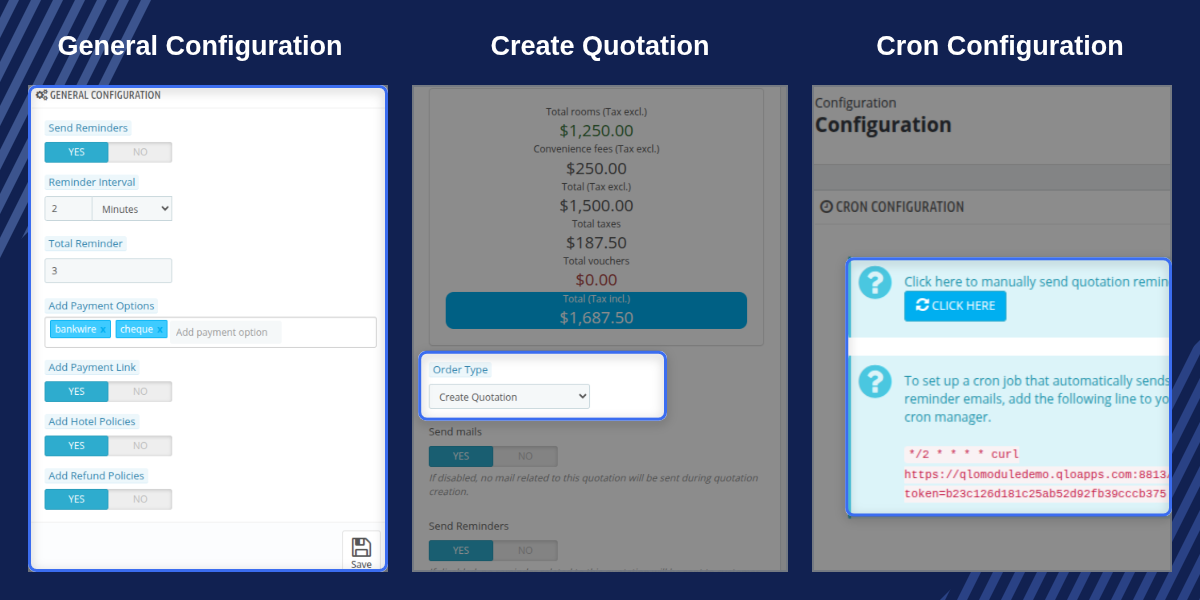
    QloApps Quotation and Proforma Invoice

    Highlighted Features

    Proforma Invoice Generation

    Generate professional proforma invoices with room allocations, stay dates, room charges, taxes, service fees, and other applicable booking details.

    Automated Follow-Up Reminders

    Schedule automated reminder emails at defined intervals to follow up with prospective guests before the quotation validity expires.

    Direct Deposit Payment Links

    Include secure payment links in quotation documents so guests can settle deposits online and confirm their reservations conveniently.

    Custom Pricing and Remarks

    Apply negotiated discounts, customized package pricing, special remarks, and corporate booking terms to individual quotations.

    Guest Policy Acknowledgement

    Display hotel house rules, check-in terms, and cancellation policies directly within quotation and proforma invoice documentation.

    Centralised Quotation Management

    Review quotation references, linked reservations, reminder activity, customer details, and quotation progress from a dedicated administration workspace.

    Why Use QloApps Quotation and Proforma Invoice

    Managing group bookings, corporate inquiries, extended stays, and high-value reservations often requires detailed price proposals before guests make a payment. QloApps Quotation and Proforma Invoice simplifies this process by allowing reservation teams to create structured quotations and proforma invoices directly within QloApps.

    Hotels can customize rates, add booking terms, automate follow-up reminders, and provide direct payment options to prospective guests. This helps reduce manual communication, improve response times, and make it easier to convert quotations into confirmed reservations.

    QloApps Quotation and Proforma Invoice Quotation Records

    The dedicated quotation management area provides administrators with a centralized view of generated quotations and proforma invoices. Staff can review quotation references, customer accounts, creation dates, linked room reservations, and reminder activity from a structured management grid.

    Administrators can inspect quotation details, review associated room arrangements, check quotation values, resend documentation, and follow the progress of proposals from the initial inquiry through reservation confirmation.
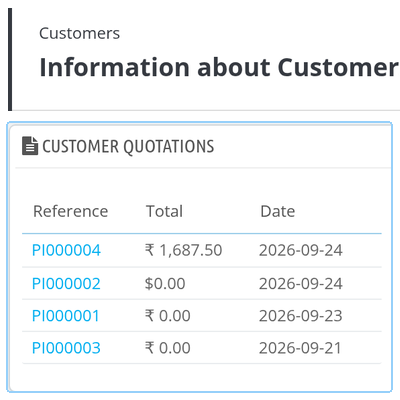
    QloApps Quotation and Proforma Invoice Quotation Records

    QloApps Quotation and Proforma Invoice Automation Settings

    Configure quotation automation and communication settings from the QloApps back office according to your hotel's reservation requirements. These settings help reservation teams manage follow-ups, payment options, and policy information within the quotation workflow.

    • Reminder Interval: Define the day or hour interval between automated quotation follow-up emails.
    • Reminder Limit: Set the maximum number of automated reminder emails that can be sent for a quotation.
    • Payment Link: Enable direct payment links and select the available payment methods for deposit settlement.
    • Policy Display: Choose whether hotel house rules and cancellation policies should be included in generated quotation documents.

    These automation options reduce manual follow-up work and help hotels maintain timely guest communication while providing convenient payment options for reservation confirmation.
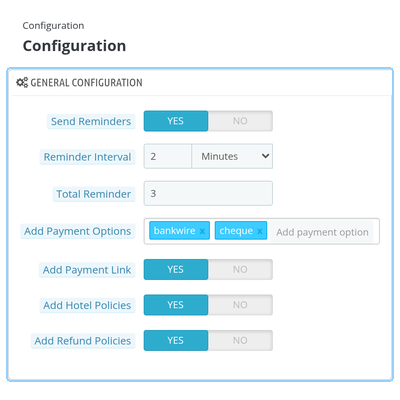
    QloApps Quotation and Proforma Invoice Automation Settings

    QloApps Quotation and Proforma Invoice Customer Records

    Reservation agents can review complete quotation histories directly within individual customer profiles in the QloApps back office. A dedicated quotations panel provides a centralized view of proforma references and associated reservation information.

    Staff can review linked room reservations, total quotation amounts, creation timestamps, transaction values, and proposal statuses from one customer management view. This makes it easier to track previous quotations and access related booking details without navigating between multiple sections.
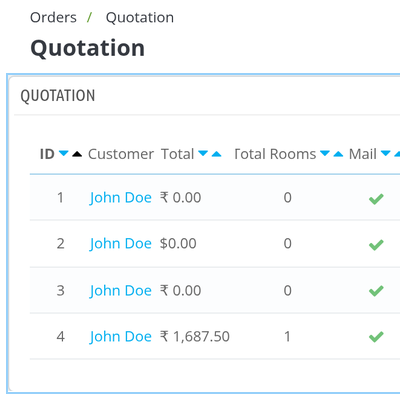
    QloApps Quotation and Proforma Invoice Customer Records

    QloApps Quotation and Proforma Invoice Support

    For any query or issue, please create a support ticket here.

    You may also explore our other top-quality QloApps Add-ons.

    Specifications

    Product Version4.0.0
    Released25 days ago
    Last UpdatedOctober 7, 2026 (24 days ago)
    Supported VersionsQloApps  1.6.x  1.7.x  

    Ratings

    We'd love to hear your thoughts! Share your feedback and help us craft an even better experience tailored just for you.

    Write a review

    Frequently Asked Questions

     Can hoteliers customize the email reminder schedule for quotations?
    Yes, administrators can define custom reminder intervals in hours or days within the module configuration. They can also specify the maximum number of automated reminder emails sent for each quotation.
     Does the quotation include room pricing and applicable taxes?
    Yes, generated proforma invoices calculate room totals, service taxes, and extra room services based on the hotel configuration. Guests receive an itemised summary outlining every component of their stay.
     Can staff add special corporate terms or remarks to a quotation?
    Yes, reservation agents can enter custom remarks and corporate discount references during quotation creation. These notes appear clearly on the generated proforma invoice sent to the customer.
     How do guests confirm a booking from the quotation email?
    When payment links are enabled in the configuration, quotation emails include a secure payment link. Guests can click the link to proceed directly to checkout and settle the required booking deposit.
     Where can administrators review past quotations for a specific guest?
    Administrators can view complete quotation histories in the main Quotations list or within the customer's profile in the administrative console. The customer detail page includes an integrated tab displaying all associated proforma invoices.
     Is this module compatible with multiple hotel branches?
    Yes, the quotation system tracks branch identifiers for properties operating in multi-hotel setups. Quotations and proforma invoices remain associated with the specific hotel branch selected during room reservation.
     

    Specification

    Detailed technical features and requirements to help you understand the module’s capabilities and ensure smooth integration with your system.

    Cloud Hosting

    Detailed technical features and requirements to help you understand the module’s capabilities and ensure smooth integration with your system.

    Default Configuration Details of Server

    1 GB
    RAM
    1 Core
    Processor
    30 GB
    Hard Disk
    1 GB RAM & 1 Core Processor
    Database

    Want to know more how exactly we are going to power up your eCommerce Website with Cloud to fasten up your store

    * Server Configuration may vary as per application requirements.

    Change Logs

    Changelog

    Version 4.0.0

    • Added compatibility with QloApps version 1.7.x.
    • Optimized database indexing and administrative tab registration.
    • Added proforma invoice generation with automated reminder schedules.
    • Added direct payment links and policy display configuration.

    Version 1.0.0

    • Initial release compatible with QloApps version 1.6.x.
    • Basic quotation management and customer notification features.