USD
  • EUR
  • INR
  • USD
Cart
Cart 0
  • You have no items in your shopping cart.
    QloApps Extensions
    Cart
    Cart 0
    • You have no items in your shopping cart.
    Hire a Developer
    ×
    Contact Us!
    Send Again
    Close
    Please Login to Write Your Review
    QloApps Redsys Payment Gateway

    QloApps Redsys Payment Gateway

    x
    Free

    * Required Fields

    $55.00
    Add To Cart

    QloApps Redsys Payment Gateway lets hotels accept secure card and Bizum payments through the Redsys payment page. Hotels can choose instant payments or pre-authorization, manage captured amounts, process refunds, and track all transactions directly from the Back Office.


    • Accept secure card and Bizum payments through the Redsys payment gateway.

    • Support instant payments or pre-authorization for flexible booking payments.

    • Charge full or partial amounts from pre-authorized bookings.

    • Automatically release uncaptured payment holds after a configurable period.

    • Process full and partial refunds with recorded transaction remarks.

    • Track payment status, amounts, customers, and transactions from the Back Office.

    • Support Sandbox and Production modes for testing and live payments.

    • Support multi-room bookings with a single payment transaction.

    QloApps Redsys Payment Gateway
    QloApps Redsys Payment Gateway
    $55.00
    Check How It Works

    Need Help Deciding?

    Support answers within one business day.

    Open a ticket
    $55.00
    Configure and Buy
    X
    • Description
    • Reviews
    • FAQ
    • Customers ()
    • Specifications
    • Cloud Hosting
    • Changelog

    QloApps Redsys Payment Gateway adds the Redsys payment page to the booking checkout and a dedicated Redsys Payment menu to the Back Office. Guests can pay by card or Bizum, while each payment is recorded as a transaction with its status, paid amount, and linked bookings.

    The module is designed for hotels, resorts, serviced apartments, and guest houses that bill in Euro. It supports full payments, advance payments, card holds, refunds, and automatic release of uncaptured holds.
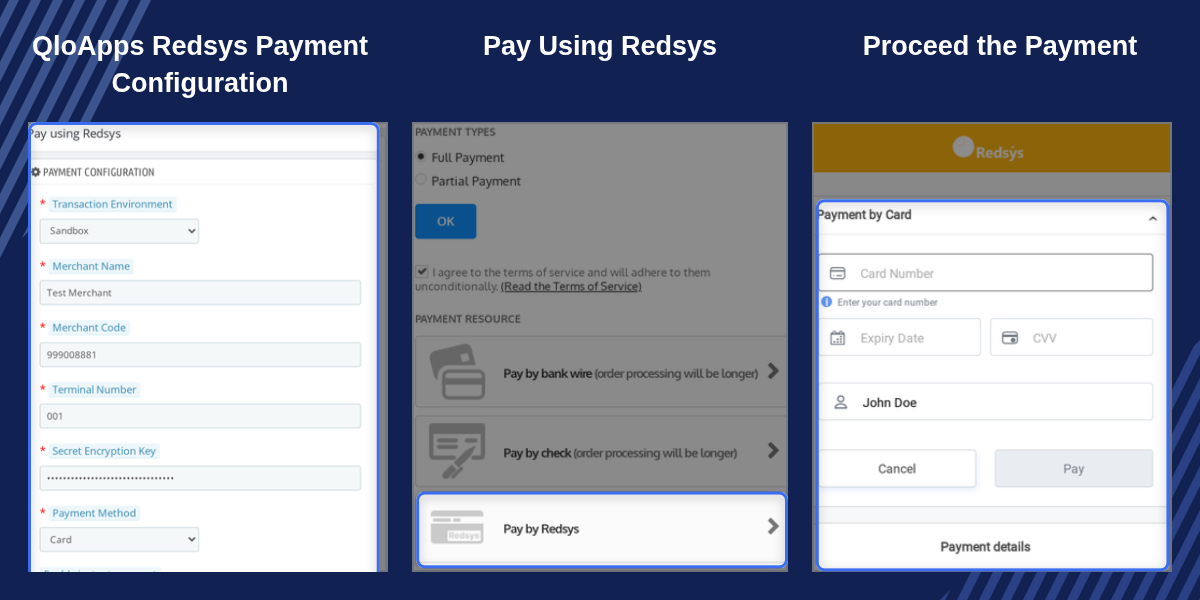
    QloApps Redsys Payment Gateway

    Highlighted Features

    Card And Bizum Checkout

    Offer guests Card, Bizum, or both on the Redsys payment page, with Bizum available once it is activated on your Redsys account.

    Instant Payment Option

    Add a Pay by Redsys option at checkout so the booking amount or advance payment is collected and confirmed straight away.

    Card Hold At Booking

    Place a pre-authorization on the guest's card and keep the booking awaiting payment until the hotel decides to charge.

    Charge Held Amounts

    Charge a held amount in full or in part from the booking page, up to the amount that was authorized.

    Automatic Hold Release

    Release uncaptured card holds after the configured number of days using a single daily cron command.

    Refunds With Remarks

    Process full or partial refunds from the transaction page, with every refund recorded alongside its remark and status.

    Signed Payment Confirmation

    Confirm payments through signature-checked Redsys notifications so booking statuses follow the actual payment result.

    Multilingual Payment Title

    Set the pre-authorization payment option title separately for each language available in the booking engine.

    Why Use QloApps Redsys Payment Gateway

    Taking card payments for bookings manually means matching bank records with reservations, managing held amounts, and processing refunds outside the booking system. Each step can increase staff workload and the chance of errors.

    QloApps Redsys Payment Gateway keeps payments, card holds, charges, and refunds connected to the booking. Management can review the status of every Redsys payment, while guests can pay through the recognised Redsys payment page using Card or Bizum.

    QloApps Redsys Payment Gateway Configuration

    The Redsys Configuration page groups the module setup into three panels. Settings are validated when saved so that missing account details do not go live unnoticed.

    Payment Configuration: Choose Sandbox or Production mode, enter the Redsys account name, account code, terminal number, and secret encryption key. Select Card, Bizum, or Both and enable instant payment when required.

    Pre-Authorization Configuration: Enable automatic hold release, set the Checkout Payment Title for each language, and define the release period from 1 to 7 days.

    Cron Settings: View the ready-to-use cron command that releases expired card holds.
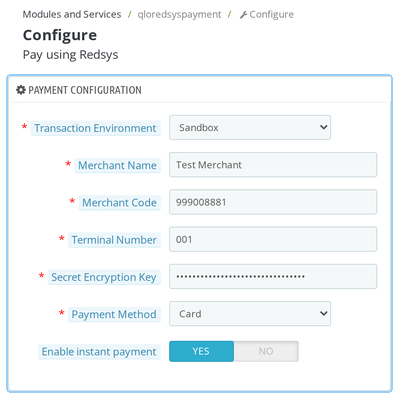
    QloApps Redsys Payment Gateway Configuration

    QloApps Redsys Payment Gateway Transactions

    The Redsys Transactions section lists every payment made through the module, allowing the finance team to see what was paid, by whom, and for which booking without opening the Redsys portal.
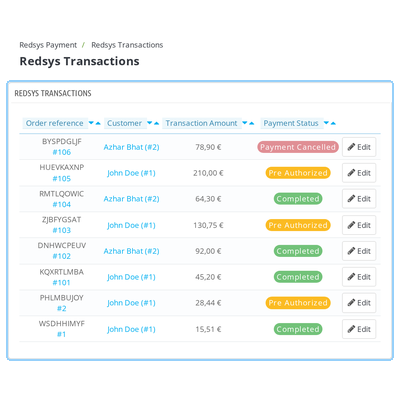
    • View the Redsys transaction ID and order reference with links to the related orders.
    • View customer name, email, transaction amount, paid amount, payment status, and date.
    • Identify Completed, Pre Authorized, Payment Failed, and Payment Cancelled transactions using status badges.
    • Filter the transaction list using available transaction details and status columns.
    QloApps Redsys Payment Gateway Transactions

    QloApps Redsys Payment Gateway Refunds

    Opening a transaction displays its details along with a Refund Transaction panel. Staff can select a full or partial refund, enter the amount and add a remark before sending the refund to Redsys.
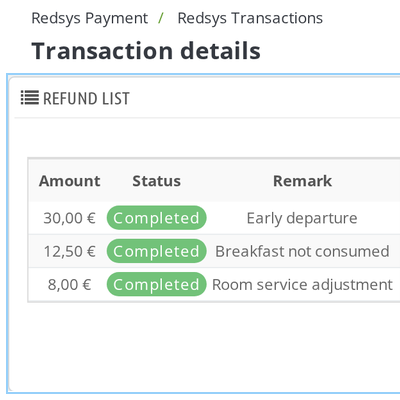
    • Select Full Refund or Partial Refund according to the booking requirement.
    • Enter the refund amount and add a remark for the transaction record.
    • View the amount already refunded and the amount still available for refund.
    • Prevent refunds from exceeding the original payment amount.
    • Review every refund in the Refund List with its type, status, remark, and date.
    QloApps Redsys Payment Gateway Refunds

    QloApps Redsys Payment Gateway Order Payment Panel

    Every booking paid through Redsys receives a Redsys payment panel on its order page. Staff can review payment information and manage pre-authorized card amounts directly from the booking.
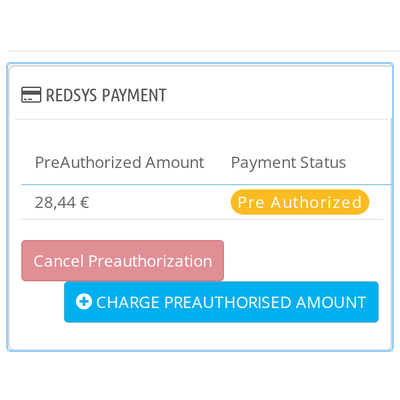
    • View the payment date, transaction ID, pre-authorized amount, charged amount, and payment status.
    • Enter an amount and charge it directly from the payment panel for card holds.
    • Cancel a pre-authorized card hold when required.
    • Ensure the charge does not exceed the amount originally authorized.
    • Create a charge only once against a pre-authorized transaction.
    • View all linked orders when one Redsys transaction covers multiple orders.
    QloApps Redsys Payment Gateway Order Payment Panel

    QloApps Redsys Payment Gateway Support

    For any query or issue, please create a support ticket here.

    You may also explore our other QloApps modules.

    Specifications

    Product Version5.1.1
    Released3 years ago
    CategoryQloApps, Payment, 
    Last UpdatedOctober 13, 2026 (10 days ago)
    Supported VersionsQloApps  1.6.x  1.7.x  

    Ratings

    We'd love to hear your thoughts! Share your feedback and help us craft an even better experience tailored just for you.

    Write a review

    Frequently Asked Questions

     Which currencies does the Redsys payment module support?
    The Redsys payment module supports bookings made in Euro (EUR). The Redsys payment options appear at checkout only when the booking currency is set to Euro. Make sure Euro is enabled in the module's currency restrictions.
     How can I test the Redsys module before accepting live payments?
    You can test the module by selecting Sandbox as the Transaction Environment in Redsys Configuration and entering your Redsys test credentials. Once testing is complete, switch the environment to Production to accept real payments.
     Does the Redsys module support Bizum payments?
    Yes, the module supports Bizum payments. Select Bizum or Both as the Payment Method in Redsys Configuration. You must also ensure that Bizum is activated on your Redsys account for the payment option to work correctly.
     What happens if a pre-authorized card payment is not captured?
    When Auto-Release Pre-Authorization is enabled, the module automatically cancels uncaptured card holds through a cron job after the configured period of 1 to 7 days. The transaction status changes to Payment Cancelled. You can find the cron command under the Cron settings.
     Can I capture a smaller amount than the pre-authorized amount?
    Yes, you can capture an amount lower than or equal to the pre-authorized total. Open the order page, access the Redsys payment panel, and enter the amount you want to charge. The charge can be created only once per transaction.
     Does the module support partial refunds?
    Yes, the module supports partial refunds. Open the relevant transaction in Redsys Transactions, select Partial Refund, enter the refund amount, and add a remark. The module tracks the remaining refundable amount to help you manage subsequent refund requests.
     

    Specification

    Detailed technical features and requirements to help you understand the module’s capabilities and ensure smooth integration with your system.

    Cloud Hosting

    Detailed technical features and requirements to help you understand the module’s capabilities and ensure smooth integration with your system.

    Default Configuration Details of Server

    1 GB
    RAM
    1 Core
    Processor
    30 GB
    Hard Disk
    1 GB RAM & 1 Core Processor
    Database

    Want to know more how exactly we are going to power up your eCommerce Website with Cloud to fasten up your store

    * Server Configuration may vary as per application requirements.

    Change Logs

    Changelog

    V5.0.0 | COMPATIBLE:: QloApps 1.7.x

    V4.0.0 | COMPATIBLE:: QloApps 1.7.x

    V2.0.0 | COMPATIBLE:: QloApps 1.6.x

    V1.0.0 | COMPATIBLE:: QLOAPPS 1.6.x


