USD
  • EUR
  • INR
  • USD
Cart
Cart 0
  • You have no items in your shopping cart.
    Cart
    Cart 0
    • You have no items in your shopping cart.
    Hire a Developer
    ×
    Contact Us!
    Send Again
    Close
    Please Login to Write Your Review

    QloApps Universal Payment Gateway

    QloApps Universal Payment Gateway is an addon that empowers you to accept online payments through multiple payment gateways from a single platform. Instead of managing different gateways for different payment modes, hotels can centralize everything into one solution. Simplify global transactions, boost guest convenience, and ensure secure, seamless payments across multiple currencies and methods.

    Screenshots
    QloApps Universal Payment Gateway  QloApps Universal Payment Gateway  QloApps Universal Payment Gateway  QloApps Universal Payment Gateway  QloApps Universal Payment Gateway  QloApps Universal Payment Gateway  QloApps Universal Payment Gateway  QloApps Universal Payment Gateway
    Show More Hide All
    $65.00

    * Required Fields

    Add To Cart
    $65.00
    Configure and Buy
    • Description
    • Reviews
    • FAQ
    • Customers ()
    • Specifications
    • Cloud Hosting
    • Changelog

    The QloApps Universal Payment Gateway is a powerful add-on for QloApps as managing multiple payment gateways can be challenging for you—different setups, inconsistent reports, and complex refunds can slow operations and create confusion. The QloApps Universal Payment Gateway Addon eliminates these challenges by offering a unified platform that integrates multiple payment gateways.

    With multi-currency support and PCI-DSS compliance, it caters to international guests while keeping every transaction secure, transparent, and hassle-free. From instant settlements to easy refunds, this module ensures smooth cash flow and simplified financial management.
    QloApps Bitpay Payment Gateway

    Highlighted Features

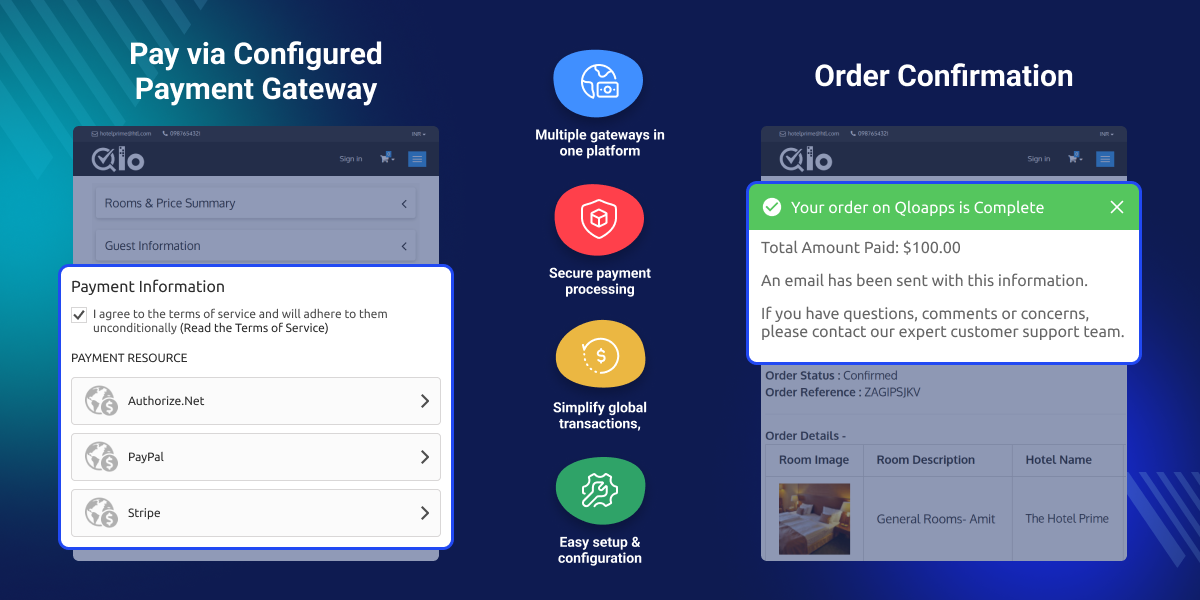
    Accept Payments Through Multiple Gateways

    A single platform that lets hotels accept online payments through various payment methods, including credit/debit cards, without managing separate gateways.

    Centralized Reporting

    Provides a unified overview of all transactions from different payment gateways in one place.

    Global Guest Convenience

    Supports multiple payment methods, making it easy for travelers worldwide to complete bookings without friction.

    Why Use QloApps Universal Payment Gateway

    Hotels manage multiple payment methods, and handling separate gateways for each makes operations time-consuming and complex. QloApps Universal Payment Gateway solves this by giving you one unified platform for all online payments.

    It supports multiple gateways and currencies, ensuring a frictionless experience for both local and international guests. With instant settlements, hotels benefit from faster cash flow and smooth financial operations.

    The gateway also ensures PCI-DSS compliance, encryption, and fraud protection to secure transactions and protect sensitive guest data.

    Centralized reporting simplifies financial tracking, while faster payments enhance guest satisfaction. Overall, it's a complete solution for modern hotel payment management.
    Configuration of QloApps Universal Payment Gateway

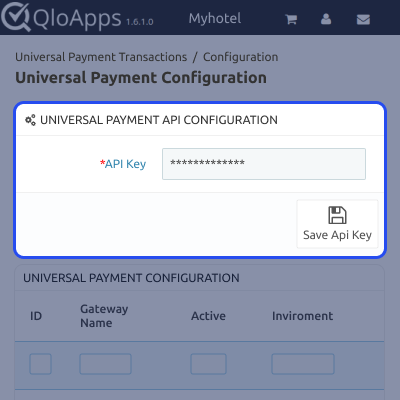
    • Once the module is installed, click the Configure button to open the settings panel.
    • Enter your API Key and click Save and Stay.
    • If the API key remains unchanged and you click the submit button again, the system automatically updates the payment gateway list. Any newly added gateways in PCI Booking’s Universal Payment Gateway will appear without affecting your existing configurations.
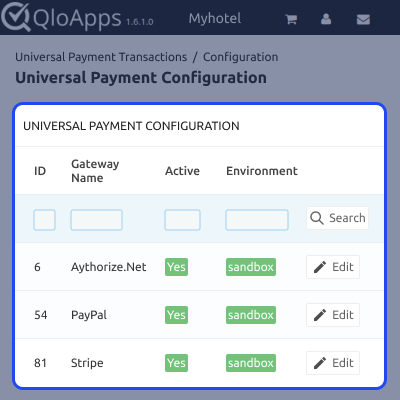
    • After entering the API Key, the complete list of all available payment gateways will be displayed.
    Iyzico Configuration Screenshot

    Configure Multiple Payment Gateways Under QloApps Payment Gateway

    • From the list of available gateways, click Edit on the gateway you want to activate.
    • Enter the required credentials and enable the payment gateway.
    • Add the display name, select the environment (sandbox or production), and fill in fields like Client ID and Secret Key.
    • Click Save to complete the setup. Repeat these steps to configure multiple gateways as needed.
    transaction-details-screenshot

    Transaction List

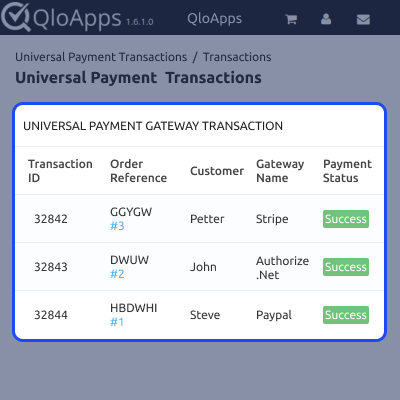
    • Under the Universal Payment Transaction tab in the back office, you can view all transactions made using the configured payment gateways.
    • The Transaction section shows complete booking payment details.
    • The Configuration section displays all available payment gateways for further setup.
    • Click the View button to see full transaction details.
    • Refunds can also be managed here, with support for full refunds depending on the payment gateway.
    transaction-list-screenshot

    QloApps Universal Payment Gateway Support

    For any query or issue, please create a support ticket here.

    You may also explore our other top-quality QloApps Add-ons.

    Specifications

    Product Version4.0.0
    Released5 months ago
    CategoryQloAppsPayment
    Last UpdatedFebruary 27, 2026 (1 month ago)
    Supported VersionsQloApps  1.6.x  1.7.x  
    Write a review

    Move to Cloud Today

    AWS Free tier hosting for one year by amazon web services, for more details please visit AWS Free Tier.

    GCP Free tier hosting for one year with 300 credit points by google cloud platform, for more details please visit GCP Free Tier.

    Azure free tier hosting for one year with 25+ always free services, for more details please visit Azure Free Tier.

    In our default configuration we will provide tremendous configuration for your eCommerce Website which is fast to load and response.

    Default Configuration Details of Server

    • 1 GB RAM
    • 1 Core Processor
    • 30 GB Hard Disk
    • DB with 1 GB RAM and 1 Core Processor

    * Server Configuration may vary as per application requirements.

    Want to know more how exactly we are going to power up your eCommerce Website with Cloud to fasten up your store. Please visit the Cloudkul Services.

    Get Started with Cloud
    Not Available