Send Again
Close
The WePay Payment Gateway is a powerful add-on for QloApps, offering a secure and reliable payment solution. It helps build guest trust while ensuring a smooth and transparent online booking experience.
With this module, guests can make secure online payments via WePay using major debit and credit cards. The integration provides PCI-compliant processing, fraud prevention, and a seamless checkout experience, ensuring both safety and convenience during payment.
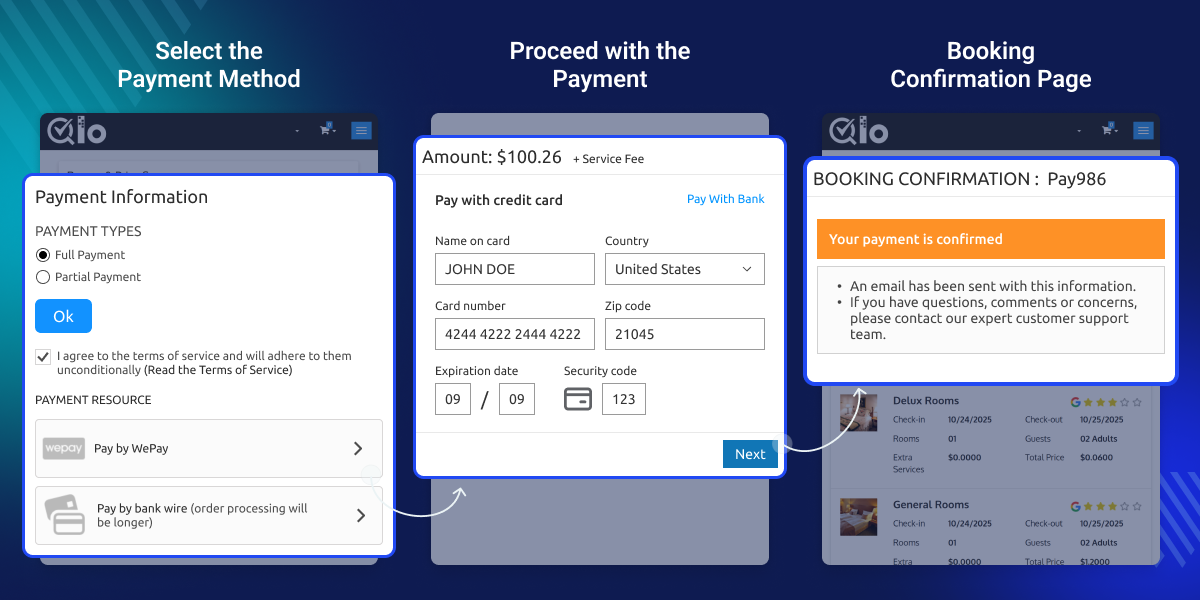
The module ensures that all payments are processed through WePay’s PCI-DSS compliant checkout, safeguarding sensitive card data and enhancing trust.
A dedicated WePay Transactions section is added to your QloApps back office, allowing you to view, track, and manage all WePay payments in one place.
WePay, powered by Chase, is known for its strong security protocols, fraud protection tools, and optimized card processing, making it a trusted choice for hotels in the USA and Canada.
The QloApps WePay Payment Gateway provides a secure and smooth checkout experience, maintains a complete log of all WePay payments, and ensures transparency, reliability, and guest confidence during online transactions.
Note: WePay is available only to merchants registered in the United States and Canada. If you’re operating in Canada, you must create a separate Canadian WePay merchant account; U.S. accounts cannot be used for Canadian operations. WePay only supports payments in USD (U.S. Dollar) and CAD (Canadian Dollar). Payments in other currencies are not accepted.
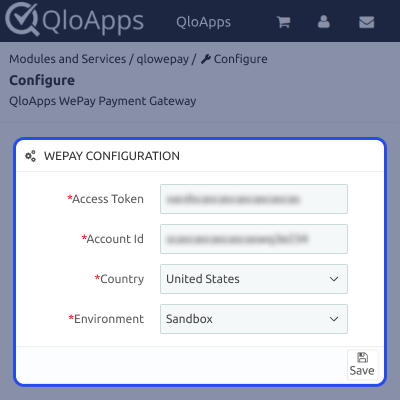
The QloApps WePay Payment Gateway requires a few essential configuration details to start processing payments. You need to set up the following:
These settings ensure a secure and seamless connection between QloApps and the WePay payment system.
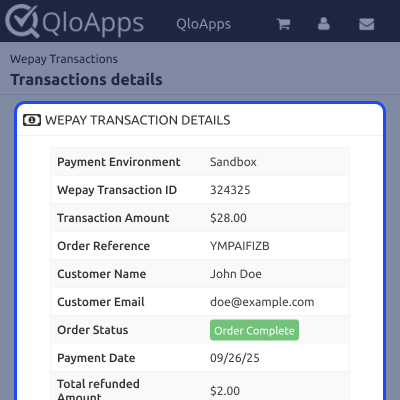
The QloApps WePay Payment Gateway allows you to view complete details of every transaction. In the “WePay Transactions” section, simply click on any transaction to access the full payment summary and status.
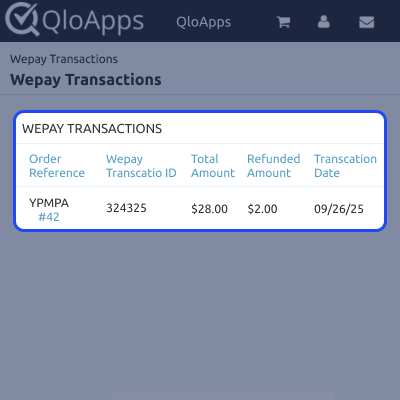
All WePay transactions are displayed in a detailed list view under the “WePay Transactions” section. This centralized list allows you to monitor every payment processed via WePay. Clicking on any entry opens the complete transaction details.
For assistance or queries, please create a support ticket here.
You may also explore our wide range of premium QloApps Add-ons.
Detailed technical features and requirements to help you understand the module’s capabilities and ensure smooth integration with your system.
Detailed technical features and requirements to help you understand the module’s capabilities and ensure smooth integration with your system.
We’re partnered with top-tier, trusted providers!
Want to know more how exactly we are going to power up your eCommerce Website with Cloud to fasten up your store
* Server Configuration may vary as per application requirements.



