USD
  • EUR
  • INR
  • USD
Cart
Cart 0
  • You have no items in your shopping cart.
    Cart
    Cart 0
    • You have no items in your shopping cart.
    Hire a Developer
    ×
    Contact Us!
    Send Again
    Close
    Please Login to Write Your Review

    QloApps WiPay Payment Gateway


    QloApps WiPay Payment Gateway enables you to accept secure online payments through WiPay. This integration ensures smooth, reliable transactions and builds guest trust with a secure,checkout experience.


    • Supports card and bank payments with trusted WiPay security.

    • Dedicated “WiPay Transactions” tab to view all payments.

    • Supports merchants in Caribbean countries with local currencies (TTD, USD, JMD).


    Screenshots
    QloApps WiPay Payment Gateway QloApps WiPay Payment Gateway QloApps WiPay Payment Gateway QloApps WiPay Payment Gateway QloApps WiPay Payment Gateway
    Show More Hide All
    $55.00

    * Required Fields

    Add To Cart
    $55.00
    Configure and Buy
    • Description
    • Reviews
    • FAQ
    • Customers ()
    • Specifications
    • Cloud Hosting
    • Changelog

    The QloApps WiPay Payment Gateway is a secure and reliable add-on for QloApps, enabling properties to accept online payments directly through WiPay. It ensures a smooth, trusted, and transparent booking experience for guests.

    Guests can pay via WiPay using supported debit and credit cards. Transactions are securely processed, and admins can monitor all payments from the QloApps backend.
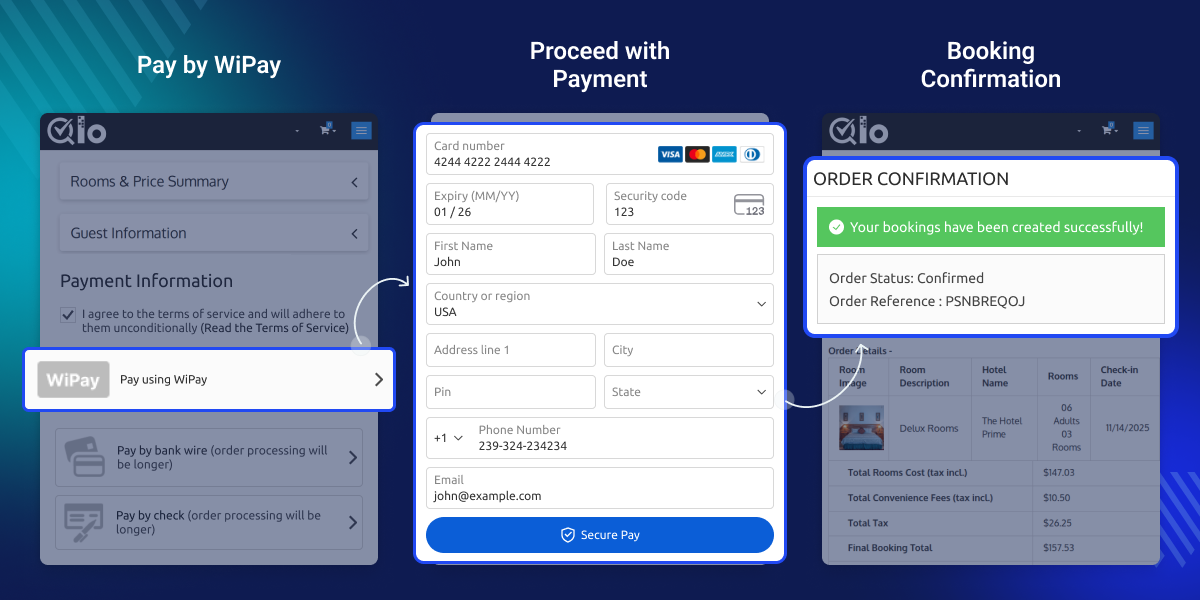
    QloApps WiPay Payment Gateway

    Highlighted Features

    Real-Time Payment Processing

    Supports real-time authorization and confirmation of payments using WiPay, ensuring immediate transaction feedback.

    Multi-Currency Support

    Supports transactions in TT Dollars, USD, and JMD, enabling operations in key Caribbean currencies.

    Easy Backend Configuration

    Admins can configure WiPay merchant credentials, environment (Sandbox/Production), and transaction fee responsibility.

    Transaction Logging

    All WiPay payments are recorded in the dedicated “WiPay Transactions” tab, providing full visibility into each transaction.

    WiPay Configuration

    To configure the WiPay gateway, admins must enter the following details:
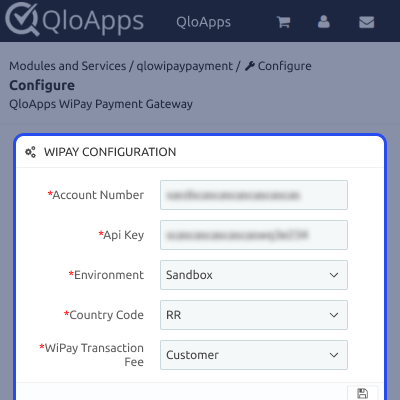
    • WiPay Account Number: Merchant account identifier.
    • API Key: Secure API token provided by WiPay.
    • Country Code: Two-letter code for currency handling.
    • Environment: Choose Sandbox for testing or Production for live transactions.
    • Transaction Fee Responsibility: Option to assign the fee to Customer or Merchant.
    WiPay Configuration Screenshot

    WiPay Transactions

    All WiPay transactions are displayed in a centralized list. Admins can filter, search, and sort transactions, making it easy to track payments for all bookings.
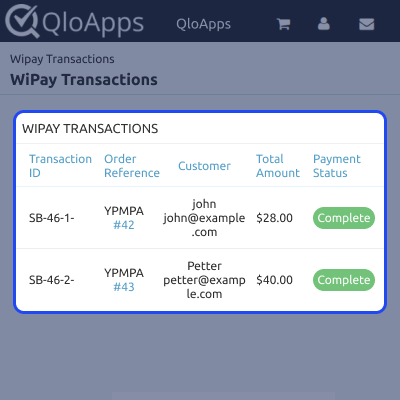
    WiPay Transaction List

    WiPay Transaction Details

    Clicking on any transaction in the list opens the detailed summary view. This provides full information about the transaction, including the payment reference, status, customer details, and booking association, helping admins reconcile payments efficiently.
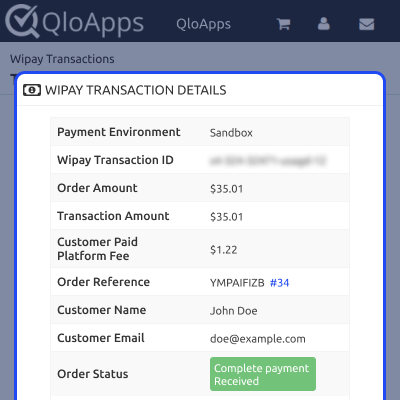
    WiPay Transaction Summary

    QloApps WiPay Payment Gateway Support

    For assistance, create a support ticket here.

    Explore other QloApps Add-ons for additional features.

    Specifications

    Product Version4.0.0
    Released4 months ago
    CategoryQloAppsPayment
    Last UpdatedFebruary 11, 2026 (2 months ago)
    Supported VersionsQloApps  1.6.x  1.7.x  
    Write a review

    Move to Cloud Today

    AWS Free tier hosting for one year by amazon web services, for more details please visit AWS Free Tier.

    GCP Free tier hosting for one year with 300 credit points by google cloud platform, for more details please visit GCP Free Tier.

    Azure free tier hosting for one year with 25+ always free services, for more details please visit Azure Free Tier.

    In our default configuration we will provide tremendous configuration for your eCommerce Website which is fast to load and response.

    Default Configuration Details of Server

    • 1 GB RAM
    • 1 Core Processor
    • 30 GB Hard Disk
    • DB with 1 GB RAM and 1 Core Processor

    * Server Configuration may vary as per application requirements.

    Want to know more how exactly we are going to power up your eCommerce Website with Cloud to fasten up your store. Please visit the Cloudkul Services.

    Get Started with Cloud
    Not Available


