USD
  • EUR
  • INR
  • USD
Cart
Cart 0
  • You have no items in your shopping cart.
    Cart
    Cart 0
    • You have no items in your shopping cart.
    Hire a Developer
    ×
    Contact Us!
    Send Again
    Close
    Please Login to Write Your Review

    QloApps Worldpay Payment Gateway


    QloApps Worldpay Payment Gateway enables properties to accept secure online payments through Worldpay, providing a reliable and smooth checkout experience for hotel bookings.


    • Supports secure card payments via Worldpay.

    • Accepts major debit and credit cards for bookings.

    • Offers easy backend configuration with merchant credentials.

    • Provides safe and trusted checkout for guests.

    • Supports 120+ global currencies including USD, EUR, GBP, CAD, AUD, SGD and more.

    • Admin can process full or partial refunds from the transaction summary page.

    • Dedicated Worldpay Transactions tab for payment tracking.


    Screenshots
    $55.00

    * Required Fields

    Add To Cart
    $55.00
    Configure and Buy
    • Description
    • Reviews
    • FAQ
    • Customers ()
    • Specifications
    • Cloud Hosting
    • Changelog

    The QloApps Worldpay Payment Gateway is a secure and reliable payment add-on for QloApps, enabling properties to accept online payments via Worldpay.

    This gateway ensures a seamless and trusted checkout experience for guests, with robust card processing, wide currency support, and built-in options for admins to issue full or partial refunds directly from the transaction summary page.

    Highlighted Features

    Secure Card Payments

    Supports secure online card payment processing using Worldpay for hotel bookings.

    Global Currency Support

    Supports 120+ international currencies for global guest payments. View supported currencies.

    Easy Backend Integration

    Admins can configure Worldpay credentials directly from the QloApps back office.

    Full & Partial Refund Support

    Admins can process full or partial refunds directly from the Worldpay transaction summary panel.

    Transaction Visibility

    All Worldpay transactions can be monitored from the dedicated Transactions tab.

    Worldpay Configuration

    Admins can set up the Worldpay gateway by entering required merchant and API credentials from the back office.

    This section allows enabling the gateway, selecting the environment, and managing transaction keys and secret codes.
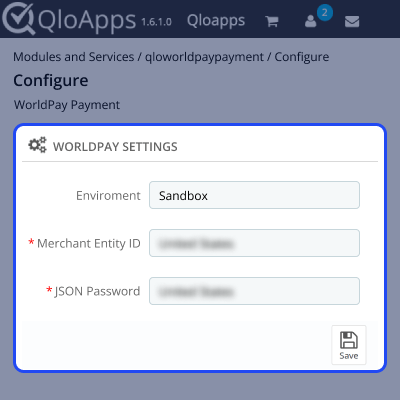
    QloApps Worldpay Configuration

    Worldpay Transactions

    All Worldpay payments are listed in a centralized Transactions tab, allowing admins to track orders, customers, payment amounts, and statuses from one place.
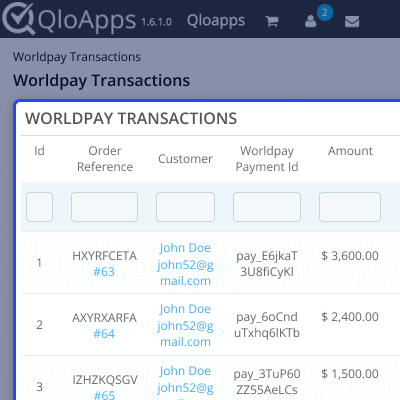
    QloApps Worldpay Transactions

    Worldpay Transaction Summary

    Clicking on any transaction opens a detailed summary view showing the transaction ID, order reference, customer information, total amount, payment status, and refund controls where admins can issue full or partial refunds and also have a dedicated refund list view.
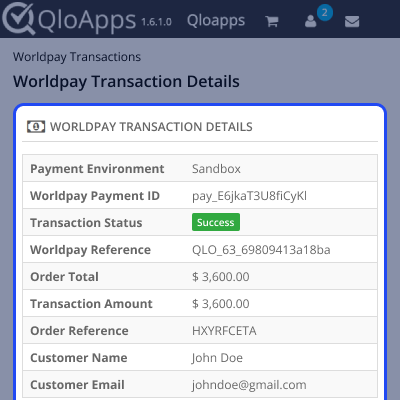
    QloApps Worldpay Transaction Summary

    QloApps Worldpay Payment Gateway Support

    For assistance, create a support ticket here.

    Explore more QloApps Add-ons to enhance your platform’s capabilities.

    Specifications

    Product Version4.0.0
    Released26 days ago
    CategoryQloAppsPayment
    Last UpdatedFebruary 25, 2026 (17 days ago)
    Supported VersionsQloApps  1.6.x  1.7.x  
    Write a review

    Move to Cloud Today

    AWS Free tier hosting for one year by amazon web services, for more details please visit AWS Free Tier.

    GCP Free tier hosting for one year with 300 credit points by google cloud platform, for more details please visit GCP Free Tier.

    Azure free tier hosting for one year with 25+ always free services, for more details please visit Azure Free Tier.

    In our default configuration we will provide tremendous configuration for your eCommerce Website which is fast to load and response.

    Default Configuration Details of Server

    • 1 GB RAM
    • 1 Core Processor
    • 30 GB Hard Disk
    • DB with 1 GB RAM and 1 Core Processor

    * Server Configuration may vary as per application requirements.

    Want to know more how exactly we are going to power up your eCommerce Website with Cloud to fasten up your store. Please visit the Cloudkul Services.

    Get Started with Cloud
    Not Available


