USD
  • EUR
  • INR
  • USD
Cart
Cart 0
  • You have no items in your shopping cart.
    Magento 2 Extensions
    Cart
    Cart 0
    • You have no items in your shopping cart.
    Hire a Developer
    ×
    Contact Us!
    Send Again
    Close
    Please Login to Write Your Review
    SAP Magento 2 Connector

    SAP Magento 2 Connector

    x

    * Required Fields

    $1,999.00
    Add To Cart
    30 Days Money Back Guarantee*

    SAP Magento 2 Connector exports categories, products, customers, and orders from Magento 2 to SAP Business One, keeping ecommerce and ERP data in sync.


    • Sync Magento 2 categories, products, customers and orders with SAP B1.

    • Export Magento 2 customers as SAP Business One Business Partners.

    • Choose the Price List and Currency used for products created in SAP B1.

    • Set a default warehouse for product sync and real-time stock updates.

    • Pick the Shipping Method, Sales Employee and Due Date for synced orders.

    • Use an existing Business Partner or create a new one to sync orders.

    • Map Magento 2 tax rates to the matching SAP Business One tax fields.

    • Connect Magento 2 straight to SAP B1 with no third-party server.

    SAP Magento 2 Connector
    SAP Magento 2 Connector
    $1,999.00
    Check How It Works

    Need Help Deciding?

    Support answers within one business day.

    Open a ticket
    $1,999.00
    Configure and Buy
    30 Days Money Back Guarantee*
    X
    • Description
    • Reviews
    • FAQ
    • Customers ()
    • Specifications
    • Cloud Hosting
    • Changelog

    SAP Magento 2 Connector links your Magento 2 store with SAP Business One and exports categories, products, customers and orders, so your online store and your ERP always hold the same data.

    This connector works in real time, which means that new products, customer details and orders reach SAP B1 within minutes and your team no longer has to enter the same data twice.

    It connects Magento 2 directly to SAP B1 through SAP Business Service Layer, so no third-party server is involved and the risk of your data being compromised or lost stays low.

    Magento 2 customers are exported as Business Partners in SAP B1, which gives your sales and accounts teams faster and more accurate access to customer information.

    You can choose the Price List, Currency and default warehouse used when products are created in SAP B1, and the same warehouse receives the real-time inventory updates.

    For orders, you can set the Shipping Method, Sales Employee and Due Date, and you can pick an existing Business Partner or create a new one from the configuration view.

    The code is open source, so your developers can review it against your own security model and customise it for your business processes whenever that is needed.

    Additionally, this connector includes a tax mapping option and supports Magento 2.4.x with SAP Business One versions listed in the specifications, and if your business runs Odoo as its ERP, you can use the Odoo ERP Connector for Magento 2 instead.
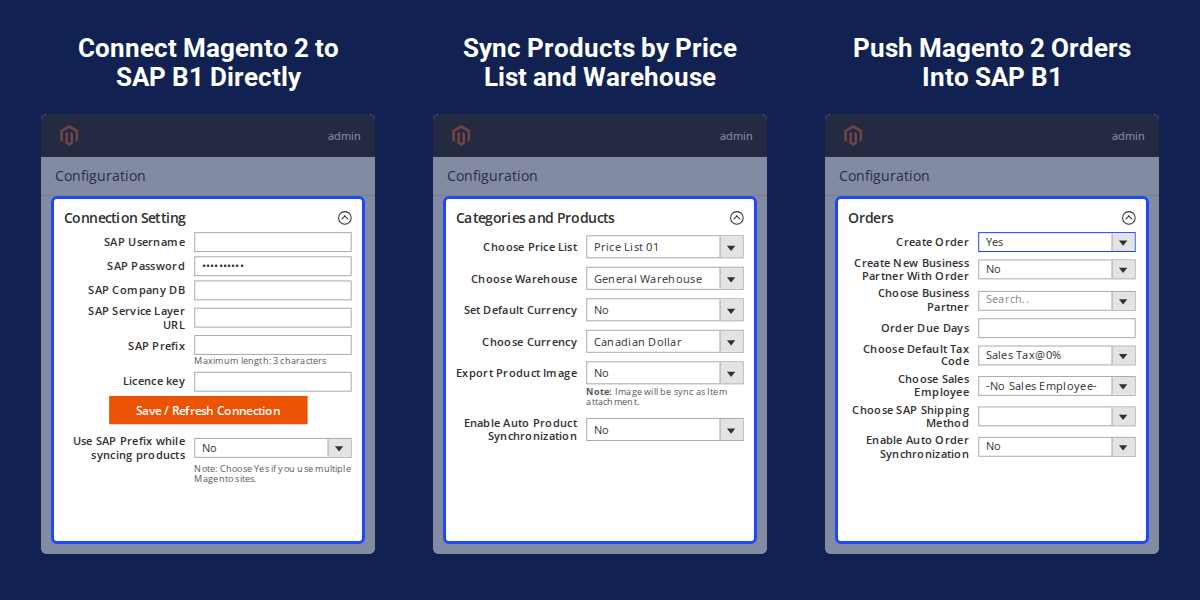
    SAP Magento 2 Connector

    Highlighted Features

     Real-Time Sync for Four Data Types

    Categories, products, customers and orders move from Magento 2 to SAP B1 in real time.

     Customers Exported as Business Partners

    Each Magento 2 customer is created as a Business Partner in SAP Business One.

     Price List and Currency Selection

    Choose the Price List and Currency that SAP B1 uses when it creates a product.

     Default Warehouse and Inventory Update

    Pick the default warehouse used for product sync and real-time stock updates at SAP B1 end.

     Shipping Method, Sales Employee and Due Date

    Set these three values for every order that is synced to SAP Business One.

     Existing or New Business Partner for Orders

    Sync orders against a Business Partner you already have, or create a new one from the configuration view.

     Tax Field Mapping

    Map the tax fields of Magento 2 to the tax fields of SAP B1 so orders carry the right tax.

     Direct Connection, No Third-Party Server

    Data moves straight from Magento 2 to SAP B1 without passing through an outside server.

    Why Do We Need SAP Magento 2 Connector?

    SAP Magento 2 Connector helps online stores manage product, customer, and order data across Magento 2 and SAP Business One, where eCommerce operations and business records are maintained in separate systems.

    Without a link between them, your staff has to copy categories, products and orders by hand, which takes time and leads to typing mistakes and stock figures that do not match.

    Magento 2 on its own does not know SAP concepts such as Price Lists, Business Partners, Sales Employees and warehouses, so the default setup cannot keep an SAP-centric business up to date.

    A connector that reads these SAP settings and pushes data in real time removes the double entry and gives your sales and accounts teams one reliable set of records to work from.

    This connector does this by exporting categories, products, customers and orders from Magento 2 to SAP B1 according to the options you choose in the configuration screen.

    Apart from this, Webkul is an official SAP partner and an Adobe Solution Partner, and if you also keep customer data in a CRM, the Magento 2 Salesforce Integration syncs categories, products, customers and orders to Salesforce.

    Use Cases

    • Moving Online Orders Into SAP B1

      A store owner exports Magento 2 orders to SAP Business One with the Shipping Method, Sales Employee and Due Date already set.

    • Giving Finance Teams Customer Data

      Customers created in Magento 2 appear as Business Partners in SAP B1, so the finance team works from the same customer list.

    • Running Several Warehouses

      A merchant with more than one warehouse chooses which default warehouse receives the synced products and stock.

    • Selling From Several Magento 2 Sites

      Businesses with multiple Magento 2 sites can use SAP Prefix while syncing products to keep their records apart.

    • Matching Tax in Both Systems

      A business maps its Magento 2 tax rates to SAP tax fields so that synced orders carry the correct tax.

    • Selling in a Different Currency

      A store creates products in SAP B1 with a chosen Price List and Currency, such as Canadian Dollar.

    Magento 2 SAP B1 Connection Configuration

    Admin set the connection once and then manage every sync from the same Magento 2 configuration page, which keeps the setup short for new stores and for stores with several sites.
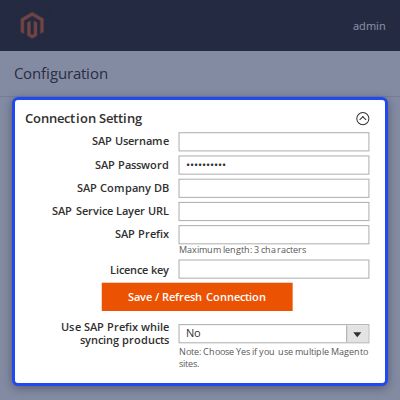
    • Enter SAP Username, SAP Password and SAP Company DB.
    • Add SAP Service Layer URL of your SAP Business One server.
    • Set an SAP Prefix of up to 3 characters.
    • Licence key field, with the key issued on request.
    • Save / Refresh Connection button to connect or refresh the link.
    • Use SAP Prefix while syncing products option for multiple Magento 2 sites.
    Magento 2 SAP B1 Connection Configuration

    Magento 2 to SAP B1 Category Sync

    Store owners can check each exported category in one list, see its SAP Category Id and status, and let new categories follow automatically when auto synchronization is on.
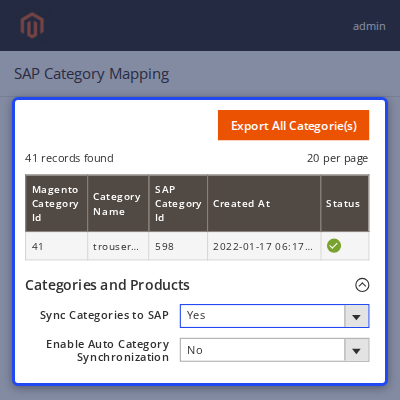
    • Sync Categories to SAP option with Yes and No.
    • Export All Categorie(s) button for a full export.
    • Enable Auto Category Synchronization for real-time sync.
    • Grid shows Magento Category Id, Category Name, SAP Category Id, Created At and Status.
    Magento 2 to SAP B1 Category Sync

    Magento 2 to SAP B1 Product Sync

    Merchants can match product creation in SAP B1 to their own pricing and stock setup, and turn on auto product synchronization so changes follow in real time.
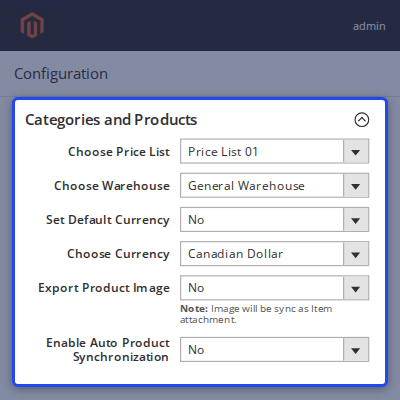
    • Choose Price List for products created in SAP B1.
    • Choose Warehouse as the default warehouse for sync.
    • Set Default Currency and Choose Currency, for example Canadian Dollar.
    • Export Product Image, which is synced as an Item attachment.
    • Enable Auto Product Synchronization for real-time sync.
    Magento 2 to SAP B1 Product Sync

    Magento 2 Customer to SAP B1 Business Partner Sync

    SAP Customer Synchronization grid exports Magento 2 customers to SAP Business One as Business Partners, all together with the Export all button.
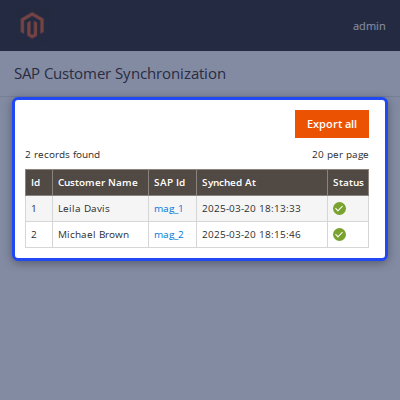
    • Export all button to send customers to SAP B1.
    • Grid columns for Id, Customer Name and SAP Id.
    • Synched At column shows when each customer was synced.
    • Status column that shows if a customer was synced.
    Magento 2 Customer to SAP B1 Business Partner Sync

    Magento 2 to SAP B1 Order Sync

    This lets a store push each Magento 2 order into SAP B1 with the same sales settings every time, and Enable Auto Order Synchronization sends orders in real time.
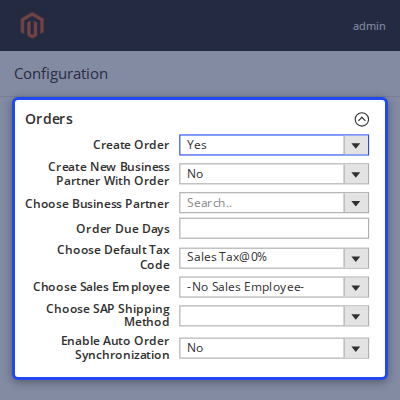
    • Create Order option to sync orders to SAP B1.
    • Create New Business Partner With Order or Choose Business Partner.
    • Order Due Days and Choose Default Tax Code.
    • Choose Sales Employee and Choose SAP Shipping Method.
    • Enable Auto Order Synchronization for real-time order sync.
    Magento 2 to SAP B1 Order Sync

    Magento 2 and SAP B1 Tax Field Mapping

    SAP Tax Field Mapping screen pairs each SAP Field with a Magento Field, for example CENVAT and VAT with US-CA-*-Rate 1, and you save the pairs with the Save Mappings button.
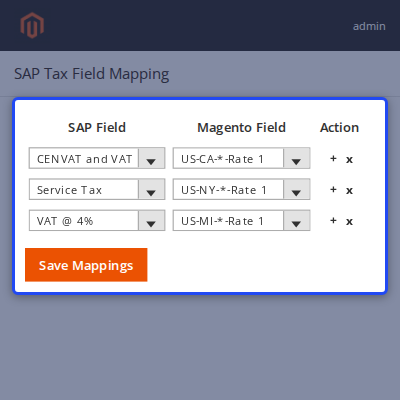
    • SAP Field and Magento Field dropdowns in every row.
    • Plus and x actions to add or remove a mapping row.
    • Save Mappings button to store the pairs.
    • Default Tax Code in the order settings covers orders with no tax applied.
    Magento 2 and SAP B1 Tax Field Mapping

    Magento 2 Product and Stock Data in SAP B1

    Warehouse and stock teams can confirm in SAP B1 that a Magento 2 product, such as Antonia Racer Tank-S-Purple, arrived with the right warehouse stock.
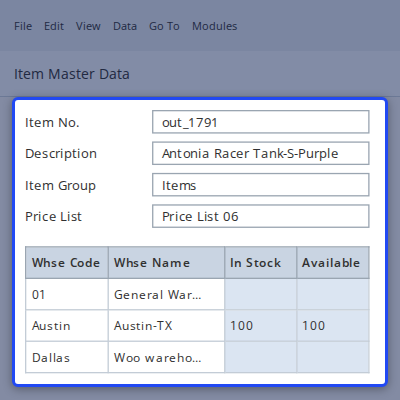
    • Item No. created for the synced product, for example out_1791.
    • Description shows the Magento 2 product name.
    • Price List selected for the product.
    • Warehouse rows with Whse Code and Whse Name.
    • In Stock and Available quantity for each warehouse.
    Magento 2 Product and Stock Data in SAP B1

    Prerequisites at SAP Business One End

    • SAP Business Service Layer
    • If you are using DB-MSSQL, the SAP B1 version should be at least 10.0.
    • If you are using DB-HANA, the SAP B1 version should be at least 9.2 or 9.3.
    • Service Layer configuration compatibility may change in the future. It depends entirely on SAP policy. Please contact Webkul support before purchasing.

     SAP Magento 2 Connector - Support

    For any query or issue please create a support ticket here http://webkul.uvdesk.com

    Specifications

    Product Version1.0
    Released4 years ago
    CategoryMagento 2, SAP, Connectors, 
    Last UpdatedNovember 3, 2026 (7 days ago)
    Supported VersionsMagento  2.4.x  SAP Business One  10.0  9.1  9.2  9.3  

    Ratings

    We'd love to hear your thoughts! Share your feedback and help us craft an even better experience tailored just for you.

    Write a review

    Frequently Asked Questions

     Which data does SAP Magento 2 Connector sync?
    It exports categories, products, customers (as Business Partners) and orders from Magento 2 to SAP Business One.
     
     Does the connector sync in real time?
    Yes, categories, products, orders and customers can sync in real time when you turn on the Enable Auto Synchronization options.
     
     Is the sync one-way or two-way?
    This connector is unidirectional, from Magento 2 to SAP B1, and you can request a customization if you need bidirectional sync.
     
     Is a third-party server involved?
    No, this connects Magento 2 directly to SAP B1, so no third-party server handles your data.
     
     What do I need on SAP Business One side?
    You need SAP Business Service Layer, SAP B1 10.0 or higher for MS SQL, and 9.2 or 9.3 or higher for HANA.
     
     Which Magento 2 versions are supported?
    The specifications list Magento 2.4.x, and the product page lets you pick Magento Open Source or Adobe Commerce (on-premise).
     
     Can I choose the Price List, Currency and warehouse?
    Yes, the Categories and Products settings let you choose the Price List, Warehouse and Currency used for products in SAP B1.
     
     Can I use an existing Business Partner for orders?
    Yes, you can choose an existing Business Partner or create a new one with the order from the configuration view.
     
     Does the connector support tax mapping?
    Yes, SAP Tax Field Mapping screen maps SAP Fields to Magento Fields, and a Default Tax Code covers orders with no tax.
     
     Can I use it with multiple Magento 2 sites?
    Yes, set an SAP Prefix of up to 3 characters and choose Yes for Use SAP Prefix while syncing products.
     
     Are product images exported?
    Yes, when Export Product Image is set to Yes, the image is synced as an Item attachment in SAP B1.
     
     What support comes with the connector?
    Support is included for 3 months at no extra cost, and a 6-month option is available, with a 30-day money back guarantee.
     

    Specification

    Detailed technical features and requirements to help you understand the module’s capabilities and ensure smooth integration with your system.

    Cloud Hosting

    Detailed technical features and requirements to help you understand the module’s capabilities and ensure smooth integration with your system.

    Default Configuration Details of Server

    1 GB
    RAM
    1 Core
    Processor
    30 GB
    Hard Disk
    1 GB RAM & 1 Core Processor
    Database

    Want to know more how exactly we are going to power up your eCommerce Website with Cloud to fasten up your store

    * Server Configuration may vary as per application requirements.

    Change Logs

    Not Available