USD
  • EUR
  • INR
  • USD
Cart
Cart 0
  • You have no items in your shopping cart.
    Akeneo Extensions
    Cart
    Cart 0
    • You have no items in your shopping cart.
    Hire a Developer
    ×
    Contact Us!
    Send Again
    Close
    Please Login to Write Your Review
    Supplier Portal for Akeneo PIM

    Supplier Portal for Akeneo PIM

    x
    Free

    * Required Fields

    $699.00
    Add To Cart

    Supplier Portal for Akeneo PIM helps suppliers manage product data and submit updates. It syncs approved data with Akeneo PIM in a secure self service portal.


    • Manage products in Akeneo Supplier Portal with safe and secure access.

    • Review each product before approved data syncs with Akeneo PIM.

    • Sync approved products and media through Akeneo REST API.

    • Set supplier roles and permissions for each product family.

    • Import and export products and suppliers using CSV job profiles.

    • Track every product update with complete version and audit logs.

    • Keep attributes, families, categories, and channels synced in LibrePIM.

    • Track background jobs with execution logs and job status.

    Supplier Portal for Akeneo PIM
    Supplier Portal for Akeneo PIM
    $699.00
    Check How It Works
    $699.00
    Configure and Buy
    X
    • Description
    • Reviews
    • FAQ
    • Customers ()
    • Specifications
    • Cloud Hosting
    • Changelog

    Supplier Portal for Akeneo PIM gives suppliers one place to create, edit, and submit product information. Admins check each submission before data moves to the connected PIM.

    Akeneo Supplier Portal lets suppliers work on their own without direct access to the main PIM. This keeps product updates organized and gives admins better control.

    Akeneo Product Approval Workflow helps teams check every product before it goes live. It cuts errors and makes sure only approved data reaches your catalog.

    Akeneo Supplier Management helps admins give the right supplier roles, set product family access, and set user permissions. This keeps supplier access simple, clear, and well organized.

    CSV import, export, and background jobs make large catalog updates easy. Teams can track each process, download execution logs, and keep daily data transfers reliable. The LibrePIM Supplier Portal keeps attributes, categories, families, channels, and locales up to date. This helps suppliers use correct and consistent catalog data.

    Additionally, if you want to manage scheduled backup tasks without manual execution, the Akeneo Cron Scheduler module helps automate backup jobs and keeps your backup process consistent.
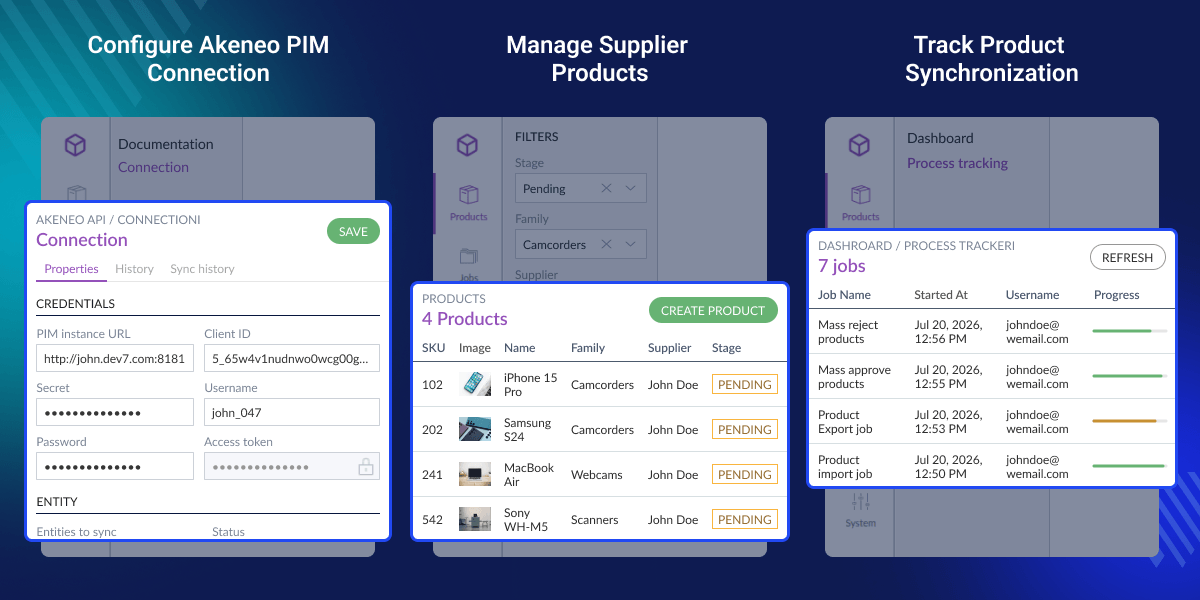
    Supplier Portal for Akeneo PIM

    Highlighted Features

     Supplier Portal for Akeneo PIM Access

    Suppliers can use catalog data without direct access to the main Akeneo PIM.

     Akeneo Product Approval Workflow

    Each product goes through review before approved data reaches Akeneo PIM.

     Akeneo Supplier Management

    Each supplier gets the right role and access for every assigned product family.

     Akeneo PIM Data Sync

    Approved products and media move to Akeneo PIM by using the secure REST API.

     CSV Import and Export

    Teams can move supplier and product data by using CSV jobs with full job tracking.

     Reference Data Sync

    Suppliers can use the latest attributes, families, and categories with every product.

    Why Do We Need Supplier Portal for Akeneo PIM?

    Supplier Portal for Akeneo PIM lets suppliers add and manage product data without direct access to your PIM. They work in a secure self service portal while admins stay in full control.

    Many businesses still use emails, spreadsheets, or manual updates instead of an Akeneo Supplier Portal. This slows product updates and creates errors in catalog data. The main PIM stores approved product data, not supplier submissions.

    Every product is reviewed before it reaches the main catalog. Approval workflows, role based permissions, and automatic sync reduce manual work. Teams review products faster and keep catalog data accurate.

    CSV jobs, activity logs, and reference data help large supplier networks manage daily tasks. They also keep product information consistent across the catalog.

    Suppliers can start work quickly and follow the same process every day. This saves time, improves teamwork, and keeps product data organized.

    Apart from this, if your team frequently updates product information in bulk, the Akeneo Backup Management module helps safeguard existing catalog data before large scale changes are applied.

    Supplier Portal for Akeneo PIM Use Cases

    Businesses use Supplier Portal for Akeneo PIM to get product data from suppliers. Each update is checked before it reaches Akeneo PIM. This keeps product data clear, correct, and easy to manage.

    • Multi Vendor Retailers

      Let many suppliers add products while admins review each update before it goes live.

    • Manufacturing Companies

      Get product data from manufacturers before products are added to the main catalog.

    • Wholesale Distributors

      Handle supplier updates with less work and no spreadsheets or long email chains.

    • Marketplace Product Onboarding

      Help new sellers add products through Akeneo Supplier Portal with a fast review process.

    • Consumer Goods Brands

      Keep product data the same across large supplier networks with an easy review process.

    • LibrePIM Catalog Management

      Suppliers add catalog data in the LibrePIM Supplier Portal before it goes live.

    Supplier Portal Dashboard

    See product submissions, approvals, and catalog activity from one dashboard. Manage daily supplier work from one simple and organized place. Check pending tasks and open important sections quickly from the Akeneo Supplier Portal dashboard.
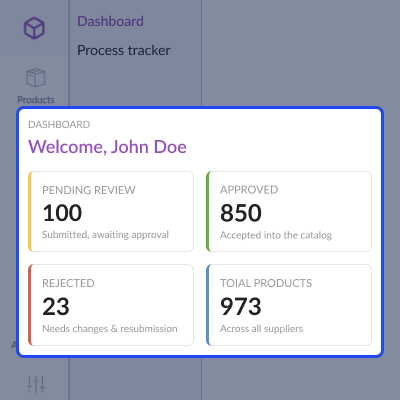
    • View pending, approved, and rejected product counts.
    • Check total products for all supplier accounts.
    • Open quick links to common sections.
    • Check catalog activity from one dashboard.
    • Move through the dashboard with a clean and simple layout.
    Supplier Portal Dashboard

    Reference Data Management

    View attributes, families, and categories from Akeneo PIM in one easy reference view. Find the data fast and use it with ease. Akeneo Supplier Management gives the latest catalog data. This cuts mapping errors and keeps product data correct.
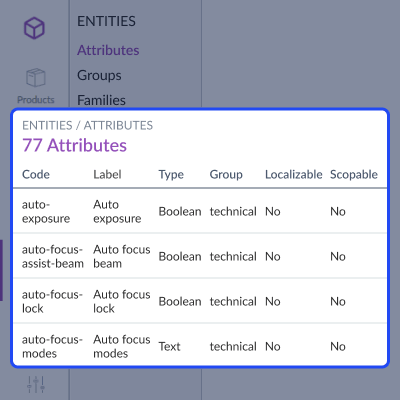
    • View synced attributes and attribute groups.
    • Browse categories in a simple tree view.
    • View families, channels, and locales.
    • Search and filter reference data quickly.
    • Use read only data from Akeneo PIM.
    Reference Data Management

    Supplier Management

    Create supplier accounts, set roles, and manage account status from one simple admin panel. Akeneo Supplier Management helps admins give the right access. It makes every account easy to manage.
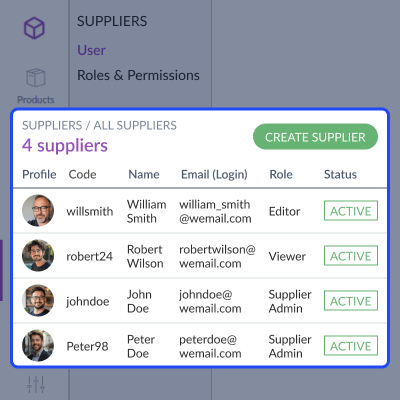
    • Create, edit, or remove supplier profiles.
    • Set custom roles and access levels.
    • Assign product families to each supplier.
    • Find and filter all supplier records.
    • Manage account status from one simple screen.
    Supplier Management

    Supplier Product Management

    Create, update, and manage supplier products from one simple work area. Use Akeneo Supplier Product Portal to check products before they sync with the catalog.
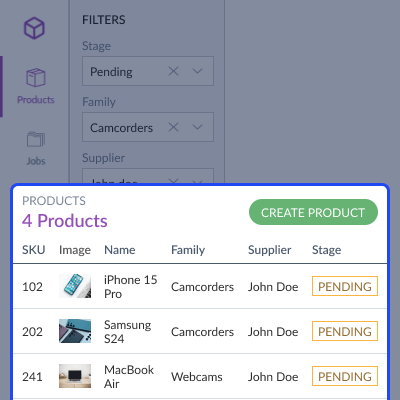
    • Create and edit supplier product records.
    • Filter products by stage, family, or supplier.
    • View draft, pending, and approved status.
    • Find products by SKU or product name.
    • Manage product records from one simple screen.
    Supplier Product Management

    Akeneo PIM Connection

    Set up a secure REST API to connect approved products and reference data with Akeneo PIM. Akeneo Product Submission Portal helps move approved data to Akeneo PIM. This cuts manual catalog work.
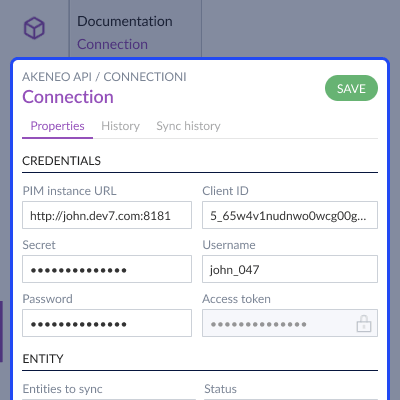
    • Set up Akeneo PIM REST API connection details.
    • Sync attributes, families, and categories with ease.
    • Turn on automatic sync for approved products.
    • View connection status and complete sync history.
    • Manage entity sync from one simple settings page.
    Akeneo PIM Connection

     Support

    For any query or issue, please create a support ticket here http://webkul.uvdesk.com/. You may also check our top-quality Akeneo Extensions.

    Specifications

    Product Version1.0.0
    Released16 days ago
    CategoryAkeneoAkeneo Add-Ons
    Last UpdatedJuly 27, 2026 (13 days ago)
    Supported VersionsAkeneo  7.x.x  

    Ratings

    We'd love to hear your thoughts! Share your feedback and help us craft an even better experience tailored just for you.

    Write a review

    Frequently Asked Questions

     Can suppliers edit products after submitting them for review?
    Once a product goes for review, suppliers cannot edit it. If the product is rejected, they can update the details and submit it again for review.
     
     How are approved products transferred to Akeneo PIM?
    Approved products sync with Akeneo PIM through the REST API. Product media and related data also move during the same process.
     
     What happens if a supplier submits incorrect product information?
    Admins can reject the product during the review process. Suppliers can then make the needed changes and submit the product again for approval.
     
     Does the portal support bulk product imports and exports?
    Yes, CSV job profiles make it easy to import or export supplier and product data while tracking each process through execution logs.
     
     Can businesses monitor background synchronization jobs?
    Every import, export, and process job shows its status and log files, making it easy to check completed and running jobs at any time.
     
     Is supplier access separated from the main Akeneo PIM?
    Suppliers work in Akeneo Supplier Portal instead of the main PIM. This helps admins control product updates and keep the catalog up to date.
     
     How does the portal keep catalog data consistent?
    The portal keeps all reference data up to date. Attributes, categories, families, channels, and locales stay current. This helps suppliers use the latest product data.
     
     Can this solution work with LibrePIM as well?
    LibrePIM Supplier Portal works with the same features. Approved product data moves through the same integration process.
     
     Does the portal keep a history of product changes?
    Every product update is saved with version history and audit logs. This helps teams check earlier changes whenever needed.

    Specification

    Detailed technical features and requirements to help you understand the module’s capabilities and ensure smooth integration with your system.

    Cloud Hosting

    Detailed technical features and requirements to help you understand the module’s capabilities and ensure smooth integration with your system.

    Default Configuration Details of Server

    1 GB
    RAM
    1 Core
    Processor
    30 GB
    Hard Disk
    1 GB RAM & 1 Core Processor
    Database

    Want to know more how exactly we are going to power up your eCommerce Website with Cloud to fasten up your store

    * Server Configuration may vary as per application requirements.

    Change Logs

    • - Feature Add (+)
    • - Feature remove (-)
    • - Bug Fixed (!)
    • - Modification (*)
    Version 1.0
    • + Initial release of Supplier Self Service Portal for Akeneo PIM and LibrePIM (Community Edition) built with Symfony 7.4 and React.
    • + Added supplier authentication with email or username login, remember me, CSRF protection, role based access control, and 31 granular permissions.
    • + Added product management with create, edit, delete, draft, pending, approved, and rejected workflow.
    • + Added one click product approval with automatic product and media synchronization to Akeneo or LibrePIM through REST API.
    • + Added mass actions for approve, reject, delete, and assign products.
    • + Added product version history and audit logs.
    • + Added full text product search using Elasticsearch or OpenSearch with MySQL fallback support.
    • + Added in app notifications with live unread badge for product lifecycle events.
    • + Added asynchronous CSV and XLSX import and export with job profiles and execution logs.
    • + Added detailed import reports with product wise messages and media validation.
    • + Added REST synchronization for attributes, attribute groups, families, categories, channels, locales, and options.
    • + Added database migration support for installation and upgrade process.
    • + Added responsive React based frontend using Akeneo Design System.


