- Description
- Reviews
- FAQ
- Customers ()
- Specifications
- Cloud Hosting
- Changelog
UnoPim Azure Integration lets you save product images and PDFs directly in Azure Blob Storage. You can move old files from your server to Azure. You can also switch storage on or off anytime.
Managing files is easy. Upload, replace, preview, or download files inside UnoPim. Secure login details keep your Azure account safe. This reduces load on your server and makes files available worldwide.
If you are looking to store your UnoPim media files on Amazon S3, check out the UnoPim AWS Integration.
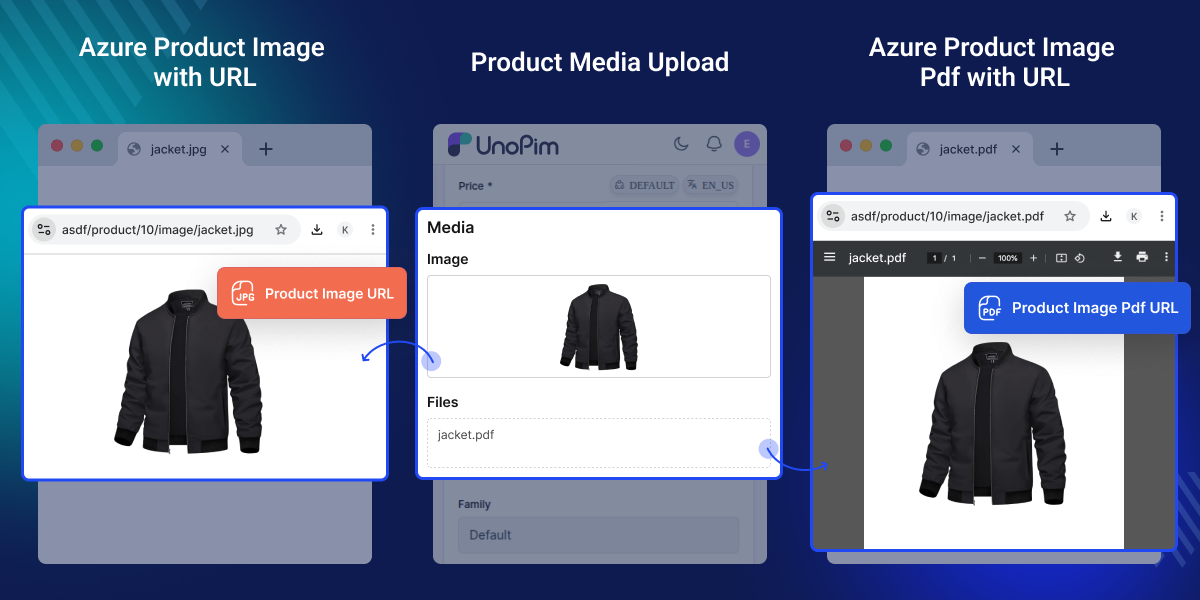
Highlighted Features of UnoPim Azure Integration
File Storage in Azure
Save product images and PDFs in Azure.
Easy File Management
Upload, replace, preview, and download from UnoPim.
Local File Cleanup
Delete files already moved to Azure.
Secure Credentials
Connect Azure Blob Storage with safe login details.
Why Do We Need UnoPim Azure Integration?
UnoPim Azure Integration stores your files in Azure, ensuring fast, secure access while saving server space and improving performance. You do not rely on local storage. Your files stay in Azure, and you can reach them anywhere.
If you are looking for a module that allows you to generate product catalogs, reports, and PDFs directly from UnoPim, check out the UnoPim PDF Generator.
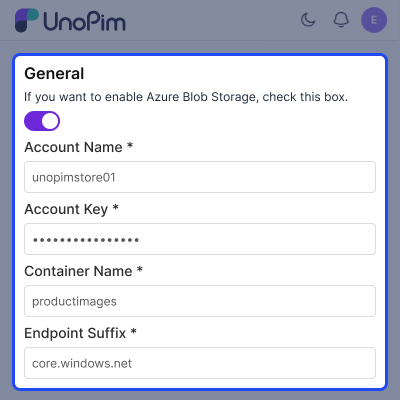
Azure Credential Setup
Add your Azure storage account details.
- Enable or disable Azure storage with one toggle.
- Add Account Name, Key, Container, and Endpoint.
- Save to store files in Azure.
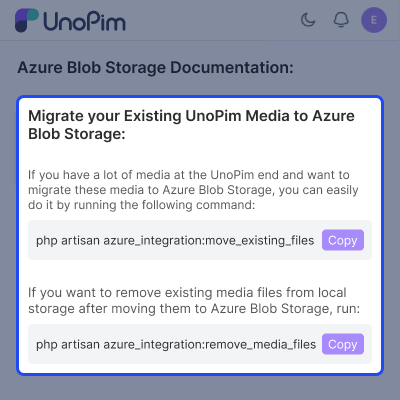
Azure Integration Commands
Migrate media files to Azure with a single command.
- Remove old local files after migration.
- Run migration and cleanup using artisan commands.
- Copy commands instantly with one click.
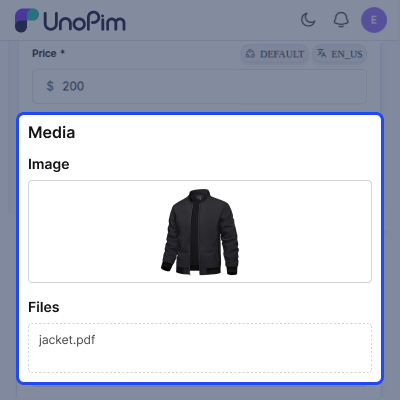
Product Media Management
Upload and preview images.
- Add PDFs like manuals.
- Keep all files in one place.
- Replace old files anytime.
Support
For any query or issue, please create a support ticket here http://webkul.uvdesk.com/. You may also check our all UnoPim Extensions.
Specifications
Frequently Asked Questions
Specification
Detailed technical features and requirements to help you understand the module’s capabilities and ensure smooth integration with your system.
Cloud Hosting
Detailed technical features and requirements to help you understand the module’s capabilities and ensure smooth integration with your system.
Move to Cloud Today
We’re partnered with top-tier, trusted providers!



Default Configuration Details of Server
RAM 1 Core
Processor 30 GB
Hard Disk
Database
Want to know more how exactly we are going to power up your eCommerce Website with Cloud to fasten up your store
* Server Configuration may vary as per application requirements.
Change Logs
- - Feature Add (+)
- - Feature remove (-)
- - Bug Fixed (!)
- - Modification (*)
- + Added full compatibility with UnoPim 3.0, Laravel 13, and PHP 8.4.
- ! Fixed connector loading and compatibility issues that caused features to crash on UnoPim 3.0.
- ! Fixed product exports to correctly include product data and media columns, with support for importing exported files back.
- ! Fixed Job Tracker export downloads and aligned file download permissions with UnoPim's permission system.
- ! Fixed measurement attributes such as length, weight, and capacity to correctly preserve their values and units during exports and imports.
- + Added and improved Azure CDN/media support, including public URLs, temporary sharing links, image imports, and media handling in exports.
- * Improved the Azure credential experience with secure access-key handling, AJAX saving, unsaved-change detection, and improved Credential/History tab placement.
- * Cleaned up and standardized the connector by removing unused/dead code, adding its own
composer.json, correcting the feature documentation, and maintaining existing storage, uploads, credentials, history, and Artisan command functionality.
- Made the Azure Blob connector compatible with the latest UnoPim release.
- Updated the module for the UnoPim 2.0.0 application stack.
- Aligned installation and package registration with the latest UnoPim structure.
- Continued support for storing and retrieving media files using Azure Blob Storage.
- + Introduced Unopim Azure Integration for storing catalog images and PDFs.
- + Toggle switch to enable/disable saving files to Azure Blob Storage.
- + Seamless file handling:
- + Upload, re-upload, preview, and download images and PDFs directly through the Unopim interface.
- + Migration Command to move existing local files to the specified Azure Blob Container.
- + Optional Command to safely delete local images and PDFs that have already been migrated to Azure Blob Storage.
- + Secure credential handling.
