- Description
- Reviews
- FAQ
- Customers ()
- Specifications
- Cloud Hosting
- Changelog
UnoPim BigCommerce Connector makes it easy to manage product data between UnoPim and BigCommerce. You can handle all product information from UnoPim and sync it with your store.
The module allows both import and export of data. You can send categories and products to BigCommerce or bring them into UnoPim. It supports simple and configurable products, making it useful for different product types. This helps businesses manage their catalog in a better way.
By using this connector, you can reduce manual work and avoid data errors. It also helps keep your store data consistent and up to date.
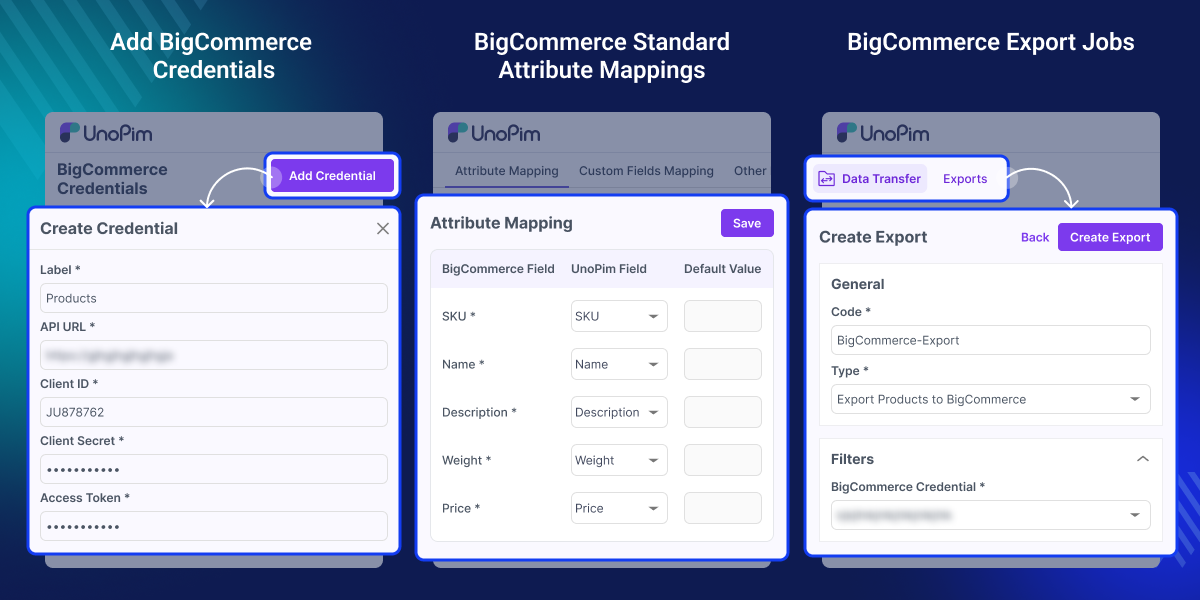
Highlighted Features of UnoPim BigCommerce Connector
Easy BigCommerce Setup
Connect your BigCommerce store with UnoPim and manage data from one place.
Import & Export Support
Sync categories and products between UnoPim and BigCommerce.
Product Type Support
Handle both simple and configurable products during import and export.
Advanced Attribute Mapping
Map UnoPim attributes with BigCommerce fields for accurate data transfer.
Custom Field Mapping
Add and map custom fields to send additional product data.
Multiple Store Management
Add and manage multiple BigCommerce store accounts easily.
Why You Need to Use UnoPim BigCommerce Connector
Managing product data across platforms can be time-consuming. UnoPim BigCommerce Connector helps you manage everything from one place. You can change details in UnoPim and send them to BigCommerce in just a few steps. This saves time and stops mistakes.
It also helps keep your store data consistent and up to date. This is useful for businesses managing large product catalogs. You can also check the UnoPim WooCommerce Connector module to manage product data between UnoPim and WooCommerce easily.
Use Cases
-
Manage Multiple Stores
Control the data for many BigCommerce stores from one dashboard.
-
Bulk Product Updates
Change many items in UnoPim and export them all to your store at once.
-
Central Product Management
Control all product data from UnoPim instead of multiple platforms.
-
Easy Data Migration
Move products and categories between UnoPim and BigCommerce easily.
-
Keep Store Data Updated
Make sure your BigCommerce store always shows the latest info.
-
Reduce Manual Work
Let the system move data for you to save time and stop errors.
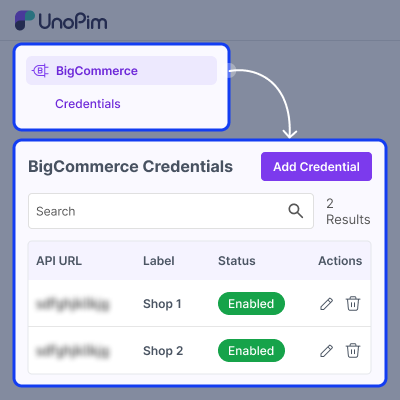
Credential Configuration
Connect your BigCommerce store with UnoPim using API credentials.
- Add your BigCommerce store details
- Manage more than one store at a time
- Set up a safe connection
- Enable or disable store configuration
- Change your store details anytime
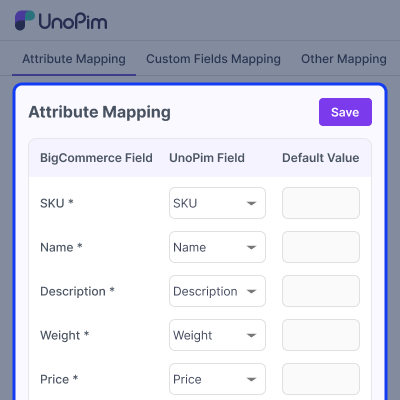
Attribute Mapping
Map UnoPim product details with BigCommerce fields.
- Map details like Name, Price, Weight, and SKU
- Set default values for fields if required
- Ensure correct data sync between both platforms
- Control how product data is sent to BigCommerce
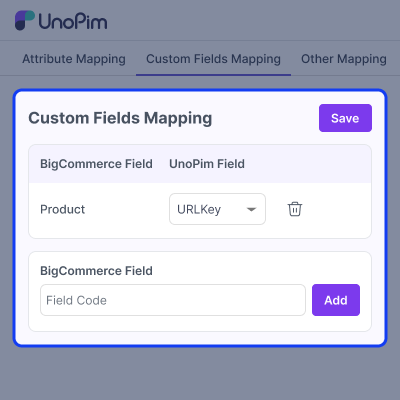
Custom Fields Mapping
Add extra BigCommerce fields and with UnoPim attributes.
- Create custom field mappings
- Link additional data fields easily
- Share more info than the standard fields allow
- Manage these custom fields mapping from your dashboard
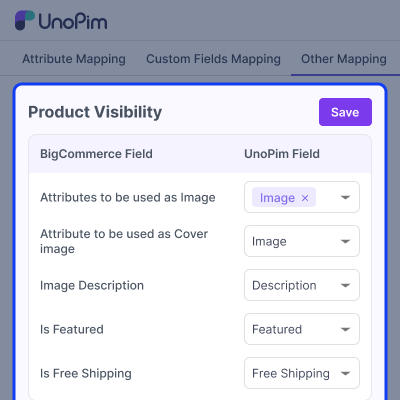
Other Mapping
Control product display and settings using mapping options.
- Map product images and gallery
- Set cover image for products
- Map brand and product attributes
- Define image description and other details
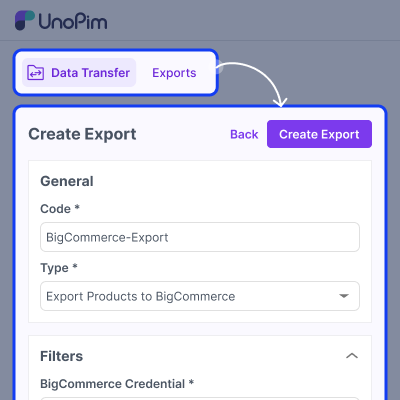
Export Data
Send product data from UnoPim to BigCommerce.
- Export categories
- Export simple products
- Export configurable products with variants
- Apply mapped attributes during export
- Sync updated product data easily
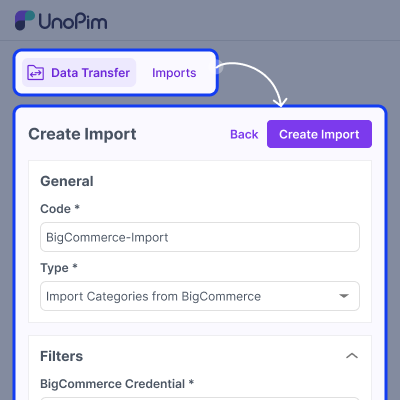
Import Data
Bring product data from BigCommerce into UnoPim.
- Import categories
- Import simple products
- Import configurable products
- Use mapping to match incoming data
- Update existing product data
Support
For any query or issue, please create a support ticket here http://webkul.uvdesk.com/. You may also check our all UnoPim Extensions.
Specifications
Frequently Asked Questions
Specification
Detailed technical features and requirements to help you understand the module’s capabilities and ensure smooth integration with your system.
Cloud Hosting
Detailed technical features and requirements to help you understand the module’s capabilities and ensure smooth integration with your system.
Move to Cloud Today
We’re partnered with top-tier, trusted providers!



Default Configuration Details of Server
RAM 1 Core
Processor 30 GB
Hard Disk
Database
Want to know more how exactly we are going to power up your eCommerce Website with Cloud to fasten up your store
* Server Configuration may vary as per application requirements.
Change Logs
- - Feature Add (+)
- - Feature remove (-)
- - Bug Fixed (!)
- - Modification (*)
- Feature Add: Mappings are now saved per credential, with a credential picker available on every mapping screen. Existing installations retain their current mappings.
- Feature Add: Added mapping history with one grid listing every mapping change across all sections and credentials.
- Feature Add: Product export jobs now support the same filters as UnoPim's product export, including channel, locale, currency, attribute family, category, completeness, status, date ranges, and attribute conditions.
- Feature Add: Added a SKU filter to product export jobs with a paste-friendly field.
- Feature Add: Products can now be exported with their associations. Association types selected on the Association Mapping screen are sent to BigCommerce as related products.
- Feature Add: Added brand attribute mapping to BigCommerce brands. Brands are created on the store when they do not already exist.
- Feature Add: DAM assets can now be mapped as image fields and exported as product images. The DAM bundle remains optional.
- Feature Add: Rate limits are now handled automatically, allowing the sync to wait and continue instead of stopping the remaining batch.
- Feature Add: Mappings are validated when saved against the attribute type expected by each field.
- Feature Add: Warnings from imports and exports are now displayed on the job instead of being available only in the log.
- Bug Fixed: Products with an unexported category are now skipped and identified in the log instead of being sent to BigCommerce with incomplete category data.
- Bug Fixed: Product categories are now kept up to date on BigCommerce. Updates no longer leave categories empty.
- Bug Fixed: Missing images are now excluded instead of being sent as a link to the site's home page.
- Bug Fixed: Imported images are now saved to the configured storage disk, including S3.
- Bug Fixed: Weight and price are no longer overwritten with 0 when no values are mapped.
- Bug Fixed: A default value of "0" can now be saved again.
- Bug Fixed: Empty custom field values are no longer stored.
- Bug Fixed: Credentials now save correctly on PostgreSQL.
- Bug Fixed: Duplicate mappings and mappings to non-existent attributes are now rejected with a proper message instead of a server error.
- Bug Fixed: Created and updated products are now counted separately in the export summary.
- Bug Fixed: Only sellable variants are exported. Empty variant groups left after an import are no longer pushed as products.
- Added:
- + Database migration to widen credential secret columns to text and encrypt any existing plaintext secrets.
- + Warning log during product import/export when the image field mapping (Other Mappings) is not configured, so product images are no longer skipped silently.
- + Full localization across all supported locales (added 25 missing locale files and completed the previously partial translations).
- Fixed:
- ! Empty-string credential secrets no longer trigger a decryption error (normalized to null).
- ! Updated the package Pest feature tests and fixtures to work with encrypted secrets.
- Security:
- * Encrypt BigCommerce access_token and client_secret at rest using Laravel's encrypted cast.
- * Add ACL coverage for the credential update (PUT) route and the export-mapping history and additional-attribute add/remove routes, which were previously not permission-checked.
- Changes:
- * Made the BigCommerce connector compatible with the latest UnoPim release.
- * Updated the module for the UnoPim 2.0.0 application stack.
- * Aligned installation and package registration with the latest UnoPim structure.
- * Continued support for exporting products and variants between UnoPim and BigCommerce.
- + Support for managing multiple BigCommerce store credentials.
- + Export categories from UnoPIM to BigCommerce.
- + Export simple products from UnoPIM to BigCommerce.
- + Export configurable products from UnoPIM to BigCommerce.
- + Import categories from BigCommerce to UnoPIM.
- + Import simple products from BigCommerce to UnoPIM.
- + Import configurable products from BigCommerce to UnoPIM.
