- Description
- Reviews
- FAQ
- Customers ()
- Specifications
- Cloud Hosting
- Changelog
UnoPim DAM is a strong digital asset management tool that helps companies keep all their media files organized in one place.
As an open source DAM solution, it helps store, organize, and efficiently manage digital assets such as images, videos, documents, and audio files.
This makes it super easy for teams to manage their assets. It has cool features like drag and drop, bulk actions, and straightforward file management.
Also, you can customize downloads and add comments, which helps everyone work together better.
This free DAM solution works with different file types and offers tools for changing image formats (like JPG, PNG, WEBP, and JPEG).
It also has features for searching and filtering assets, making it easy for users to find and use what they need quickly.
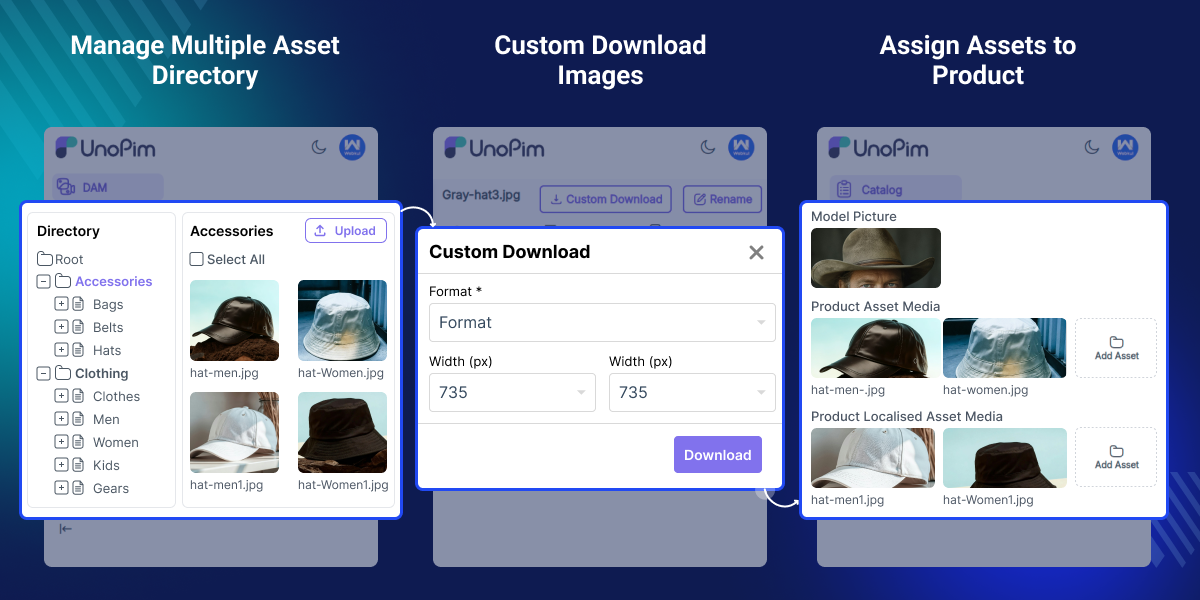
Highlighted Features of UnoPim DAM
Custom Image Conversion
This open source DAM Software allows you to quickly convert images into various formats like JPG, PNG, WebP, and JPEG. You can also adjust image dimensions in no time.
Asset Gallery View
You can handle your assets in a grid layout that allows you to search and use filters. This makes it simpler to sort and find your files quickly.
Directory Structure Organization
Organize assets in a directory tree with drag and drop support for simple uploads, renaming, and file management.
One Click Download
You can easily download directory structure, including all media and subfolders, into a zip file in just one click.
Linking Related Resources
Link similar resources to make it easier to find related products and help with navigation.
Bulk Actions for Assets
You can delete a bunch of files all at the same time. This helps you save time and work more efficiently.
Supports Multiple File Types
UnoPim digital asset managment can manage different types of files like images, CSV, XLSX, PDF, and even audio and video files.
Add Comments to Assets
Unopim DAM Software lets you add comments to assets, which helps your team work together better and gives more detailed feedback.
Asset filter
The user can filter assets by tag, extension, creation date, property name, property value, and asset name.
Multiple Assets to Products and categories
This open source DAM software lets you assign and manage several assets for products and categories.
Why Do We Need UnoPim DAM (Digital Asset Management)
UnoPim DAM (Digital Asset Management) makes it easier for companies to handle their digital assets and products.
This software is an open source digital asset management tool that brings all your assets together in one place. This makes it easier to find and organize everything, saving you time when you're looking for files.
This digital asset management software simplifies asset handling for teams. It supports various file types and offers strong filtering options and bulk actions.
This free DAM tool offers great teamwork features, like commenting and easy asset organization.
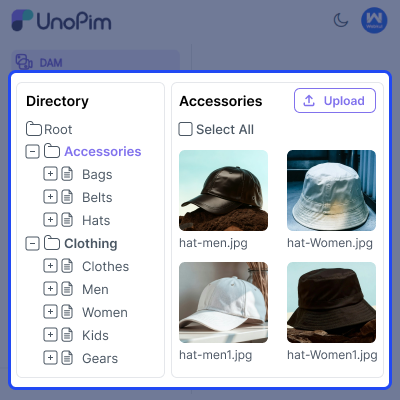
Structured Directory Organization for Assets
UnoPim digital asset management software has a really neat folder system that helps you sort and manage your assets easily.
- Categorize assets with a simple folder structure for better organization.
- You can quickly upload, rename, delete, copy, or download files with just a few clicks.
- Make sure your asset library is neat and organized to help your work go smoothly.
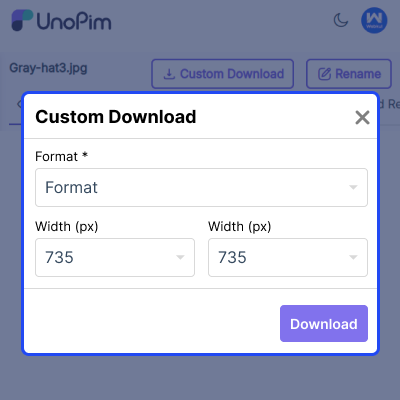
DAM Image Custom Download
This open source digital asset management software simplifies image format conversions and also allows you to manage image dimensions easily.
- You can easily change images into formats like JPG, PNG, and WebP.
- Easily adjust image width and height in custom downloads.
- Simplify asset management by keeping everything in your preferred format.
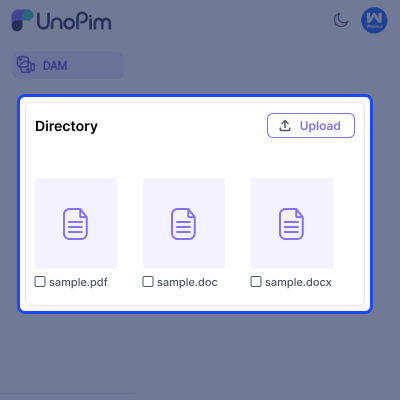
Support for Multiple Asset Formats
UnoPim DAM makes it easy to handle many different types of files all in one place.
- Upload, preview, rename, delete, and download files with ease.
- Manage various file types, including images, audio, video, and documents.
- Centralize all your assets for easy access and management.
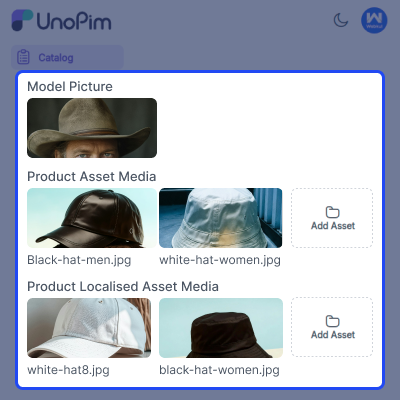
Attach Multiple Assets to Products
Assets play a crucial role in building your eCommerce brand. With this DAM solution, you can easily sort your assets into folders. You can also link several files to your products.
- Create an asset type attribute and assign the attributes to product families.
- Assign assets to the product attribute for more efficient management.
- Easily add or remove assets from the product as required.
- Download, remove, and preview the assets assigned to a product.
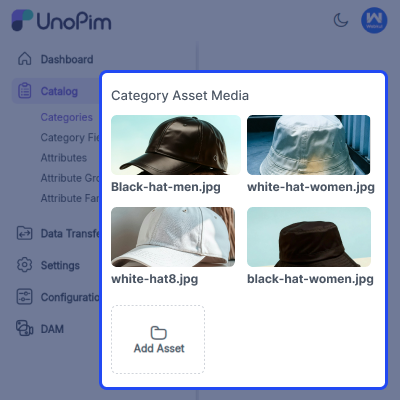
Assign Multiple Assets to Categories
DAM (Digital Asset Management) allows users to store everything in one place. This means you can use the same asset in different categories.
- Select the asset type and create a category field for assets.
- Assign assets into categories for faster management.
- Add or remove assets from the categories and subcategories.
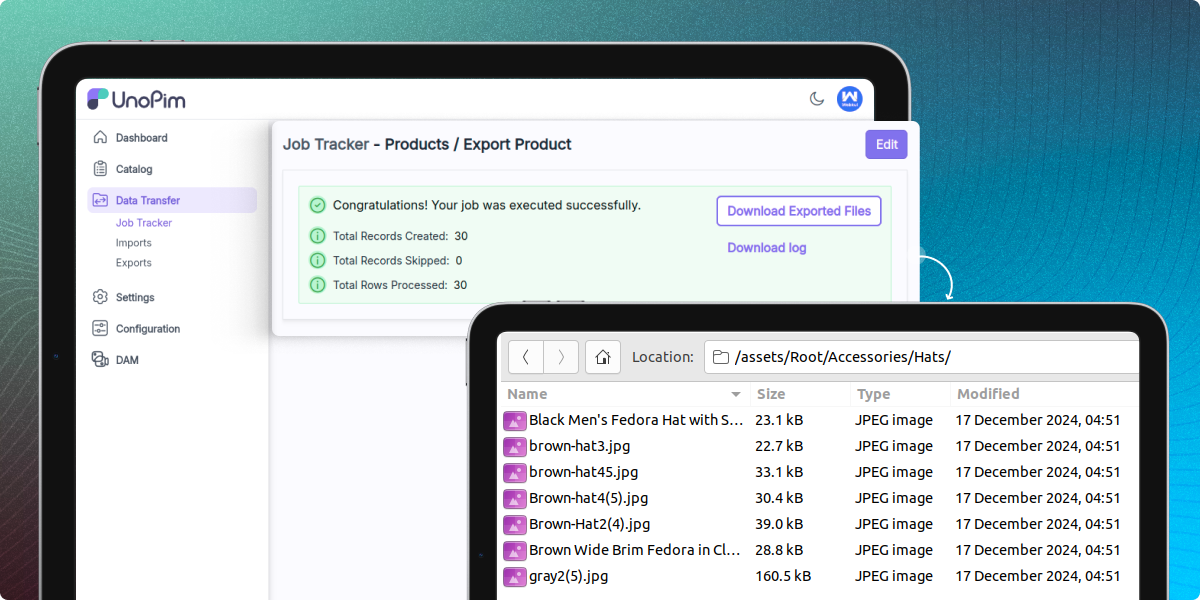
Export Assets with Product
This open source DAM allows you to easily export products along with media files in formats such as CSV, XLS, and XLSX.
- Simplify integration with online stores or other tools by exporting asset details with products.
- Easily move both product info and media between systems with a few clicks.
Support
For any query or issue, please create a support ticket here http://webkul.uvdesk.com/. You may also check our top-quality Bagisto Extensions.
Specifications
Frequently Asked Questions
Specification
Detailed technical features and requirements to help you understand the module’s capabilities and ensure smooth integration with your system.
Cloud Hosting
Detailed technical features and requirements to help you understand the module’s capabilities and ensure smooth integration with your system.
Move to Cloud Today
We’re partnered with top-tier, trusted providers!



Default Configuration Details of Server
RAM 1 Core
Processor 30 GB
Hard Disk
Database
Want to know more how exactly we are going to power up your eCommerce Website with Cloud to fasten up your store
* Server Configuration may vary as per application requirements.
Change Logs
- - Feature Add (+)
- - Feature remove (-)
- - Bug Fixed (!)
- - Modification (*)
- Added support for the latest UnoPim 3.0.
- Improved navigation by removing full-page reloads across the DAM for a smoother user experience.
- Added breadcrumb navigation across all DAM pages.
- Added an unsaved changes notification with Save and Discard actions on the Configuration page.
- Fixed image thumbnails, previews, and the built-in image editor after upgrading to the latest UnoPim.
- Fixed the layout issue causing empty space on the Asset Edit page.
- Fixed UI and permission-related issues introduced during the upgrade.
- Updated directory search to return results only from the currently selected directory.
- Fixed the asset comment counter to update correctly when comments are added or removed.
- Updated the Assets page and Asset Picker filters to match the latest UnoPim filtering experience.
- Fixed asset assignment in category fields to preserve selected assets on lookup failure and correctly detect unsaved changes.
- Updated the DAM to use UnoPim's shared
primarycolor token for consistent application theming.
- Added Tag Management with a new DAM → Tags page to create and manage tags. Users can search, filter, sort, edit, delete, and bulk delete tags, as well as assign them to single or multiple assets.
- Added a new DAM → Configuration page to enable or disable directory tree asset visibility, Explorer view, Explorer bookmarks panel, and Explorer directory tree sidebar.
- Improved directory tree performance by loading directories in batches of 100 items with a Load More option.
- Updated and implemented the Asset Bulk Edit feature using the core product datagrid. The functionality is now fully integrated and working as expected.
- Fixed video handling for assets stored in AWS S3.
- Fixed an issue where newly created folders required a page refresh before they became fully accessible.
- Added missing translations for the Tag Management feature and background upload controls across all supported languages.
- Improved the DAM modal with drag-and-drop support for the Asset Picker, Asset Full View, and file uploads.
- Prevented uploads of HTML and other executable web file types.
- Improved asset security by preventing unsafe files from being rendered directly in the browser.
- Strengthened permission checks for bulk asset operations and folder uploads.
- + dam:demo-data command — New Artisan command that seeds sample directories and assets (Accessories, Audio and Video, Clothes, Documents) so DAM can be explored without uploading real files. Idempotent by default; re-run with --force to wipe and re-seed. The --force flag prompts for explicit Y/N confirmation (defaults to No) before deleting existing assets.
- + Demo data step in dam-package:install — The install command now offers an optional demo data seed as its final step, after migrations and asset publishing complete.
- + Asset REST API filters — The asset API data source now exposes filters for file_type, mime_type, extension, file_size, file_name, code, created_at, and updated_at, with range operators on size and date fields.
- - Hardened DAM API directory authorization — Asset access-control resolution now fails closed: directory lookups run through a direct query, and any error during the permission check denies access instead of leaking it.
- - Namespace casing in FileStorer.php — Corrected the namespace from Webkul\DAM\FileSystem to Webkul\DAM\Filesystem to match the directory casing and fix autoloading on case-sensitive filesystems.
- + Added real thumbnail generation for PDF and video assets with support for backfilling existing assets.
- + Added inline asset previews with image, video, audio, and PDF rendering directly on the asset edit page.
- + Added click-to-preview functionality for asset gallery cards.
- + Added advanced image zoom, rotate, pan, and fit controls in asset previews and shared viewers.
- + Added full-path breadcrumb navigation with deep links to parent directories.
- + Added token-based shareable links for assets and directories with expiry, revoke, counters, and ZIP downloads.
- + Added Shared Links management grid with share tracking and management actions.
- + Added role-based directory permissions across UI and API endpoints.
- + Added inherit-children permission support for automatic descendant directory access.
- + Added automatic permission assignment for newly created subdirectories.
- + Added directory search with ACL-aware results and breadcrumb navigation.
- + Added folder upload support with drag-and-drop and progress tracking.
- + Added filterable and sortable dynamic asset property columns.
- + Added ACL-based access control for the metadata tab.
- + Added advanced image editor with crop, filters, transformations, background editing, and AI fill support.
- + Added custom video and audio players with enhanced playback controls.
- + Added embedded audio cover art support for thumbnails and preview backgrounds.
- + Added ZIP download support for assets.
- + Added server-side descendant expansion for directory filtering.
- + Added horizontally and vertically scrollable directory trees.
- + Added lazy-loading support for asset listings within the directory tree.
- + Added recursive asset counts for each directory node.
- + Added busy-state interaction locking during uploads, moves, and mass actions.
- + Added upload size validation messages and upload cancellation support.
- + Added overwrite handling and cache clearing for same-name asset uploads.
- + Added range-request support for local asset streaming.
- + Added improved AWS S3 support for thumbnails, downloads, and asset migration.
- + Added infinite scrolling for public directory shares.
- + Added directory tree performance improvements through optimized asset loading.
- + Added per-directory loading indicators for move, copy, and delete actions.
- + Added upload progress indicators and button state management.
- + Added persistent asset metadata storage with dedicated metadata views and API support.
- + Added visibility-aware AWS S3 URL resolution.
- + Added directory-scoped previous and next navigation for assets.
- + Added upload restrictions for OS-generated metadata files such as .DS_Store and Thumbs.db.
- + Added proper thumbnail placeholders for non-image asset types.
- - Fixed filename search in the asset datagrid to support partial matches and filenames without extensions.
- - Fixed datagrid filter state persistence when navigating between assets.
- - Fixed ACL permission updates after creating new directories.
- - Fixed asset picker thumbnail rendering for S3 and storage-aware environments.
- - Fixed directory tree context menu issues and ancestor node handling.
- - Fixed asset grid interactions during active uploads.
- - Fixed filter-applied indicators in the asset picker.
- - Fixed directory tree flickering during uploads.
- + UnoPim 2.0 compatibility — Migrated internals to work against UnoPim v2.0.0 (Laravel 12, PHP 8.3+, Intervention Image v3). DAM v2.x no longer supports UnoPim v1.x.
- + Composer dependency constraints — composer.json now declares php: ^8.3 and intervention/image: ^3.0, preventing accidental installation on incompatible UnoPim 1.x environments.
- + AWS S3 integration — Added native AWS S3 support to the Digital Asset Management system. You can now configure AWS S3 credentials and upload assets directly to S3.
- + S3 migration command — New php artisan unopim:dam:move-asset-to-s3 Artisan command for migrating existing local/public assets to S3. Supports migrating only new files and optionally deleting local copies after a successful transfer.
- + REST API support — Full REST API under api/v1/rest/ for managing DAM resources: directories — create, update, delete, list assets — upload, update metadata, delete, list, retrieve, download
- + Comment & link history — Added history tracking for comments and linked resources so changes over time are auditable for collaboration and versioning.
- + New file type support — Added input support for SVG files (with JPG/PNG/JPEG download options in the type dropdown), and upload/preview support for .mp4 and .step files.
- + File size validation on upload — Added maximum file size validation across the admin asset upload flow and the REST POST /api/v1/rest/assets endpoint, with a new file-too-large translation key so users get a clear error when they exceed the limit. (10106e0)
- + Editable Asset Property name — The Name field in Asset Properties can now be updated after creation.
- + Full 33-locale translation coverage — DAM now ships translations for every UnoPim-supported locale. Added 21 previously missing locales: ca_ES, da_DK, en_AU, en_GB, en_NZ, es_VE, fi_FI, hr_HR, it_IT, ko_KR, no_NO, pl_PL, pt_BR, pt_PT, ro_RO, sv_SE, tl_PH, tr_TR, uk_UA, vi_VN, zh_TW. Existing locales were updated with newly introduced keys.
- + Asset Gallery Grid View: Visual, grid-based interface with filters and a search box for easy browsing and management of assets. Supports mass actions like bulk delete.
- + Directory Structure: Organize assets in a structured directory tree. Allows right-click actions for file upload, adding/renaming/deleting directories, copying directory structures, and downloading directories as ZIP files.
- + Resource Editing: Add tags and custom properties (e.g., copyright, source, author) to assets, with the option to add comments and link related resources.
- + Linked Resources: Direct linking of related resources from the asset edit page for enhanced navigation and relevance.
- + Comprehensive Asset Operations: Upload, preview, rename, delete, re-upload, and download assets across various file types (images, CSV, XLSX, PDF, audio, video).
- + Metadata and Tagging: Add embedded metadata, tags, and custom properties to improve searchability and organization.
- + Collaboration: Multi-user comments and resource linking for team collaboration on assets.
- + Asset Detail Export in Product CSV: Export asset details as part of product CSV export for streamlined data management.
