- Description
- Reviews
- FAQ
- Customers ()
- Specifications
- Cloud Hosting
- Changelog
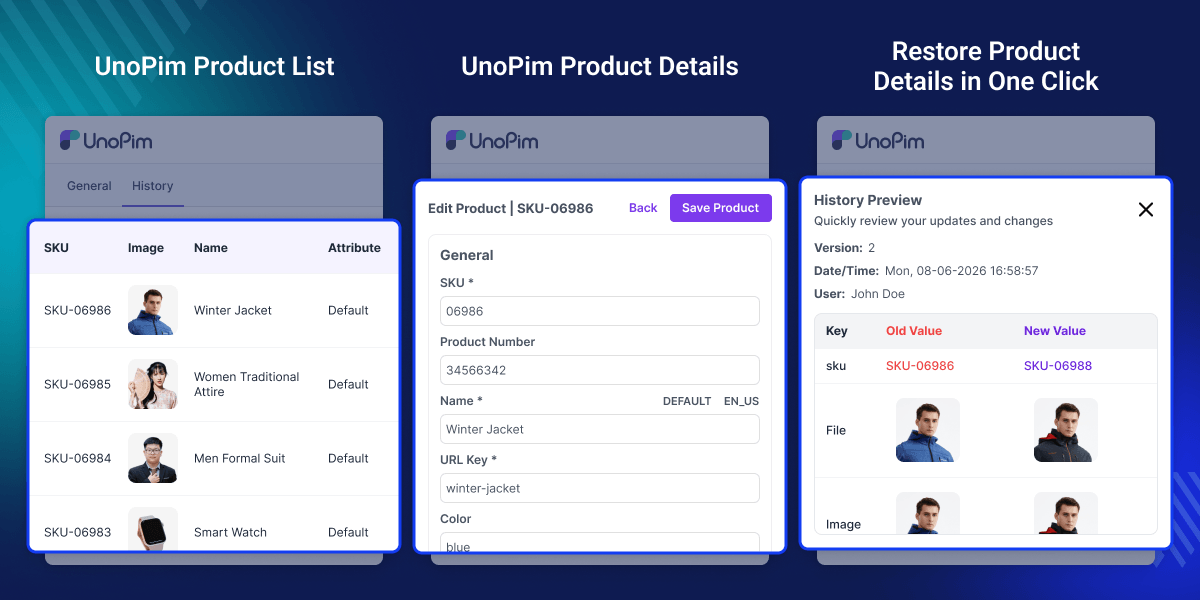
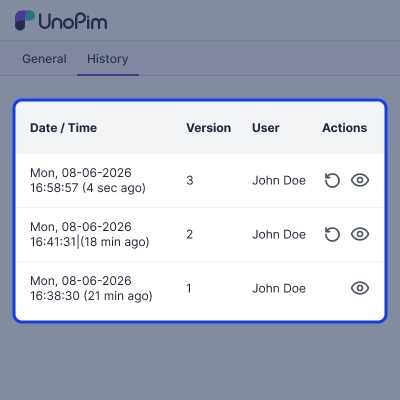
UnoPim History Preview & Restore helps users view past changes by adding file previews and version restore options to the History tab. Users can view images, videos, audio files, PDFs, and documents directly from the History tab without opening other pages.
This UnoPim data restore add-on works with products, categories, attributes, channels, users, roles, DAM assets, and webhook settings. If a record was deleted, this module can recover it first and then restore the selected version from history.
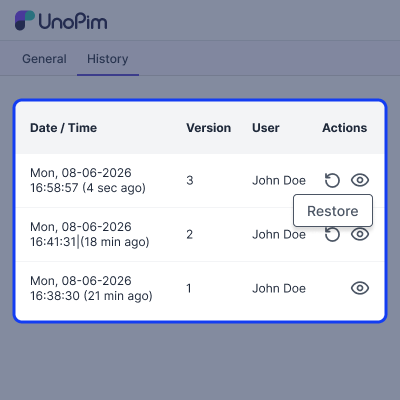
Each restore action is recorded, showing who made the change, when it happened, and which version was restored. This module supports UnoPim entities that use the History trait and works with or without the DAM module.
You can also use our UnoPim Product PDF Generator plugin to create and download product PDFs directly from UnoPim.
Highlighted Features
Restore Any Previous Version
Go back to an old version at any time, and keep the current version in history.
Preview Files in History
View images, videos, audio files, and PDFs directly from the History tab.
Restore Related Records Together
Restore parent records, translations, and linked data in a single action.
Recover Deleted Records
The UnoPim deleted record restore feature can bring back soft deleted records before applying older values.
Keep Previous Asset Files
Keep old files when new ones are uploaded, and bring them back later if needed.
Full Restore Tracking
See who made the change, when it happened, and which version was chosen.
Why Do We Need UnoPim History Preview & Restore?
UnoPim Commercetools Connector reduces manual product entry across many platforms. This helps prevent mistakes. It also reduces delays in product updates.
Catalog data changes often. Teams update products, categories, attributes, files, and settings every day. UnoPim keeps a record of these changes. However, the default history log only shows what changed.
It does not provide a quick way to restore old versions. Users may spend time finding old data and updating records again. Files can also be a problem. A new upload may replace an older file. Later, a team may need that old image, document, or media file again.
UnoPim History Preview & Restore makes this process easier. Users can view old files, check past versions, and restore the data they need from the History tab. The module can also bring back deleted records and restore related data at the same time.
This helps save time and reduces manual work. Teams can control who has access to restore actions. Every restore is recorded, making it easy to see what was restored and when. Used by teams that need a simple way to restore old data and manage catalog history.
Use Cases
Fix Wrong Changes
Restore an earlier version when data is updated by mistake.
Correct Import Errors
Recover older data when imports create incorrect records.
Manage Team Updates
Bring back previous data when recent changes are not required.
Save Time on Data Recovery
Restore data from history instead of re-entering information.
Restore Products, Categories, and Settings
This UnoPim restore module supports multiple record types and helps users recover previous data versions without making manual changes.
- Restore product versions from audit history.
- Roll back category and attribute changes.
- Recover families, channels, users, and roles.
- Restore previous configuration values.
- Keep the current version in history.
- Support multiple UnoPim entity types.
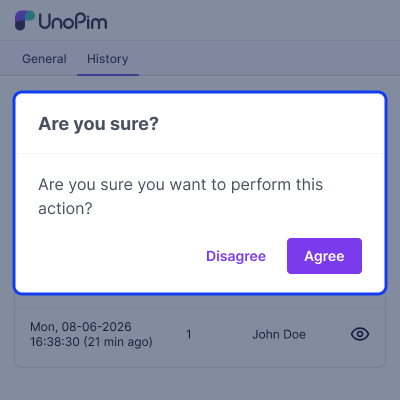
Preview Images, Videos, and Documents
Preview files directly from the History tab before restoring older versions, making it easier to select the correct record.
- Images can be previewed before restoration.
- Videos can be viewed from history.
- Audio files can be played directly.
- PDF files open inside the history.
- Documents can be reviewed before restore.
- Multiple files can be viewed together.
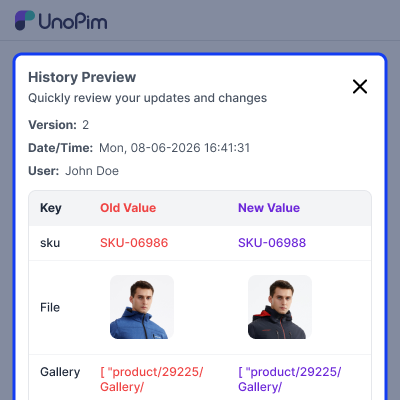
Restore Related Data in One Click
Restore connected records together from the same version to maintain data consistency across related entities.
- Related records restore from one version.
- Translation data returns with main records.
- Locale mappings restore with selected data.
- Currency mappings return from history.
- Linked records stay connected after restore.
- Version groups restore in one action.
Protect Asset History and File Versions
Keep older files available even after replacements, allowing teams to recover previous media versions whenever needed.
- Older files remain available after uploads.
- Previous media versions stay easy to access.
- File replacement does not remove history.
- Asset history remains available for review.
- DAM assets support version recovery.
- Multiple storage disks are fully supported.
Manage Access with ACL Permissions
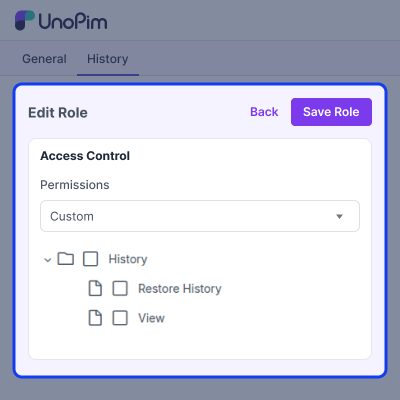
Control who can view history records and perform restore actions using existing UnoPim access permissions.
- User access follows existing ACL rules.
- Restore permissions can be assigned easily.
- History access stays under administrator control.
- User roles determine restore permissions.
- Access rules apply to supported records.
- Restore actions remain secure and controlled.
Maintain and Clean Audit Records
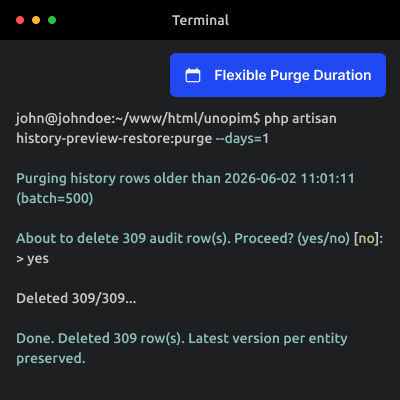
Manage audit history efficiently by removing old records while keeping important versions available for future recovery.
- Old audit records can be removed.
- Cleanup tasks support batch processing.
- Records can be filtered before cleanup.
- Dry run mode checks cleanup results.
- Scheduled cleanup reduces manual maintenance.
- Latest versions remain available after cleanup.
Support
For any query or issue, please create a support ticket here http://webkul.uvdesk.com/. You may also check our all UnoPim Extensions.
Specifications
Frequently Asked Questions
Specification
Detailed technical features and requirements to help you understand the module’s capabilities and ensure smooth integration with your system.
Cloud Hosting
Detailed technical features and requirements to help you understand the module’s capabilities and ensure smooth integration with your system.
Move to Cloud Today
We’re partnered with top-tier, trusted providers!



Default Configuration Details of Server
RAM 1 Core
Processor 30 GB
Hard Disk
Database
Want to know more how exactly we are going to power up your eCommerce Website with Cloud to fasten up your store
* Server Configuration may vary as per application requirements.
Change Logs
- - Feature Add (+)
- - Feature remove (-)
- - Bug Fixed (!)
- - Modification (*)
- Bug Fixed: Image preview now opens on top of the History Preview popup instead of behind it.
- Bug Fixed: Gallery and other multi-file fields now show thumbnails instead of raw text.
- Bug Fixed: Video fullscreen and settings menu now appear above the video.
- Bug Fixed: Zoom percentage no longer jumps while zooming an image.
- Bug Fixed: History popup now fits the screen correctly.
- Bug Fixed: Tests now pass when UnoPim is installed in a sub-folder.
- Bug Fixed: DAM Assets assigned to Products now show thumbnails instead of IDs in the History tab.
- Feature Add: Restore error messages can now be translated.
- Feature Add: Added a LICENSE file.
- Feature Add: Added a version number to composer.json.
- Feature Add: Added thumbnail preview functionality for Gallery-type attributes.
- Feature Add: Extended thumbnail preview support to Multiple Gallery-type attributes.
- Modification: Completed translations for all 33 languages, replacing remaining English text.
- Modification: Removed inline code comments.
- + Inline thumbnails for image/video/audio/PDF in the History tab.
- + Standalone preview modal (no DAM dependency).
- + Full-version restore with soft-deleted-record revival.
- + Restore lineage stored on audits.metadata.
- + Per-model restorers for Product, Category, Attribute, DAM Asset, Admin, Role.
