- Description
- Reviews
- FAQ
- Customers ()
- Specifications
- Cloud Hosting
- Changelog
UnoPim Job Scheduler helps automate data operations in UnoPim. Admin can schedule import and export jobs directly from the admin panel using a simple UI.
The module allows users to set when a job should run and track its execution. They can also retry failed jobs and view detailed logs. This reduces manual work and helps ensure that important tasks run on time.
It is useful for tasks like regular product imports or scheduled data exports. By automating these jobs, businesses can keep their data updated and maintain a smooth workflow.

Highlighted Features of UnoPim Job Scheduler
Cron-Based Scheduling
Schedule jobs using flexible cron settings to run tasks automatically at specific times.
Import & Export Automation
Automatically run product and category import or export jobs without manual work.
Execution History
Check job records to see what happened during each job and find issues quickly.
Detailed Logs
Check job records to see what happened during each job and find issues quickly.
Retry Failed Jobs
Set how many times a failed job should try again automatically.
Notifications
Receive email alerts when a job finishes successfully or fails.
Why Do You Need UnoPim Job Scheduler?
Managing large data tasks manually takes time and can lead to errors. UnoPim Job Scheduler automates import and export jobs so they run on time without regular checking.
This helps reduce manual work, avoid mistakes, and keep product and category data updated. It also makes it easy to check job results and keep data updates running smoothly.
You can also explore our other UnoPim modules to extend the functionality of your PIM system.
General Settings
Create and manage scheduled jobs easily from the UnoPim admin panel.
- Go to Admin Panel → Job Scheduler → Jobs
- Click Create Job
- Enter the job name and a unique job code
- Select the job type such as Import or Export
- Choose the entity such as products or categories
- Assign an existing UnoPim job instance
- Enable or disable the job based on your needs

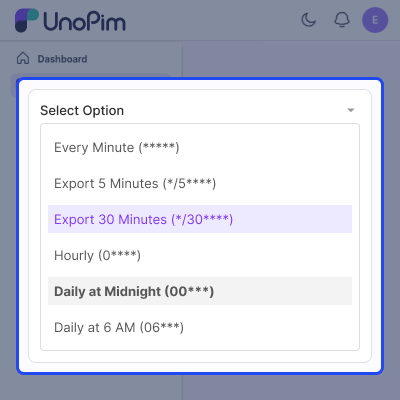
Job Scheduler Configuration
Set the schedule and execution rules for how the job should run.
- Define the cron expression (daily, weekly, monthly, or custom)
- Set the timezone for correct execution timing
- Configure retry attempts for failed jobs
- Set the delay between retries
- Define the job execution timeout
- Control how much data is processed at a time for better performance.
Job Execution & Monitoring
Monitor job activity and review execution results from the admin panel.
- View all job runs in a single grid
- Check job status such as pending, running, completed, or failed
- Track execution time and processed records
- Cancel running jobs when required
- Access detailed logs for each job execution
- Find errors easily with detailed logs for each data row.

Support
For any query or issue, please create a support ticket here http://webkul.uvdesk.com/. You may also check our all UnoPim Extensions.
Specifications
Frequently Asked Questions
Specification
Detailed technical features and requirements to help you understand the module’s capabilities and ensure smooth integration with your system.
Cloud Hosting
Detailed technical features and requirements to help you understand the module’s capabilities and ensure smooth integration with your system.
Move to Cloud Today
We’re partnered with top-tier, trusted providers!



Default Configuration Details of Server
RAM 1 Core
Processor 30 GB
Hard Disk
Database
Want to know more how exactly we are going to power up your eCommerce Website with Cloud to fasten up your store
* Server Configuration may vary as per application requirements.
Change Logs
- - Feature Add (+)
- - Feature remove (-)
- - Bug Fixed (!)
- - Modification (*)
- Compatibility bump — now targets UnoPim 3.0.0+ with PHP ^8.4.1.
- Create and Edit job forms now save via AJAX, without a full page reload — both forms opt into the Admin package's shared
ajaxform-submit flow (ConvertAjaxFormRedirectmiddleware), matching the rest of the admin panel. - Job creation now redirects to the Edit page instead of the index listing on success, matching the convention used by
AttributeController::store(). Pairedjob_scheduler.jobs.create.before/job_scheduler.jobs.create.afterevents now fire around job creation. - Category export failing with
Undefined array key "with_media"— scheduling a Categories export without checking "With Media" left that key out of the persisted job filters, and DataTransfer'sCategory\Exporterread it unguarded, crashing the export batch and surfacing as afailedexecution on the history show page. Fixed via a JobScheduler-side override (Helpers/Exporters/Category/Exporter.php), bound over DataTransfer's exporter inJobSchedulerServiceProvider, without modifying the DataTransfer package. - Duration showing negative values (e.g. "-56 seconds") on the execution history show page instead of the actual elapsed time.
- Processed rows showing negative values during product imports when the number of failed rows exceeded the number of successful rows.
- Export job statistics showing all zeros — processed, failed, and total row counts displayed as
0on the history show page even when the export had successfully processed data. - CSRF exclusion on public API routes was a no-op —
trigger,health,execution/{id}/status, and the webhook trigger route excludedApp\Http\Middleware\VerifyCsrfToken, a class that does not exist in this app, so the exclusion silently failed to match anything and these routes stayed CSRF-protected (returning419) despite being documented as CSRF-exempt. Now correctly excludesIlluminate\Foundation\Http\Middleware\PreventRequestForgery, the actualweb-group CSRF middleware.
- Changed:
- Compatibility bump — now targets UnoPim 2.0.1+ with PHP ^8.3.
- Installation instructions updated: service provider is now registered in bootstrap/providers.php (replacing the legacy config/app.php provider array).
- Module registration clarified: ModuleServiceProvider must be added to config/concord.php for model discovery.
- ModuleServiceProvider::register() no longer self-registers JobSchedulerServiceProvider — the main provider is registered via bootstrap/providers.php following UnoPim core conventions.
- Fixed:
- LaravelScheduleService::registerAll() now guards against missing tables using Schema::hasTable(), so fresh installs no longer fail during composer dump-autoload / package:discover before migrations have run.
- + Initial Release
- + Cron-based scheduling using Laravel schedule:run with 5-part cron expression
- + Support for Export and Import job types (Products, Categories)
- + Preset schedule options: Every Minute, Hourly, Daily, Weekly, Monthly, Custom
- + Timezone-based scheduling with recurring and one-time execution
- + Job dependency chaining to run jobs sequentially
