- Description
- Reviews
- FAQ
- Customers ()
- Specifications
- Cloud Hosting
- Changelog
UnoPim n8n Connector is an UnoPim extension that provides an UnoPim n8n Integration for catalog workflows, in both directions.
A product, category, attribute, or family change starts a workflow. n8n can also read and update catalog records in return.
Seventeen catalog events are available, including wildcards that cover one record type or the whole catalog.
Eleven catalog resources can be listed, read, created, replaced, or removed from an n8n workflow.
Delivery queues, signed requests, failure counts, and delivery logs keep the traffic between UnoPim and n8n on record.
Additionally, if you want to send your catalog to a Shopify store, then check UnoPim Shopify Connector.
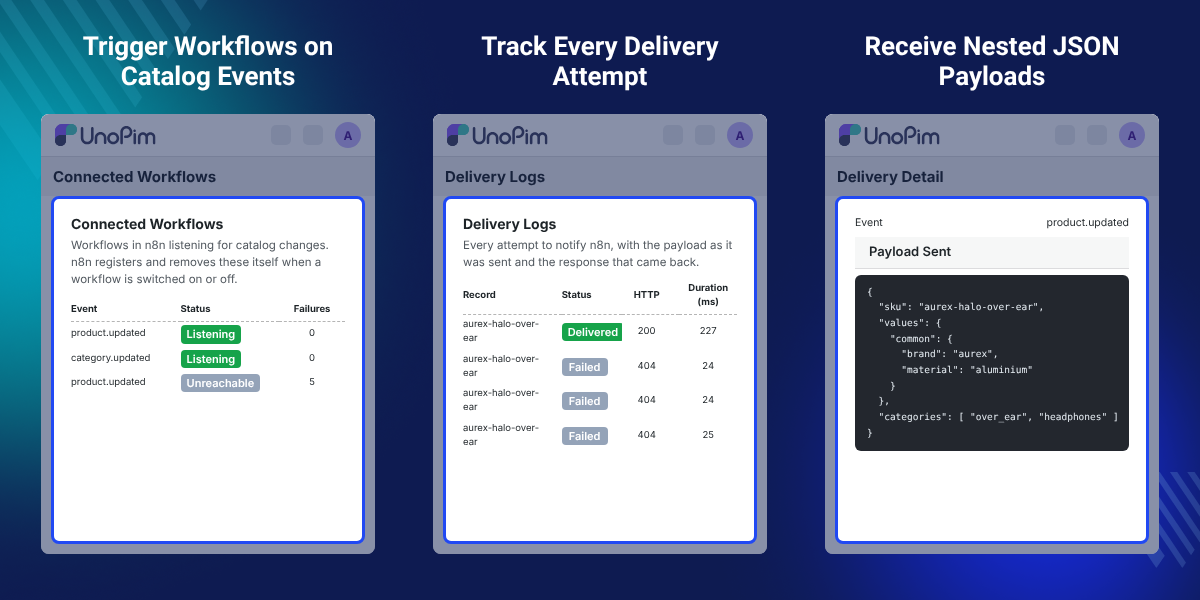
Highlighted Features of UnoPim n8n Connector
17 Catalog Events
Start n8n workflows when products, categories, attributes, or families are created, updated, or deleted.
11 Catalog Resources
Read and write products, categories, attributes, families, locales, channels, currencies, and more.
Locale and Channel Filtering
Limit workflow data to a chosen locale and channel, with each value kept in its saved scope.
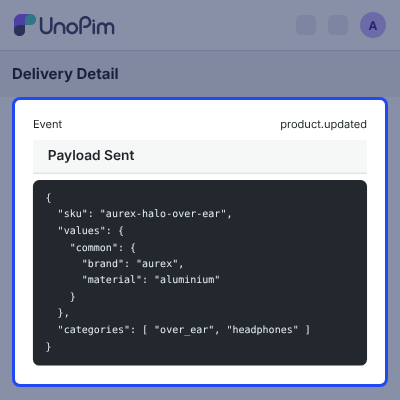
Nested JSON Payloads
Receive structured catalog data with the identifier, record type, human reference, and event.
Queue-Based Delivery
Run deliveries on a separate n8n queue, so a slow workflow never holds up indexing or imports.
Signed Deliveries
Block private and loopback destinations, and sign each delivery with HMAC-SHA256 when a secret is set.
Delivery Logs
Record every attempt with its event, record, outcome, HTTP code, duration, payload, and response.
AI Agent Support
Add the catalog node as an AI Agent tool, so an agent can query and update products directly.
Why Do We Need UnoPim n8n Connector?
UnoPim n8n Connector lets catalog changes start the workflows your team already runs in n8n, with no integration built per tool.
Without an n8n PIM Integration, each catalog change needs a manual check or a separate integration per tool.
That work repeats for every Slack alert, sheet update, or storefront push the team wants to run.
n8n can also write data back, so UnoPim Catalog Automation such as enrichment and cleanup runs end to end.
Setup is short: switch a workflow on in n8n and it registers itself in UnoPim. Switch it off and it disconnects.
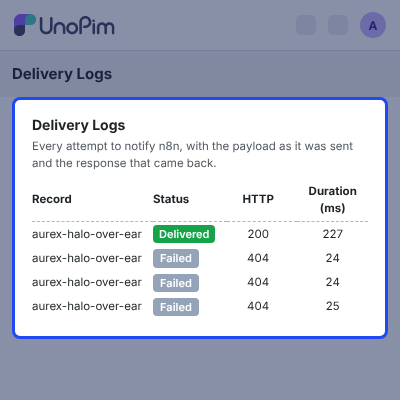
When an update goes missing, the Delivery Logs page shows the payload that was sent and the response that came back.
Also, if you want approval steps before product changes go live, you can check our extension UnoPim Maker Checker Workflow.
UnoPim n8n Automation Use Cases
-
Product Launch Notifications
Filter the product.updated event on status and post to Slack when a product goes live.
-
Catalog Change Tracking
Send catalog.any events to Google Sheets, so merchandising keeps a running change log.
-
Product Data Enrichment
On a schedule, find products missing a description, have an AI node write one, and save it back.
-
Attribute Removal Alerts
Open a ticket when the attribute.deleted event fires, because an attribute removal is rarely meant to be silent.
-
Storefront Updates
Transform each product update in n8n and pass it to your commerce platform, one record at a time.
-
AI Catalog Updates
Let an n8n AI Agent query and update product information through the catalog node.
Catalog Events and Workflow Triggers
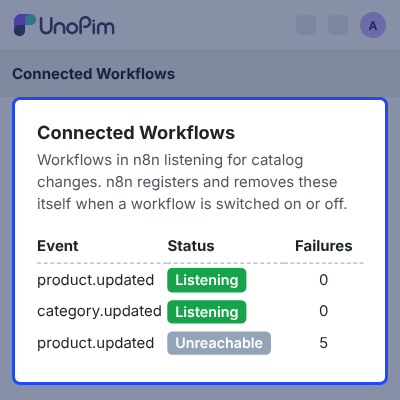
UnoPim publishes an event the moment a supported record changes. There are 12 concrete events and 5 wildcard events.
A single save reaches its concrete event, its record-type wildcard, and the catalog wildcard, but never the same workflow twice.
- Listen for product.created, product.updated, and product.deleted.
- Listen for category created, updated, and deleted events.
- Listen for attribute and attribute family changes of all three kinds.
- Use product.any, category.any, attribute.any, or family.any for one record type.
- Use catalog.any to receive all 12 concrete events in one workflow.
- Read the record type and human reference carried by every payload.
Localization and Channel-Based Catalog Data
A workflow can narrow deliveries to a single locale and channel, so it only receives the catalog data it needs.
- Filter deliveries by a single locale.
- Filter deliveries by a single channel.
- Keep common, locale-specific, channel-specific, and channel-and-locale values intact.
- Turn on Flatten Values per workflow for a single flat field list.
- Read flattened keys that carry their channel and locale.
Secure UnoPim and n8n Connection
The n8n credential uses an UnoPim API key: client ID, client secret, API username, and API password.
The connector handles token exchange, caching, and one retry on expiry for the workflow author. A connection test names the instance.
- Accept only HTTP or HTTPS URLs, without embedded credentials, trailing slashes, or query strings.
- Check every destination and block private, loopback, and link-local addresses.
- Pin the validated address for the connection and never follow redirects.
- Sign each delivery with HMAC-SHA256 when the workflow sets a signing secret.
- Reject a delivery at the trigger when its signature does not match.
- Restrict the credential to this connector's own nodes.
Reliable Workflow Delivery and Logging
Deliveries run on their own queue, named n8n by default, so a slow workflow cannot hold up product indexing or imports.
A failed delivery is counted, not acted on. The subscription stays, and it pauses only after 5 consecutive failures.
- Wait up to 15 seconds per delivery by default.
- Clear the failure count when n8n registers the workflow again.
- Queue nothing when no workflow is listening.
- Log the event, record, outcome, HTTP code, duration, and destination host.
- Open View Payload to see what was sent and what came back.
- Keep log rows for 30 days by default, or forever.
Admin Workflow and Delivery Management
For UnoPim Workflow Automation, the connector adds an n8n section to the sidebar with Connected Workflows and Delivery Logs.
Connected Workflows is read-only apart from a manual disconnect, because n8n creates and removes these records itself.
- See the event, n8n host, workflow, status, failures, last delivery, and connection time.
- Search, filter, and sort both grids.
- Read Delivered, Failed, and Blocked outcomes in plain language.
- Expand the Delivery Summary for the success rate and outcome counts.
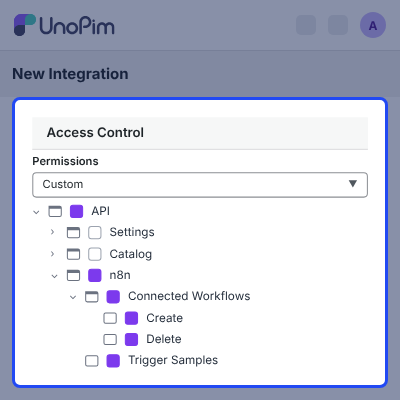
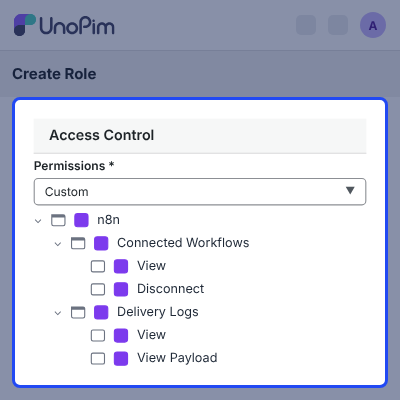
- Control access with dedicated ACL permissions for each page.
- Use the module in all 33 languages UnoPim ships.
Configuration and Technical Requirements
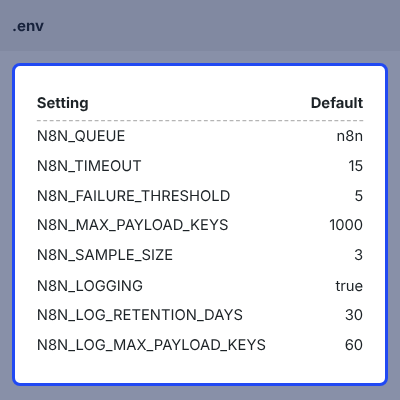
An environment variable can override every connector setting, from the queue name to the log retention period.
A console command clears log rows that are older than the retention window.
- Set N8N_QUEUE, N8N_TIMEOUT, and N8N_FAILURE_THRESHOLD for delivery behaviour.
- Set N8N_MAX_PAYLOAD_KEYS and N8N_SAMPLE_SIZE for payload size and editor samples.
- Set N8N_LOGGING, N8N_LOG_RETENTION_DAYS, and N8N_LOG_MAX_PAYLOAD_KEYS for logs.
- Run UnoPim 3.0 or newer on PHP 8.4 with MySQL or PostgreSQL.
- Run a queue worker on the connector's queue.
- Use n8n 1.x or newer, reachable from UnoPim over HTTP or HTTPS.
Complete UnoPim n8n Connector Feature List
Catalog Events & Workflow Triggers
- Trigger workflows from 12 concrete events across four record types
- Listen on 5 wildcards: product.any, category.any, attribute.any, family.any, and catalog.any
- Deliver each save once per workflow, even when several matching events apply
- Connect and disconnect workflows automatically when they are switched on or off in n8n
Catalog Operations & AI Agent
- List, read, create, replace, partially update, and delete 11 catalog resource types
- Walk whole result sets with Return All and keyset pagination, at up to 100 records per page
- Request exactly the records a workflow needs with UnoPim's own query syntax
- Load locales, channels, families, attributes, and categories live from the connected instance
- Use the catalog node as an AI Agent tool to query and update products
Payloads, Locales & Channels
- Receive nested values with the identifier, record type, human reference, and triggering event
- Get SKU, type, status, family, parent, and category codes on every product payload
- Receive the full record on deletions, captured before it is removed
- Narrow deliveries by locale and channel, with saved value scopes kept intact
- Flatten values per workflow, with a configurable key cap that reports when it is hit
Connection & Delivery Security
- Connect with an UnoPim API key, with token caching, one retry on expiry, and a connection test
- Validate the instance URL before it is accepted
- Block private, loopback, and link-local destinations, pin the checked address, and ignore redirects
- Sign deliveries with HMAC-SHA256 and reject deliveries whose signature does not match
- Route on the event and record type sent in each request's headers
Delivery Reliability & Logging
- Run deliveries on a dedicated queue with a 15-second default timeout
- Pause a subscription after 5 consecutive failures and restore it on re-registration
- Log each attempt with its payload, response, HTTP code, duration, and destination host
- Keep log rows for 30 days by default, cap stored payloads, or switch logging off
- Keep log rows after their subscription is removed, for later troubleshooting
Admin Management & Permissions
- Manage Connected Workflows and Delivery Logs from the n8n section of the sidebar
- Find any workflow or log row by search, with breadcrumbs on each page
- Review the success rate and outcome counts in the collapsible Delivery Summary
- Assign 7 admin permissions and 5 API-key permissions to cover every write route
- Use menus, grid columns, event names, and outcome labels in all 33 UnoPim languages
API & Compatibility
- Use 5 endpoints under the same authentication, rate limiting, and API-key scoping as the UnoPim API
- Return the existing record when the same workflow registers twice, so deliveries never double
- Install the n8n node package with no runtime dependencies
- Run on UnoPim 3.0+, PHP 8.4, MySQL or PostgreSQL, a queue worker, and n8n 1.x+
- Build the node package with Node.js 22 or newer
Support
For any query or issue, please create a support ticket here http://webkul.uvdesk.com/. You may also check our all UnoPim Extensions.
Specifications
Frequently Asked Questions
Specification
Detailed technical features and requirements to help you understand the module’s capabilities and ensure smooth integration with your system.
Cloud Hosting
Detailed technical features and requirements to help you understand the module’s capabilities and ensure smooth integration with your system.
Move to Cloud Today
We’re partnered with top-tier, trusted providers!



Default Configuration Details of Server
RAM 1 Core
Processor 30 GB
Hard Disk
Database
Want to know more how exactly we are going to power up your eCommerce Website with Cloud to fasten up your store
* Server Configuration may vary as per application requirements.
Change Logs
- - Feature Add (+)
- - Feature remove (-)
- - Bug Fixed (!)
- - Modification (*)
- + Product Delete via API: product.deleted now fires for deletes made through the REST API.
- + Import Triggers: CSV and XLSX imports now fire product.created and product.updated.
- + Auto Revive: Subscriptions switched off by failures come back on after a cool-down (N8N_REVIVE_AFTER).
- * Removed Webhooks: A 404 from n8n switches the subscription off at once.
- * Cleaner Logs: An unreachable n8n is logged as one line, and the delivery log shows the real attempt number.
- * Node 1.0.5: Return All returns every record, a wrong signature gets HTTP 401, and errors show UnoPim's message.
- + 17 Instant Event Triggers: Real-time webhooks for create, update, and delete events on products, categories, attributes, and families, plus wildcard catalog triggers.
- + 11 Catalog Resources: Full CRUD for products, configurable products, categories, attributes, attribute groups, families, category fields, association types, locales, channels, and currencies.
- + Dynamic Connection Lifecycle: Workflows register on activation in n8n and unregister on deactivation.
- + AI Agent Integration: The UnoPim node works as a tool inside n8n AI Agent nodes.
- + Dynamic Dropdowns: Live locale, channel, family, attribute, and category options fetched from UnoPim.
- + Admin Dashboard: UnoPim admin menu with active workflows, success rates, and delivery logs.
- + Delivery Logging: Status, duration, response code, request payload, and response body for every delivery, with automatic cleanup of old logs.
- + Channel & Locale Filtering: Restrict triggers to specific channels and locales.
- + Flexible Payloads: Nested JSON by default, with optional flat namespace support and full record data on delete.
- + HMAC-SHA256 Signatures: Webhook verification using a shared secret.
- + SSRF Protection: Blocks delivery to private and internal IP addresses.
- + Retry & Failure Handling: Retries failed deliveries and pauses exhausted webhooks without dropping active subscriptions.
- + Dedicated Queue: Webhook dispatches run asynchronously, so PIM operations stay fast.
