- Description
- Reviews
- FAQ
- Customers ()
- Specifications
- Cloud Hosting
- Changelog
Unopim WooCommerce WPML Connector helps you manage multilingual product data between UnoPim and WooCommerce. It connects both systems and syncs data across multiple store languages in one process.
It is useful for businesses that manage product data in UnoPim and sell in multiple languages using WooCommerce with WPML. It removes the need to enter product data separately for each language. Export products, categories, attributes, and media in all selected languages together.
It also supports importing multilingual data back into UnoPim. This keeps both systems aligned and reduces manual updates across platforms. This integration supports product types like simple and variable products. It also handles variations with their own pricing, stock, and images.
It works well for large catalogs as all sync jobs run in the background. This helps keep the admin panel responsive during data operations.
Note: This addon works on top of the UnoPim WooCommerce Connector and requires it to be installed and configured.
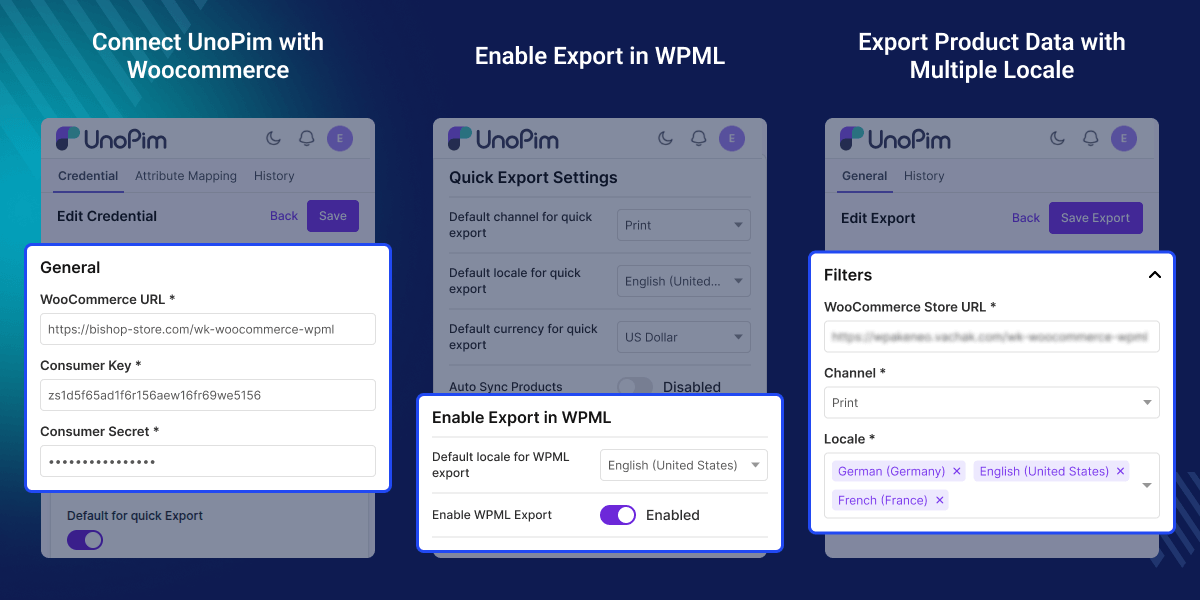
Key Features of UnoPim WooCommerce WPML Connector
Multi Language Sync in One Job
Export and import product data for all languages in a single sync process.
Product and Variation Support
Sync simple and variable products with full variation level details.
Category and Attribute Translation
Sync translated categories and attributes with proper structure.
Import and Export Images
Easily export and import images between both the platforms.
Why Do You Need a UnoPim WooCommerce WPML Addon?
Managing a multilingual WooCommerce store often means entering product data for each language. This takes time and can lead to errors. WooCommerce with WPML handles translations, but it does not manage product data in one place.
You still need a system to control and sync data across channels. This addon connects UnoPim with WooCommerce and automates data flow. It lets you manage product data in one place and sync it across languages. In real projects, teams use this setup to reduce manual work and keep product data the same across stores.
Apart from this, you can also look at UnoPim Magento 2 Connector if you need to connect your Magento store with Unopim.
Use Cases for UnoPim WooCommerce WPML Connector
-
Multilingual eCommerce Stores
Manage product data in one place and publish it across multiple store languages.
-
Large Product Catalog Management
Handle thousands of products with language specific data from UnoPim.
-
Centralized Product Information
Use UnoPim as the main source of truth for all product data.
-
Multi Store WooCommerce Setup
Sync data across multiple WooCommerce stores with separate configurations.
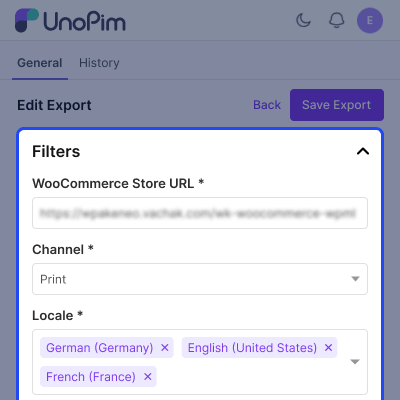
Multilingual Product Data Sync
This feature lets you sync product data across many languages in one job. It reduces manual work and keeps product data the same across all store views.
- Export products in all selected languages together
- Import multilingual data back into UnoPim
- Sync product names, descriptions, and slugs
- Maintain consistency across store languages
Product and Variation Management
Unopim WooCommerce WPML Connector supports full product structure with variations. Each variation syncs with its own data.
- Sync simple and variable products
- Create WooCommerce variations from UnoPim data
- Map variation attributes and options
- Support variation specific images
- Maintain parent child product relation
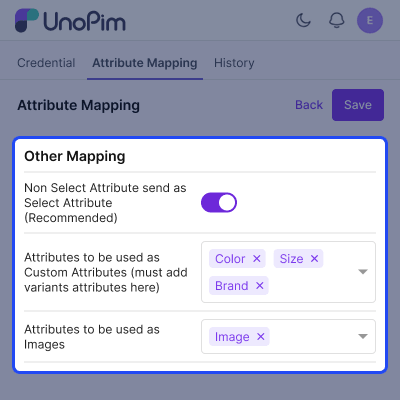
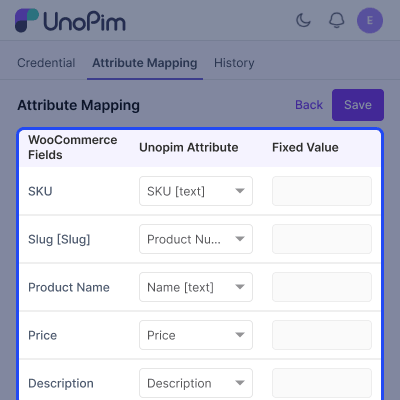
Attribute Mapping
Map attributes between UnoPim and WooCommerce. This helps keep your catalog clear across all languages.
- Map attributes to WooCommerce fields
- Sync attribute options per language
- Maintain consistent information across stores
Support
For any query or issue, please create a support ticket here http://webkul.uvdesk.com/. You may also check our all UnoPim Extensions.
Specifications
Frequently Asked Questions
Specification
Detailed technical features and requirements to help you understand the module’s capabilities and ensure smooth integration with your system.
Cloud Hosting
Detailed technical features and requirements to help you understand the module’s capabilities and ensure smooth integration with your system.
Move to Cloud Today
We’re partnered with top-tier, trusted providers!



Default Configuration Details of Server
RAM 1 Core
Processor 30 GB
Hard Disk
Database
Want to know more how exactly we are going to power up your eCommerce Website with Cloud to fasten up your store
* Server Configuration may vary as per application requirements.
Change Logs
- - Feature Add (+)
- - Feature remove (-)
- - Bug Fixed (!)
- - Modification (*)
- Certified against UnoPim v3.1.x (PHP 8.4.1+, Laravel 13).
- Fixed category export missing nested descendant categories and exporting duplicates.
- Fixed category image export losing its code/name context.
- Fixed default-locale conflicts in category export and quick export.
- Fixed variant export for configurable products with nested variant groups.
- Fixed stale product ID reuse after a failed WooCommerce API response.
- Fixed SKU-already-exists recovery not covering all error response shapes.
- Fixed gallery/multi-image attribute export and image ordering/duplicates.
- Fixed WPML mapping table still used after WPML export was disabled.
- Fixed auto-sync (real-time create/update/delete) not syncing images.
- Updated API client and exporters/importers for upstream WooCommerce connector changes.
- Added missing translations and cleaned up unused code.
- Resolved PHPStan findings and added missing method return types.
- Certified against UnoPim v3.0.0 (PHP 8.4.1+, Laravel 13).
- Remains compatible with UnoPim v2.1.6 (PHP 8.3, Laravel 12) from the same codebase.
- Fixed variant product exports silently dropping inherited parent attribute values (weight, dimensions, brand, features, etc.) — UnoPim 3.0 stopped copying inherited values into a variant's raw values column; the exporter now reads Product::resolvedValues() per product and per variant, with a safe fallback to raw values on hosts where that API doesn't exist (2.1.x).
- Fixed a stale in-memory mapping cache causing ModelNotFoundException crashes (and failed export batches) when a variant's WooCommerce mapping was deleted and re-read within the same export request.
- Fixed the export job summary always folding "updated" counts into "created", so the "Records Updated" figure now reports correctly for product exports.
- Corrected the standalone repo's root composer.json (wrong autoload path, missing require/version).
- + Compatible with UnoPim v2.1.6 (PHP 8.3, Laravel 12).
- ! Fixed product export when no images are selected.
- ! Fixed product variants export issue.
- ! Fixed attribute and option export.
- ! Fixed attribute export and import.
- ! Fixed category export.
- ! Fixed category and attribute export.
- ! Fixed product import.
- ! Fixed locale comparison bug.
- ! Fixed product export — SKU already exists recovery.
- + Ensured compatibility with UnoPim v2.0.0.
- + Introduced WPML add-on integration for WooCommerce and UnoPim.
- + Implemented attribute mapping between WooCommerce and UnoPim, with export support for WPML.
- + Added configuration to enable WPML export and select a default locale (validated with sample data).
- + Developed export and import modules with multi-language support.
- + Enabled category, attribute, and product export/import based on the selected language.
- + Created comprehensive test cases covering all implemented features.
