- Description
- Reviews
- FAQ
- Customers ()
- Specifications
- Cloud Hosting
- Changelog
UnoPim Zapier Connector links UnoPim with Zapier using instant REST Hook triggers. It sends product and catalog updates to your Zaps.
This module supports create, update, and delete events for products, categories, attributes, and attribute families. This helps teams automate tasks as data changes. It turns UnoPim data into a simple format that Zapier can read and map.
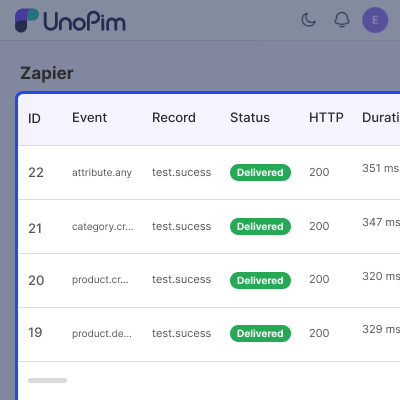
Admin can filter data by locale and channel for each Zap. This connector keeps a log of every delivery. You can check the status, response code, delivery time, target host, sent data, and response.
Zapier can add or remove webhook subscriptions through the connector. This happens when a Zap is turned on or off, with no admin action needed.
This module also protects webhook requests with HMAC SHA256 signing and network checks. It uses retries, payload limits, and a separate queue for Zapier requests.
Additionally, if you want to connect your Shopify store with UnoPim, you can use UnoPim Shopify Connector.
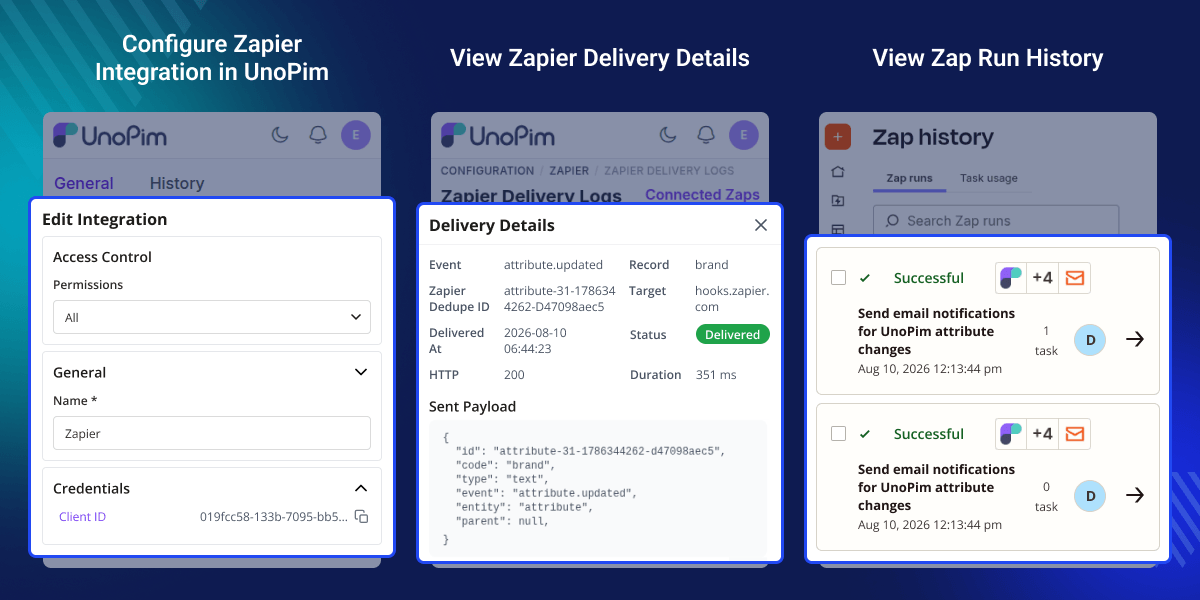
Highlighted Features of UnoPim Zapier Integration
Instant REST Hook Triggers
Send UnoPim events to Zapier when products or catalog data changes. This supports UnoPim Event Automation for connected workflows.
Product Lifecycle Events
Start Zaps when you create, update, or delete products in UnoPim. This helps automate product tasks with less manual work.
Catalog Structure Triggers
Start workflows when categories, attributes, or attribute families change. This helps teams keep catalog tasks up to date.
Automatic Webhook Management
Zapier can add or remove webhook subscriptions on its own. So, admins do not need to manage each subscription by hand.
Locale and Channel Filters
Choose which data each Zap receives with locale and channel filters. This helps send the right data to each connected workflow.
Delivery Logs and Admin View
Check each webhook delivery from the admin view. You can see the status, HTTP code, response, time, and connected Zaps.
Secure Webhook Delivery
Use HMAC SHA256 signatures to check webhook requests. Built-in network protection also helps secure outgoing requests.
Dedicated Delivery Queue
Keep Zapier requests in a separate queue. This keeps them apart from product imports and indexing tasks.
Why Do We Need UnoPim Zapier Integration?
UnoPim Zapier Integration helps cover automation needs for external apps. When product data changes, teams can send that data to other tools. This reduces manual work and helps prevent missed updates.
Teams may also need to watch changes in products, categories, attributes, and attribute families. Checking these changes across different systems can become hard as the catalog grows.
Zapier Integration for UnoPim helps solve this problem by sending catalog events to Zapier through REST Hooks. This Zapier Integration for UnoPim helps connect UnoPim data with external apps and workflows.
This helps teams set up tasks that run after a catalog change. For example, a product update can start a Zap without anyone checking UnoPim and sending the update by hand.
This module also keeps a record of each delivery. Admins can check if a request was sent, see its status, and review the response from the target service.
These logs make it easier to find failed deliveries and check past events. Admins can use the delivery history when they need to check or fix an automation task.
If you’re using Akeneo as your PIM, you can connect it with Shopify using Shopify Akeneo Connector.
Use Cases
-
Product Update Automation
Send product changes from UnoPim to Zapier when you add, edit, or remove a product. Use UnoPim Product Automation to start tasks or send alerts.
-
Catalog Change Alerts
Get alerts when categories, attributes, or attribute families change in UnoPim. Teams can track catalog changes without checking them by hand.
-
Product Data Sync
Send new product data to other tools through Zapier. This lets teams share product updates when a product record changes.
-
Team Notifications
Send team alerts when a product or catalog changes. For example, a product update can send a Slack or email alert through a Zap.
Configure Zapier Integration Credentials
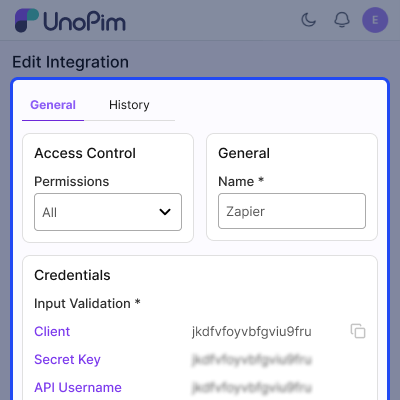
Connect UnoPim with Zapier by adding the required integration credentials. Admins can manage connection details from UnoPim admin panel. This is part of the Zapier Integration for UnoPim setup.
- Add Zapier authentication credentials
- Test the Zapier connection
- View integration identity details
- Manage connection settings from admin
- Check default integration scope settings
- Keep catalog data outside authentication tests
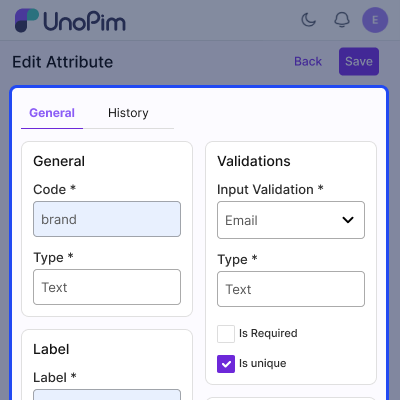
Edit Product Attribute Settings
Control how UnoPim product attributes are prepared before they are sent to Zapier. This connector supports locale and channel based data filtering.
- Configure product attribute data
- Filter attributes by locale
- Filter attributes by channel
- Flatten nested attribute values
- Map fields for Zapier workflows
- Send only required product data
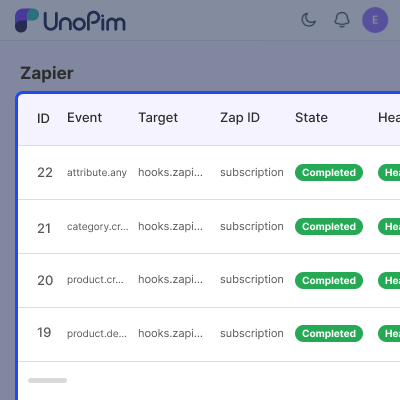
Manage Connected Zaps
View connected Zaps from UnoPim admin panel and manage webhook subscriptions through Zapier.
- View connected Zaps in admin
- Register Zapier webhook subscriptions
- Remove inactive Zap subscriptions
- Manage event based webhook connections
- Support automatic subscription handling
- Keep disconnected Zap history available
Track Zapier Delivery Logs
Review webhook delivery activity from the admin panel. Each attempt records request details, status, response data, and delivery timing.
- View complete Zapier delivery history
- Check webhook delivery status
- Track HTTP response codes
- Review delivery duration details
- Filter logs by event
- Monitor Zapier delivery success rates
Support
For any query or issue, please create a support ticket here http://webkul.uvdesk.com/. You may also check our all UnoPim Extensions.
Specifications
Frequently Asked Questions
It connects UnoPim with Zapier and sends product, category, attribute, and attribute family changes through REST Hooks to start automated workflows without manual checks.
This connector starts a Zap when a product is created, updated, or deleted in UnoPim, helping automate actions in connected tools.
Yes, you can trigger a Zap when a category is created, updated, or deleted in UnoPim, helping send category changes to connected tools.
Yes, you can set a locale filter for each Zapier subscription, so the Zap receives product data for the selected language or locale.
Yes, Zapier can add or remove webhook subscriptions through the connector when a Zap is turned on or off, so admin work is not needed for each subscription change.
Yes, the delivery log shows the request status, HTTP code, time, payload, target host, and response, so admins can check failed requests and past delivery results.
Failed webhook requests are retried three times through a separate queue, with a 30 second wait between each attempt before the delivery fails.
This connector protects webhook deliveries with network checks and HMAC SHA256 signing when a secret is added to the Zap subscription.
No. Zapier deliveries use a separate queue, so product imports and indexing can continue without waiting for Zapier requests.
Yes, this connector provides a test endpoint for Zapier. It uses the same data format as live events, so you can check field mapping before enabling the Zap.
This module runs zapier:logs:prune on a daily schedule to remove old logs in small batches. This helps control log size and keep storage use steady.
Specification
Detailed technical features and requirements to help you understand the module’s capabilities and ensure smooth integration with your system.
Cloud Hosting
Detailed technical features and requirements to help you understand the module’s capabilities and ensure smooth integration with your system.
Move to Cloud Today
We’re partnered with top-tier, trusted providers!



Default Configuration Details of Server
RAM 1 Core
Processor 30 GB
Hard Disk
Database
Want to know more how exactly we are going to power up your eCommerce Website with Cloud to fasten up your store
* Server Configuration may vary as per application requirements.
Change Logs
- - Feature Add (+)
- - Feature remove (-)
- - Bug Fixed (!)
- - Modification (*)
- First release. Connects UnoPim to Zapier with instant REST Hook triggers, delivery logging and an admin view of connected Zaps.
- Added twelve instant REST Hook triggers covering the create, update and delete lifecycle of products, categories, attributes and attribute families.
- Added programmatic subscribe and unsubscribe endpoints so Zapier registers and removes its own webhooks when a Zap is switched on or off, with no admin involvement.
- Added a sample endpoint that feeds Zapier's "Test trigger" step through the same transformer as a live delivery, so the fields a user maps are the fields that arrive.
- Added a payload transformer that flattens UnoPim's `(attribute, locale, channel)` value structure onto the flat namespace Zapier's field mapper can address, with an optional locale and channel filter per subscription.
- Added delivery logging: every attempt records the event, record, status, HTTP code, duration, target host, the payload as delivered and the response.
- Added an admin delivery-log page with a success rate, a per-event breakdown and a filterable history, plus a read-only list of connected Zaps.
- Added `zapier:logs:prune` and a daily schedule entry to enforce log retention, deleting in bounded chunks so a large table never locks for the whole delete.
- Added a cheap authentication-test endpoint that returns instance identity and scoping defaults without touching the catalog.
- Reused the core webhook SSRF and DNS-rebinding guard for every outbound call, so a subscription can never be stored or delivered to loopback, private, link-local or cloud-metadata address space.
- Reused the core audit diff so an update payload carries which attributes changed, letting a Zap filter on a specific field rather than on any change at all.
- Signed deliveries with HMAC-SHA256 when a subscription carries a secret.
- Isolated deliveries on a dedicated `zapier` queue with three attempts and a thirty-second backoff, so a slow or unresponsive Zap endpoint cannot starve product indexing or imports.
- Skipped queueing entirely when no subscription exists for an event, leaving installations without a connected Zap unaffected.
- Deleted a subscription on an HTTP 410 response, which is the only signal Zapier gives that a Zap has been switched off, while retaining its delivery history.
- Captured product and structure deletions on the `before` hook, because the row — and therefore any payload built from it — no longer exists by the time `after` runs.
- Resolved deletion events that arrive as either an integer id or a SKU string, which core dispatches inconsistently across its API controllers, repositories and admin controllers.
- Composed the dedupe id from the record id, its update timestamp and a fingerprint of the changed content. Zapier caches every id it has seen and silently drops repeats, and `updated_at` is second-precision, so two edits inside the same second would otherwise collide and the second would never reach the Zap.
- Namespaced structure dedupe ids by entity type so a category and an attribute sharing a row id cannot collide.
- Probed for the `translations` relation and the `updated_at` column rather than assuming them: categories have no translations relation and keep labels in `additional_data`, and `attribute_families` carries no timestamp columns.
- Capped both the delivered payload and the stored log copy, so a catalogue with many attributes, locales and channels cannot exceed Zapier's payload limit or turn the log into the largest table in the schema.
- Registered the structure events from configuration, so adding an entity is a configuration change rather than another listener class.
- Placed the admin pages at `/admin/zapier` rather than under `/admin/configuration/`, which core's configuration catch-all would otherwise swallow before the request reached this package.
