USD
  • EUR
  • INR
  • USD
Cart
Cart 0
  • You have no items in your shopping cart.
    Cart
    Cart 0
    • You have no items in your shopping cart.
    Hire a Developer
    ×
    Contact Us!
    Send Again
    Close
    Please Login to Write Your Review

    WooCommerce Twilio SMS

    WooCommerce Twilio SMS lets your store send automated SMS notifications for order updates, account activity, and customer communication using Twilio.


    • Send automated WooCommerce Twilio SMS order notifications.

    • Notify customers of order status changes through SMS.

    • Send SMS alerts for customer registration and account updates.

    • Receive admin and customer SMS for refunds and cancellations.

    • Get SMS alerts for failed deliveries and on hold orders.

    • Notify admins when customers submit product reviews.

    • Configure Twilio using SID, Auth Token, and phone number.

    • Send SMS notifications to both customers and store admins.

    • Keep customers informed with instant order and account updates.

    • Improve customer communication with automated SMS notifications.

    Screenshots
    $34.00 $49.00 30% Off Hurry Up! Expiring Soon

    * Required Fields

    Add To Cart
    Only One Time Payment
    $34.00
    $49.00 30% Off
    Configure and Buy
    • Description
    • Reviews
    • FAQ
    • Customers ()
    • Specifications
    • Cloud Hosting
    • Changelog

    WooCommerce Twilio SMS lets WooCommerce stores send SMS alerts for orders, customer accounts, and other store updates. Customers and store admins get text messages for supported events.

    Customers get SMS alerts after they register, update their account, change their password, or when an order status changes. They can stay updated without checking emails or logging into the store.

    This plugin sends SMS alerts for orders placed, completed, on hold, cancelled, failed, and refunded. Store admins also get SMS alerts for refunds and new product reviews.

    It is a good choice for stores that want to keep customers informed with SMS. You can also add your Twilio Account SID, Auth Token, and sender phone number with ease.

    Also, to send order receipts and personalised WhatsApp messages to POS customers manually, automatically, or in bulk, check out WooCommerce POS WhatsApp Notification Message.
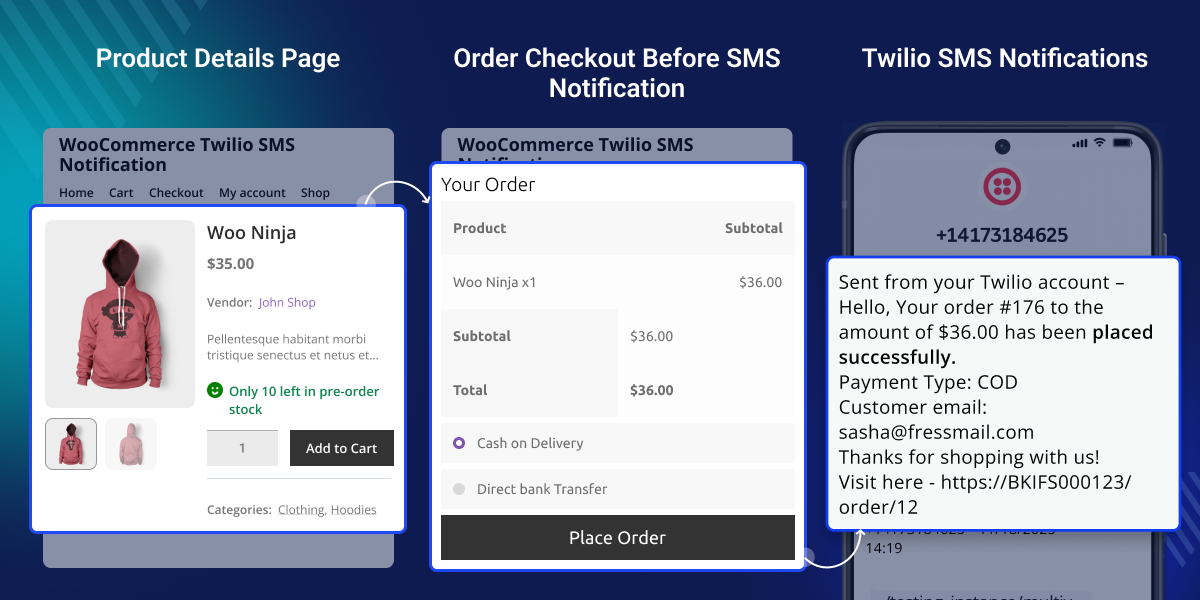
    WooCommerce Twilio SMS

     Highlighted Features

     Order Status Updates

    The admin can send notifications to the customers about the change in the order status for order placed, processing, on-hold, cancelled, order failed, refund details.

     New Review Notification

    The admin will receive the details of the review which customers write for the products.

     My Profile Updates

    The customers can manage their profiles after registering themselves to a store.

     New Account Registration Notification

    The customers will receive SMS notifications when a new account is created on the store.

    Why do we need WooCommerce Twilio SMS?

    WooCommerce Twilio SMS helps stores send SMS notifications for customer accounts and order updates. Customers and store admins receive SMS notifications when supported events occur.

    WooCommerce mainly sends updates by email. Customers may not see these emails on time. This can lead to missed order updates and more support requests.

    This plugin sends SMS for registration, account updates, order changes, refunds, cancellations, failed deliveries, and on hold orders. Customers and store admins stay informed.

    Built for WooCommerce stores, this plugin helps businesses keep customers informed with fast and reliable SMS notifications.

    Additionally, to display live sales and product rating popups with customer, product, price, and location details, check out WooCommerce Live Sales Notifications.

    Use Cases

    Online Retail Stores

    Send SMS for customer registration, order updates, refunds, and cancelled orders. Customers receive important updates directly on their phones.

    Multi-Store WooCommerce Businesses

    Send the same SMS alerts across multiple WooCommerce stores so customers and admins receive timely order notifications.

    High-Volume Order Processing

    Notify customers instantly when orders are placed, completed, on hold, cancelled, refunded, or failed during busy sales periods.

    Customer Support Teams

    Receive SMS alerts for product reviews, refunds, cancelled orders, and failed deliveries to respond more quickly.

    Subscription and Membership Stores

    Notify customers after registration, account updates, and password changes to keep them informed about account activity.

    Businesses That Use SMS

    Use SMS alongside email notifications so customers receive important order updates even if they miss an email.

    Checkout Order Page

    Customers receive an SMS after placing an order through the WooCommerce checkout page. The message confirms that the order was placed successfully and lets customers know their order has been received.
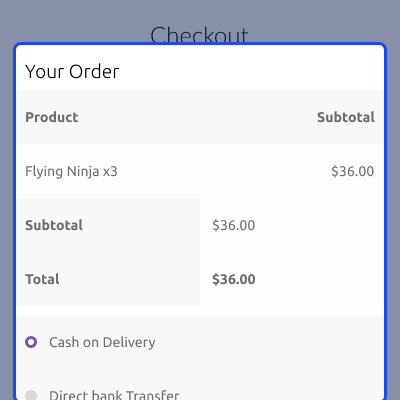
    • Send an SMS after a successful order.
    • Confirm the order immediately.
    • Send SMS to the customer's registered phone number.
    • Support WooCommerce checkout orders.
    • Use the Twilio SMS service.
    • Notify customers that their order was received successfully.
    Checkout Order Page

    Twilio Configuration Settings

    Configure your Twilio account by entering the Account SID, Auth Token, and Twilio phone number with the country code. These settings connect your WooCommerce store with the Twilio SMS service.
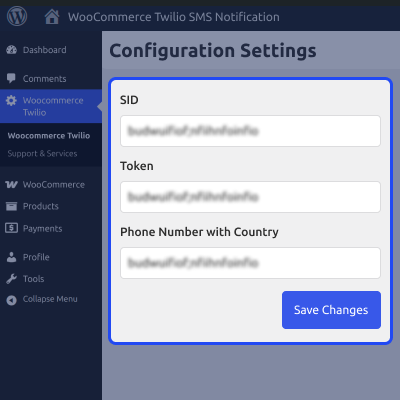
    • Configure the Twilio Account SID and Auth Token.
    • Add the Twilio phone number with the country code.
    • Connect WooCommerce with the Twilio SMS service.
    • Save and update SMS settings from the admin panel.
    • Enable SMS notifications for supported store events.
    Twilio Configuration Settings

    Customer Order SMS Notifications

    Customers receive an SMS after placing an order. The message includes the order ID, total amount, payment method, and order confirmation details, helping customers quickly verify their purchase.
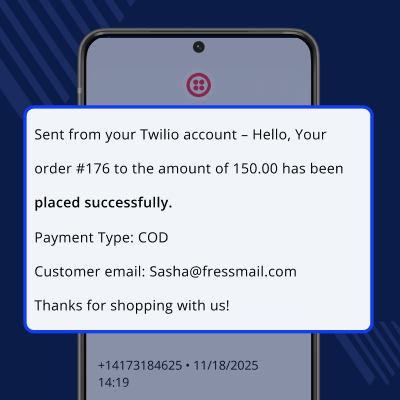
    • Send an SMS after a successful order.
    • Include the WooCommerce order ID in the message.
    • Display the total order amount for reference.
    • Show the selected payment method, such as Cash on Delivery.
    • Include the customer email and order confirmation details.
    Customer Order SMS Notifications

    Support

    For any query or issue, please create a support ticket here http://webkul.uvdesk.com/

    You may also check our quality WooCommerce Plugins.

    Specifications

    Product Version1.0.1
    Released7 years ago
    Last UpdatedJuly 7, 2026 (Today)
    Supported VersionsWordPress  5.x.x  6.x.x  WooCommerce  5.x.x  6.x.x  
    Write a review

    Frequently Asked Questions

     Do I need a Twilio account to use this plugin?
    Yes, you need a Twilio account with your Account SID, Auth Token, and a Twilio phone number.
     
     What information is required to connect to Twilio?
    You need your Twilio Account SID, Auth Token, and a Twilio phone number with the country code to configure this plugin.
     
     Is this plugin suitable for all WooCommerce stores?
    Yes, it is suitable for stores that want to keep customers and admins informed through SMS notifications instead of relying only on email updates.
     
     Which order status notifications are supported?
    This plugin supports SMS notifications for supported order status updates, including completed, on hold, cancelled, failed, and refund events.
     
     Does this plugin send SMS for refund updates?
    Yes, both customers and store admins can receive SMS notifications when refund details are generated.
     
     What happens if an order delivery fails?
    This plugin can send SMS notifications to inform both the customer and the store admin about failed deliveries.

    Move to Cloud Today

    AWS Free tier hosting for one year by amazon web services, for more details please visit AWS Free Tier.

    GCP Free tier hosting for one year with 300 credit points by google cloud platform, for more details please visit GCP Free Tier.

    Azure free tier hosting for one year with 25+ always free services, for more details please visit Azure Free Tier.

    In our default configuration we will provide tremendous configuration for your eCommerce Website which is fast to load and response.

    Default Configuration Details of Server

    • 1 GB RAM
    • 1 Core Processor
    • 30 GB Hard Disk
    • DB with 1 GB RAM and 1 Core Processor

    * Server Configuration may vary as per application requirements.

    Want to know more how exactly we are going to power up your eCommerce Website with Cloud to fasten up your store. Please visit the Cloudkul Services.

    Get Started with Cloud
    • + Features
    • - Bugs
    Version 1.0.1
    • Fixed customer end SMS notification Issue.
    • Fixed admin end phone number issue
    Version 1.0.0
    • Initial release


