Send Again
Close
CS-Cart Authorize.Net Payment Gateway helps stores accept card and eCheck payments through Authorize.Net. It gives customers a simple and secure way to pay online. Store owners can offer more payment options at checkout. This helps customers choose a payment method that works best for them.
Choose AuthOnly or AuthCapture based on your payment process. This gives more control when handling orders and payments. Use test mode to check payment settings before accepting real payments. This helps reduce errors during checkout.
Authorize.Net includes fraud protection tools to help reduce payment risks during online transactions. Customers can place orders with more confidence. Manage surcharge fees, payment instructions, and payment records from one place. This helps store owners handle daily payment tasks with ease.
Also, if your business needs a payment solution that supports secure card payments, simple checkout, and reliable payment processing for online orders, then you can check the CS-Cart CardConnect Payment Gateway add-on.
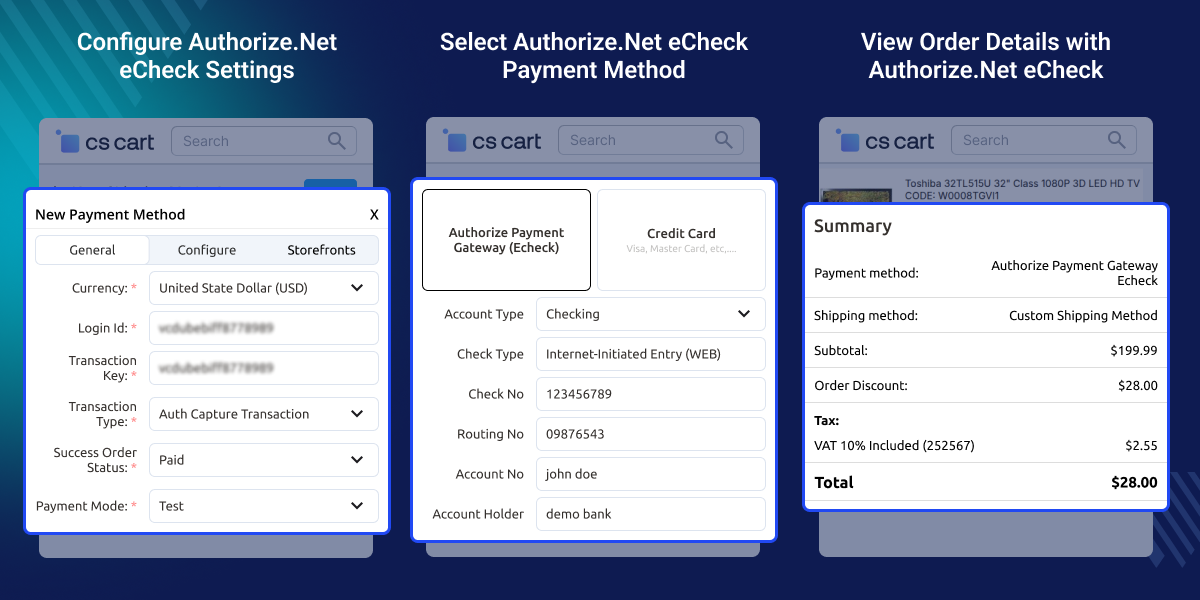
Let customers pay by card or bank account with ease.
Pick how and when customer payments are taken.
Try the payment setup before taking real customer payments.
Use Authorize.Net fraud protection tools during payment processing.
Add extra fees to payments when needed.
Save payment responses in the admin panel for later review.
CS-Cart stores need an easy way to collect money from customers online. Fewer payment choices can lead to missed sales and unfinished orders. Many customers prefer different ways to pay. Some use cards, while others prefer bank account payments during checkout.
CS-Cart Authorize.Net Payment Gateway helps stores accept card and eCheck payments in one place. This makes buying easier for customers. Some businesses collect payments right away, while others collect them later. Flexible payment options help match different order handling needs.
Checking payment settings directly on a live store can cause problems. Test mode helps store owners check everything before accepting real payments. This module is suitable for online stores that need secure payment collection and flexible transaction handling.
Apart from this, If your store needs support for major credit and debit cards along with payment processing in Canadian and US dollars, then CS-Cart Moneris Payment Gateway can be a suitable payment solution for your store.
Collect payments easily when selling products through your store.
Let buyers pay for products purchased from different sellers.
Accept card and bank account payments for bulk purchases.
Approve payments first and collect funds at a later stage.
Check payment settings before taking payments from customers.
Accept customer payments across daily store operations.
After installation, the admin is required to configure this module in order to activate the functionality of the CS-Cart payment gateway.
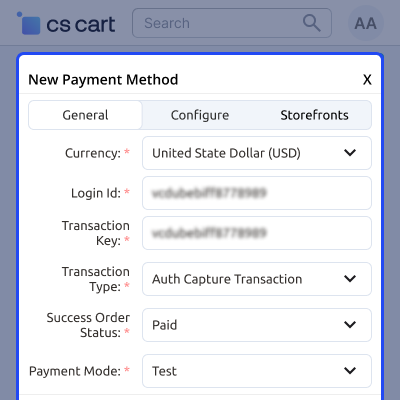
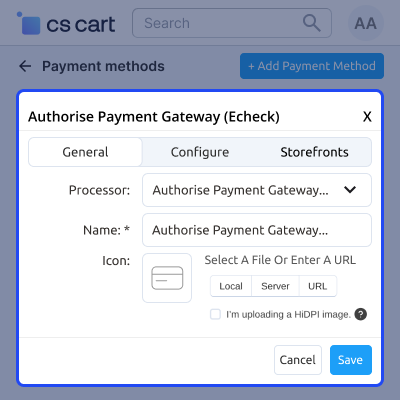
Here, the admin is required to input a payment method name and authorize approvals for the user group. Incorporate an additional surcharge fee, and need to set various other features.
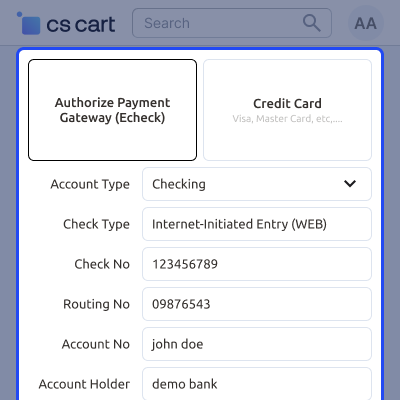
With the help of CS-Cart Authorize.net Payment Gateway, customers can easily choose their payment method and effortlessly complete their transactions.
For any query or issue please create a support ticket here http://webkul.uvdesk.com/
You may also check our other top-quality CS-Cart Plugins.
Detailed technical features and requirements to help you understand the module’s capabilities and ensure smooth integration with your system.
Detailed technical features and requirements to help you understand the module’s capabilities and ensure smooth integration with your system.
We’re partnered with top-tier, trusted providers!
Want to know more how exactly we are going to power up your eCommerce Website with Cloud to fasten up your store
* Server Configuration may vary as per application requirements.



