USD
  • EUR
  • INR
  • USD
Cart
Cart 0
  • You have no items in your shopping cart.
    Cart
    Cart 0
    • You have no items in your shopping cart.
    Hire a Developer
    ×
    Contact Us!
    Send Again
    Close
    Please Login to Write Your Review

    CS-Cart Delivery Feedback System

    CS-Cart Delivery Feedback System helps store owners collect delivery feedback through custom forms, ratings, and email requests to improve customer experience.


    • Collect delivery feedback directly from completed orders.

    • Create custom feedback forms with flexible question fields.

    • Add star ratings to measure delivery satisfaction easily.

    • Send automated feedback request emails to customers.

    • Choose order statuses that trigger feedback notifications.

    • Allow customers to view, edit, or hide submitted feedback.

    • Manage delivery feedback responses from the admin panel.

    • Notify store owners instantly when feedback is submitted.

    • Support both CS-Cart and Multi-Vendor marketplaces.

    • Works with both old and new CS-Cart email templates.

    Screenshots
    CS-Cart Delivery Feedback System CS-Cart Delivery Feedback System CS-Cart Delivery Feedback System CS-Cart Delivery Feedback System CS-Cart Delivery Feedback System CS-Cart Delivery Feedback System CS-Cart Delivery Feedback System
    Show More Hide All
    $49.00

    * Required Fields

    Add To Cart
    $49.00
    Configure and Buy
    • Description
    • Reviews
    • FAQ
    • Customers ()
    • Specifications
    • Cloud Hosting
    • Changelog

    CS-Cart Delivery Feedback System helps store owners collect customer feedback after order delivery. The add-on allows businesses to gather valuable insights about delivery experiences. It provides a structured feedback form with custom questions, ratings, and response options.

    Feedback requests can be sent automatically based on order status. Businesses can also customize email templates and notify internal teams when feedback is submitted.

    The module gives customers the option to view, edit, or hide their responses based on store settings. Customer feedback helps identify delivery issues, improve service quality, and make better business decisions.

    Additionally, to automate post-delivery confirmation and verify successful order receipt, you can use CS-Cart Delivery Confirmation Request add on.
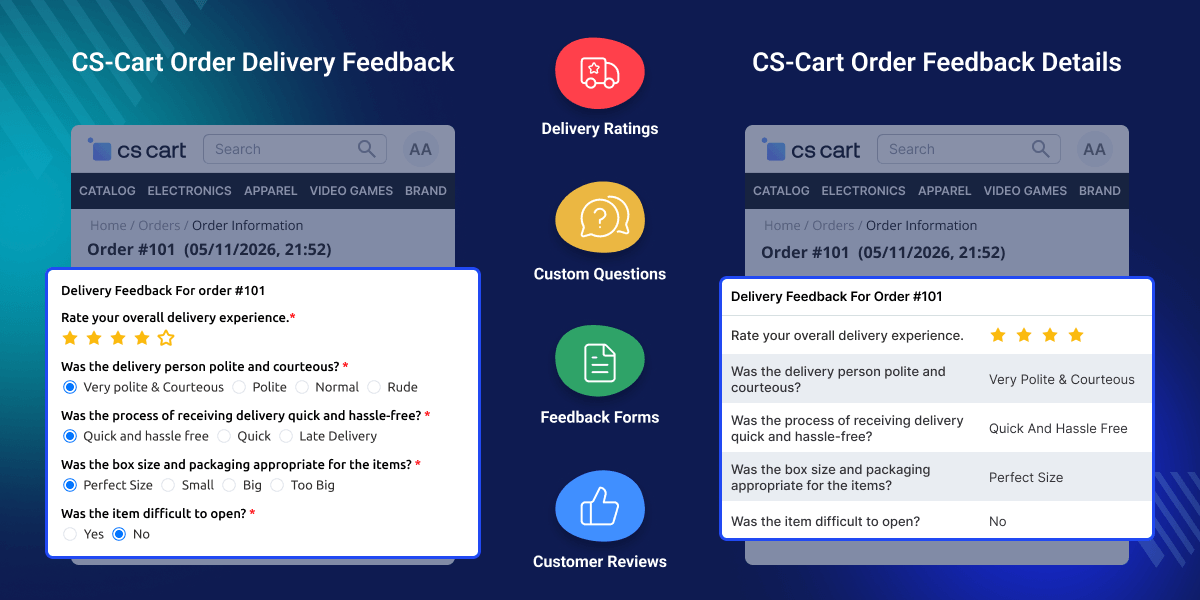
    CS-Cart Delivery Feedback System

    Highlighted Features of CS-Cart Delivery Feedback System

     Easy Feedback Sharing

    With the CS-Cart Delivery Feedback system, the customer can tell how their delivery experience was with just a few clicks.

     User-Friendly Interface

    The CS-Cart Delivery Feedback System is easy to navigate and use.

     Real-Time Feedback

    The customer feedback will reflect in real time.

     Option to Add Star Rating

    The customer can express their feelings about the delivery by adding a star rating.

    Why do we need CS-Cart Delivery Feedback System?

    CS-Cart Delivery Feedback System helps stores collect delivery feedback through ratings, comments, and custom questions. Many stores do not know how customers feel about their delivery service after an order is completed, also manual feedback collection takes time.

    This module automates feedback requests based on order status and lets customers submit feedback through a dedicated form. Additionally, to manage recurring deliveries, subscription orders, and recurring payments, you can use CS-Cart Subscription Delivery add-on.

    Use Cases

    Online Grocery Stores

    Collect delivery feedback to monitor delivery quality and customer satisfaction.

    Food Delivery Businesses

    Gather ratings on delivery speed, order handling, and overall delivery experience.

    Multi-Vendor Marketplaces

    Allow vendors to receive delivery feedback and improve their service quality.

    Local Delivery Services

    Identify recurring delivery issues and improve operational efficiency.

    CS-Cart Delivery Feedback Configuration

    After installation, the admin needs to configure the CS-Cart Delivery Feedback system.
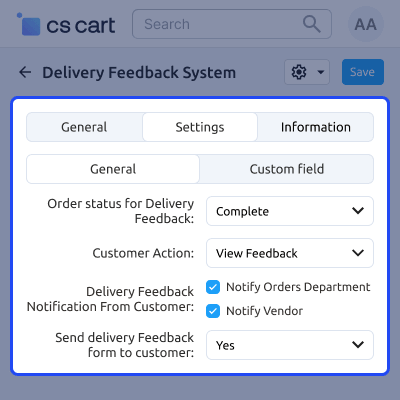
    • The admin can set the CS-Cart order status on which the admin wants to send the mail notification to a customer for submitting feedback.
    • The admin is allowed to view and edit the submitted feedback or hide it from the front end.
    • The admin can set the delivery notification from the customer for the order department or store owner.
    • The admin has the option to enable or disable the delivery feedback email to be sent to the customer from the backend system.
    CS-Cart Delivery Feedback Configuration

    Delivery Feedback Template

    CS-Cart Delivery Feedback Template provides the admin with an easy and convenient way to mail your customers. It helps enhance the delivery process and ensure a satisfaction rate.
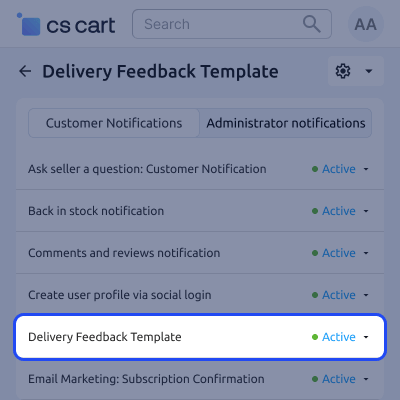
    • The admin can set the desired template using the placeholders provided in the notes.
    • The admin can add custom fields and potential questions for the feedback form.
    • The admin can add the question and select the response type, including star ratings.
    • The email template for the customer can be viewed and updated as per the new feature.
    Delivery Feedback Template

    Submit CS-Cart Delivery Order Feedback

    The CS-Cart Delivery Feedback makes it simple for your customers to share their thoughts and experiences.
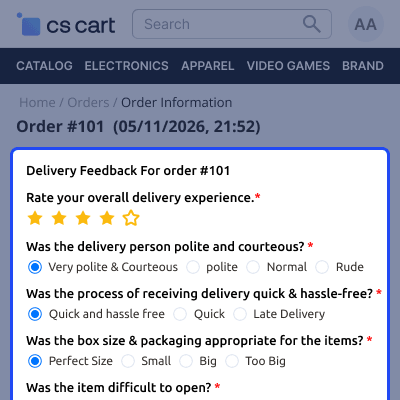
    • Customers will be able to view a tab for the Delivery Feedback form.
    • They will also receive the feedback form link in the email notification.
    • The store owner and order department will be notified via email on successful feedback submission as per the addon settings.
    • The admin can view and update the given feedback as per the applied settings of the extension.
    Submit CS-Cart Delivery Order Feedback

     CS-Cart Delivery Feedback System Support -

    For any query or issue please create a support ticket here http://webkul.uvdesk.com/

    You may also check our other top-quality CS-Cart Plugins.

    Specifications

    Product Version1.1
    Released8 years ago
    Last UpdatedJune 11, 2026 (12 days ago)
    Supported Versions4.14.x  4.15.x  4.16.x  4.17.x  CS-Cart  4.18.x  
    Write a review

    Frequently Asked Questions

     Can feedback requests be sent automatically?
    The module can send feedback request emails automatically based on selected order statuses.
     
     Can customers edit their submitted feedback?
    Admins can allow customers to edit feedback, view it only, or hide it completely.
     
     Can I choose when the feedback form becomes available?
    You can configure specific order statuses that trigger feedback requests and form access.
     
     Can vendors view customer feedback in a multi-vendor store?
    Vendors can access feedback related to their orders from the backend order details section.
     
     What happens if a customer does not receive a separate feedback email?
    You can add the feedback form link to existing order status emails, allowing customers to access the form directly.
     
     Is the module compatible with CS-Cart Multi Vendor?
    It works with both CS-Cart and CS-Cart Multi Vendor installations.
     
     How often can the customer provide feedback for my orders?
    The customer can provide feedback for each individual order once it's been delivered.

    Move to Cloud Today

    AWS Free tier hosting for one year by amazon web services, for more details please visit AWS Free Tier.

    GCP Free tier hosting for one year with 300 credit points by google cloud platform, for more details please visit GCP Free Tier.

    Azure free tier hosting for one year with 25+ always free services, for more details please visit Azure Free Tier.

    In our default configuration we will provide tremendous configuration for your eCommerce Website which is fast to load and response.

    Default Configuration Details of Server

    • 1 GB RAM
    • 1 Core Processor
    • 30 GB Hard Disk
    • DB with 1 GB RAM and 1 Core Processor

    * Server Configuration may vary as per application requirements.

    Want to know more how exactly we are going to power up your eCommerce Website with Cloud to fasten up your store. Please visit the Cloudkul Services.

    Get Started with Cloud
    • - Feature Add (+)
    • - Feature remove (-)
    • - Bug Fixed (!)
    • - Modification (*)
    Version 1.1
    • ! Fixed git issues.


