USD
  • EUR
  • INR
  • USD
Cart
Cart 0
  • You have no items in your shopping cart.
    Cart
    Cart 0
    • You have no items in your shopping cart.
    Hire a Developer
    ×
    Contact Us!
    Send Again
    Close
    Please Login to Write Your Review

    CS-Cart Order Status Tracker

    CS-Cart Order Status Tracker enables customers to visually track their orders on the order details page, with 3 interactive infographic designs for a user-friendly experience.


    • Well integrated with CS-Cart & Multi-Vendor.

    • Three different templates were provided for order tracking.

    • Functionality to create custom states or order tracking status for making a more interactive frontend order tracker.

    • A graphical and user-interactive frontend for tracking the orders.

    • Allows to change the custom status at the front end automatically on the basis of actual order status.

    • Easy to configure and manage at the admin end.

    Screenshots
    CS-Cart Order Status Tracker CS-Cart Order Status Tracker CS-Cart Order Status Tracker CS-Cart Order Status Tracker CS-Cart Order Status Tracker CS-Cart Order Status Tracker
    Show More Hide All
    $59.00

    * Required Fields

    Add To Cart
    $59.00
    Configure and Buy
    • Description
    • Reviews
    • FAQ
    • Customers ()
    • Specifications
    • Cloud Hosting
    • Changelog

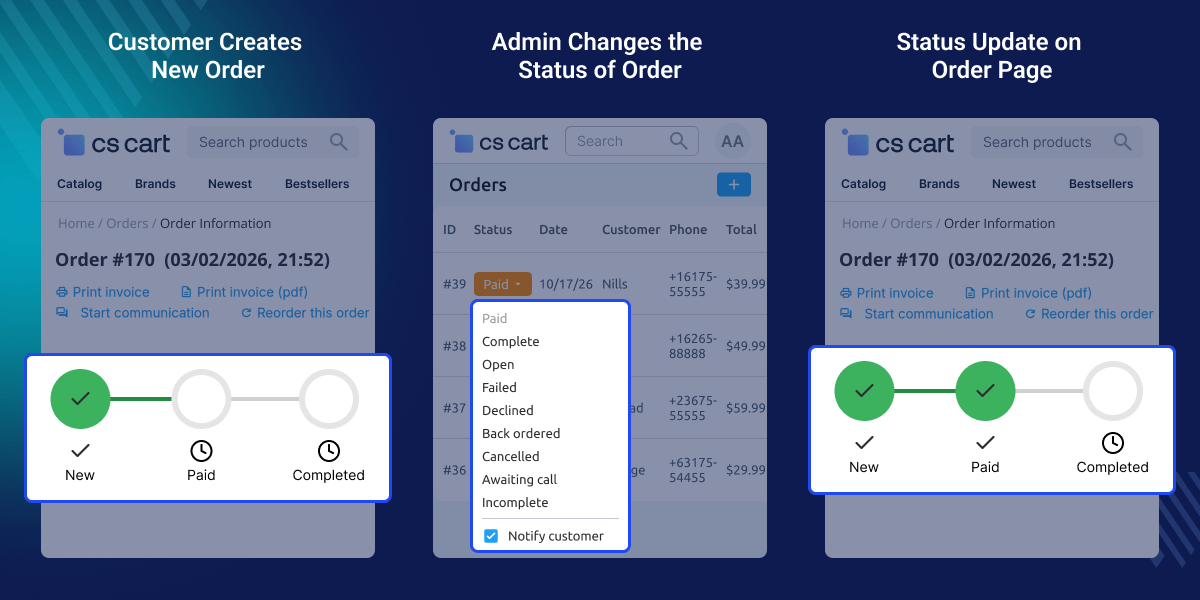
    CS-Cart Order Status Tracker allows customers to visually track their orders in real time through an interactive interface on the order details page. By entering basic order information, users can instantly view their order progress without any hassle, making the process simple and transparent.

    Customers often want to stay updated after placing an order, especially during processing and delivery stages. This add-on addresses that need by presenting order status in a clear, graphical format, eliminating confusion and improving communication between the store and its customers.

    The module offers multiple infographic-style tracking templates, allowing store owners to display order progress in a visually engaging way. These designs enhance usability and make it easier for customers to understand the current status at a glance.

    For businesses handling frequent orders, this plugin helps reduce repetitive customer inquiries related to order tracking. Since customers can independently check updates, support teams can focus on more critical tasks instead of answering routine questions.

    Store admins can create and manage custom tracking states that align with their order workflow. These states are automatically updated based on actual order status, ensuring accurate and dynamic tracking information on the frontend.

    The add-on is suitable for both CS-Cart and Multi-Vendor marketplaces, making it a flexible solution for different types of eCommerce businesses. Its easy configuration and seamless integration allow quick setup without technical complexity.
    CS-Cart Order Status Tracker

    Highlighted Features

     Order tracking in real-time

    By order value and email address, customers can get a quick overview of their orders as they are being processed.

     Customer-friendly portal

    Customers can use this to access they enter their email address and order number to get more information about their order.

     Keep an eye on all shipments

    All shipments and packages are tracked in one central location.

     Helps you save time

    You had to manually handle all of the clients' order tracking queries, which took a long time. However, this add-on saves both your time and the time of your clients, therefore saving the day.

    Why this CS-Cart Order Status Tracker?

    An important aspect of an e-commerce site or a CS-Cart online store is the ability for customers to track their packages/orders.

    Customers will be satisfied knowing that their order is in good shape, as well as the order's status, such as ready for shipment, despatched, or delivered, as customers are always interested in knowing where their orders are.

    It's also crucial to keep clients informed about the status of their orders, as this fosters customer loyalty. More customers will be attracted to a store as a result of this strategy, and conversion rates will be reasonably high.

    Additionally, if you are looking for a module that allows customers to frequently ask questions then you can our CS-Cart FAQs module.

    Use Cases

    • Real-Time Order Tracking

      Customers can instantly check order progress without logging in, ensuring quick and easy access to updates.

    • Reduced Support Queries

      Allows customers to track orders themselves, cutting down repetitive “order status” inquiries.

    • Visual Order Updates

      Displays order progress in a clear, infographic-style format for better understanding.

    • Custom Order Workflows

      Admins can create tracking stages that match their business process and order flow.

    • Efficient High-Volume Handling

      Automates tracking for large order volumes, reducing manual effort for store teams.

    • Better Post-Purchase Experience

      Keeps customers informed after purchase, increasing trust and satisfaction.

    Basic Setup of CS-Cart Order Status tracker

    At the front end of the CS-Cart marketplace, the admin can enable or disable the CS-Cart Order Status Tracker.
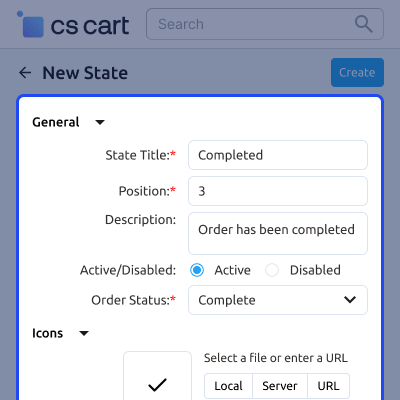
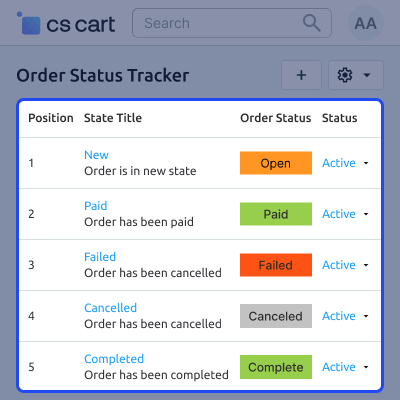
    • Custom order processing and tracking statuses can be added by the admin.
    • All of the newly added states, as well as their tracker locations, will be included here.
    • The state's position in the tracking template.
    • The name of the state that will appear on the tracker.
    Basic Setup of CS-Cart Order Status tracker

    Seller view of CS-Cart Order Status tracker

    By providing his full name, email address, international bank account number, and cell phone number.
    • On the order details page, the consumer can now see an interactive tracker.
    • The consumer will see the template that was set at the admin end.
    • Take a closer look at each of the templates one by one.
    Seller view of CS-Cart Order Status tracker

     CS-Cart Order Status Tracker Support -

    For any query or issue please create a support ticket here http://webkul.uvdesk.com/

    You may also check our other top-quality CS-Cart Plugins.

    Specifications

    Product Version1.4
    Released8 years ago
    Last UpdatedApril 16, 2026 (13 days ago)
    Supported VersionsCS-Cart  CS-Cart Multivendor  4.16.x  4.17.x  4.18.x  4.19.x  4.20.x  
    Rating 5.0
    based on 1 reviews

    Recent Reviews

    Write a review

    Very easy to set up

    Posted On - September 13, 2021

    Very good module... It allows my customers to follow the progress of their orders and the delivery of their packages. It greatly reduces customer returns.

    Frequently Asked Questions

     Is it possible that customers can check the status of their orders graphically?
    Yes, it is possible to check the status of their orders graphically with the help of the CS-Cart order status tracker.
     
     Is it saving time for the customer to check their order status?
    Yes, clients check the status of their orders interactively on the order details page and save time.
     
     How many templates are in the CS-Cart Order Status Tracker?
    You have the option of selecting one of the three templates from the list. The following templates are available:
    • Template for Maps.
    • One Linear Template.
    • Two Linear Templates.
     
     Can the admin edit or delete states?
    Yes, the admin can go to the admin panel and edit or delete.
     
     Can customers will be able to view an interactive tracker on the order details page?
    Yes, the customer will be able to view an interactive order.

    Move to Cloud Today

    AWS Free tier hosting for one year by amazon web services, for more details please visit AWS Free Tier.

    GCP Free tier hosting for one year with 300 credit points by google cloud platform, for more details please visit GCP Free Tier.

    Azure free tier hosting for one year with 25+ always free services, for more details please visit Azure Free Tier.

    In our default configuration we will provide tremendous configuration for your eCommerce Website which is fast to load and response.

    Default Configuration Details of Server

    • 1 GB RAM
    • 1 Core Processor
    • 30 GB Hard Disk
    • DB with 1 GB RAM and 1 Core Processor

    * Server Configuration may vary as per application requirements.

    Want to know more how exactly we are going to power up your eCommerce Website with Cloud to fasten up your store. Please visit the Cloudkul Services.

    Get Started with Cloud
    • - Feature Add (+)
    • - Feature remove (-)
    • - Bug Fixed (!)
    • - Modification (*)
    Version 1.4
    • + Added activate and deactivate button.
    • * Compatible with 4.20.x.
    • ! Fixed the bug of more than six statuses.
    Version 1.3
    • + Template should change as soon as the option.
    • + Show color to status button.
    Version 1.2
    • ! When clicked on Order status tracker site was not working properly.
    • ! Order status issue observed with multiple store.
    Version 1.1
    • * Made compatible with multistore.
    Version 1.0
    • + Three different templates provided for order tracking.
    • + Functionality to create custom states or order tracking status (6 at max) for making a more interactive frontend order tracker.
    • + Functionality to change the custom status at frontend automatically on the basis of actual order status.
    • + A graphical and user interactive frontend for tracking the orders.


