USD
  • EUR
  • INR
  • USD
Cart
Cart 0
  • You have no items in your shopping cart.
    Cart
    Cart 0
    • You have no items in your shopping cart.
    Hire a Developer
    ×
    Contact Us!
    Send Again
    Close
    Please Login to Write Your Review

    CS-Cart Extended Order List

    CS-Cart Extended Order List shows order details directly on the order list page and allows admins, vendors, and customers to expand or collapse orders across the backend and frontend.


    • CS-Cart Extended Order List improves the visibility of the order list page.

    • The expand and collapse option allows quick access to order details.

    • The expanded view can display ordered products with or without images.

    • Admins can set the default display mode for the order list.

    • Enables admins, vendors, and customers to view orders in expanded or collapsed format.

    Screenshots
    $49.00

    * Required Fields

    Add To Cart
    $49.00
    Configure and Buy
    • Description
    • Reviews
    • FAQ
    • Customers ()
    • Specifications
    • Cloud Hosting
    • Changelog

    CS-Cart Extended Order List add-on simplifies the order management process. Whether you're a small startup or a large enterprise, the extension offers advanced features that empower vendors and customers to efficiently manage and check their orders on the order list page.

    CS-Cart Extended Order List extension has the ability to display a complete overview of users' orders and removes the necessity to go to separate order detail pages for a quick check of what each order entails.

    Also, if you want to provide an enhanced view of the customer order list, then CS-Cart Advanced Customer Order List provides a beautiful tab view similar to Amazon to view the open orders, canceled orders, and whole orders.
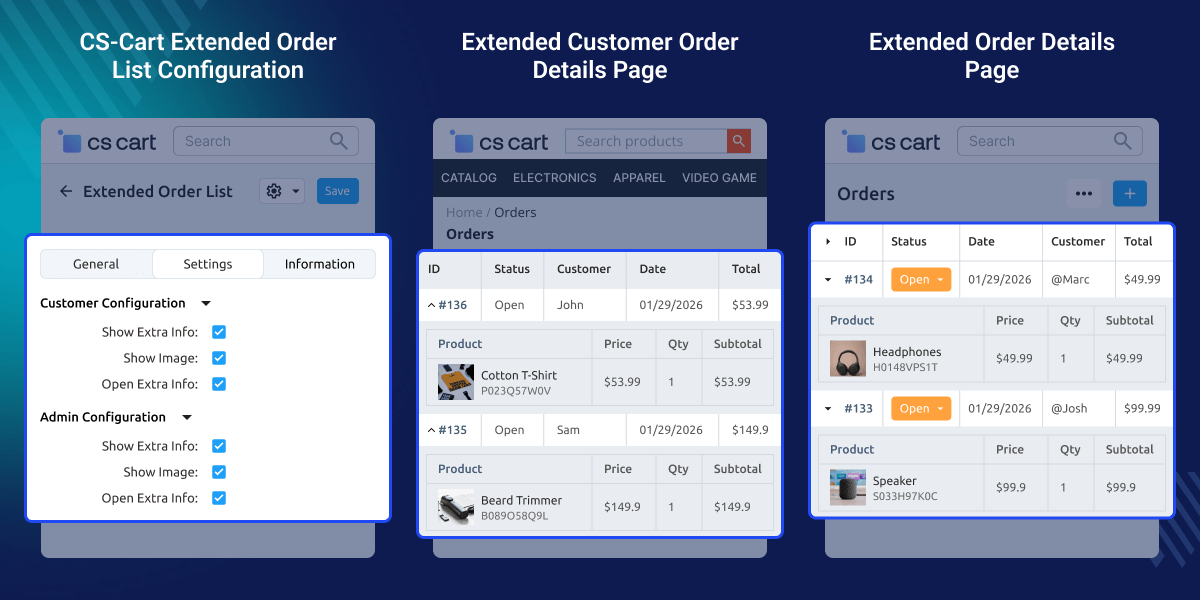
    CS-Cart Extended Order List

    Highlighted Features of CS-Cart Extended Order List

     Expand Order Details

    Enables users to expand order details directly on the order list page, allowing for quick checks of vital order information.

     Change Order List View

    The customer can expand or collapse the order list just to check the purchased products. The admin can enable and disable the collapse mode on the customer order page.

     Expand/Collapse Order List

    The admin can efficiently expand and collapse the order list of an order from the backend.

     User-Friendly Interface

    Both the admin and customers can easily access and check the order information on the order list page.

    Why do we need a CS-Cart Extended Order List Add-on?

    CS-Cart Extended Order List becomes an essential addition to your store due to its transformative impact on order management. The extended order list's export functionality enables businesses to extract order data in multiple formats.

    Firstly, the extension introduces a dynamic feature that allows you to expand order details directly on the order list page itself. This eliminates the need to navigate to individual order detail pages for a quick check of each order's details. Enables you to access critical information at a glance.

    Moreover, the extension's functionality is not limited to a single area. It seamlessly integrates into the Admin, Vendor, and Customer sections, serving both the backend and front end of your store.

    Whether you're an admin, a vendor, or a customer, you can enjoy the benefits of a more accessible and engaging order management process. Also, the customer can directly buy from the recently purchased order and can search or filter the product with the option based on product name, date, and time duration through CS-Cart ordered product history.

    CS-Cart Extended Order List Configuration

    Admins can define rules to control how extra order details appear on the orders page for customers, vendors, and the admin area.
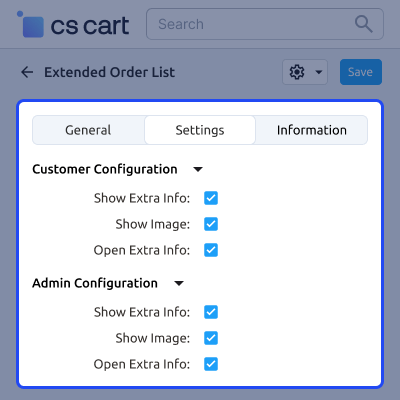
    • Admins can enable or disable extra order information for customers, vendors, and the admin area.
    • Admins can turn product image display on or off in extra order details.
    • Customers, vendors, and admins can view extra order information in collapse mode.
    • Admins control how extra order details appear on order pages.
    CS-Cart Extended Order List Configuration

    CS-Cart Extended Order List at Admin Panel

    After configuration, the admin and vendor can view order details on the order list page. They can expand or collapse the details as needed.
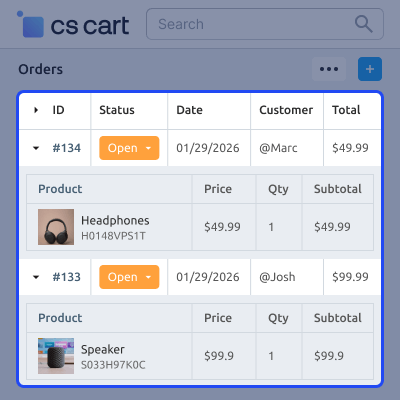
    • The collapsed order list allows admins and vendors to quickly navigate through a summary of orders.
    • Essential information such as order date, customer name, store name, and order status is displayed in a compact format.
    • By expanding an order, admins and vendors can view detailed order information directly from the order list page.
    • This eliminates the need to navigate to individual order detail pages, saving time and improving overall efficiency.
    CS-Cart Extended Order List at Admin Panel

    CS-Cart Collapsed Order List at Customer Area

    After the Order List configuration, customers can expand or collapse an order ID to view the purchased products for a specific order.
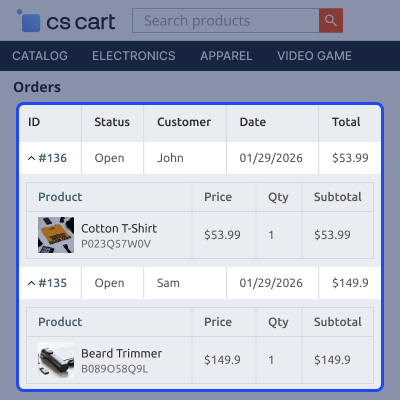
    • Customers can view order details in the expanded view.
    • Order details are displayed in a clear and organized layout for easy review.
    • The collapsed order list allows customers to quickly browse and review multiple orders.
    • This reduces navigation through complex menus and improves the overall purchasing experience.
    CS-Cart Collapsed Order List at Customer Area

     Support

    For any query or issue please create a support ticket here http://webkul.uvdesk.com/

    You may also check our other top-quality CS-Cart Add-Ons.

    Specifications

    Product Version1.1
    Released8 years ago
    Last UpdatedFebruary 11, 2026 (20 days ago)
    Supported VersionsCS-Cart  4.16.x  4.17.x  4.18.x  4.19.x  
    Write a review

    Frequently Asked Questions

     What is the CS-cart Extended Order List?
    The CS-Cart Extended Order List add-on enhances order management in CS-Cart Stores. This add-on eliminates the need to navigate to individual order detail pages for a quick check of each order's details.
     
     How does the CS-Cart Extended Order List add-on work?
    The CS-Cart Expand Order List add-on allows both the vendors and customers to check the order information directly on the list page. Users can click to expand their order and see detailed product information without navigating to a separate page, saving time and improving convenience.
     
     Can I use the CS-Cart Extended Order List on both the Admin and Customer panels?
    Yes, the add-on is versatile and can use by both the admin and customer areas. The store admin, vendors, and customers can all benefit from its features, making order management more efficient.

    Move to Cloud Today

    AWS Free tier hosting for one year by amazon web services, for more details please visit AWS Free Tier.

    GCP Free tier hosting for one year with 300 credit points by google cloud platform, for more details please visit GCP Free Tier.

    Azure free tier hosting for one year with 25+ always free services, for more details please visit Azure Free Tier.

    In our default configuration we will provide tremendous configuration for your eCommerce Website which is fast to load and response.

    Default Configuration Details of Server

    • 1 GB RAM
    • 1 Core Processor
    • 30 GB Hard Disk
    • DB with 1 GB RAM and 1 Core Processor

    * Server Configuration may vary as per application requirements.

    Want to know more how exactly we are going to power up your eCommerce Website with Cloud to fasten up your store. Please visit the Cloudkul Services.

    Get Started with Cloud
    • - Feature Add (+)
    • - Feature remove (-)
    • - Bug Fixed (!)
    • - Modification (*)
    Version 1.1
    • * Made compatible with 4.18.x.
    • * Made compatible with 4.19.x.
    • + Updated the language files.
    • + Added vendor configuration
    Version 1.0
    • + Enhanced view for order list page.
    • + Functionality to view the products in an order on the order list page itself.
    • + Option to show ordered product with or without an image in the expanded view of an order.
    • + Admin can set the default view (collapsed or expanded) of the order list.


