USD
  • EUR
  • INR
  • USD
Cart
Cart 0
  • You have no items in your shopping cart.
    CS-Cart Extensions
    Cart
    Cart 0
    • You have no items in your shopping cart.
    Hire a Developer
    ×
    Contact Us!
    Send Again
    Close
    Please Login to Write Your Review
    CS-Cart GPGCheckout Payment Gateway

    CS-Cart GPGCheckout Payment Gateway

    x
    Free

    * Required Fields

    $49.00
    Add To Cart
    30 Days Money Back Guarantee*

    CS-Cart GPGCheckout Payment Gateway lets your store accept online payments through GPGCheckout with secure redirection for checkout across Africa and the Middle East.


    • Accept payments through GPGCheckout at checkout.

    • Redirect customers to a secure hosted payment page.

    • Reduce PCI compliance burden by processing payments off site.

    • Configure gateway credentials and settings from admin panel.

    • Set default currency and language for transactions.

    • Works with CS-Cart MultiVendor for marketplace payments.

    CS-Cart GPGCheckout Payment Gateway
    CS-Cart GPGCheckout Payment Gateway
    $49.00
    30-Day Refund Policy.
    Check How It Works
    $49.00
    Configure and Buy
    30 Days Money Back Guarantee*
    X
    • Description
    • Reviews
    • FAQ
    • Customers ()
    • Specifications
    • Cloud Hosting
    • Changelog

    CS-Cart GPGCheckout Payment Gateway connects your store with GPGCheckout to accept online payments through a secure hosted flow. It supports VISA and MasterCard regulations, helping you maintain a compliant payment setup.

    Customer payment data stays protected as users are sent to a secure page to complete their payment. This reduces PCI concerns since sensitive details are not handled on your server.

    The interface keeps the checkout process simple for customers, while built-in risk control supports safe transactions. Admins can configure the gateway easily from the backend without complex setup.

    You can improve checkout flexibility by pairing it with the CS-Cart Wallet System, allowing customers to use stored balance along with gateway payments.
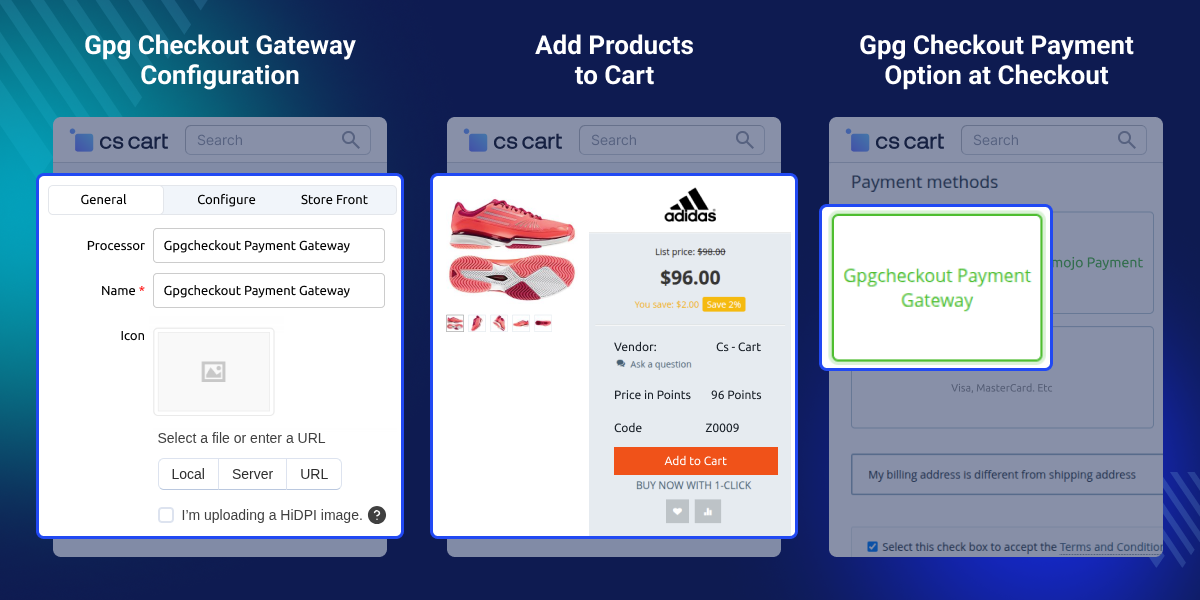
    CS-Cart GPGCheckout Payment Gateway

    Highlighted Features of CS-Cart GPGCheckout Payment Gateway

     VISA and MasterCard Compliance

    Keeps your store aligned with VISA and MasterCard payment standards.

     Secure Payment Redirection

    Sends customers to a hosted GPGCheckout page to complete payment safely.

     Simple Admin Configuration

    Set up and manage gateway credentials directly from the admin panel.

     MultiVendor Compatibility

    Works with CS-Cart MultiVendor for consistent payment handling across sellers.

    Why Do We Need CS-Cart GPGCheckout Payment Gateway?

    CS-Cart GPGCheckout Payment Gateway fills the gap for stores that need region-specific payment support. Default CS-Cart options may not work for businesses in Africa and the Middle East.

    Handling payments on your own server increases PCI responsibility and puts card data at risk. This adds extra work and security concerns for store owners.

    This module connects your store with GPGCheckout and moves payments to a secure hosted page. It keeps transactions safe and removes the need to manage compliance on your end.

    You can also use CS-Cart Payment Link for Customer add-on to share payment links directly with customers.

    Use Cases

    This module fits businesses that rely on secure online payments through GPGCheckout.

    • Regional Payment Support

      Stores operating in Africa and the Middle East can accept payments through a locally supported gateway.

    • MultiVendor Marketplace Payments

      Marketplaces can offer a consistent payment option across all vendors using a single gateway setup.

    • Secure Checkout Without Data Handling

      Businesses can avoid storing card data by letting GPGCheckout handle the payment page.

    • Simple Payment Setup for New Stores

      New store owners can start accepting payments quickly without complex configuration.

    Configure Payment Method

    Admin can create and configure the GPGCheckout payment method from the payment settings in the backend.

    The setup includes adding basic details and selecting the correct payment processor. Once saved, the payment method appears at checkout for customers to use.
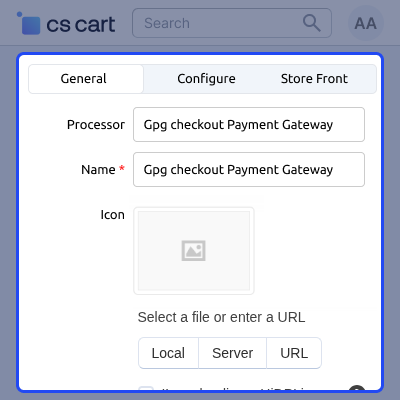
    • Select GPGCheckout as the payment processor
    • Enter required payment method details
    • Upload icon for display at checkout
    • Enable or disable the payment method
    • Assign user groups for availability
    Configure Payment Method

    Checkout Payment with GPGCheckout

    Customers can choose GPGCheckout at checkout and pay through a secure hosted flow.

    Payment is completed on the GPGCheckout page, and customers are redirected back to the store once finished.
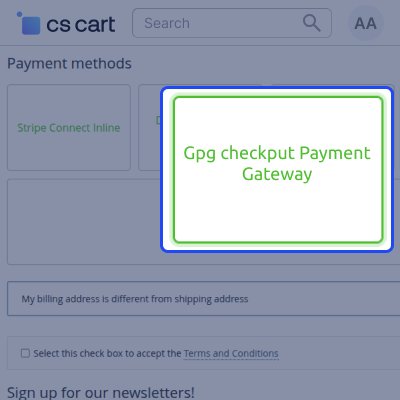
    • Display GPGCheckout as a payment option at checkout
    • Redirect customers to secure GPGCheckout page
    • Complete payment outside the store environment
    • Show order confirmation after successful payment
    • Provide invoice and payment details to customers
    Checkout Payment

      Support for CS-Cart GPGCheckout Payment Gateway

    For any query or issue please create a support ticket here http://webkul.uvdesk.com

    You may also check our other top-quality CS-Cart Modules.

    Specifications

    Product Version1.0
    Released9 years ago
    CategoryCS-CartPayment
    Last UpdatedApril 27, 2026 (3 months ago)
    Supported VersionsCS-Cart  CS-Cart Multivendor  4.16.x  4.17.x  4.18.x  4.19.x  4.20.x  

    Ratings

    We'd love to hear your thoughts! Share your feedback and help us craft an even better experience tailored just for you.

    Write a review

    Frequently Asked Questions

      Where can store owners use GPGCheckout payment gateway?
    GPGCheckout is designed for businesses in Africa and the Middle East. It is PCI DSS certified and supported by VISA and MasterCard in these regions.
     
      What is the setup process for GPGCheckout in CS-Cart?
    Setup is done from the admin panel. Add your gateway credentials and basic settings and the payment method is ready to use.
     
      What happens during the secure redirect process?
    Customers are redirected to a hosted GPGCheckout page where payment is completed. Sensitive data is handled on that page instead of your store.
     
      Does it support Multivendor marketplaces?
    The module works with CS-Cart Multi Vendor, so all sellers can use the same payment gateway for orders.
     
      Can customers use other payment methods along with this?
    Stores can keep multiple payment options active. Customers pick their preferred method at checkout.
     
      How does GPGCheckout keep payment data secure?
    All payment data is processed on the GPGCheckout page, so nothing sensitive passes through your server.

    Specification

    Detailed technical features and requirements to help you understand the module’s capabilities and ensure smooth integration with your system.

    Cloud Hosting

    Detailed technical features and requirements to help you understand the module’s capabilities and ensure smooth integration with your system.

    Default Configuration Details of Server

    1 GB
    RAM
    1 Core
    Processor
    30 GB
    Hard Disk
    1 GB RAM & 1 Core Processor
    Database

    Want to know more how exactly we are going to power up your eCommerce Website with Cloud to fasten up your store

    * Server Configuration may vary as per application requirements.

    Change Logs

    Not Available


